
Facial recognition used to feel like the sort of technology you’d only see in airports or sci-fi movies. These days, it can turn up in phones, stores, offices, public spaces, and plenty of places where you weren’t expecting your face to become a data point.
That raises the question of whether you can actually avoid facial recognition. There’s no universal way to avoid facial recognition systems, as cameras and recognition models work in distinct ways.
You still have ways to limit exposure, though. We’ll look at which methods can reduce facial recognition, which options only work in limited situations, and where their limitations start to show.
How Facial Recognition Works
Facial recognition can seem a little mysterious from the outside. Underneath all the AI terminology, though, the process is fairly straightforward.
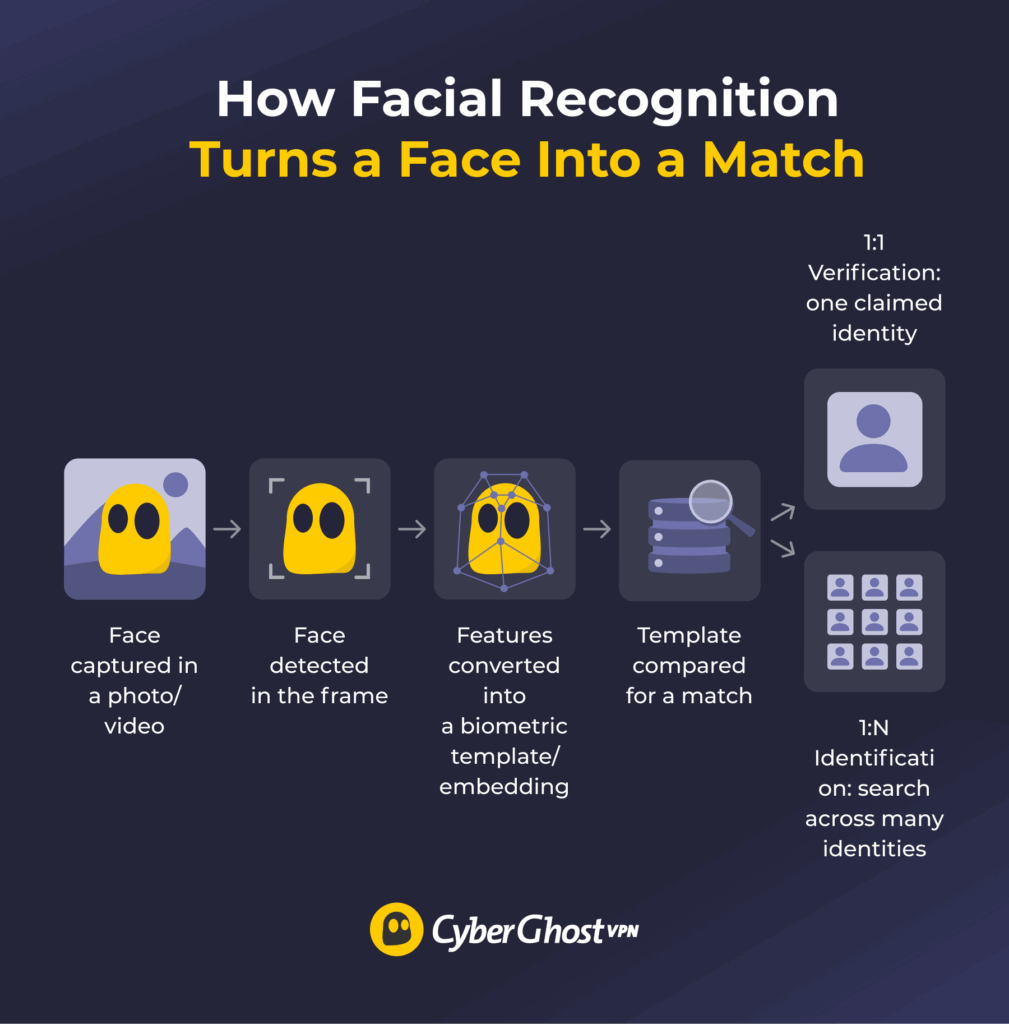
A camera or uploaded photo captures your face, software locates the face within the frame, and an algorithm turns distinguishing features into a numerical representation. The system then compares that representation with another image or searches against a larger collection of faces.
From Face Detection to a Biometric Match
A facial recognition system breaks that process down into four stages: capture, detection, feature extraction, and matching.
Detection is where the software isolates your face from the rest of the image, and feature extraction is where it builds that numerical representation into what’s formally called a biometric template or embedding. Matching is the final step, where the system checks that template against a target and returns a result.
Face detection only asks, “Is there a face here?” Facial recognition goes further and tries to determine whose face it is.
1:1 Facial Verification vs 1:N Facial Identification
With 1:1 facial verification, the system compares your face with one stored template tied to the identity you’re claiming. Unlocking a phone with your face is a familiar example.
With 1:N facial identification, the system compares one face against many stored templates to find a possible identity. That difference is crucial because an incorrect identification can put the wrong person among the system’s potential matches.1
Some verification systems also use liveness checks to look for signs that a real person is present. That makes simple presentation tricks, such as showing the camera a printed photo, far less dependable.2
False Positives vs False Negatives
Facial recognition errors generally fall into two categories. A false positive incorrectly links two people or returns the wrong identity as a candidate. A false negative fails to match two images of the same person.
The consequences depend on the setting. A false negative while unlocking your phone might mean trying again or entering a passcode. A false positive during a suspect search is far more consequential because it can wrongly draw attention to an uninvolved person, especially if someone treats the match as stronger evidence than it is.1
Why Facial Recognition Raises Privacy and Civil Rights Concerns
A false positive can become far more damaging when investigators treat a possible match as reliable evidence instead of one lead that still needs independent verification.
Robert Williams learned that the hard way in 2020, when Detroit police arrested him after investigators relied on an incorrect facial recognition match linking him to a shoplifting case. Authorities released him after roughly 30 hours in custody.3
The case led to a 2024 settlement that tightened how Detroit police can use the technology, including a rule preventing officers from making an arrest based solely on a facial recognition result.4
Misidentification is only part of the concern. Facial recognition can also involve collecting biometric data without people understanding when it happens, how long organizations keep that data, or what else they may use it for. A photo gathered for one purpose can later find its way into a broader database, creating the kind of function creep that’s difficult to undo once the data is already out there.
How to Avoid Facial Recognition Online
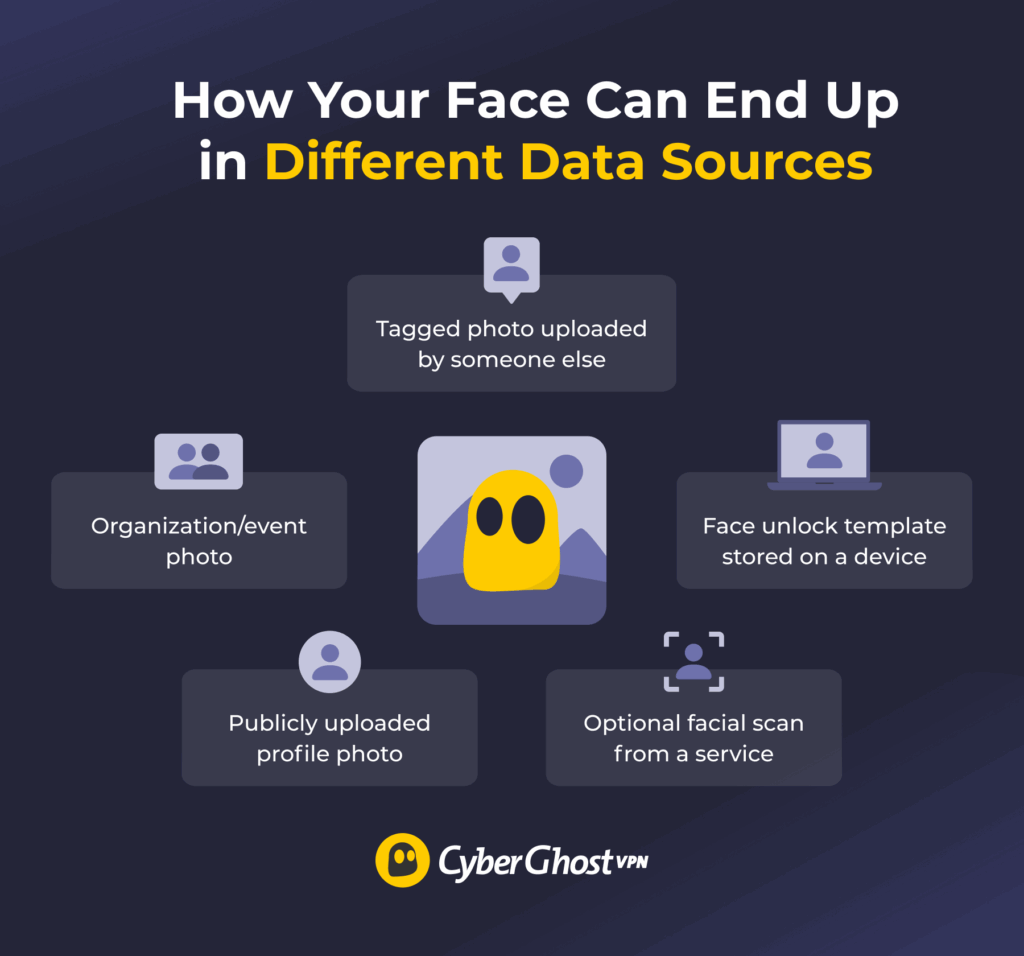
Some of the easiest ways to reduce facial recognition exposure happen before a camera ever enters the picture. Online photos can become reference material for recognition systems, while face unlock and similar features create a separate, voluntary use of your biometric data. You have more control over both than you might think.
Limit Public Photos and Tags
Every clear photo of your face that ends up publicly accessible is another image that could potentially be collected, copied, or used in a facial recognition dataset.5 That doesn’t mean you need to stage a dramatic disappearance from the internet. A little housekeeping can go a long way.
Review tagged photos before they appear on your profile, restrict who can see albums when the platform allows it, and periodically check your social media privacy settings. If an employer, school, club, or another organization wants to publish your photo, you can also ask them how and where they’ll use it before agreeing.
Reducing new public photos gives you some control over future exposure, though it can’t erase the images that are already out there. Friends may upload photos you didn’t take, and event pictures can resurface later. Removing one image also doesn’t guarantee that other copies or dataset entries disappear with it.
Review Facial Recognition and Face Unlock Settings
Face unlocking usually involves 1:1 verification, where the system compares your live face with the biometric template already enrolled on that device. If you’d rather avoid using facial recognition for unlocking your phone, approving payments, or signing in to certain apps, you can turn those options off and use another authentication method instead.
Where a device stores that biometric template is another factor worth considering. Devices that keep biometric templates locally in protected hardware may retain the data on the device rather than upload it elsewhere.6
Turning off face unlock only affects that device. Cameras elsewhere can still capture your face, and any photos or biometric data already stored by third parties remain untouched.
Treat Photo-Cloaking Tools as Experimental
Photo cloaking tools make tiny alterations to a photo before you upload it. The goal is to make that image less useful if it’s later scraped and added to a facial recognition training set.
One well-known example is Fawkes, which subtly alters facial features in a way that still looks normal to people while making the image harder for some recognition models to learn from.5
The catch is that photo cloaking only affects the images you actually process, and even then the protection may not last. It can’t rewrite photos that are already online, stop someone else from posting an untreated picture, or change a recognition model trained on older images. Developers can also adapt their systems to counter cloaking techniques over time.
University of Chicago researchers later described Fawkes as useful for giving people more control over unwanted facial recognition, while also making clear that no current anti-facial recognition tool can promise strong long-term protection.7
How to Block Facial Recognition Cameras: What May and May Not Work
Facial-recognition cameras aren’t all working from the same playbook. How well any physical countermeasure works depends on the specific setup. Here’s what the evidence says about common approaches.
Face Coverings and Hats
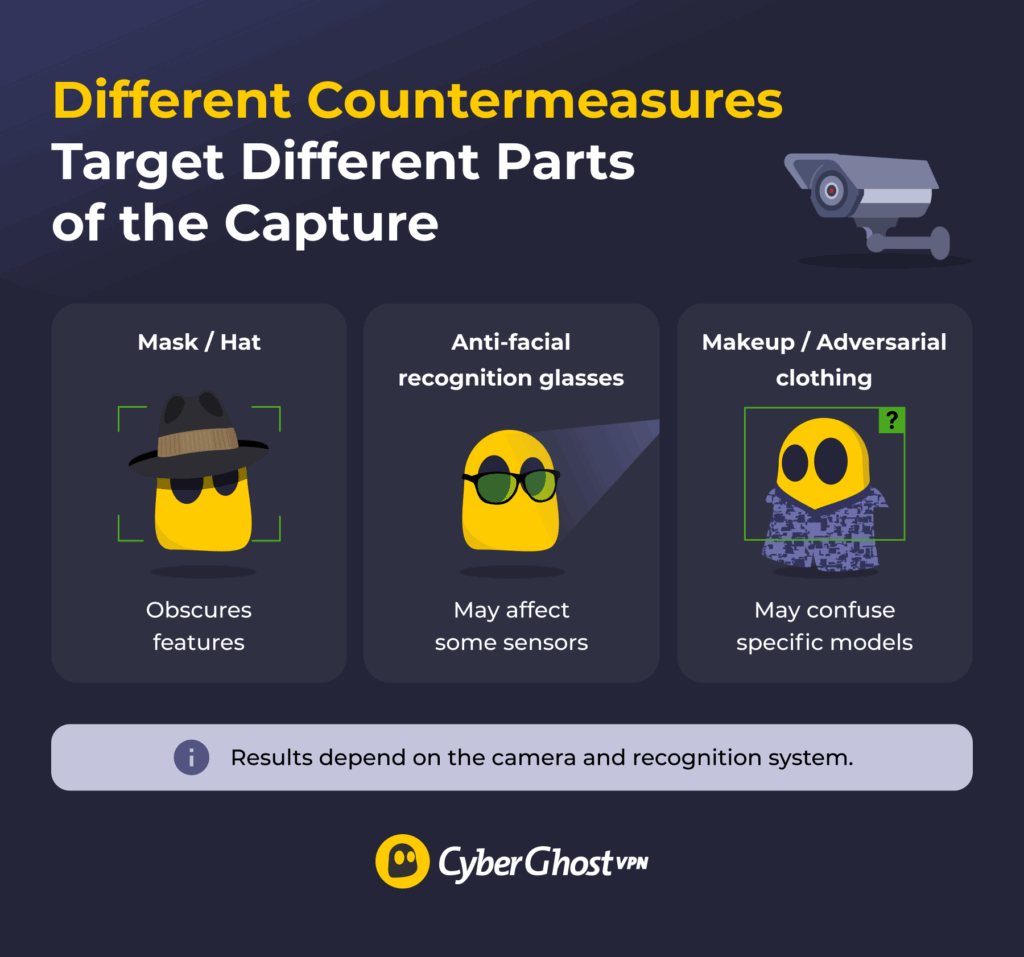
A mask, scarf, or hat can reduce how much of your face a camera sees in a single frame. If you’re considering a mask to avoid facial recognition, though, covering more of your face doesn’t automatically mean the software gives up. Modern recognition systems have become much better at working with partial faces.
For instance, the National Institute of Standards and Technology (NIST) found that masks affected algorithms in diverse ways, with newer systems improving considerably at matching masked faces.8 Local rules around face coverings can also vary, so it’s worth checking what’s legal in your jurisdiction.
Sunglasses and Anti-Facial Recognition Glasses
Regular sunglasses can hide part of the eye area, especially if the frames are large, but they don’t make the rest of your face disappear. A visible-light camera may still get plenty to work with from your nose, cheeks, jawline, and overall facial structure.
Specialist glasses to avoid facial recognition take a more technical approach. Research prototypes have used near-infrared light or reflective materials to interfere with the way some cameras detect a face.9
Their usefulness depends on what they’re designed to interfere with. Near-infrared techniques may have little effect on cameras that aren’t sensitive to those wavelengths.9
Makeup, Hair, and Adversarial Clothing
Makeup, hairstyles, and patterned clothing try to interfere with the way computer vision interprets a person. Some techniques alter the appearance of facial features, while others like adversarial clothing use unusual patterns designed to confuse person detection models. However, stopping one model from detecting a person doesn’t always mean a separate facial recognition system would fail to identify the face.10
While makeup and clothing may interfere with some facial recognition systems, presentation-attack research suggests they’re better treated as experimental techniques than dependable day-to-day fixes.
Why Wearables Don’t Work Everywhere
Physical countermeasures have to contend with far more than what you’re wearing. Camera resolution, visible-light or infrared sensing, distance, lighting, movement, viewing angle, image compression, and the quality of the reference photos can all affect the result. Recognition models change over time as well, so a technique that trips up one system in a controlled demo may behave differently compared to another.7
That variability means the same mask, pair of glasses, or patterned clothing can produce distinct results from one capture to the next — sometimes because of an awkward angle, sometimes because another camera happens to get a clearer view.
There’s a human trade-off, too. An elaborate combination of coverings, glasses, makeup, or unusual clothing may interfere with a particular system while making it easier for people to remember you. And even when a facial match fails, other identifiers don’t suddenly disappear. What you’re wearing, gait, location data, account activity, and digital fingerprinting can all provide additional clues that connect an activity to a person.
How to Opt Out of Facial Recognition
If you’re asked to complete a facial scan, the simplest place to start is asking whether it’s optional. In some settings, you may be able to use a passport, ID card, boarding pass, or another manual identity check instead.
Airports are a good example of why it pays to ask. The Transportation Security Administration (TSA) describes its biometric participation as voluntary and says travelers who decline facial recognition can use its standard ID-verification process instead.11 That gives you a clear alternative without assuming the same opt-out rules apply everywhere.
If a company, airport, workplace, or service wants to scan your face, it’s worth asking a few questions before agreeing:
- Is participation optional?
- Where will they store my facial template?
- How long will they keep the image or template?
- What can I do if the system gets a match wrong or I want the data deleted?
The answers can vary depending on the organization, program, and local law. Some services offer clear opt-outs and deletion controls, while others give you far less room to choose.
That’s why the most practical approach is to check the specific policy in front of you rather than assume there’s one universal right to refuse facial recognition.
What CyberGhost VPN Can and Can’t Do About Facial Recognition
CyberGhost VPN works on the network side of privacy. It encrypts the traffic traveling between your device and the VPN server with AES 256-bit encryption, and swaps the IP address websites and online services see for one belonging to the VPN server. That gives IP-based tracking less to work with while you browse.
Facial recognition goes down a completely different road. A VPN can’t change the face a camera captures, alter a biometric template, erase photos you’ve already posted, or remove facial data another organization has stored. It also has no effect on whether a recognition system finds a match.
Think of CyberGhost VPN as covering the connection side of your digital footprint, while your photo sharing choices, account settings, and biometric opt-outs affect the facial-recognition side.
Focus on the Facial Data You Can Control
You’ll get the most mileage from the parts of facial recognition you can actually influence: what photos you share, which biometric features you enable, and whether an optional scan needs a yes.
The strongest controls are often the least flashy ones. Being selective about public photos, reviewing biometric settings, and using opt-outs where they’re available gives you more control than chasing the idea of a gadget that promises to make facial recognition disappear.
CyberGhost VPN adds another layer of privacy by encrypting your traffic and replacing the IP address websites normally see with one from the VPN server. Our independently audited No-Logs policy also means we don’t keep browsing activity logs. Pair that with tighter control over where you share your facial data, and you’re covering more of the digital footprint you actually have a say over.
FAQ
Can facial recognition be blocked completely?
No method can reliably block every facial recognition system. Cameras, sensors, lighting, image quality, recognition models, and reference databases all vary, so a trick that works in one setup may fall flat in another. You can still reduce your exposure by limiting public photos, declining optional scans, changing device settings, and using coverings where they’re lawful and practical.
Do anti-facial recognition glasses work?
Some anti-facial recognition glasses may interfere with certain cameras or sensors. Effectiveness depends on whether the camera is even sensitive to whatever the glasses interfere with, such as near-infrared light. Regular sunglasses can hide part of the eye area too, though you shouldn’t rely on either option as a reliable way to avoid recognition.
Do masks stop facial recognition?
Masks can make facial recognition harder for some systems by hiding part of the face, though modern algorithms have become much better at working with masked images. NIST testing found newer algorithms have gotten better at matching masked faces, though older systems may still struggle. A mask may reduce the quality of one capture while another camera gets a much clearer view.
What happens if I opt out of facial recognition?
It depends on the program or organization asking for the scan. Some offer a document check, passcode, or another identity-verification method instead. Others may give you fewer alternatives. Before agreeing, ask whether participation is optional, how they’ll store your facial data, how long they’ll keep your image, and what options you have to challenge an incorrect match or request deletion.
Is facial recognition legal?
Facial recognition is legal in many places, although the rules around its use vary. The US relies on a mix of federal policies, existing privacy and civil-rights rules, and state or local restrictions. The EU AI Act prohibits certain biometric uses and places tighter limits on some forms of remote identification. Always check the current rules for your location and the specific use involved.
References:
- NIST Study Evaluates Effects of Race, Age, Sex on Face Recognition Software — NIST
- Face Analysis Technology Evaluation (FATE) Part 10: Performance of Passive, Software-based Presentation Attack Detection Algorithms — NIST
- Farmington Hills Father Sues Detroit Police Department for Wrongful Arrest Based on Faulty Facial Recognition Technology — ACLU of Michigan
- Civil Rights Advocates Achieve the Nation’s Strongest Police Department Policy on Facial Recognition Technology — ACLU of Michigan
- Fawkes: Protecting Privacy against Unauthorized Deep Learning Models — USENIX
- Facial Matching Security — Apple Support
- Evaluating Anti-Facial Recognition Tools — University of Chicago
- Face Recognition Software Shows Improvement in Recognizing Masked Faces — NIST
- Privacy Protection Techniques Using Differences in Human and Device Sensitivity — National Institute of Informatics
- Adversarial T-shirt! Evading Person Detectors in a Physical World — European Computer Vision Association
- TSA Myth Busters: Biometrics — Transportation Security Administration

Leave a comment
Gail Waddington
Posted on 11/01/2023 at 23:47
How do I get facial recognition? My sister works for Titan Robotics and sees had my driver’s license when my parents gave me their car. On 12/25/21 she set my car and me on facial recognition. The satellite feed was set up to allow the drones she set up to at 4oo ft, to follow me and shoot sound wherever I am. The drones have been shooting sound at me. Because the satellite feed lets them know where I am. 480-761-8252
Ghostie
Posted on 12/01/2023 at 11:02
Hi, Gail,
That’s an interesting story, to say the least! Why would your sister set your car on facial recognition, though?
Since your sister implemented this system, she’s likely the best person to talk to about removing it. You can explain that you don’t feel comfortable with your biometric data being stored and used in such a manner.
Stay safe