
Interception Attacks
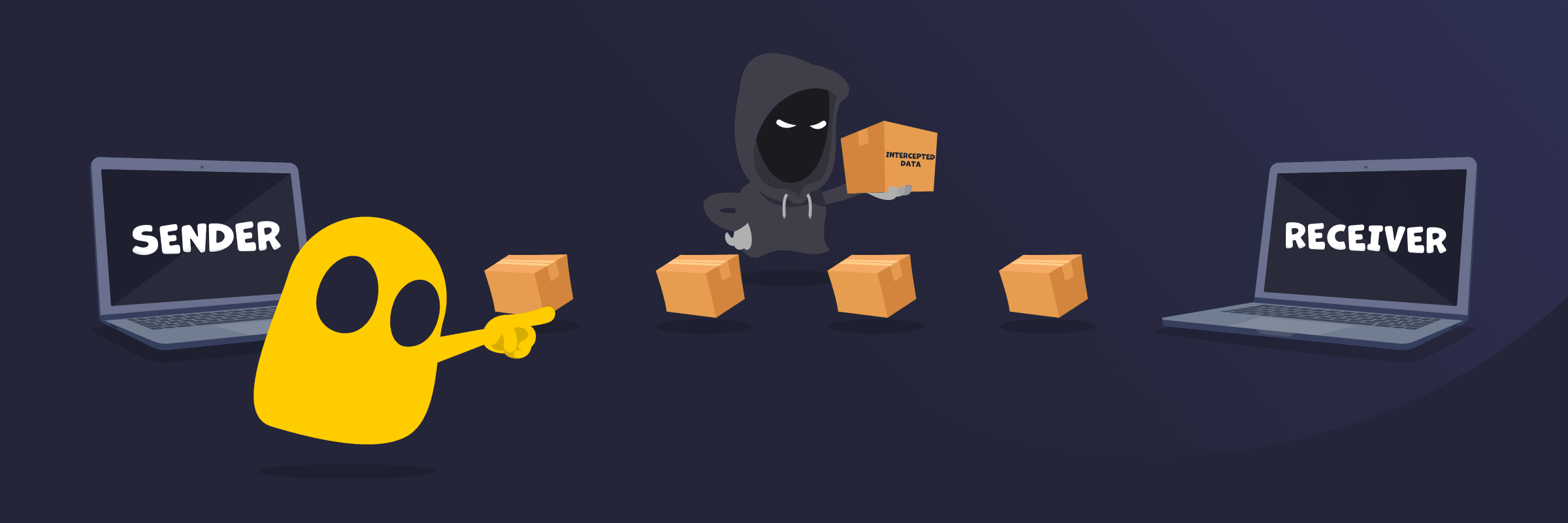
Interception Attacks Definition
An interception attack is a type of cyberattack where an unauthorized third party secretly gains access to data or communications without permission. It usually happens while information is being transmitted between systems or users. The attacker’s goal is to capture sensitive data like passwords, messages, or financial details without the sender or receiver noticing.
How Interception Attacks Work
Interception attacks work by exposing data as it travels across a network. When information moves between devices, it can pass through networks, routers, or access points that aren’t fully secure. Attackers take advantage of these weak points to capture the data in transit, especially if it isn’t encrypted. In many cases, they simply collect the information without interrupting the connection, which makes the attack hard to detect.
Common Types of Interception Attacks
- Packet sniffing: Uses specialized tools to capture data packets as they move across a network, often targeting unencrypted traffic on public or unsecured connections.
- Man-in-the-Middle (MitM) attacks: Involve placing an attacker between two parties to intercept, read, or modify communication without detection.
- Eavesdropping attacks: Rely on quietly monitoring private communications, such as emails, messages, or calls, to collect sensitive information.
- Wi-Fi spoofing (Evil Twin attacks): Creates a fake Wi-Fi network that appears legitimate, leading users to connect and expose their data.
- DNS spoofing: Manipulates domain name requests to redirect users to fake or malicious websites and capture their data.
- SSL stripping: Downgrades secure HTTPS connections to unsecured HTTP, making intercepted data easier to read.
Signs of an Interception Attack
- Unusual security warnings: Frequent browser alerts about invalid or missing security certificates can signal that a connection is being tampered with.
- Unexpected HTTP connections: Websites load over HTTP instead of HTTPS, even when they should be secure.
- Slow or unstable connections: Network performance drops without a clear reason, especially on public Wi-Fi.
- Frequent logouts or session issues: Sessions end suddenly or require repeated logins, which can point to session interference.
- Suspicious Wi-Fi networks: Networks with familiar names appear in unexpected places, such as duplicates of trusted networks.
- Redirects to unknown websites: Typing a correct URL leads to a different or suspicious site.
- Unrecognized account activity: Strange logins or actions appear in accounts without user involvement.
Read More
FAQ
Interception attacks target any data that moves across a network, especially information that can be used for access, identity, or financial gain. This includes login credentials, personal details, emails and messages, payment information, and browsing activity. Attackers focus on data that is transmitted without strong encryption because it’s easier to capture and read.
You can prevent interception attacks by protecting your data while it’s in transit and avoiding insecure networks. Use encryption by visiting HTTPS websites and enabling secure connections on apps and devices. Avoid public Wi-Fi or use a VPN to secure your traffic when you must connect. Keep your software and devices updated to fix security flaws. Verify network names before connecting, and avoid sharing sensitive information over unsafe or unknown connections.
Encryption doesn’t stop interception attacks from happening, but it makes the intercepted data unreadable. Attackers may still capture the data as it travels across a network, but strong encryption ensures they can’t understand or use it without the correct decryption key.
In some cases, attackers may store encrypted data with the hope of decrypting it later if more powerful computing methods or vulnerabilities emerge. This is often referred to as a “store/harvest now, decrypt later” approach and is a consideration for highly sensitive or long-term data.
 45-Day Money-Back Guarantee