
Ever tried playing League of Legends with friends overseas only to realize your accounts are stuck on different servers? Or maybe your ping suddenly shoots up because you moved to another country, and every game feels like a laggy nightmare. You’re not alone. Many players face the same problem.
Riot Games doesn’t make region transfers automatic, and switching isn’t as easy as changing a setting in the client. There are costs, restrictions, and account changes to consider before making the move. This guide explains how to change region in League of Legends, what happens to your account during a transfer, and how to make the switch so you can get back to stable games.
Important: Please be aware that changing your account region may violate a platform’s Terms of Service (ToS). Game publishers frequently update their policies regarding regional pricing, content availability, and account migration, so you should stay up-to-date.
What Changing Region Means in League of Legends
When you create a League of Legends (LoL) account, it’s locked to one region. That region decides which server you play on and who you’re matched with. It can even affect your ping rates. It’s likely that Riot Games assigns this based on your IP address and location. All your data, such as champions, skins, and progress, is stored on that region’s servers.
Changing the region means transferring your account from one server region to another. It’s not just a location change in the settings; it moves your game data to a different server system. After transferring, you play with players from that new region, and your ping might change depending on your distance from its servers.
Riot Games doesn’t allow free region switching. The company offers a paid transfer option. Note that certain regions may limit or pause transfers during patch updates.
How to Check Your Server Region in LoL
There are a few simple ways to see which region your LoL account is connected to:
-
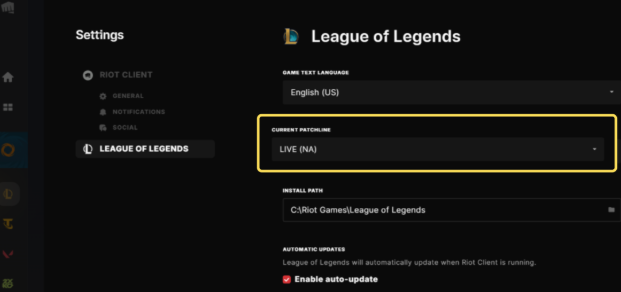
- Check your account settings: If you’re already logged in, click on your profile icon and go to Settings or Account Info. It might say something like North America (NA), Europe West (EUW), or Korea (KR).
-
- Use the Riot Account website: If your account is associated with a Riot Account, navigate to the Riot Account Management page online. Log in and look under Personal Information to see your region.
How to Change Regions in League of Legends
LoL gives you a couple of ways to switch regions. You can either move your existing account to a new region or create a fresh one. Both options work, but each has its own steps, costs, and limitations. Let’s take a closer look at how each method works so you can choose what’s best for you.
Change Your Account Region for 2,600 RP
You can officially switch your League of Legends region if you purchase an account transfer with Riot Points. Here’s how to do it.
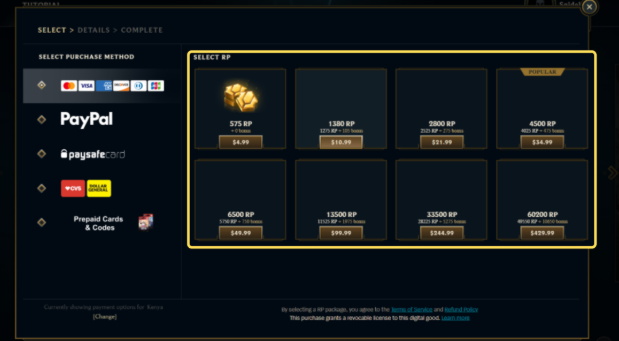
- Buy Riot Points (RP). Log in to your League of Legends client and go to the Store. You’ll need 2,600 RP, which costs roughly $20 USD, depending on your region and payment method.
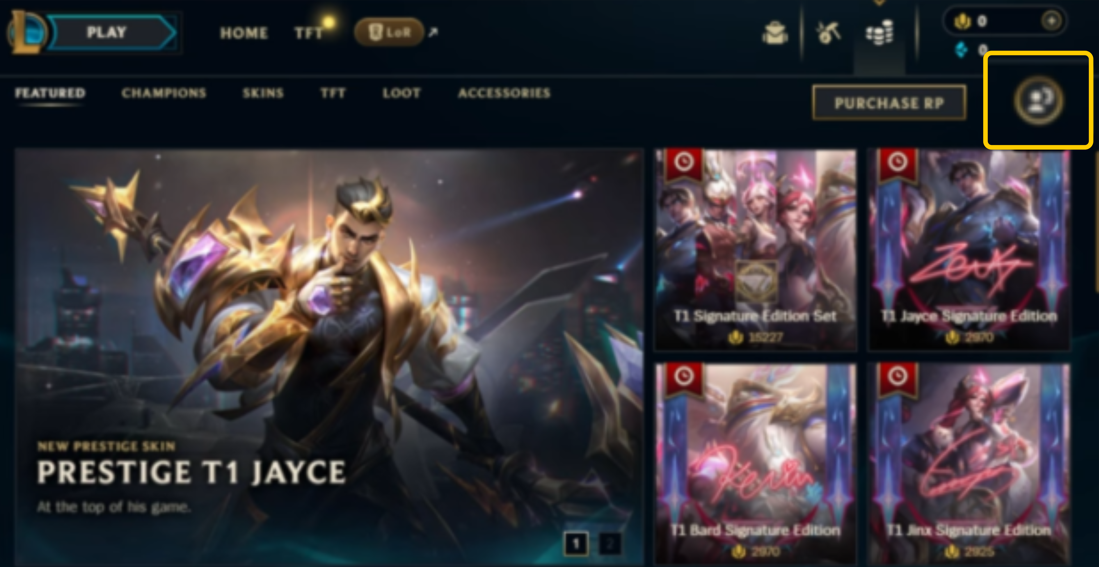
- Open the Account tab. Go back to the Store and click the Account tab in the top-right corner. This will show you all the regions your account is eligible to transfer to.
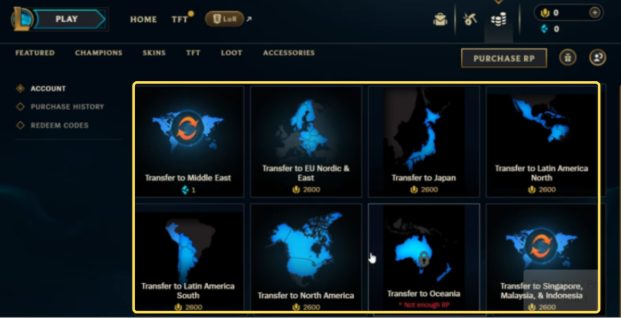
- Pick a new region. Select the server you want to transfer to. Make sure it’s the right one, since transfers aren’t refundable.
- Confirm the transfer. Once you do, your account will be moved to the new region. The process usually finishes within a few minutes.
Reminder: You won’t be able to transfer your account to a new region again for 90 days. Make sure you choose carefully and double-check your decision before confirming.
Create a New Riot Account
Another way to play on a different server is by making a new Riot account. This method is free, but it doesn’t allow you to move your existing account or its progress. Instead, it simply lets you start fresh in a new region. Here’s how to do it:
- Go to Riot’s official website. Find the signup page and create a new Riot account. The site may automatically assign you a region, but you’ll have the option to choose a new region before the signup process is over. Just be aware that this may change the language and affect your ping rates.
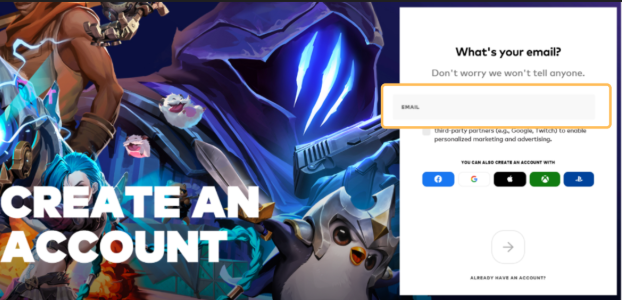
- Download and install the client. After creating your account, download the League of Legends client for that region and sign in using your new credentials.
- Start playing. You’ll now be able to play on that region’s server with your new account.
Note: This method starts you from level one, so your champions, skins, and progress from your old account won’t carry over. However, it’s a good option if you just want to try another region or play casually with friends in a different part of the world.
Things to Know Before You Change Your League of Legends Region
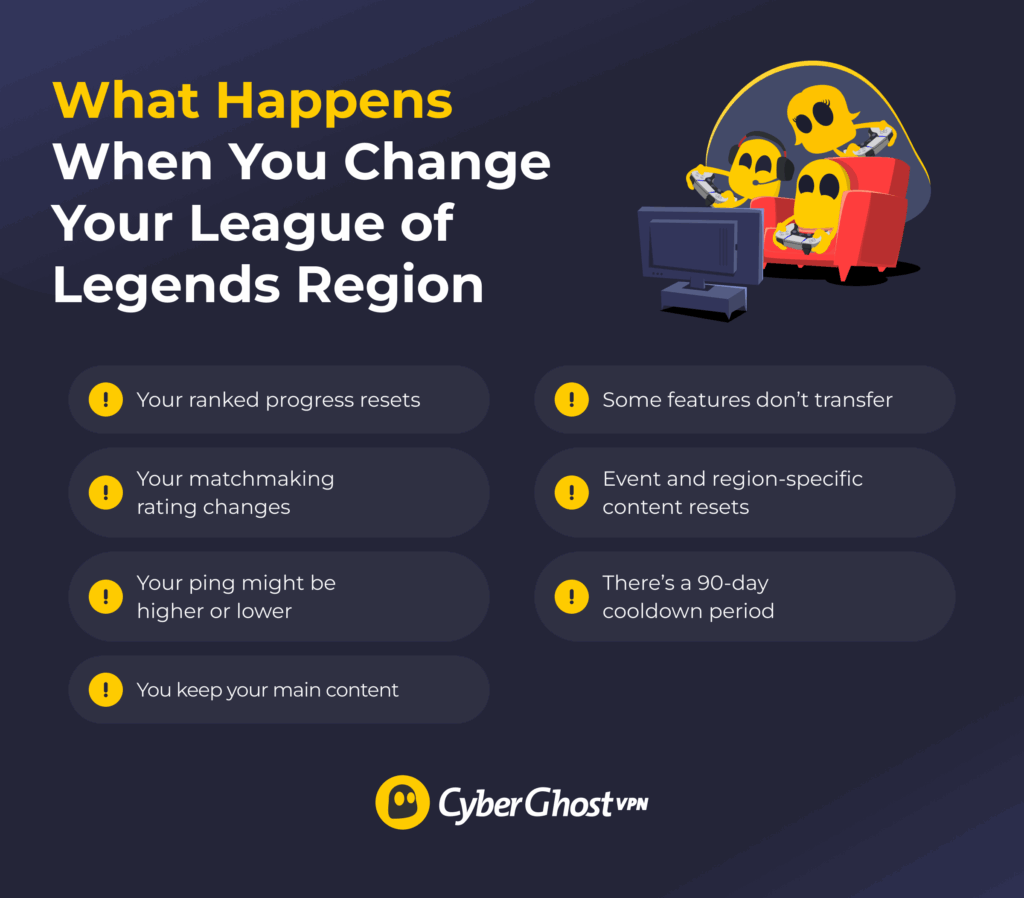
When you transfer your League of Legends account to another region, some parts of it remain unchanged. However, some aspects of your account will reset or be completely removed. Here’s what you should know before you make the move:
- You keep your main content: Your summoner level, champions, skins, emotes, and RP balance will all transfer with your account. You won’t lose the items or cosmetics you’ve unlocked.
- Some features don’t transfer: Your friends list, clubs, and chat history may be empty on the new server. It’s possible that you’ll need to re-add your friends manually.
- Your ranked progress may reset: You might need to compete in new placement matches to earn your rank again. Each region has its own ranked ladder, so your previous rank doesn’t carry over.
- Your matchmaking rating could change: The game may adjust your MMR to fit the new region’s player base.
- Your ping might be higher or lower: If the new server is farther from your location, you could experience more lag or slower response times during games.
- Event and region-specific content could reset: Things like Your Shop offers, Clash teams, and region-based missions or rewards might not carry over.
- There’s a cooldown period: Once you transfer, you’ll have to wait 90 days before you can transfer again.
Which League of Legends Regions Can You Transfer To?
League of Legends has several regions around the world, and most of them allow players to transfer their accounts. The exact list you can move to depends on the region you’re currently in, but here’s a general idea of how it works.
Completely restricted regions include Brazil, Russia, and Korea. Brazilian and Russian accounts can’t transfer anywhere, and no regions can transfer into them. Korean accounts can’t receive transfers from other regions.
Vietnam, Turkey, and Taiwan face partial restrictions. Turkish accounts won’t be able to transfer to or from LATAM North or South (also referred to as Latin America). Vietnamese and Taiwanese accounts can’t transfer to/from North America.
All other regions can transfer between each other. This means there’s free travel between NA, EU West, EU Nordic/East, Oceania, Japan, LATAM North/South, SEA, and the Middle East regions.
Is There Only One Southeast Asia Server?
Yes, Riot Games has condensed the countries in this area into one region. There used to be separate servers for places like Thailand, the Philippines, and Singapore/Malaysia/Indonesia. Each had its own login system and player base.
However, Riot Games merged all of these into one large SEA server1. This means players from all those countries now play together on the same platform. The goal was to make matchmaking faster, reduce confusion about accounts, and bring everyone under one Riot-managed system.
Can You Get in Trouble for Changing Your League of Legends Region?
No, you won’t get in trouble for changing your League of Legends region if you do it through the official method provided by Riot Games. Riot allows players to move their accounts to other supported regions using the transfer option in the client. It’s completely safe and legal as long as you use the in-game system and pay with Riot Points.
Easily Change Your LoL Region When You Need It
Changing your region in League of Legends can sound tricky, but it’s something people do every day. Whether you’re moving to a new country, trying to fix your ping, or just want to play with friends from another region, you have clear choices.
You can use Riot’s paid transfer or create a new account. Take a little time to plan your switch so you don’t lose progress or waste RP. After that, you can explore new regions with fresh competition.
FAQ
Is League of Legends region-locked?
No, League of Legends isn’t fully region-locked, but each Riot account is tied to a specific region. You can play only in the region your account is set to unless you transfer it to another region. Once transferred, your account, store, friends list, and matchmaking will all belong to that new region.
How many times can you change regions in League of Legends?
You can change regions in League of Legends as many times as you want, but there’s a 90-day cooldown between each transfer. This means that once you move your account to a new region, you’ll have to wait roughly three months before transferring again. Each transfer costs 2,600 RP and is non-refundable, so it’s best to plan carefully before switching servers to avoid losing progress or wasting RP.
Why can’t I change region in League of Legends?
You might not be able to change your region in League of Legends if your account is already tied to a specific Riot region or the region you want isn’t available for transfers. Some regions, like Korea, China, or certain SEA servers, don’t allow transfers due to local systems or publishers. It can also happen if your account is too new, you’re in the middle of a transfer cooldown, or the transfer feature is temporarily disabled by Riot.
Can I change my region in League of Legends for free?
No, you can’t change your region in League of Legends for free. You can create a new Riot account in a different region at no cost, but your champions, skins, progress, and RP won’t transfer to that new account. Riot only allows region transfers through a paid account transfer, which costs 2,600 Riot Points (RP). This is the only official way to move your existing account to another region.
What are the benefits of using a VPN with League of Legends?
Using a VPN with League of Legends can improve your connection and protect your privacy. It can help create a more stable route to Riot’s servers, which may reduce lag or ping spikes if your internet provider has poor routing. A VPN also hides your real IP address and encrypts your data, which could keep you safe from DDoS attacks and protect your information when you play on public or shared networks.
What is the best VPN for online gaming?
The best VPN for online gaming is one that gives you a fast, stable, and secure connection without adding lag. CyberGhost VPN is a great choice because it’s built with gamers in mind. It has high-speed gaming-optimized servers all over the world. It also protects you from DDoS attacks and hides your IP address, which keeps you safe while gaming online.
References

Leave a comment
SeventhAbyth
Posted on 11/05/2023 at 12:18
I need to transfer my NA account to EUW, but I didn’t see the options in the account page
Ghostie
Posted on 15/05/2023 at 13:08
Riot temporarily disabled non-SEA transfers a few months ago due to an issue with the server migration. It’s possible there might be lasting issues that could be affecting your account. Your best bet would be to contact Riot’s support to log the issue with them. Hope you can sort it out soon!
Andreea
Posted on 10/05/2023 at 12:10
Hello! I would like to transfer my account from EUNE to EUW but I can’t seem to find the option anymore. Do you know anything about it?
Ghostie
Posted on 15/05/2023 at 13:08
Riot temporarily disabled non-SEA transfers a few months ago due to an issue with the server migration. It’s possible there might be lasting issues that could be affecting your account. Your best bet would be to contact Riot’s support to log the issue with them. Hope you can sort it out soon!
hoang
Posted on 23/04/2023 at 21:38
i live in vietnam and i dont know why my riot account was transferred to russia server
how to tranfer my account to vietnam region
Ghostie
Posted on 25/04/2023 at 13:03
Hi hoang, if your account has been transferred by accident, you may be able to switch back to your old region free of charge if it’s within 2 weeks since the last game you played in your original region. If not, then you’ll have to follow the steps in this guide to switch to a new region, which involves purchasing RP and choosing a new region in the LoL client. If Riot switched your account without your consent, you’ll have to create a support ticket with Riot so they can help you sort it out. Good luck!
Mahogany
Posted on 16/04/2023 at 04:15
Hello it is currently 4/15/2023 I am stuck in the Vietnam region and do not have an option available to transfer to any other region, can I please get some help with this?
Ghostie
Posted on 17/04/2023 at 15:13
Hi Mahogany, unfortunately, Riot has been quoted saying once you’ve migrated your account to Southeast Asia, it will be region-locked, meaning you can’t transfer back to EU or NA servers. Some players were accidentally moved to the SEA region during the SEA migration and Riot has now suspended the move due to players experiencing issues. If using a VPN to get around the problem isn’t working for you, and you don’t want to create a new account, your only option is to create a support ticket with Riot and hope they can help you sort it out.
Sebastian
Posted on 04/04/2023 at 04:58
I transfer my lol account to OCE a couple months ago but I have the account transfers disable issue and have been unable to transfer it for a while. I dont even get the option to transfer it anymore, I’m more than willing to play to go back but I dont have the option. Is there anyway to be able to transfer back?
Ghostie
Posted on 04/04/2023 at 16:25
Hi Sebastian, unfortunately, Riot is currently having trouble with its servers due to the SEA migration and I’m not sure when things will be back to normal. Lots of people are having the same issue and the best you can do is to create a support ticket with Riot and hope they get back to you. If you really want to play in your old region right now, you may need to create a new account in that region and start from scratch. Keep in mind you’ll need to use a different email address for the new account.
Veronique
Posted on 13/03/2023 at 00:45
Тhiѕ piece of ᴡriting is really a nice one it helps new internet peoplе, who aгe wishing in favor of blogging.
Ghostie
Posted on 17/03/2023 at 11:30
Thank you so much for the support, Veronique! We’re here to help if you have any questions about this topic or our service.
Shihao
Posted on 01/03/2023 at 02:24
Hi I want to transfer my NA account into OCE, but the option given only in SEA, and I thought maybe I cost 1 blue essence to transfer in SEA region may help me to change into OCE, but clearly after I change into SEA region, the account section is noting left for my account to transfer. How can I transfer into OCE?
Ghostie
Posted on 07/03/2023 at 16:44
Hi Shihao, can you revert back to your NA account and try again from there? According to Riot’s FAQ, you should be able to transfer back within two weeks from the last game you played in your original region. If you can’t then you may need to try to transfer to OCE from the SEA region, which means you’ll have to buy RP to do the transfer. Riot temporarily allowed players to transfer to the SEA region using Blue Essence but has since suspended this due to an unexpected spike in account issues. It’s possible you may need to use an SEA region payment method to buy the RP. If you run into issues, please contact Riot support to help you out.
razin
Posted on 17/02/2023 at 20:10
hi, can i know can i change my server (malaysia) to any server ,,, asian player are emo player,,, i cant handle it,, stuck on silver for a year cause of troller,, if i can change my server pleaese let me know ,,and how,, thanks and please help me <3
Ghostie
Posted on 20/02/2023 at 17:42
Hi Razin, Riot recently made some changes to the accounts system for the SEA region. Have you linked your Garena account to your Riot Games account yet? This guide can help: https://support-leagueoflegends.riotgames.com/hc/en-us/articles/4415015313043-How-to-Link-and-M%5B…%5De-of-Legends-Account-to-Riot-Games-Southeast-Asia
After that, you should be able to follow the steps in the guide above as normal to change your region. Just make sure the VPN is on at all times when you switch regions and while you’re playing, otherwise Riot will detect your IP address is from the wrong region which might cause problems.
Amy
Posted on 26/01/2023 at 04:33
Hi there I have purchased rp and still no servers are coming up for me to change to?
Ghostie
Posted on 26/01/2023 at 11:25
Hi Amy, are you not seeing the option to change regions at all? As in, do you not see any regions in your account tab? If that’s the case, it might be because you’re in a region that Riot doesn’t support for region switching. As you can see on its FAQ, Riot restricts region changes depending on your current region: https://support-leagueoflegends.riotgames.com/hc/en-us/articles/201751924-Account-Transfer-FAQ
It’s also possible this option is just turned off entirely for all or most players at the moment. Riot suffered a cyber attack this week and may have switched off the region-switching feature right now.
If your problem persists, try reaching out to Riot support to see if they can help you with the issue.
duc hung le
Posted on 16/01/2023 at 12:40
hi Riot, i am in Europawest, and i have i account lol with server Vietnam, can i tranfer my account from vietnam to europa.
thanks for all
Ghostie
Posted on 17/01/2023 at 11:26
Hi duc hung le, you’ll need to follow the steps in the guide to switch regions for your Riot account. You can purchase a transfer in the official store, by clicking the account button, next to “Purchase RP”. It costs 2600 RP for a one-way transfer and you can select which region you wish to transfer to.
Drick
Posted on 14/01/2023 at 15:52
we can’t transfer back to my server now.
Ghostie
Posted on 16/01/2023 at 11:26
Hi Drick, could you elaborate a bit more on your situation? Are you trying to change your region back to one you previously played in? If so, you’ll need to follow the steps, including paying RP to switch again. Make sure your VPN server location is set correctly. If you’re still having trouble with this, I’d suggest you contact Riot Games and explain that you’re struggling to connect to your local server.
Tuan
Posted on 09/01/2023 at 13:09
Hi I transfer my Na account to vietnam region with 1 Blue Essence, and how can i transfer my account back to Na
Ghostie
Posted on 10/01/2023 at 14:16
Hi Tuan,
You’ll need to follow the same process outlined above and pay again to change your account back to the Na region. Although as far as I know, you can only use RP to pay for a region change. Unfortunately, this is the only way to transfer your account between regions, unless you create a Na new account.
felix
Posted on 18/01/2023 at 16:16
Hi i have same isssue with Tuan
under my account it only shows “summoner name change”
no region at all.
cant go back?
Ghostie
Posted on 20/01/2023 at 11:28
Hi Felix, it could be that region transfers are currently disabled – Riot sometimes does this for maintenance reasons. Or the feature is broken, which also happens sometimes. In that case, you’ll need to log a support ticket with Riot Games. If you’re still having trouble switching after finding the option, it might have to do with Riot’s region switch restrictions as can be seen on its FAQ: https://support-leagueoflegends.riotgames.com/hc/en-us/articles/201751924-Account-Transfer-FAQ
William-Alexandre Migneault-Bouchard
Posted on 05/01/2023 at 00:52
I tried with prepaid turkey card with brand news account lvl 30 smurf and it dosent work with this vpn because i am region restricted.
Ghostie
Posted on 06/01/2023 at 12:41
Hi William, did you turn the VPN on and switch to a server in Turkey when you created the new account? If not, it won’t work. You’ll also have to turn the VPN on before you start up the game’s client. Make sure to follow the steps in the guide exactly, or you might encounter issues. If this is still not working for you, please reach out to our customer service who may be able to assist you. They’re available 24/7 via email or chat.