
You say something out loud. A few minutes later, you see it on Facebook. Coincidence? It definitely doesn’t feel like one. That’s why so many people keep asking the same question: is Facebook actually listening to me?
The short answer is no, but the real answer is arguably more complicated. Facebook doesn’t need to hear you to know what you want. Instead, it builds a detailed picture of your interests through your clicks, searches, and behavior across the web. In this guide, we’ll break down exactly how that works and what you can do about it.
Why Does It Feel Like Facebook Is Listening to Your Conversations?
There is no verified evidence that Facebook listens to your conversations through your phone’s microphone for advertising purposes. Even though ads may sometimes feel uncannily specific, investigations by journalists, privacy experts, and security researchers haven’t found proof to back that up.
Smartphones do have microphones, and apps can request access to them. But continuously recording and analyzing conversations at scale would require massive infrastructure and raise serious legal risks. Instead, what often feels like “listening” is usually the result of data signals like your searches, browsing activity, app usage, and interactions.
What Meta Platforms Officially Says About Microphone Access
Meta Platforms states that it doesn’t use your device’s microphone to listen to conversations for ad targeting. According to the company, ads are based on user activity and preferences, not audio recordings1.
Microphone access is only used for specific features that require it, such as recording videos, sending voice messages, or using audio in-app. These features require user permission, and you can control or revoke that access in your device settings at any time.
How Facebook Ad Targeting Works and Why Ads Feel So Timely
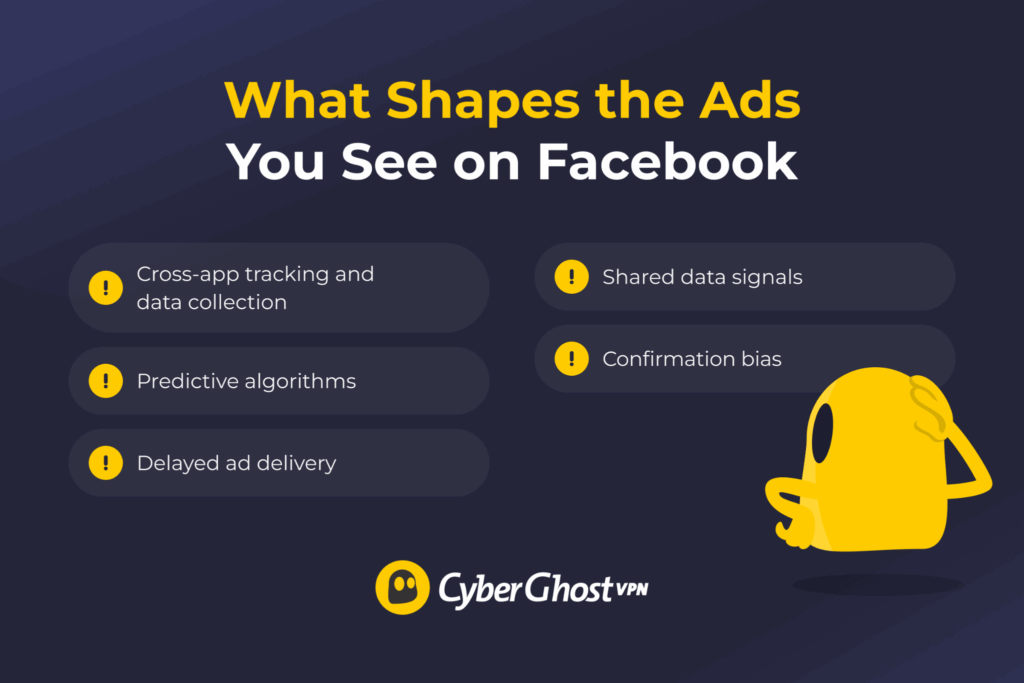
Facebook’s ad system runs on data. It tracks what you do on the platform, like your likes, shares, and clicks. It also gathers signals from other websites and apps that use its tracking tools. Think of it like leaving a trail of breadcrumbs all over the internet. Facebook just follows the crumbs.
All of this feeds into personalization. Over time, Facebook builds a detailed profile of your interests, habits, and preferences. It isn’t just a one-off thing. It’s constantly connecting the dots, looking at what you engage with, what you ignore, and what you keep circling back to. This is similar to how your favorite streaming app somehow always knows what you will binge next, even when you’re just “looking for something quick.”
This can get surprisingly precise. Research shows that even small combinations of interests can be enough to uniquely identify individuals and enable highly specific ad targeting, sometimes called nanotargeting2. In other words, it doesn’t need to hear you say anything out loud to get a pretty good read on you.
So why does it sometimes feel like Facebook is reading your mind? Let’s look at a few things that are going on behind the scenes.
Cross-App Tracking and Data Collection
When you visit websites, use apps, or check out products, that data can be shared through tracking tools like pixels and cookies. These tools help advertisers understand what you’re interested in, even if you don’t make a purchase.
It’s not just Facebook either. Meta owns Instagram and Threads, and activity across these platforms can help shape the ads you see. WhatsApp works a bit differently, since messages are end-to-end encrypted and not used for ad targeting, but your overall account activity can still add context. Instagram used to offer end-to-end encryption for private DMs sent on the platform, but that feature was removed in May 20263.
Then there’s also what happens outside Meta’s apps. If you’ve ever looked at something on a website and then seen it follow you around later, that’s not a coincidence. Many sites use tracking pixels that send signals back when you visit, click, or spend time on a page. In fact, a 2025 investigation by The Guardian found that some websites were sending user activity data straight to Facebook through tracking pixels, which then helped power targeted ads4.
Predictive Algorithms
Facebook can also spot patterns in your behavior and predict what might interest you in the future5. If you regularly engage with fitness content, for example, you’ll likely start seeing ads for gym gear or supplements, even if you never looked them up.
The same idea applies across different topics. A few travel searches, some beach videos, maybe a couple of hotel pages, and suddenly you’re getting ads for flights and holiday deals. It’s pattern matching. The more you interact, the better these predictions get.
There’s another layer to it as well. Facebook groups users with similar behavior in what are called “lookalike audiences.” This means you can receive ads based on what people with related interests or habits are engaging with — even if you never searched for those things yourself.
Delayed Ad Delivery
Ads don’t always appear as soon as you interact with something. There’s often a delay between what you do and when the ad shows up. That gap can make it feel like the ad is reacting to something you just said, when really the signal came from something you did earlier.
Here’s why that delay happens:
- Ad auctions take time: Every time you open Facebook or Instagram, an automated auction decides which ads to show you. Your past activity feeds into that, but it doesn’t always trigger an ad immediately.
- Algorithms need more signals: The system often waits for patterns, not one-off behavior. Visiting a page once may not do much, but repeat it or interact with similar content, and it starts to build a stronger signal.
- Ad timing is controlled by advertisers: Even if you showed interest earlier, an ad might only appear later when a campaign is running or has budget to show.
Shared Data Signals
Some signals come from the environment around you, not just your own activity. That’s why it can sometimes feel like your recommendations overlap with people you live with or spend time around. There are a few ways this can happen:
- Shared location or IP address: If multiple people are using the same network or are often in the same place, platforms can pick up on those overlapping signals. So if someone nearby is browsing for furniture, you might start seeing similar ads too.
- Linked devices and accounts: Using the same laptop, tablet, or login can mix activity between users. Over time, that can blur the signals and influence what each person sees.
- Social connections: What your friends and contacts engage with can also influence what you see. If several people in your network are interacting with the same content, it can increase the chances of it appearing in your feed.
- Lookalike audiences: Advertisers often target groups of people who behave similarly. That means you might see ads based on what people with similar interests are doing, even if you haven’t searched for it yourself.
Confirmation Bias
Not everything comes down to data. Confirmation bias means you’re more likely to notice and remember things that match what’s already on your mind, while tuning out everything that doesn’t. A recent study published in Frontiers shows that people naturally tend to favor information that aligns with their existing beliefs6.
That’s why ads can feel oddly specific. If it lines up with something you recently talked about, it stands out and feels meaningful. Meanwhile, all the irrelevant ads fade into the background and are quickly forgotten. Over time, this creates a skewed impression. A handful of “accurate” ads stick in your memory, making it seem like it’s happening constantly, even though most ads don’t match at all.
Is Passive Listening Even Possible?
Technically, yes — smartphones can run background processes that support features like voice assistants. These rely on passive “wake word” detection to listen for commands like “Hey Siri” or “OK Google,” so the hardware capability is there.
However, that’s very different from secretly recording conversations at scale. For a company like Facebook to do that, it would come with some obvious downsides. Constant background recording would drain your battery, trigger microphone indicators on iOS and Android, and require massive infrastructure to process audio from billions of users. It would also carry significant legal risks.
A Northeastern University study analyzing over 17,000 apps found no evidence that phones were secretly recording conversations for ad targeting7. What researchers have found instead is much simpler: Facebook collects vast amounts of behavioral data, and that alone is enough to make its targeting feel surprisingly accurate.
Does Facebook Use Your Microphone Permission?
Facebook can request access to your device’s microphone, but only for features that actually need it. These include recording videos, sending voice messages, or using audio within the app. You have to approve this access first, and you can turn it off anytime in your device’s settings.
Both iOS and Android are designed to keep this in check. Apps can’t just use your microphone in the background without permission, and you can always see which apps have access and revoke it if needed. Reviewing permission settings regularly helps you stay in control of what data apps can access.
How to Check and Control Facebook Permissions on Android
- Open Settings on your phone.
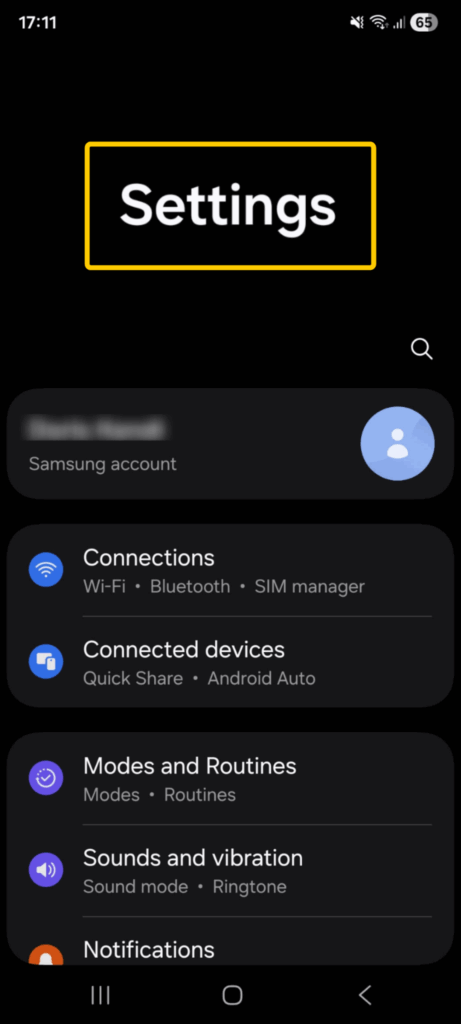
- Scroll down the menu and tap Apps.
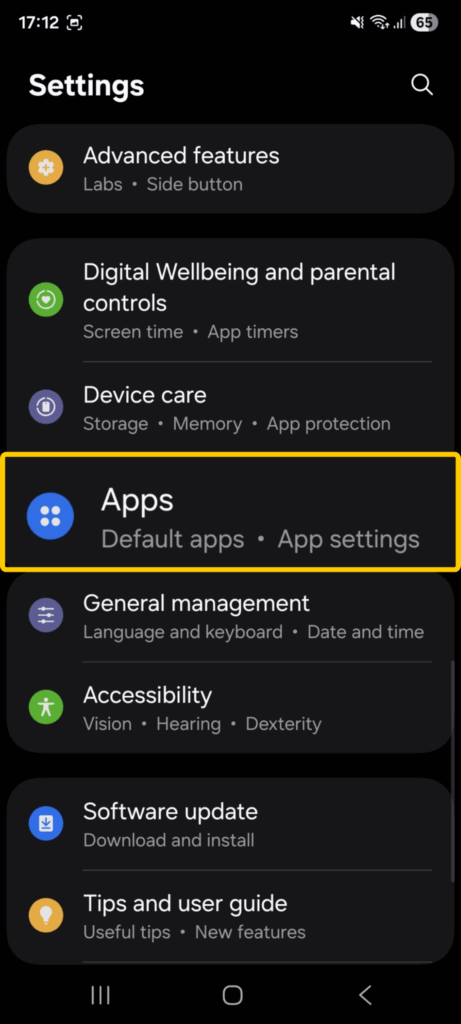
- Scroll down to find Facebook and open it.
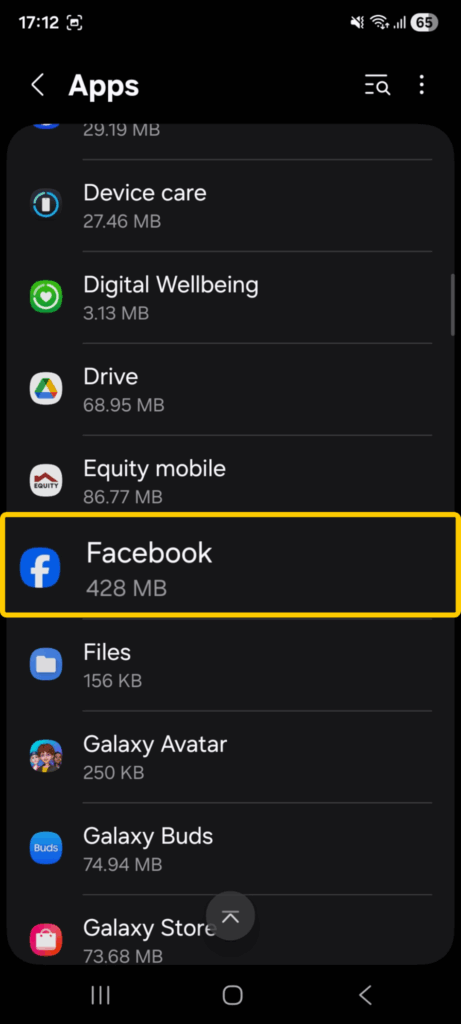
- Choose Permissions.
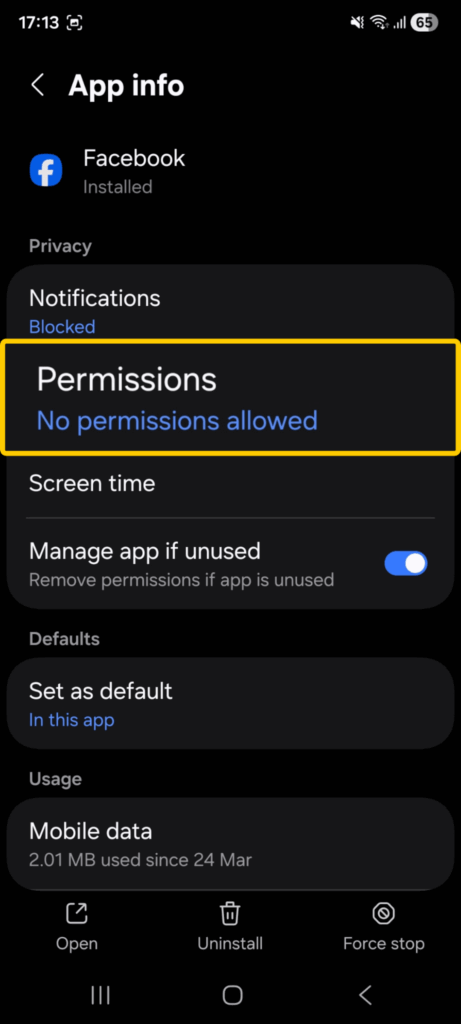
- Click Microphone.
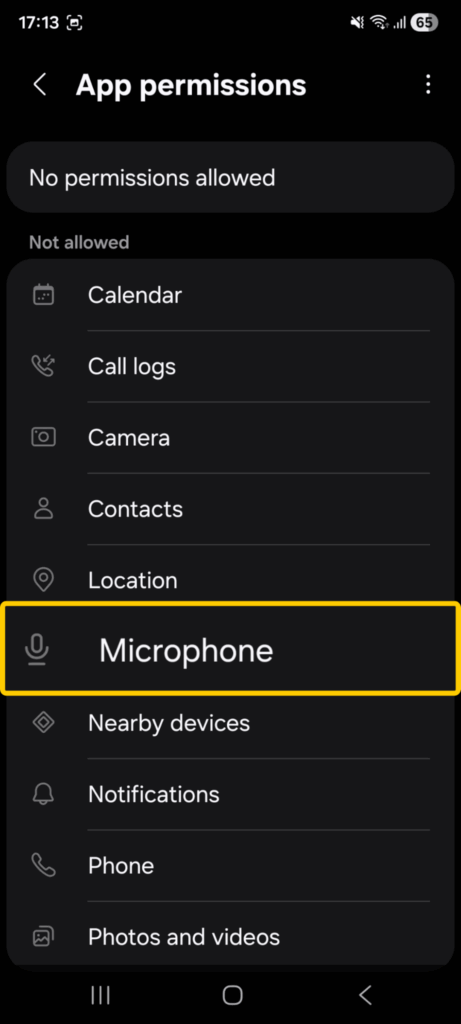
- Finally, pick Don’t Allow.
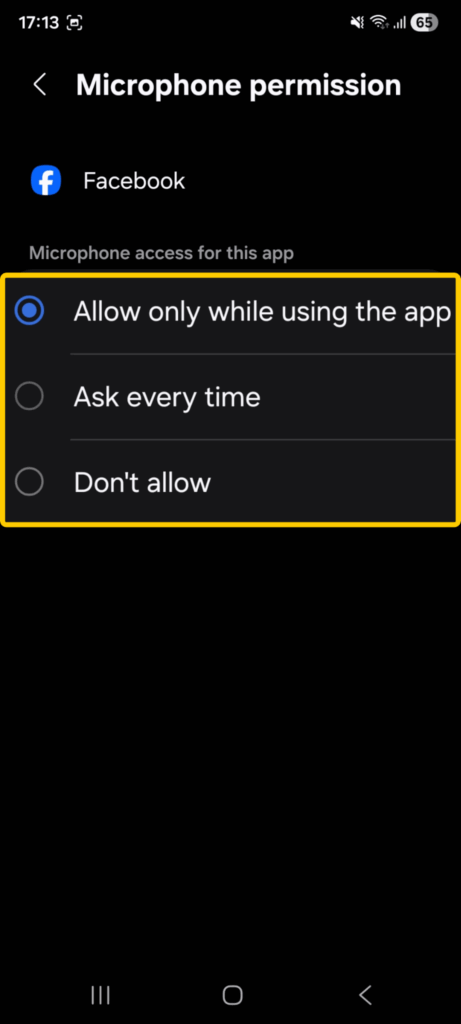
You can review each permission and turn off anything you don’t want to allow, such as the microphone or location. You can also check the Permission Manager in your settings to see which apps have access to specific features.
How to Check and Control Facebook Permissions on iOS
The exact steps may differ depending on what iOS version you’re running, but it typically follows these steps:
- Open Settings.
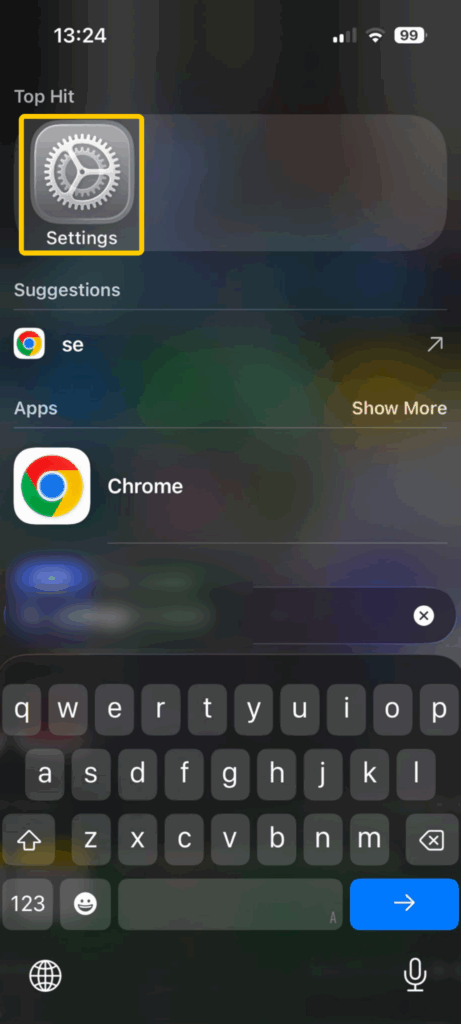
- Go to Privacy & Security. Alternatively, you may be able to scroll down and tap Apps > Facebook to view a list of permissions the app currently has.
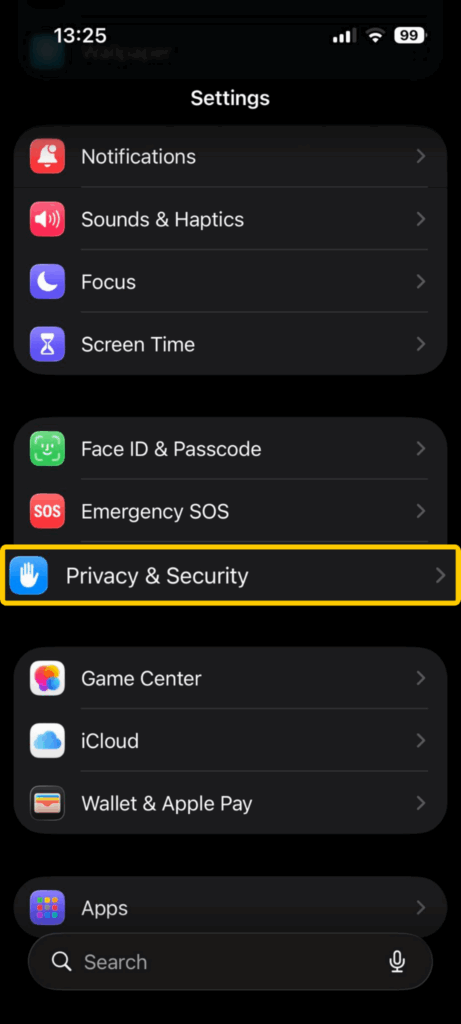
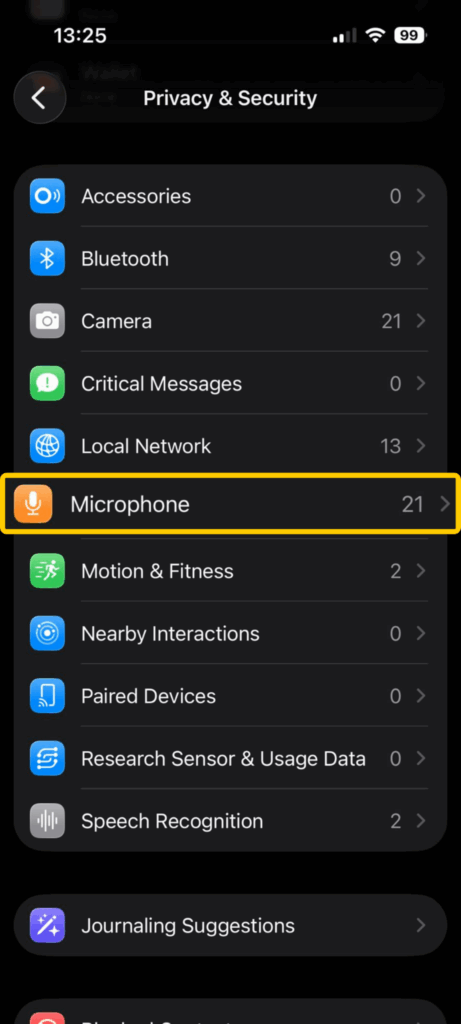
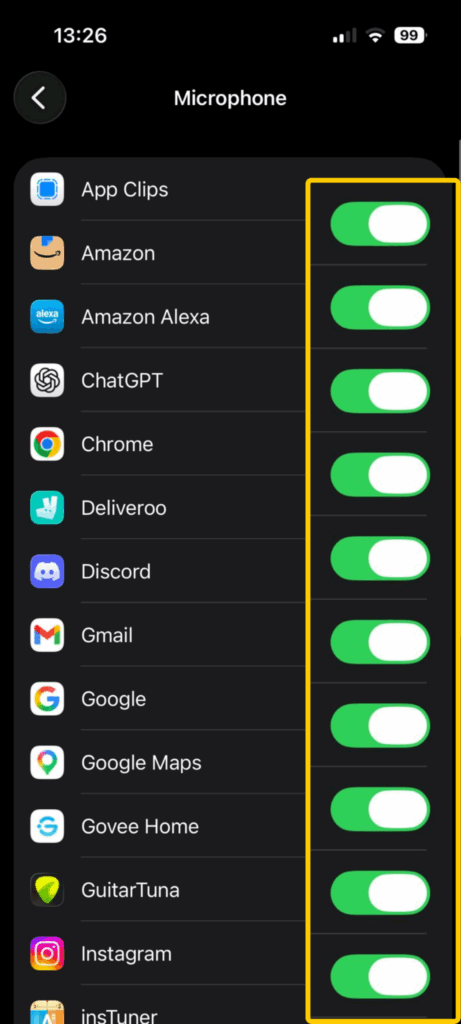
- Open Microphone. You will see a list of all apps that have access to use your device’s microphone.
- Find Facebook and use the toggle to turn the permissions off.
How to Limit How Facebook Tracks You
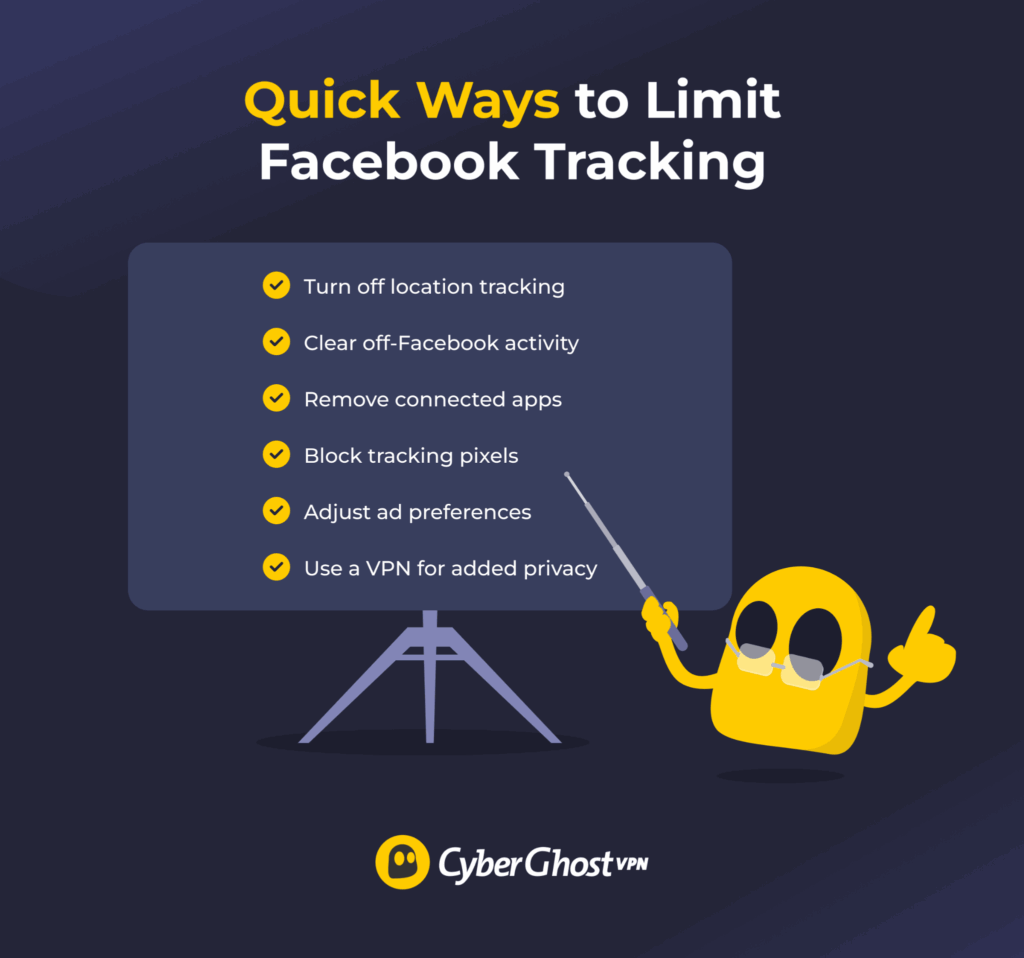
You can reduce how much data Facebook collects by changing a few settings and adjusting how you browse. Here’s what each step does and why it matters:
- Turn off location tracking on your device: Go to your phone’s privacy settings and remove location access for Facebook. This helps stop the app from collecting precise location data, such as where you go throughout the day, and helps limit location-based ads.
- Clear your off-Facebook activity: Facebook keeps a record of activity it receives from other websites and apps. Clearing this data breaks the link between your browsing outside Facebook and your account, which can reduce how personalized your ads are.
- Reduce data sharing with external apps: Many apps and services connect to Facebook when you log in or use integrations. Check your connected apps in your Facebook settings and remove any you don’t need to prevent them from sending data back to Meta.
- Block tracking pixels across websites: Websites often use tracking pixels that report your activity to Facebook. You can limit this by using browser privacy settings, ad blockers, or anti-tracking extensions.
- Adjust your ad preferences: Facebook lets you control some aspects of ad targeting. You can remove certain interests, limit data used from partners, and review why you’re seeing specific ads. This doesn’t stop ads, but it gives you more control over how personalized they are.
- Use a VPN like CyberGhost VPN to add protection: A VPN masks your IP address and encrypts your internet traffic. This makes it harder for websites and advertisers to link your activity to your identity or location, which can reduce certain types of tracking. However, a VPN isn’t a silver bullet. It won’t stop Facebook from tracking what you do within its own apps or websites, where your activity is still tied to your account.
Should You Be Concerned About Facebook Listening?
The idea of Facebook secretly listening through your microphone can feel unsettling, but there’s no solid evidence to support that claim. Ad targeting is largely driven by the data you generate through browsing, clicks, and interactions, rather than anything you say out loud.
That said, platforms do collect a significant amount of behavioral data, which is what makes ads feel so relevant. If you’d prefer to limit how much information is used, it’s worth reviewing your app permissions and ad settings. For additional privacy, tools like CyberGhost VPN can help reduce tracking by encrypting your connection and masking your IP address. It won’t stop all forms of data collection, but it can add an extra layer of control over how your activity is shared. You can try it with a 45-day money-back guarantee (14 days for monthly users).
FAQ
Does Facebook actually use my phone’s microphone to listen to conversations?
There’s no verified evidence that Facebook uses your phone’s microphone to listen to what you talk about. Meta Platforms states it doesn’t do this, and investigations haven’t found proof. Instead, ads are based on your activity, behavior, and data collected across apps and websites.
Why do Facebook ads feel like they match my private conversations?
Ads can feel accurate, but that’s usually down to behavioral data and not your microphone. Facebook tracks things like your searches, clicks, and activity across apps and websites to predict your interests. Timing also plays a role, and confirmation bias makes the “accurate” ads stand out while the irrelevant ones fade into the background.
Can Facebook access my microphone without permission?
No, Facebook can’t access your microphone without your permission. Modern operating systems like iOS and Android require apps to request access to it first. You can allow, deny, or revoke that permission at any time in your device settings.
How does Facebook target ads so accurately without listening?
Facebook ads rely on large amounts of behavioral data rather than audio. This includes your activity across apps and websites, location signals, and how you interact with content. That data is then used to predict your interests and match you with ads designed for similar users or patterns of behavior.
What can I do to stop Facebook from collecting too much data?
You can limit how much data Facebook collects by adjusting your privacy settings and reducing what you share. Turn off location tracking, review app permissions, and manage your ad preferences. You can also clear off-Facebook activity, limit third-party data sharing, and use tools like tracker blockers or a VPN to reduce tracking across the web.
References
- Facebook Does Not Use Your Phone’s Microphone for Ads or News Feed Stories — Meta
- Formulation and Evidence of (Nano)targeting Individual Users with non-PII Data — Arxiv
- Instagram to Remove End-to-End Encryption for Private Messages in May — The Guardian
- How did Facebook know where we’d been? —The Guardian
- Introduction: Understanding AI Predictive Analytics — Koast
- The impact of confirmation bias awareness — Frontiers
- Is Your Smartphone Spying on You? — Northeastern Global News

Leave a comment