
Most people think of computer viruses when they hear the word “malware,” but viruses are only one part of the threat. Malware comes in many forms, from ransomware that locks your files to spyware that collects your personal information and Trojans that disguise themselves as legitimate software.
Learning about unique varieties of malware can help you defend yourself from cyberattacks. Though it’s impossible for this guide to cover every possible malware and remedy, we’ll explain the most common types of malware, how they spread, and practical steps you can take to help lower the chances of an infection.
What Is Malware?
Malware, short for malicious software, is any software or code designed to perform unauthorized actions on a device, network, or system. Depending on its purpose, it can damage files, steal personal information, lock you out of your device, monitor your activity, or even give attackers remote access without your knowledge.
While people often associate malware with desktop computers, it can also target smartphones, tablets, servers, smart home devices, and other connected technology. As more devices connect to the internet, the number of potential targets continues to grow.
Why Understanding Different Types of Malware Matters
Malware doesn’t behave in one fixed way. Some threats spread automatically across networks, while others rely on tricking someone into opening an attachment or downloading fake software. Some operate in the background for months, collecting passwords and personal information, while others announce themselves immediately by locking your files or crashing your system.
That’s why cybersecurity teams classify malware by its behavior, not its name. They look at how it gets into a device, how it spreads, what it targets, and the damage it can cause.1
Understanding the different types of malware can help you recognize suspicious activity sooner and respond more effectively if something goes wrong. You can also use that knowledge to make better decisions about how to protect your devices from potential infections.
The Main Types of Malware
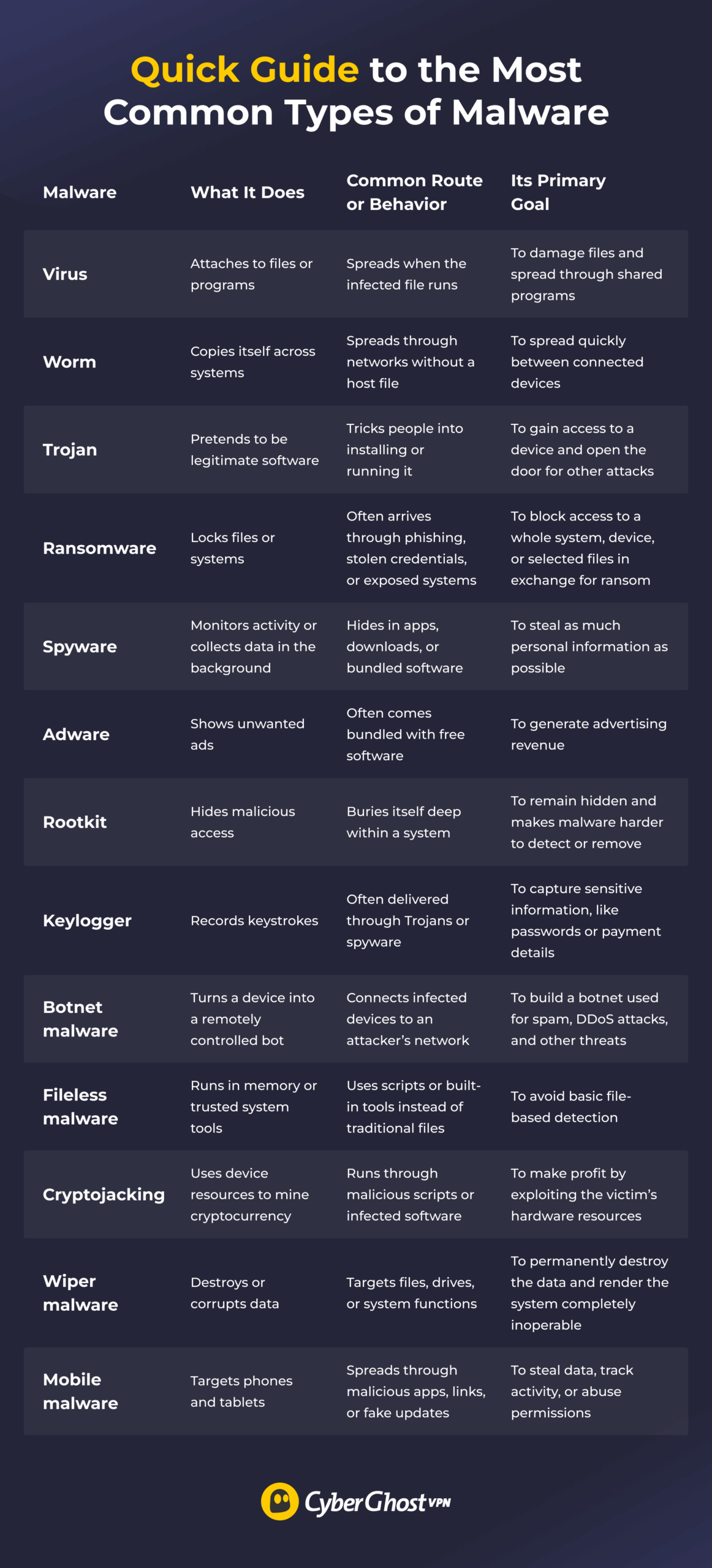
Malware isn’t one single threat. Some types rely on people opening infected files, while others spread across networks without any user interaction. Some steal passwords in the background, while others immediately make it obvious something is wrong.
Here’s how the most common types of malware differ.
Virus
When most people hear the word “malware,” this is usually what they picture. However, while every virus is malware, not all malware works like a virus. A computer virus attaches itself to a legitimate file or program and activates only when someone opens or runs that file. From there, it tries to copy itself to other files or devices, allowing the infection to spread.
Worm
Unlike a virus, a computer worm doesn’t need a host file to spread. Instead, it looks for vulnerable systems, software flaws, or poorly secured networks that allow it to move from one device to another. That’s what makes worms particularly dangerous. Once they find a way into a network, they can spread rapidly without anyone opening a file or clicking a suspicious link.
Trojan
Trojans disguise themselves as legitimate software, such as apps, installers, attachments, or updates. They don’t self-replicate like a worm or attach to legitimate files like a virus. Instead, a Trojan relies on someone willingly downloading or running it.
Once installed, a Trojan can perform many different tasks. Some steal passwords, others install additional malware, and some create a backdoor that gives attackers long-term access to a device. There are also specialized Trojans, such as banker Trojans, which steal financial information.
Ransomware
Ransomware is one of the most disruptive types of malware because it can prevent people or organizations from accessing their own files. After infecting a system, it encrypts important data and demands payment in exchange for the decryption key.
It’s also one of the most common malware threats today. According to Verizon’s 2026 Data Breach Investigations Report, ransomware appeared in 48% of confirmed data breaches,2 highlighting how frequently attackers use it against businesses and other organizations.
Modern ransomware attacks usually go a step further. Instead of locking files, attackers may also steal sensitive information before encryption begins. They then threaten to publish that data if the ransom isn’t paid, increasing the pressure on victims.
If you’re hit by ransomware, the FBI recommends following guidance from CISA or your local cybercrime authority rather than immediately paying the ransom.3
Spyware
Spyware secretly watches what you do on your device. Depending on the type, it may track the websites you visit, collect personal information, capture login details, or monitor messages and other activity on your device.
One of the biggest risks is that spyware can stay hidden. Unlike ransomware or other disruptive malware, it usually doesn’t announce its presence. Instead, it quietly gathers information in the background, potentially exposing sensitive data long before you realize anything is wrong.
Adware
Adware is software that displays unwanted ads, often through pop-ups, browser redirects, or injected banners. Not all adware is malicious. Some legitimate free applications use advertising to generate revenue, as long as they’re upfront about it.
However, deceptive or intrusive adware may track your browsing activity, change browser settings, flood your screens with ads, or redirect you to websites you never intended to visit. Usually more annoying than dangerous, but some adware can also expose you to scams or lead to other types of malware.
Rootkit
A rootkit hides malicious activity rather than carrying it out directly. It buries itself deep within a system, allowing attackers to conceal files, processes, settings, activity, or even other malware that’s already on the device.
Rootkits are about stealth and persistence, so they can be difficult to detect and remove. In some cases, the safest way to eliminate a rootkit is to completely reinstall the operating system.
Keylogger
Keyloggers record what you type on a keyboard. Attackers may use them to capture passwords, payment details, private messages, or other sensitive information. Keyloggers rarely operate on their own. They’re frequently installed as part of a larger spyware or Trojan infection, where the main goal is data theft without attracting attention.
Botnet Malware
Botnet malware turns infected devices into one small part of a much larger network (botnet) controlled by an attacker. Once compromised, your computer, phone, or other connected device can receive instructions from a command-and-control server without you ever noticing.
Botnets are commonly used to send spam, launch distributed denial-of-service (DDoS) attacks, steal credentials, or spread additional malware. Since infected devices continue working, many people have no idea they’ve become part of a botnet.
Fileless Malware
Unlike traditional malware, fileless malware doesn’t rely on installing a traditional executable file. Instead, it abuses trusted system tools, scripts, or memory to run malicious actions. This can make fileless malware harder to detect with security tools that rely mainly on scanning files.
That doesn’t mean it leaves no evidence behind. Rather than appearing as a suspicious file, the signs are more likely to show up as unusual commands, scripts, or system activity.
Cryptojacking
Cryptojacking uses your device’s processing power to mine cryptocurrency for someone else. Cybercriminals deliver this through malicious browser scripts, infected software, or compromised websites.
Unlike ransomware or spyware, cryptojacking isn’t interested in your files or personal information. Its goal is to use your hardware to generate profit. As a result, you may notice your device overheating, draining its battery faster, running slower than usual, or consuming more electricity.
Wiper Malware
Wiper malware destroys or corrupts data rather than steal or hold it for ransom. It targets files, hard drives, or critical system components with the goal of making recovery as difficult as possible.
Although it may look similar to ransomware at first, the motivation is very different. Ransomware locks data to pressure victims into paying, while wiper malware causes lasting disruption, often without offering any way to recover the lost information.
Mobile Malware
Mobile malware is a broad category that covers threats specifically designed for smartphones and tablets. Rather than describing one type of malware, it includes everything from spyware and banking Trojans to adware and ransomware built for mobile operating systems.
These threats can spread through malicious apps, fake software updates, phishing messages, unsafe downloads, or apps that request excessive permissions. As smartphones store more personal and financial information than ever before, they’re becoming increasingly attractive targets for attackers.
Other Malware-Related Terms You May See
As you read about cyber threats, you may also come across terms like “malvertising,” “logic bombs,” “backdoors,” “infostealers,” “scareware,” “polymorphic malware,” and “hybrid malware.” These terms usually describe how malware spreads, behaves, or avoids detection rather than represent standalone malware types.
For example, malvertising can deliver harmful code through ads, while a Trojan can create a backdoor to give attackers hidden access to your device. Polymorphic malware changes parts of its code to make signature-based detection harder, and hybrid malware combines techniques from multiple malware types into a single attack. You don’t need to remember all terms, but understanding what they mean can make cybersecurity news and reports easier to follow.
How Malware Infects a Device
No matter what type of malware you’re dealing with, it has to find a way onto a device first. The method attackers use to deliver malware isn’t the same thing as the malware itself. For example, a Trojan is a type of malware, and phishing is a delivery method that can spread Trojans, ransomware, spyware, and other threats.
Attackers constantly adapt their techniques, but these are still some of the most common ways malware spreads.
| Infection Route | How It Works |
| Phishing emails | Attackers send fake messages that push you to open a link, download a file, or enter login details. |
| Malicious attachments | Infected documents, archives, or installers can run malware when opened or enabled. |
| Fake software downloads | Malware can hide inside cracked apps, fake updates, browser extensions, or unofficial installers. |
| Compromised websites | A legitimate-looking website may redirect visitors or push harmful downloads. |
| Exploit kits | Attackers use tools that look for software flaws and try to infect vulnerable devices. |
| Unpatched vulnerabilities | Outdated operating systems, browsers, plugins, or apps can leave known weaknesses exposed. |
| Malicious apps | Apps may abuse permissions, collect data, show unwanted ads, or install additional malware. |
| Infected removable drives | USB drives or external storage can carry malware between devices. |
| Weak passwords | Attackers may use stolen, reused, or easy-to-guess passwords to access accounts or systems. |
| Supply-chain compromise | Malware can enter through a trusted vendor, a software update, a plugin, or a third-party service. |
Can Antivirus Software Detect All Malware?
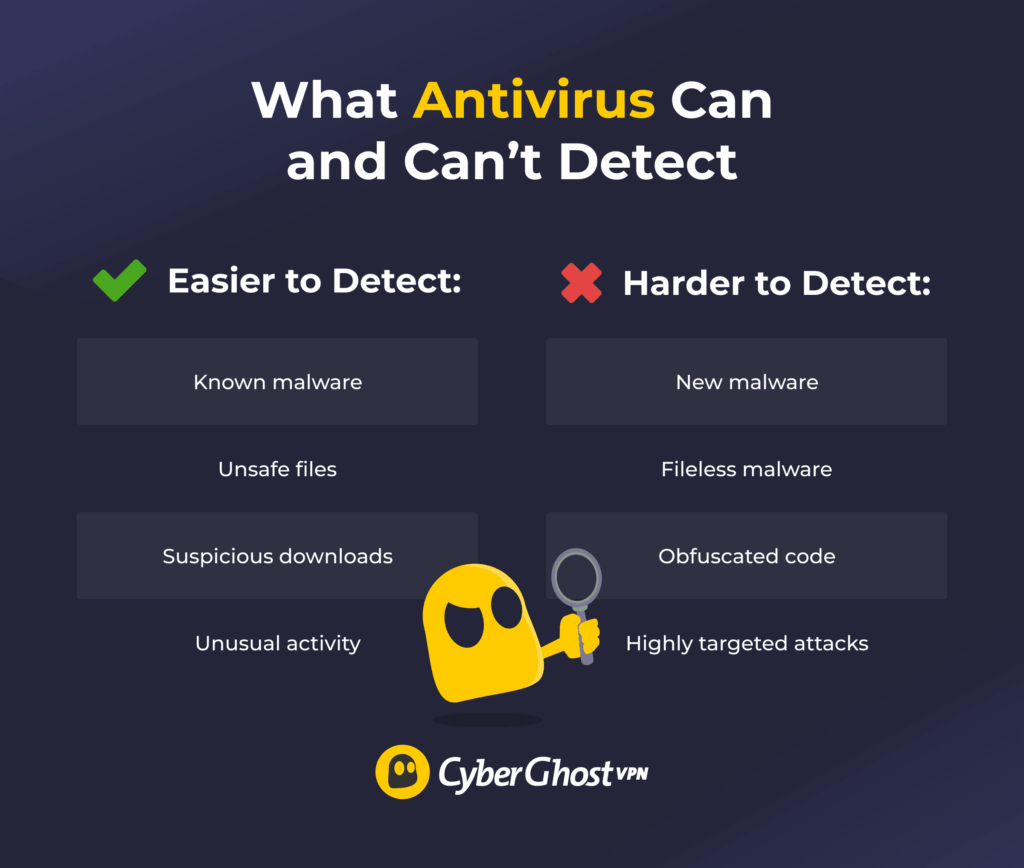
Antivirus software is still one of the most important tools for protecting your devices, but it isn’t perfect. Modern antivirus and anti-malware programs use a combination of signature detection, heuristic analysis, behavioral monitoring, and cloud-based threat intelligence to identify suspicious activity.
That works well against many known threats, but cybercriminals are always finding new techniques to avoid detection. Fileless malware, obfuscated code, and targeted attacks can be much harder to spot because they don’t always behave like traditional malware or leave obvious files behind.
That’s why cybersecurity experts recommend thinking of antivirus as one layer of protection, not your only line of defense.
How to Protect Your Devices From Malware
The best malware defense is a layered approach that combines good security habits with trusted security software. Each layer makes it a little harder for attackers to compromise your device:
- Keep software updated: Updates fix vulnerabilities that malware can exploit.
- Use reputable antivirus or anti-malware tools: These tools can detect many known and suspicious threats before they cause damage.
- Turn on multi-factor authentication (MFA): As NIST guidelines show, MFA makes it harder for attackers to access accounts with only a stolen password.4
- Use strong, unique passwords: Reused passwords can allow a single breach to affect several accounts.
- Back up important files: Clean backups make it much easier to recover if malware locks, deletes, or corrupts data.
- Avoid suspicious links and attachments: Many malware infections begin with phishing emails or fake downloads.
- Download apps from official sources: Unofficial installers, pirated software, and cracked apps are common places for malware to hide.
- Review app permissions: Apps shouldn’t access data or features they don’t need.
- Use a VPN on public or shared Wi-Fi: A secure VPN like CyberGhost VPN can help add a layer of protection on public or shared Wi-Fi by encrypting your connection. It doesn’t replace antivirus software, but it can help protect internet traffic from third parties on unsecured networks.
What to Do if Malware Infects Your Device
If you think malware has infected your device, acting fast can help limit the damage. The exact steps depend on the type of infection you’re dealing with, but these are good first responses in most situations:
- Disconnect from the internet if needed: Turning off Wi-Fi or unplugging your Ethernet cable may stop some malware from communicating with external servers or spreading further.
- Don’t log in to sensitive accounts: Avoid banking, email, work, or shopping accounts on the infected device. If spyware or a keylogger is active, it could capture anything you type.
- Run a reputable malware scan: Use trusted antivirus or anti-malware software to scan the device. Update the tool first if you can do it without exposing sensitive information.
- Change passwords from a clean device: Start with your email account, then update passwords for banking, cloud storage, and any other important services.
- Restore files from a clean backup: If malware deleted, locked, or damaged files, a clean backup may help you recover them. Avoid restoring from backups made after the infection started.
- Report serious incidents: If these incidents involve money, identity documents, work data, or sensitive accounts, report the incident to the right authority or your organization’s IT team.
Some infections are difficult to remove completely. If scans keep finding the same threat, or the device still behaves oddly after cleanup, consider getting professional help before using it for sensitive tasks again.
Stay One Step Ahead of Popular Malware Types
Malware types have one thing in common: they rely on finding an opportunity, like a phishing email, a fake software download, or an unpatched vulnerability. Understanding how they work can help you spot threats before they cause serious damage.
While no single security tool can stop every attack, combining good cybersecurity habits with trusted software can significantly reduce your risk. Keep your devices up to date, use reputable antivirus protection, back up important files, and think carefully before opening unexpected links or attachments.
For even stronger protection, CyberGhost VPN adds another layer of security to your internet traffic. By encrypting your connection, it helps protect your data from snooping on unsecured networks, so you can browse, work, and stay connected with greater confidence. Combined with antivirus software and smart online habits, it’s one more way to strengthen your overall cybersecurity.
FAQ
What are the main types of malware?
The main types of malware include viruses, worms, Trojans, ransomware, spyware, adware, rootkits, keyloggers, botnets, fileless malware, cryptojacking, wiper malware, and mobile malware. Each type behaves in a different way. Some malware steals information, others spread across networks, and some lock or destroy your files.
Which type of malware is the most dangerous?
It depends on the target and the attacker’s goal. Ransomware can lock you out of important files, wiper malware can destroy data for good, rootkits can hide malware activity deep in a system, and spyware can steal sensitive information. The impact depends on what the malware is trying to achieve and what systems it infects.
How does malware infect a device?
Malware can spread in many different ways. Common infection methods include phishing emails, malicious attachments, fake software downloads, compromised websites, unpatched software, malicious apps, or weak passwords. Many infections begin when someone unknowingly clicks a malicious link or installs software from an untrusted source.
Can antivirus software detect all malware?
No. Antivirus software can detect many known threats and suspicious behavior, but no security tool catches every type of malware. New threats, fileless malware, and obfuscated attacks can be harder to detect. That’s why cybersecurity experts recommend using antivirus alongside other security measures, such as keeping your software updated and backing up important files.
How can I protect my devices from malware?
The best defense is a layered approach. Keep software updated, use reputable antivirus tools, turn on MFA, use strong passwords, back up important files, avoid suspicious links, and download apps from official sources. When you’re using public or shared Wi-Fi, CyberGhost VPN can also help protect your connection by encrypting internet traffic, adding another layer of protection to your overall setup.
References:

Leave a comment