
Facebook scams can show up almost anywhere on the platform, from Marketplace listings and Messenger chats to comments, ads, and fake Pages. Some are painfully obvious. Others spoof legitimate offers, people you know, or official Facebook notifications.
These scams are increasing in numbers, too. In 2025, Meta removed more than 159 million scam ads, with 92% taken down before anyone reported them.1 It also removed 10.9 million Facebook and Instagram accounts linked to criminal scam centers. The FTC reports that victims lost $2.1 billion to scams that started on social media in the same year, with Facebook accounting for more reported losses than any other platform.2
It doesn’t mean you have to side-eye every ad, message, or item on Marketplace. But knowing what these scams look like can help you catch them before you click, pay, or hand over personal information. Keep reading to find out what Facebook scams you’re most likely to run into, the red flags to watch out for, and what to do if you think you’ve already fallen for one.
Why Do Scammers Use Facebook?
Facebook gives scammers several ways to disguise themselves. They can study public posts, copy profile details, message people directly, join local Groups, or run ads that appear to be ordinary promotions.
Scammers typically rely on four parts of the platform:
- Public profiles: Bad actors can copy photos, names, friend lists, and personal details to create believable fake or cloned accounts.
- Messenger: The messaging app provides a way to send urgent links, fake support alerts, or money requests that appear to come from someone familiar.
- Groups and Marketplace: Fake listings, rental posts, ticket offers, and community fundraisers are among the ways scammers exploit local communities.
- Ads and Pages: Facebook’s sponsored ads give cybercriminals a way to promote fake stores, giveaways, investment offers, or phishing pages to targeted audiences.
That mix makes scams on Facebook harder to spot than random spam, especially when the message or listing appears to come from a real person, local seller, or familiar-looking Page.
Common Facebook Scams to Watch Out For
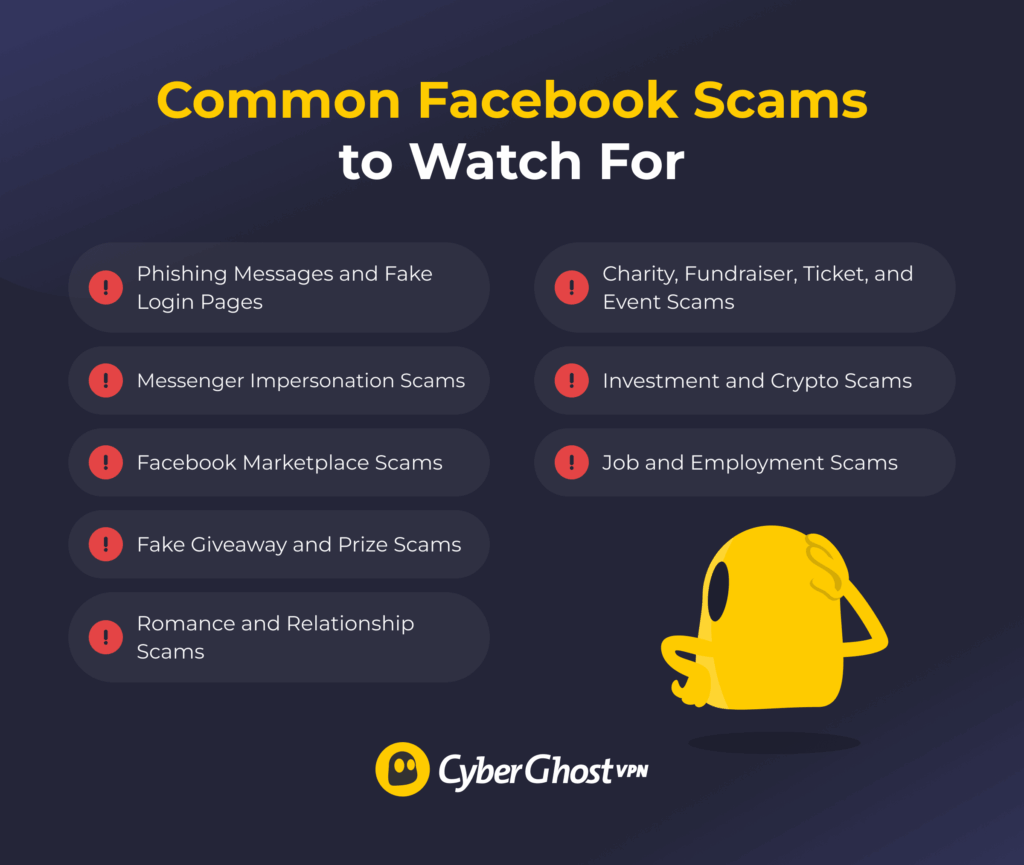
Most scams on Facebook are after the same things: your money, personal information, or account details. Here’s a list of the most common ones you might run into.
1. Phishing Messages and Fake Login Pages
Phishing scams often try to steal your Facebook password, 2FA code, payment details, or other personal information. You might get a message or comment saying the platform is going to delete your account, you’ve won a prize, or you need to confirm your details. The link then takes you to a fake page designed to look like Facebook or another familiar site.
The giveaway is often in the details. The web address might look slightly wrong, the message may pressure you to act immediately, or the page might ask you to log in when you’re already signed into Facebook. If the platform needs something from you, open the app or website yourself and check your account rather than use the link in the message.
2. Messenger Impersonation Scams
Messenger scams feel personal because they often appear to come from someone you know. A scammer may use a cloned profile, a fake account, or a real account they’ve taken over.
The message might say “Is this you in this video?” or ask for money, gift cards, a voting link, a job referral, or an account recovery code. These scams work because familiar names make people act faster.
If a message from someone you know feels off, check with them somewhere else before doing anything. Call them, text their usual number, or ask them something a stranger wouldn’t know.
3. Facebook Marketplace Scams
Marketplace scams can come from either side of a sale. A fake seller might advertise an item that doesn’t exist, use deceptive photos, ask for a deposit upfront, or push you toward a payment method with little buyer protection. A scam buyer might send a fake payment confirmation, deliberately overpay, or claim an item never arrived.
Be wary of prices that seem suspiciously low, sellers who won’t answer basic questions, and anyone pressuring you to pay or move the conversation somewhere else. Shopping scams are one of the biggest forms of fraud on Facebook and other social platforms. In 2025, shopping scams were the most-reported social media scam type. More than 40% of people who lost money to a social media scam said they ordered something from a social media ad.2
4. Fake Giveaway and Prize Scams
Fake giveaway scams promise free products, cash prizes, coupons, or exclusive discounts. They often come from fake brand pages, copied posts, comments, ads, or direct messages. The catch usually appears after you click: fill out a survey, pay a small shipping fee, enter your card details, or log in to “claim” the prize.
If you’ve apparently won something you never entered or claiming your prize involves handing over your password, 2FA code, or payment details through an unfamiliar link, that’s a pretty good reason to stop there.
5. Romance and Relationship Scams
Romance scams (sometimes known as “catfishing”) usually start with trust, not money. Someone may message you often, show a lot of interest in a short time, and spend considerable time building a relationship before asking for anything.
Eventually, a problem appears. They need help with a medical bill or family emergency, can’t afford a flight to visit you, or have an investment opportunity they think you’d love. Be careful if someone you’ve never met keeps finding reasons to avoid video calls or meeting in person, tries to push the relationship forward unusually fast, or asks you to keep things secret, especially once money enters the conversation.
6. Investment and Crypto Scams
Investment scams can start with a trading group, an ad, a supposed mentor, or even a friendly message from someone who seems to know what they’re doing. They might promise guaranteed returns, show you glowing testimonials, or give you access to a convincing-looking dashboard where your “investment” appears to be growing.
The problems usually start when you try to get your money back. You need to pay a withdrawal fee, tax, or another deposit before you can access your supposed profits. Crypto may appear in these scams, but the problem is with the fake investment setup rather than crypto itself.
7. Job and Employment Scams
Job scams on Facebook often promise easy work for high pay, creator gigs, modeling offers, or unbelievable side incomes. They may appear in posts, Groups, ads, or Messenger chats from fake recruiter profiles.
Be wary of vague roles, rushed interviews, and “training” or “equipment” fees. A scammer may also ask for your bank details, ID, or tax information before there’s a real contract. Some fake jobs start with a small task to build trust, then ask you to invest to keep earning money. A real employer wouldn’t ask you to pay upfront in order to get paid.4
8. Charity, Fundraiser, Ticket, and Event Scams
These scams often catch people when they’re already motivated to act fast. A fake fundraiser might ask for urgent donations after a disaster or personal tragedy, while a ticket scam might offer seats to a sold-out concert or match at a price that’s hard to pass up.
Before sending money, check who’s actually behind the fundraiser, listing, or event. New accounts, screenshots of photos, vague details, and pressure to pay are immediately signs to stay cautious. Be particularly wary if someone insists on gift cards, wire transfers, crypto, or other payment methods that are difficult to reverse.
Emerging Facebook Scams to Keep in Mind
The latest scams on Facebook often use the same old pressure tactics, but the packaging is getting harder to spot. Scammers now have better tools for creating fake images, cloning Pages, writing more convincing messages, and generating more believable phishing links. Here are a few trends that have become more prevalent in recent years:
- AI-generated images and fake engagement Pages: Some scam or spam Pages use AI-generated images to build an audience before pushing links, products, or misleading posts.4 Think twice before engaging with Pages that post emotional images, odd captions, or unrealistic “too perfect” photos to farm likes and shares.
- Celeb-bait and brand impersonation: Scammers may copy a public figure, creator, retailer, or well-known brand Page to promote fake giveaways, investment schemes, or discount offers.1 Look at the Page name, handle, age, post history, and linked website before engaging in anything.
- Fake support and account recovery scams: These often appear to be warnings from Facebook or Meta. They may say that the platform will delete your account, that your Page has violated the rules, or that you need to confirm your identity. The link usually leads to a fake login or “appeal” page.1
- Suspicious friend requests and new-contact scams: A new account may add you with no real connection, few mutual friends, or details that don’t match the person it claims to be. Don’t accept it only because the name or photo looks familiar.
- Messenger jobs and money-making scams: These can appear as easy remote work, paid tasks, fake recruiter messages, or money offers. It should raise your alarm bells if someone claiming to be a recruiter pushes you to click a link or pay a fee before you earn anything.
Scams on Facebook Red Flags
A scam on Facebook usually gives you a reason to act before you think. Check this list before you click a link, reply to a message, or send money.
| Red Flag | What It Can Look Like |
| Urgency or panic | “Your account will be deleted,” “last chance,” “pay now,” or “claim within 10 minutes.” |
| Unfamiliar link | A page copies Facebook, a retailer, a delivery company, or a payment service, but the domain looks slightly off. |
| New or empty profile | Few posts, generic photos, no real comments, or details that don’t match the person’s story. |
| Off-platform payment request | The person asks for gift cards, wire transfers, crypto, payment apps, or “friends and family” transfers. |
| Seller that avoids normal checks | They refuse extra photos, local pickup, a video call, or basic questions about the item. |
| Too-good-to-be-true offer | Very low prices, guaranteed returns, high-pay jobs with vague duties, or prizes from contests you never entered. |
| Sensitive information request | They ask for your password, 2FA code, bank details, ID photo, recovery code, or card information. |
| Familiar account, strange tone | A friend asks for money out of the blue, sends a weird link, or writes in a way that feels off. |
What to Do if You’ve Been Scammed on Facebook
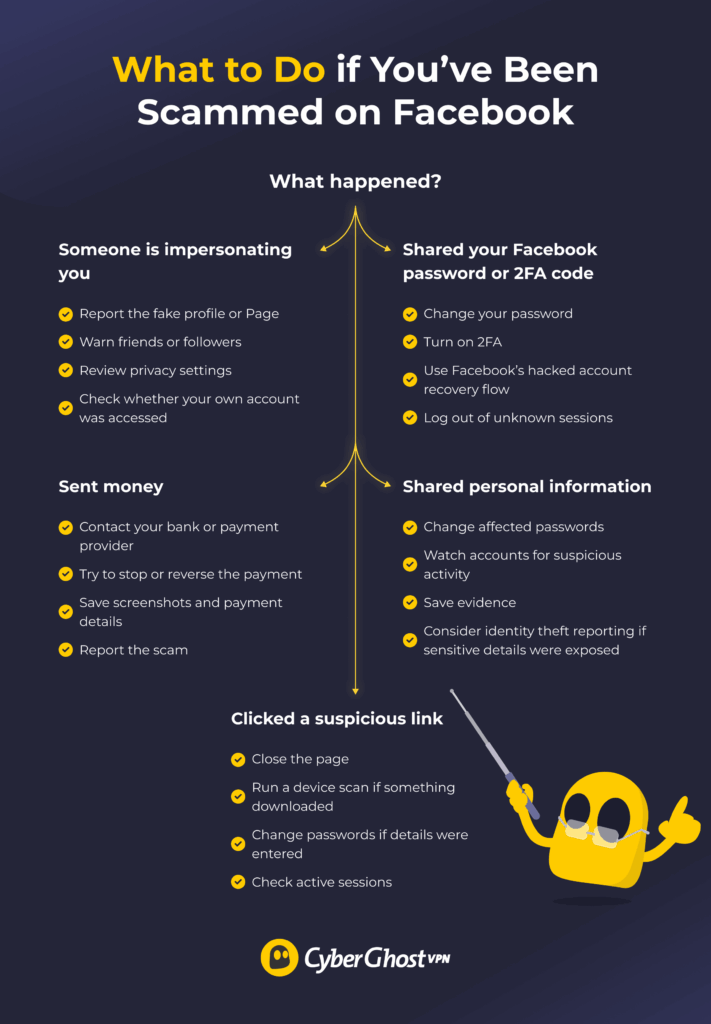
What you need to do depends on what happened. If you sent money, shared your login details, clicked a suspicious link, or lost access to your account, act fast to limit any further damage.
- Secure your Facebook account: Change your password if you shared it, entered it on a suspicious site, or notice activity you don’t recognize. Choose a strong, unique password you don’t use anywhere else.
- Check where you’re logged in: Review the devices and sessions connected to your Facebook account and log out of anything you don’t recognize.
- Turn on two-factor authentication: If you haven’t already, enable 2FA to add another barrier between your account and someone trying to access it with your password.
- Report the scam to Facebook: Report suspicious profiles, Pages, Marketplace listings, messages, or ads through Facebook so Meta can review them.
- Contact your bank or payment provider: Contact your provider as soon as possible if you sent money or shared payment details. They can advise you on securing your account and whether you can stop the payment or disputement.
- Scan your device for malware: If you downloaded a file, installed an app, or opened something suspicious, run a scan with reputable security software and remove anything it detects.
- Change other affected passwords: Make sure to change your password on other accounts that might share the same Facebook password. Start with important accounts like your email, banking logins, and social media.
- Warn your contacts if someone compromised your accounts: If a scammer used your account to send messages, links, or requests for money, alert your friends and family to not interact with them.
- Keep an eye on affected accounts: Watch for unfamiliar transactions, password reset emails, login notifications, or other activity that could indicate the scammer still has access to your information.
How to Report a Scam on Facebook
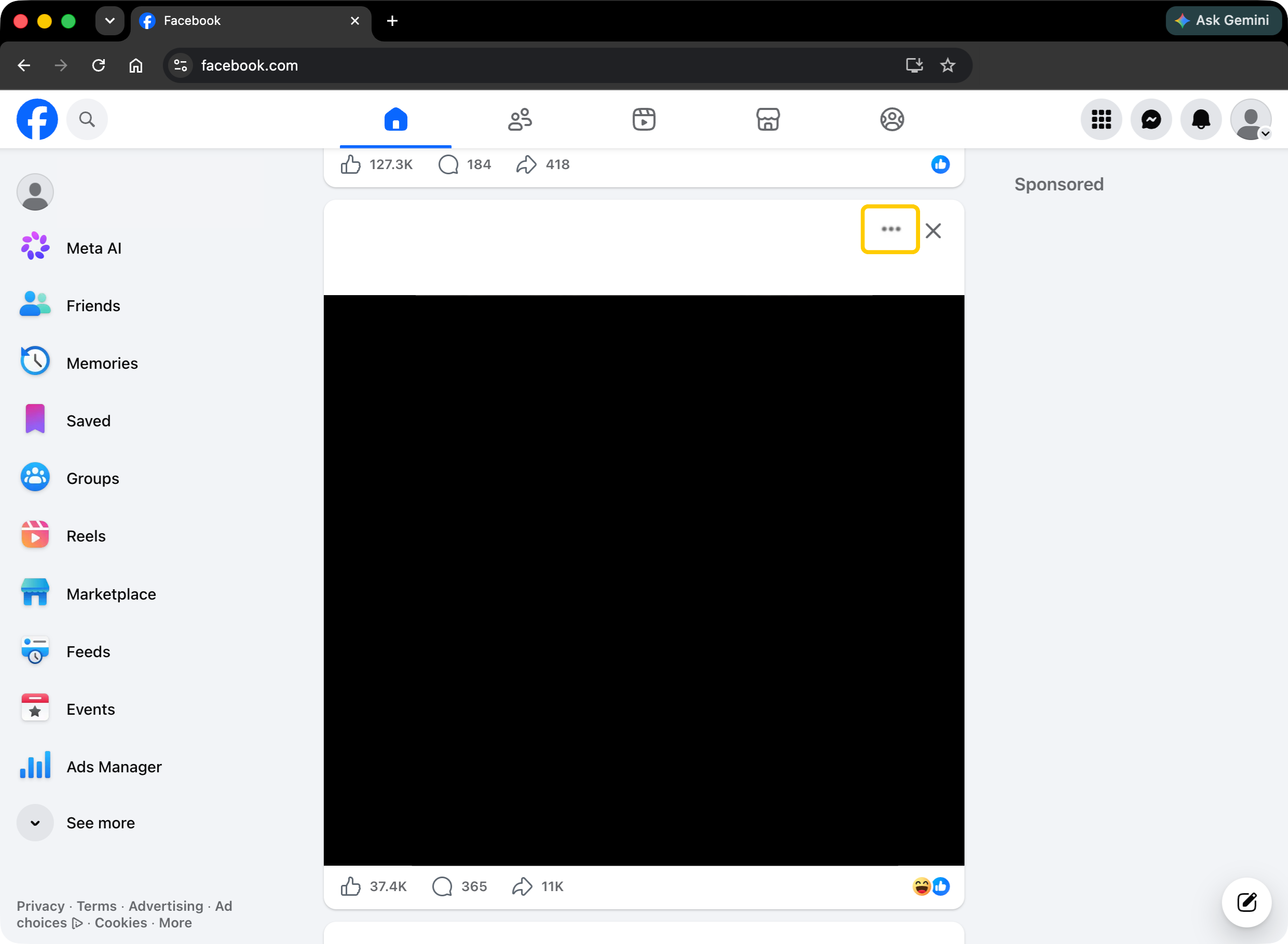
Report the scam from the place where you found it. Facebook’s menus can vary slightly depending on what you’re reporting and which device you’re using, but the process usually starts from its three-dot menu.
- If you see suspicious content or people on Facebook, select the three-dot menu near the post, profile name, listing, or conversation.
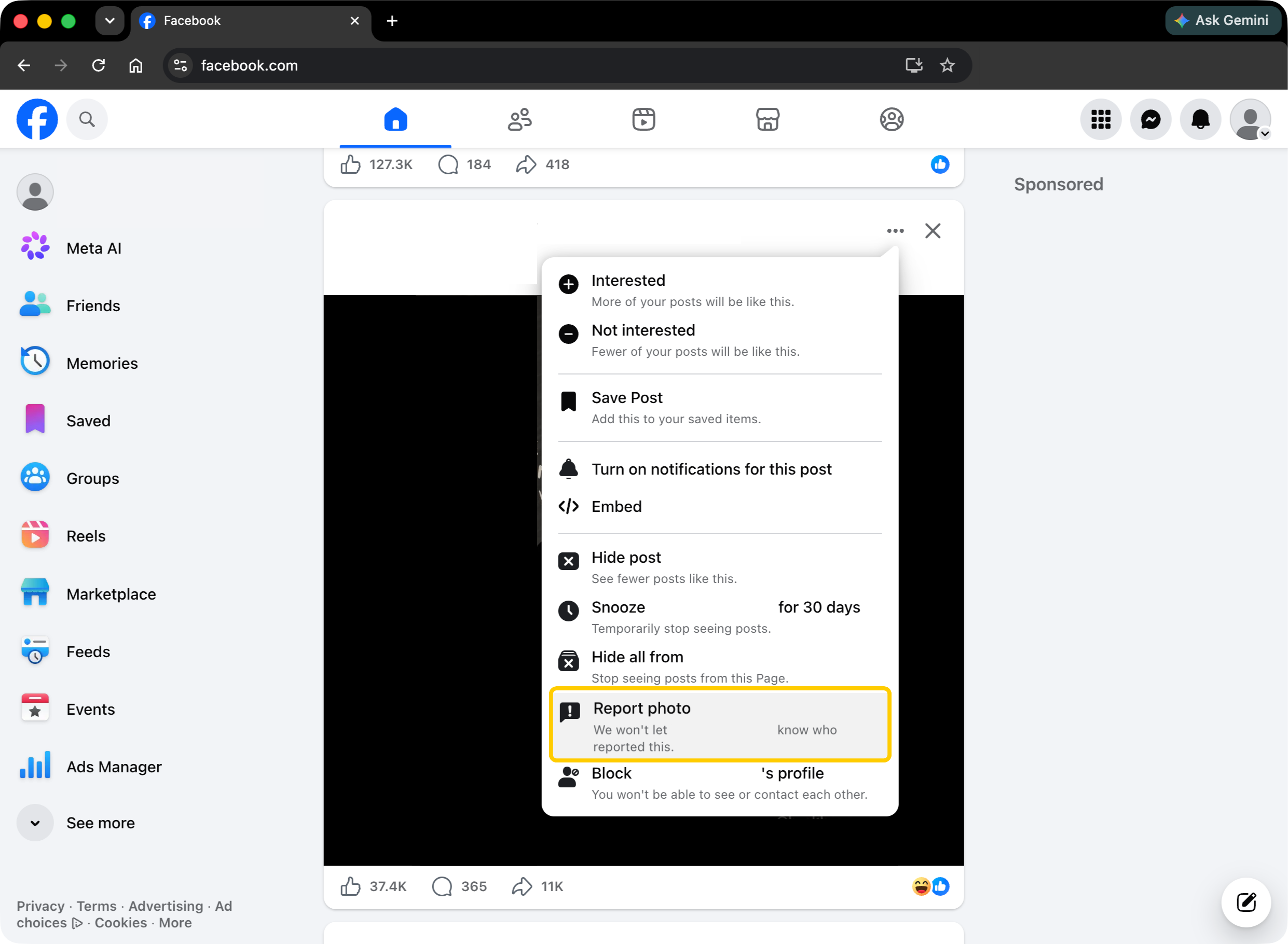
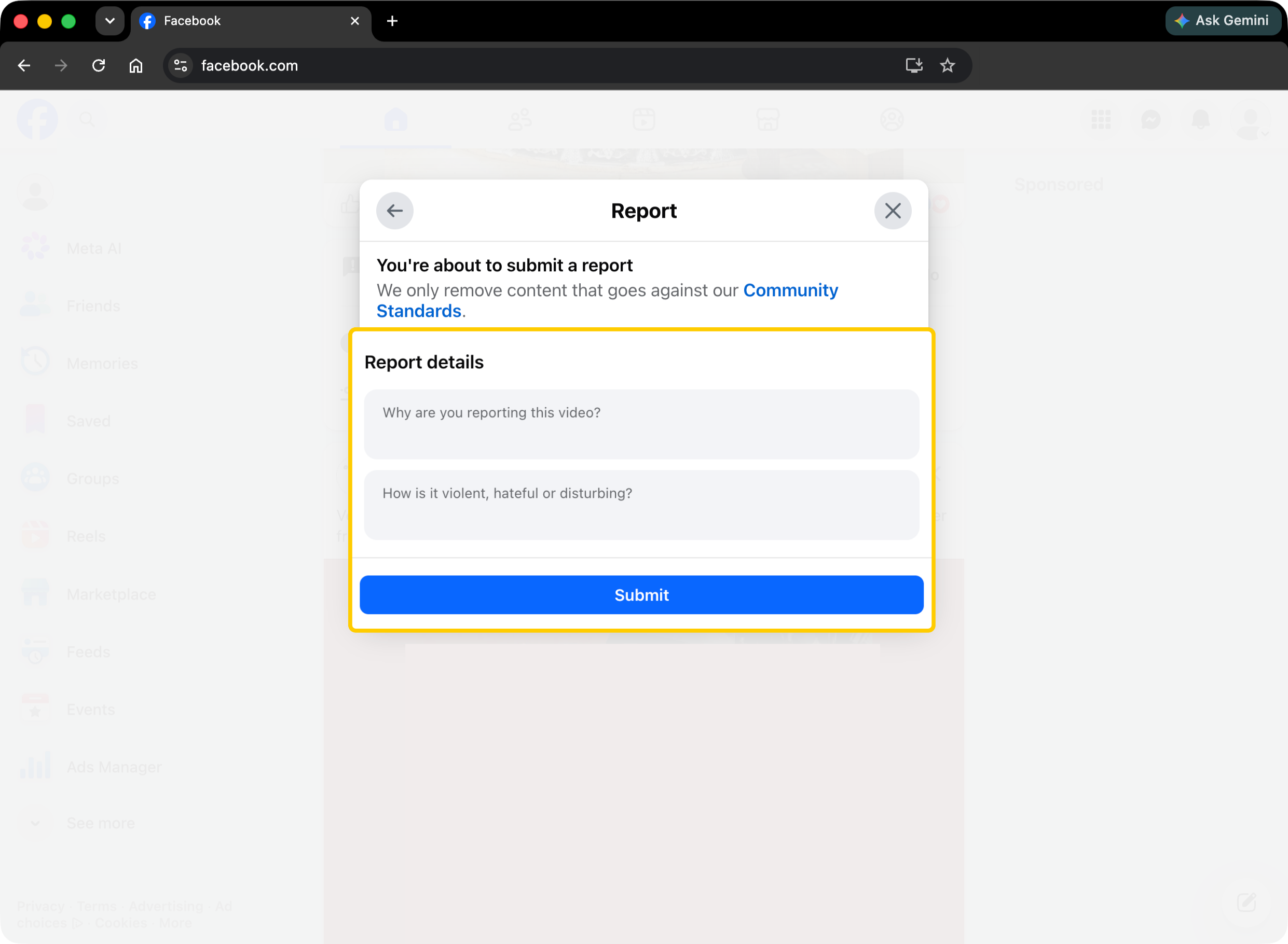
- Report the post, photo, profile, or other shady content using the relevant Report… button.
- Add details to your report if necessary. Include what happened, what the person asked for, and it included money, login details, or personal information.
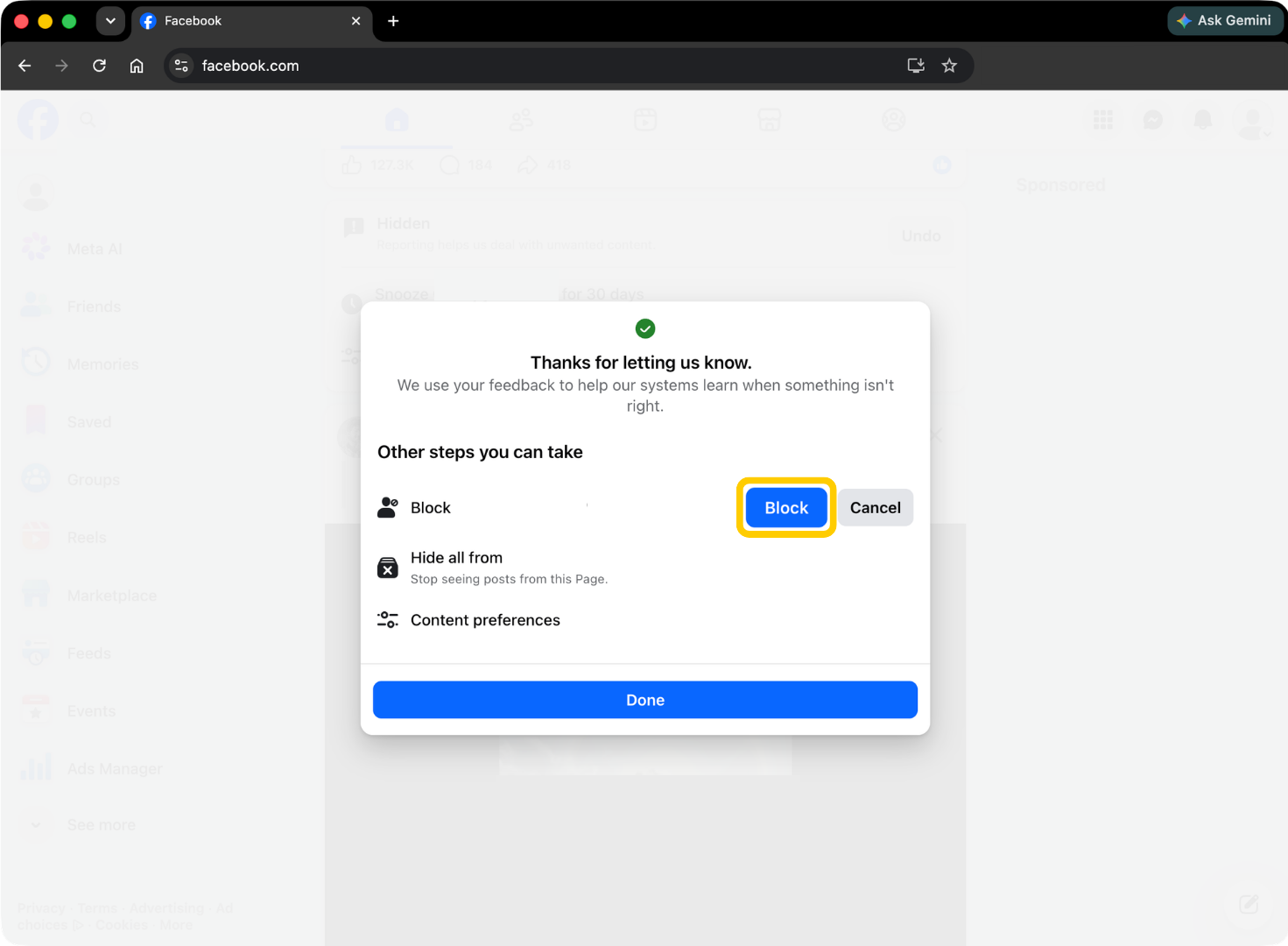
- Block the account after reporting it. This helps stop further messages while Facebook reviews the report.
If it’s certain someone compromised your account, you can use Facebook’s hacked account recovery process as well. You can also check recent emails from Facebook in your account settings if you’re unsure whether a security warning really came from Meta.
How to Reduce Facebook Scams Risks
You can’t stop scammers from trying to reach you, but you can make it harder for them to trick you or get into your account. A few changes to how you use Facebook can make a big difference:
- Secure your account: Use a strong password that combines letters, numbers, and special characters and turn on 2FA to make it more difficult for attackers to break into your profile. From time to time, it’s also worth checking where your account’s logged in and removing devices or sessions you don’t recognize.
- Verify unexpected requests: Contact the person outside Facebook if they ask for money, personal information, or a verification code. This can help you catch impersonation scams or messages sent from compromised accounts.
- Check profiles, Pages, and listings: Look at the account history, activity, photos, and other details before buying, donating, applying for a job, or sharing information. If anything is inconsistent, it can help you spot fake or impersonated accounts.
- Never share passwords or codes: Keep your login details to yourself. No one on the platform would ask for your credentials or 2FA/MFA codes.
- Use safer payment methods: Choose payment options that offer appropriate protections where available. Be cautious if someone insists on gift cards, crypto, wire transfers, or another payment method that’s difficult to reverse.
- Keep apps and devices updated: Install updates for your Facebook app, your browser, operating system, and security software. Updates can patch known vulnerabilities and add new security protections.
- Limit what you share: Review who can see your posts, friends list, contact details, and other personal information. Sharing less publicly gives scammers fewer details to use in impersonation or social engineering attempts.
- Be cautious with ads and links: Visit the official website by typing the URL into your browser instead of trusting a link in a post, comment, message, or ad.
Strengthen Your Online Security With CyberGhost VPN
Staying clear of Facebook scams starts with good cybersecurity hygiene and a VPN can be a great addition to your routine. That’s because connecting to a VPN server encrypts your traffic and changes your IP address, helping protect your private data from snooping.
CyberGhost VPN offers market-best features, including AES 256-bit encryption, which is especially useful when you’re checking Facebook on public Wi-Fi. Our Kill Switch helps prevent your traffic from leaking outside the VPN if the connection suddenly drops, while our built-in Content Blocker keeps track of DNS domains associated with ads, trackers, and malware.
A VPN is a great addition to your cybersecurity arsenal. These features can give you extra protection while you browse, shop, message, and spend time online. Try CyberGhost VPN risk-free with our 45-day money-back guarantee (14 days on monthly plans).
Stay One Step Ahead of Facebook Scams
Facebook scams keep changing, but the tactics behind them are often similar. Watch out for unexpected requests, confirm the identity of the sender, and don’t let urgency push you into acting before you’ve had a chance to evaluate your options. Use a strong password, turn on 2FA, keep your apps and devices updated, and review your Facebook account activity. If something goes wrong, take measures to secure your accounts and report the scam.
CyberGhost VPN can be part of your daily security setup. It encrypts your internet traffic, hides your IP address, and includes features like an automatic Kill Switch to give you extra protection while you’re online. You can try CyberGhost VPN risk-free with our 45-day money-back guarantee (14 days on monthly plans) to see how well it can boost your privacy.
FAQ
What are the most common Facebook scams?
The most common Facebook scams include phishing messages, fake login pages, Marketplace scams, fake giveaways, romance scams, investment scams, and impersonation scams. Though the tactics vary, most scammers are usually after your money, login details, personal information, or access to your account.
How can I tell if a Facebook message is a scam?
Look for warning signs like a sense of urgency, a suspicious link, requests for money or gift cards, or someone asking for your password or 2FA code. A message that sounds unfamiliar for the person who sent it can also be a clue, especially if it comes from a new, cloned, or empty account.
Is it safe to buy items through Facebook Marketplace?
Facebook Marketplace can be a safe way to buy and sell, but you still need to check who you’re dealing with. Check the seller and listing, keep communication on Facebook, use payment methods with buyer or seller protection, and avoid rushed deals. The risk depends on the seller, payment method, and whether you leave supported transaction channels.
What should I do if I share information with a scammer?
Change affected passwords right away, especially for Facebook, email, banking, shopping, and payment accounts. Turn on 2FA for affected accounts, watch for suspicious activity, save screenshots, and report the scam. If you share sensitive information like an ID, tax number, or financial details, use identity theft resources.
How do I report a scam on Facebook?
Open the post, profile, message, Marketplace listing, seller conversation, or Page where the scam appeared. Use the three-dot menu and choose the closest reporting option, such as scam, fraud, impersonation, fake account, or misleading content. If someone compromised your account, use Facebook’s hacked account recovery flow.
References:
- Fighting Scammers and Protecting People With New Technology and Partnerships — Meta
- New FTC Data Show People Have Lost Billions to Social Media Scams — Federal Trade Commission
- Job Scams — Federal Trade Commission
- How Spammers and Scammers Leverage AI-Generated Images on Facebook for Audience Growth — arXiv

Leave a comment