
Virtual private networks (VPNs) and Virtual Local Area Networks (VLANs) may sound similar, but they solve completely different networking problems. A VPN creates a secure connection between devices or networks, while a VLAN divides a physical network into separate logical networks. Understanding that distinction can help you determine where each technology fits.
In this guide, we’ll break down exactly how VPNs and VLANs work, where they differ, and when you should use one or both to improve network security and organization.
VPN vs VLAN: At a Glance
| VPN | VLAN | |
| Function | Encrypts internet traffic | Groups local devices |
| Scope | Works worldwide | Works on the local network |
| Setup | Install an app and connect | Configure switches and routers |
| Encryption | Built in | Provides no encryption |
| Security focus | Counters external threats | Limits internal access |
| Performance | A slight slowdown is possible | Very fast |
| Best for | Remote work and public Wi-Fi | Office network organization |
| Primary user | Remote and privacy-minded users | IT teams and admins |
What Is a VLAN?
A VLAN (Virtual Local Area Network) is a logical subdivision of a physical network. Instead of connecting devices based on their physical location, VLANs group them based on rules, such as department, function, or security level.
Imagine a large office building where all the devices connect to the same physical network. Without VLANs, everyone can theoretically access everyone else’s devices. With VLANs, you can create virtual “rooms,” such as one for finance, one for IT, and one for guests, so each group only talks to the devices meant for them.
A VLAN creates boundaries within a local network, preventing unnecessary traffic and controlling who has access to what resources. This is especially important in large organizations where you need to separate sensitive systems (like payment processing) from general office networks.
How Does a VLAN Work?
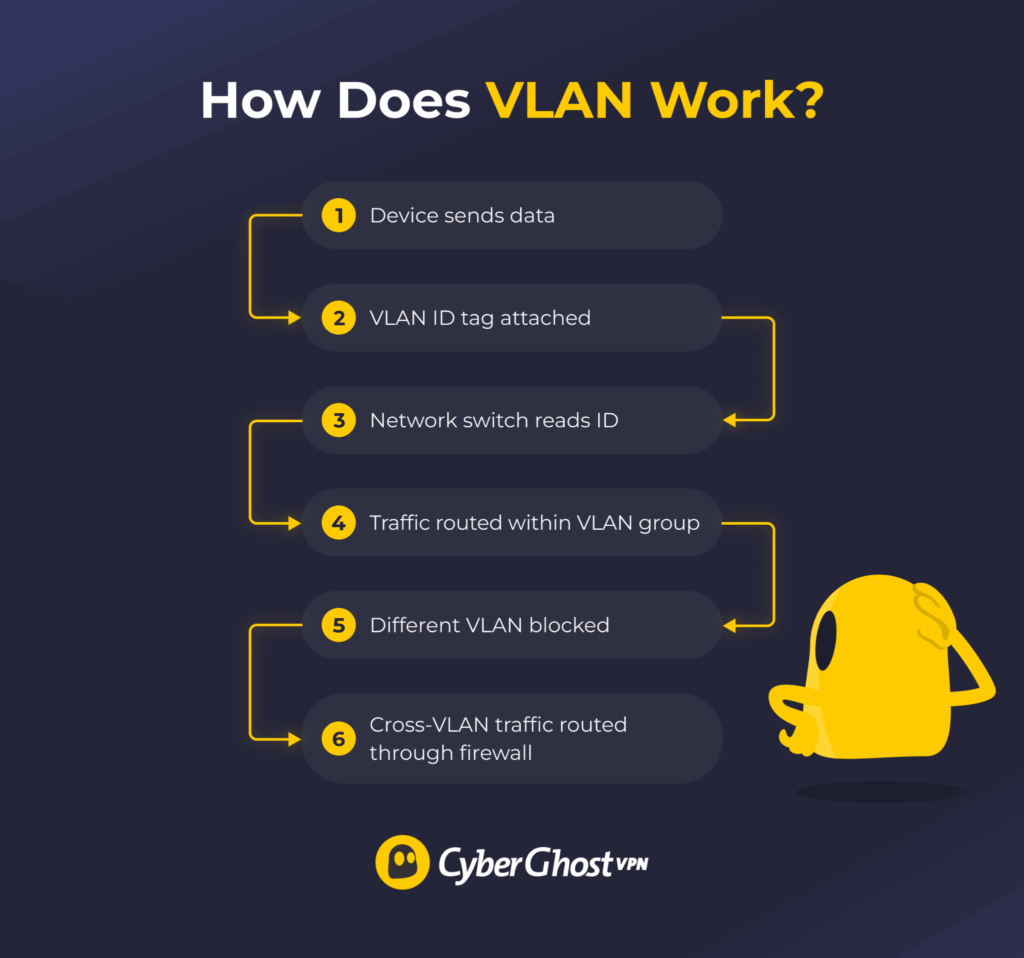
When you create a VLAN, you assign each switch port to a specific VLAN ID. The VLAN ID acts like a label that helps network switches keep traffic separated and determine where it should go. Devices connected to standard access ports typically don’t need to know which VLAN they belong to.
Here’s what the process looks like:
- The switch associates incoming traffic with the VLAN assigned to that port.
- The switch uses the VLAN ID to determine where the traffic can be forwarded.
- The data travels only to devices sharing that VLAN ID, unless a router or firewall allows cross-VLAN traffic.
- When traffic needs to move between VLANs, routing and security rules determine whether that communication is allowed.
Unlike a VPN, this segmentation happens within the network infrastructure and doesn’t create an encrypted tunnel across the internet.
VLAN Pros and Cons
| ✅ Pros | ❌ Cons |
| Isolates a compromised device | Provides no encryption |
| Controls who reaches what | Works only on the local network |
| Reduces network congestion | Needs VLAN-compatible hardware |
| Helps meet compliance rules | Risks exposure if misconfigured |
| Adjusts device groups quickly | Grow complex at scale |
What Is a VPN?
A VPN is a privacy and security tool that creates an encrypted tunnel between your device and a remote server. When you use a VPN, it scrambles your internet traffic and routes it through this tunnel, making it unreadable to third parties that might intercept it.
A VPN serves three main purposes:
- More privacy on public networks: When you’re on public Wi-Fi (like at an airport or coffee shop), a VPN encrypts your data so attackers on the same network can’t easily see what you’re sending or receiving.
- Encrypted remote access: Employees working from home can use a business VPN to connect to their company’s network over the internet and access internal resources more securely.
- IP address masking: A personal VPN replaces your public IP address with the VPN server’s IP address, making it harder for websites and other online services to identify your approximate location or link your online activity back to you.
How Does a VPN Work?
A VPN connection happens in three main steps:
- Connection and authentication: You install the VPN app (“VPN client”) on your device and connect to a VPN server. Depending on the VPN service or network, you may also need to authenticate your account or device.
- Encrypted tunnel: Once connected, the VPN app creates an encrypted tunnel between your device and the VPN server.
- Routing: Your encrypted traffic travels through the tunnel to the VPN server. The server decrypts it, sends your request to the destination website or service, and then encrypts the response before sending it back to your device.
To websites and services, it looks like your connection appears to come from the VPN server rather than your real location. Your ISP or attackers monitoring the local network may be able to see that you’re connected to a VPN, but they can’t easily inspect the traffic travelling inside the encrypted tunnel.
VPN Pros and Cons
| ✅ Pros | ❌ Cons |
| Encrypts your online activity | Can add some latency |
| Hides your IP address | May reduce connection speeds |
| Can enable secure remote access to private networks | Some websites may block VPN traffic |
| Helps protect your data on public Wi-Fi | Won’t protect an already compromised device |
| May help avoid some forms of activity-based ISP throttling | Enterprise VPN may require more complex setup and management |
VPN vs VLAN: The Key Differences
Purpose & Scope
VLANs organize and segment devices within a network. They’re about creating logical boundaries and controlling which parts of the network can communicate with each other.
VPNs serve a different purpose. They create an encrypted connection between devices or networks, helping protect data as it travels across untrusted networks such as the internet.
The difference matters. If you’re trying to isolate an IoT device from your accounting systems, a VLAN can help separate them. If you’re trying to protect a remote employee’s connection to company systems over the internet, you’d typically use a business VPN.
Security & Encryption
VLANs don’t encrypt traffic by default. Instead, they provide logical separation between different parts of a network. Communication between VLANs can still be allowed through routing and security policies, so VLANs should be combined with appropriate firewall rules and other access controls.
VPNs use encryption to protect traffic travelling through the VPN tunnel. CyberGhost VPN, for example, uses AES 256-bit encryption to help prevent third parties from reading data they might intercept between your device and the VPN server.
In practical terms, a VLAN can help isolate guest or IoT devices from sensitive systems, while a VPN protects data travelling through its encrypted connection. Used together, they can provide both network segmentation and encrypted connectivity. stops a guest from accessing your internal network.
Network Segmentation
VLANs are designed for internal network segmentation. They divide a physical network into separate logical groups, letting you apply different access rules to each one. For example:
- Finance devices in VLAN 10 can only reach accounting servers but remain separated from other parts of the network.
- Marketing devices in VLAN 20 can reach shared resources without reaching sensitive financial systems.
- IoT devices in VLAN 30 can be isolated from laptops, servers, and other critical devices.
This segmentation helps limit unnecessary communication between different parts of the network. If traffic needs to move between VLANs, routers, Layer 3 switches, or firewalls can apply rules that determine whether that communication is allowed.
VPNs don’t segment your internal network. Instead, they create an encrypted pathway for remote users to access your network from outside. Once a remote employee connects via VPN, they’re essentially “inside” your network and can reach the same resources they would in the office. Additional access controls (like VLANs or firewall rules) can further restrict what they touch.
Remote Access Capabilities
VLANs don’t provide remote access on their own. If you’re outside the office and your device isn’t on the VLAN, you can’t reach VLAN-isolated resources. VLANs only work within your physical network.
Business VPNs can provide that remote connection. An organization can configure a VPN so employees working from home, while travelling, or from other locations can securely access approved company systems over an encrypted connection.
A personal VPN such as CyberGhost VPN serves a different purpose. It encrypts internet traffic between your device and the VPN server, helping protect your connection on public Wi-Fi and other networks, but it doesn’t automatically grant access to your employer’s private systems.
Performance Implications
VLANs generally add very little to no performance overhead because they primarily organize and segment network traffic rather than encrypting it. Response times are typically in the single-digit milliseconds.
VPNs can have more of an effect on performance. Encryption and decryption take processing power, and routing traffic through a remote server can add latency. The actual impact depends on factors such as your internet connection, VPN protocol, server distance, server load, and network configuration.
Choosing a nearby VPN server can help reduce the additional distance your traffic has to travel. CyberGhost VPN also uses high-capacity 10-Gbps servers across its network to help maintain fast, reliable connections.
When to Use a VLAN, a VPN, or Both
When to Use a VLAN
- Separate employees from guests: One VLAN for office staff and another for visitor Wi-Fi. With the right access rules, guests can browse the internet but can’t access your internal files, printers, or servers.
- Isolate IoT devices: Smart cameras, thermostats, sensors, and voice assistants can be a security risk if they’re on the same network as your laptops and phones. A dedicated IoT VLAN keeps them sandboxed.
- Protect sensitive systems: Payment systems, medical devices, or research equipment often require strict isolation under regulatory requirements (PCI DSS, HIPAA, etc.). VLANs enforce these boundaries.
- Improve call quality: Video and voice conferencing need consistent bandwidth and low latency. Isolating these tools in their own VLAN can prevent other devices from competing for network resources.
- Quarantine new devices: Before adding a new device to your main network, place it in a restricted VLAN to confirm it’s not infected or misconfigured.
When to Use a VPN
- Enable remote work: Business VPNs can give employees encrypted access to approved company systems while working from home, traveling, or visiting client sites.
- Protect data on public Wi-Fi: A personal VPN encrypts the internet traffic between your device and the VPN server, helping prevent others on the local network from intercepting readable data.
- Access services while traveling: A VPN lets you connect through a server in another location, which can help you access websites and services you normally use at home. Availability may still depend on the service’s own policies.
- Get more privacy from your ISP: Your ISP can see that you use a VPN but it generally can’t see the websites your VPN traffic is being sent to because that traffic is encrypted between your device and the VPN server.
- Help secure data in transit: Organizations can use business VPNs as one part of a broader security strategy to encrypt data travelling over untrusted networks.
When to Use a VLAN and a VPN Together
VLANs and VPNs can complement each other by combining network segmentation with encrypted connectivity. Here are three practical examples:
- Secure remote access: An employee connects to the company network through a business VPN. Once connected, network policies can restrict their access to resources in the appropriate VLANs. The VPN provides the encrypted tunnel, and the VLAN provides the access control.
- Extended network across locations: A company has offices in New York and London. VLANs organize devices locally in each office, but a site-to-site VPN tunnel connects the two locations. Devices on the same subnet in both cities behave as if they’re on the same local network, even though they’re thousands of miles apart.
- Secure administrator access: System administrators can use a business VPN to remotely connect to company infrastructure through an encrypted connection. Network segmentation can then help restrict access to management interfaces and other critical systems.
VPNs and VLANs Solve Different Security Problems
VPNs and VLANs may sound similar, but they have fundamentally different jobs. VLANs segment a network into logical groups, while VPNs create encrypted connections between devices or networks. Neither is a direct replacement for the other.
For organizations, the two technologies can work together. VLANs help separate departments, devices, and sensitive resources, while business VPNs can give remote employees or offices encrypted access to approved company systems. Whether you need one or both depends on how your network is structured and what you’re trying to protect.
For personal privacy, CyberGhost VPN gives you AES 256-bit encryption and fast 10-Gbps servers worldwide. It encrypts traffic while replacing your public IP address, helping protect your privacy. You can also use CyberGhost VPN across Windows, macOS, Android, iOS, and other devices. Try CyberGhost VPN with our 45-day money-back guarantee (14 days on the monthly plan). If it’s not right for you, you can request a refund within the guarantee period.
FAQ
What is the difference between a VPN and a VLAN?
A VPN and a VLAN serve different purposes. A VLAN segments a network into separate logical groups, while a VPN creates an encrypted connection between devices or networks. VLANs are primarily used to organize and isolate network resources, whereas VPNs help protect data travelling across untrusted networks and can provide secure remote access.
Is a VPN more secure than a VLAN?
Not necessarily. VPNs and VLANs protect different risks, so it’s not an apples-to-apples comparison. A VLAN can help isolate devices and sensitive resources within a network, while a VPN encrypts traffic travelling through the VPN tunnel. Organizations can use both together to combine network segmentation with encrypted connectivity.
Can a VPN and a VLAN be used together?
Yes. Remote employees can connect through a VPN and reach only the VLAN resources appropriate for their role. Branch offices can connect through a VPN tunnel that extends your local VLANs. This combination approach provides defense in depth. The VPN helps protect the connection, and the VLAN controls what they can access once connected.
When should I use a VPN instead of a VLAN?
Use a VPN when you need to help protect data traveling outside your local network: remote work, public Wi-Fi, internet privacy, or connecting branch offices. Use a VLAN when you need to organize and segment devices within your local network: separating departments, isolating sensitive systems, or controlling guest access. Most organizations use both for different purposes.
Does a VLAN provide remote access like a VPN?
No. A VLAN only works within your physical network, so it won’t help once you leave the building. That’s exactly the gap a VPN fills, carrying you into the network over an encrypted connection from wherever you are. For remote work, you need the VPN.

Leave a comment