
Keeping your accounts secure has gotten more complicated. Many services now offer extra login steps, and terms like MFA and 2FA are often used as if they mean the same thing. In practice, that can make it harder to know whether your current setup is actually giving you the protection you expect.
This guide explains the difference between MFA and 2FA in clear terms, how each one works, and when it makes sense to use them. If you’re trying to choose the right level of protection for everyday accounts or more sensitive logins, this breakdown will help you make an informed choice.
Why Is Authentication Important?
Authentication decides who gets into an account and who doesn’t. Since passwords are easy to reuse, guess, or steal, relying on them alone isn’t enough anymore. Extra verification steps add a practical layer of protection that helps stop unauthorized access before real damage happens. It typically:
- Verifies your identity: Confirms it’s really you signing in, not someone using a stolen password.
- Prevents account takeovers: Stops most unauthorized access, even if your password is compromised.
- Protects sensitive data: Keeps your money, messages, and files out of the wrong hands.
- Detects suspicious activity: Helps spot unusual login behavior so problems are caught sooner.
What is the Difference Between 2FA and MFA?
Two-factor authentication (2FA) is a security method that uses exactly two checks to verify who you are. Most of the time, that’s a password plus one extra step, like a one-time code, an authenticator app prompt, or a biometric scan. If either step fails, access is denied.
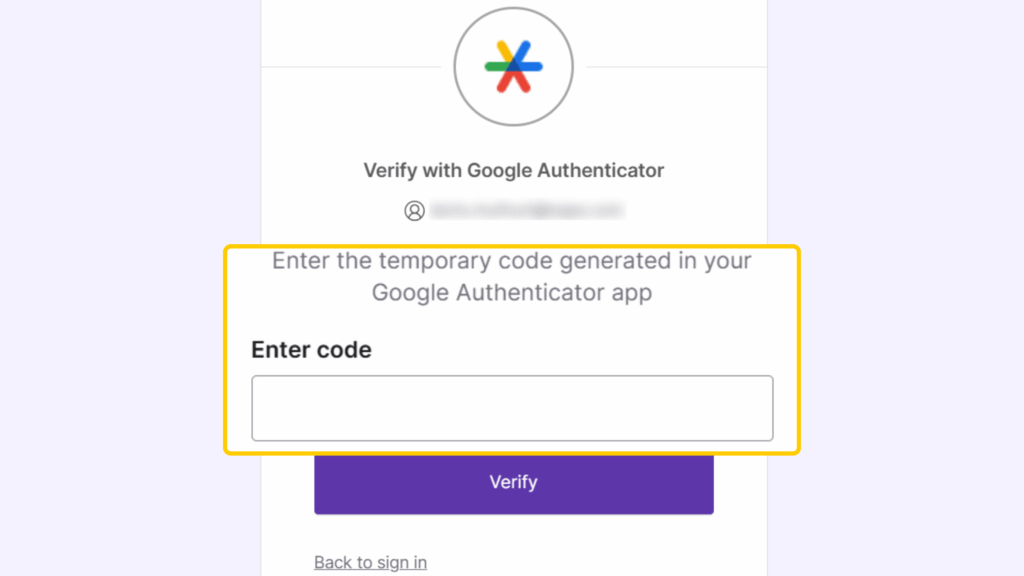
Multi-factor authentication (MFA) is a broader concept. It means using two or more verification factors. That could be standard 2FA, or it could involve additional checks based on context, risk level, or account sensitivity. This flexibility is one reason MFA adoption keeps growing. As of early 2026, around 94% of organizations have already adopted MFA, indicating strong momentum toward better account security.
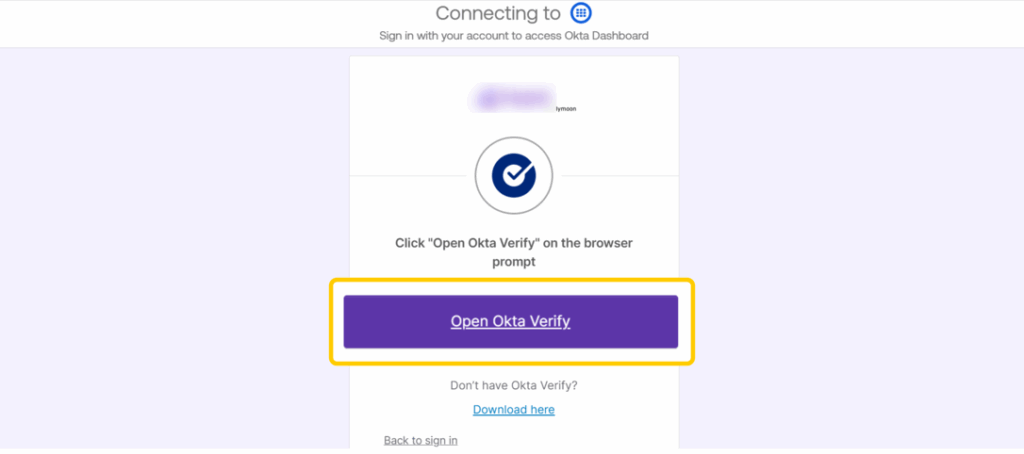
Note: 2FA isn’t separate from MFA — it’s part of it. Any login that uses two factors counts as MFA. The difference is that 2FA always stops at two checks, while MFA can add more when higher security is needed. If a service says it uses MFA, it may still only require two factors unless extra conditions trigger additional verification.
Key 2FA vs MFA Differences at a Glance
| 2FA | MFA | |
| Number of verification steps | Fixed at two | Flexible, can be two, three, or more |
| Security strength | Strong protection against basic attacks | Higher protection, especially against advanced threats |
| Risk-based enforcement | Usually the same every login | Can increase checks based on risk signals |
| Adaptability | Limited and static | Dynamic and configurable |
| Account recovery control | Basic recovery options | More granular recovery and fallback method |
| User experience | Faster and simpler | Slower but more secure |
Types of MFA Factors
A factor is a type of proof used to verify who you are, not just another login step. The main categories of factors are something you know, something you have, and something you are. Using two checks from the same category, like a password and a security question, still counts as one factor because they rely on the same kind of proof.
MFA works by layering factors from different categories. The real strength comes from mixing categories, not from adding more checks of the same type.
- Knowledge factor: Something the user knows, such as a password, PIN, or security answer. Simple to use, but can be easily compromised through phishing, breaches, or reuse, so they should always be combined with other factors.
- Possession factor: An item the user owns, like a phone, authenticator app, or hardware security key. Even if login details are stolen, access is blocked without the device.
- Inherence factor: Something the user is, confirmed through biometrics like fingerprints, face scans, or voice. Difficult to replicate, relies on secure hardware and software, and is most effective when combined with another factor.
- Context factor: Signals such as device, network, or time of access. Unusual activity can trigger extra verification or block access.
- Location or behavioral factor: Background analysis of IP location, movement patterns, or interaction behavior used to detect suspicious activity.
MFA strengthens account security, but it doesn’t protect your internet connection or the data moving between your device and the web. A VPN adds another layer of protection by encrypting your traffic and hiding your IP address, which helps prevent tracking, data interception, and exposure on unsecured networks.
CyberGhost VPN works alongside MFA by securing data in transit. It helps reduce the risk of man-in-the-middle attacks, protects sensitive activity on public WiFi, and keeps your online behavior more private.
Is MFA More Secure Than 2FA?
MFA can be more secure than 2FA because it isn’t limited to just two checks and can adapt to risk. While 2FA always uses the same steps, MFA can add trusted devices, biometrics, or contextual signals like location and behavior. This makes it harder for attackers to get in, even if one factor is compromised.
That said, the setup matters. MFA that relies only on SMS codes offers limited protection. Many security teams now recommend phishing-resistant methods such as hardware security keys, WebAuthn, or modern authenticator apps that use public-key cryptography. These options are significantly harder to intercept or spoof.
Pros and Cons of 2FA vs MFA
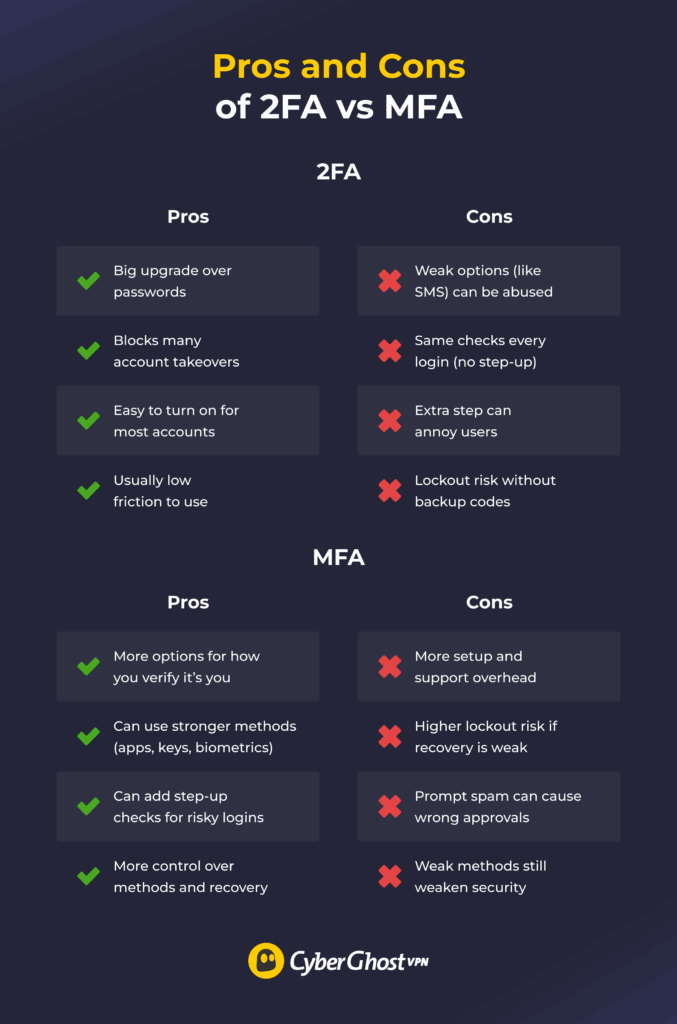
Not every account needs the same level of protection. Most services offer a basic 2-factor setup, while others support stronger MFA options such as phishing-resistant methods and step-up checks for risky logins. The comparison below shows the practical trade-offs for personal use and work.
What the 2FA Trade-Offs Mean in Practice
2FA is the easiest way to improve security. It stops most account takeovers because a stolen password by itself isn’t enough to log in. The main trade-off is the strength of the second step. SMS codes are common but easier to exploit than authenticator apps or security keys. If you use 2FA, choose app-based methods or passkeys when available, and always save backup codes so you don’t lock yourself out.
For most everyday accounts, 2FA is a practical and effective baseline. For email, banking, admin access, and cloud storage, use stronger MFA methods whenever possible.
What the MFA Trade-Offs Mean in Practice
MFA adds flexibility and stronger protection, especially for high-value accounts. It can support hardware security keys, biometric verification, trusted devices, and adaptive checks triggered by unusual activity.
The downside is that MFA can be more complex to set up and manage. Having more options means making more decisions about which factors to use, and weak recovery steps can lead to accidental lockouts. That is why the best practice is to use phishing-resistant methods (like authenticator apps or security keys) where possible and make sure you set up reliable account recovery before you need it.
Risks of Poor 2FA/MFA Implementation
Authentication only works if it’s implemented correctly. A weak setup can create gaps instead of protection. Common risks include:
- Using weak authentication factors: Options like SMS codes expose accounts to SIM swapping, message interception, and social engineering. In early 2025, more than 97% of identity attacks were password-based, driven by credential leaks and brute force techniques, highlighting the risk of weak or password-centric setups.
- Poor backup and recovery options: Weak or poorly designed recovery processes can allow attackers to bypass authentication, while overly strict recovery can lock legitimate users out.
- Lack of factor diversity: Multiple factors from the same category, such as passwords or security questions, don’t meaningfully increase security. Effective MFA requires factors from different categories.
- No risk-based checks: The same authentication steps used for every login ignore context. Without adaptive checks for new devices, locations, or unusual behavior, attackers may still succeed using stolen credentials. Verizon’s 2025 breach data shows that around 22% of breaches began with stolen or compromised credentials.
- User fatigue and workarounds: Too many prompts or confusing steps can lead users to approve requests without verifying them or look for ways to bypass controls.
- Poor device management: Lost, stolen, or shared devices can turn possession-based factors into vulnerabilities if access isn’t revoked promptly.
How to Decide Between MFA and 2FA
Choosing stronger authentication is about balancing security, usability, and compliance. MFA reduces the risk of unauthorized access and helps meet regulatory requirements, such as GDPR, HIPAA, and PCI DSS, by protecting sensitive data.
The right authentication method depends on what you’re protecting, who needs access, and how much risk is involved. Below are some key factors to consider:
- Assess the risk level: High-value accounts, such as banking, work systems, or admin access, need stronger protection than low-risk services.
- Consider the impact of a breach: If a compromised account could lead to financial loss, data exposure, or identity theft, MFA is the safer choice.
- Know your users: Authentication should be simple enough that customers follow it correctly. Overly complex setups increase mistakes and security fatigue.
- Check device availability: Some methods require phones, hardware keys, or biometrics. Make sure users can reliably access these devices and have backup options.
- Account for login behavior: If users log in from many locations or devices, risk-based authentication can add extra checks only when something looks unusual.
- Plan for recovery: Strong authentication should include secure but usable recovery options to prevent lockouts without opening security gaps.
- Match security to scale: Choose methods that are easy to deploy, manage, and enforce consistently across all accounts.
Usability vs Security
Adding more checks can improve security, but it can also frustrate users and reduce adoption if it’s heavy-handed. The goal is to make the secure choice the easy choice, then only add friction when there’s a good reason.
- Start with strong defaults: Require 2FA or MFA on important accounts like email, admin, and finance. Research shows this works best when it is the default. Okta found that 91% of admins use MFA, compared to only 66% of non-admin users. Strong defaults help close this gap without relying on users to opt in. When possible, use stronger options like authenticator apps or security keys.
- Add extra verification only when the risk is higher: Ask for additional checks when a login looks unusual, such as a new device or location. Avoid prompting users every time, since constant interruptions reduce usability without meaningfully improving security.
- Make recovery secure but simple: Provide backup codes and clear recovery options so users can regain access safely if they lose a device. This reduces risky workarounds and keeps support requests manageable.
The Best 2FA and MFA Methods
Not all authentication methods offer the same level of protection, and the choice you make can directly affect how secure an account really is.
1. Security Tokens
Security tokens are physical devices that generate or store one-time login codes. Some connect via USB, NFC, or Bluetooth, and others display rotating codes on a small screen. Because the token must be physically present, attackers can’t access the account remotely, even if they know the password.
Security tokens offer exceptional protection and are commonly used for business systems, admin accounts, and high-risk access. The main downside is cost and the risk of losing the device.
2. Authenticator Apps
Authenticator apps generate time-based one-time codes or send secure approval prompts to a trusted device. They’re more secure than SMS because they don’t rely on mobile networks, and even if a password is stolen, access is blocked without the user’s device. Easy to set up and widely supported, authenticator apps are a strong option for both 2FA and MFA.
3. Biometric Authentication
Biometric authentication uses physical traits such as fingerprints, face recognition, or voice to confirm identity. It’s fast and convenient since users don’t need to remember anything. Biometrics are difficult to copy, but they rely on secure hardware and software. For this reason, they work best when combined with another factor rather than used alone. Biometrics are widely used on smartphones, laptops, and banking apps.
4. Passkeys and Passwordless
Passkeys and passwordless authentication are also gaining traction as newer alternatives. They combine the security benefits of MFA with better usability by using cryptographic keys and removing passwords entirely. Instead of something you remember, access is tied to secure devices and biometrics.
Strengthen Account Security With the Right Authentication
MFA and 2FA both play an important role in protecting accounts, but they serve different needs. 2FA adds a strong second factor, while MFA requires additional layers that make it harder for attackers to succeed even if one factor is compromised. Choosing between them comes down to the value of the account and the level of risk involved.
That said, authentication alone isn’t enough to fully protect your online activity. MFA and 2FA help secure account access, but they don’t protect your internet connection itself. CyberGhost VPN encrypts your traffic and hides your IP address, which is especially important on public or unsecured networks. When used alongside MFA or 2FA, it helps reduce exposure to common online threats. You can try CyberGhost VPN risk-free with our reliable 45-day money-back guarantee.
FAQ
What counts as a factor?
A factor is a category of evidence used to verify your identity. The main factors are something you know, something you have, and something you are. Two checks from the same category, like a password and a security question, still count as one factor because they rely on the same type of proof.
Is 2FA sufficient for personal accounts, or should I use full MFA?
For most personal accounts, 2FA is sufficient and far better than using only a password. It stops many common attacks, especially when you use an authenticator app or passkeys instead of SMS. Full MFA is worth using for high-value accounts like your main email, banking, or cloud storage, where extra protection matters more than convenience.
Can MFA still be breached, and what are the common attack vectors?
Yes, MFA can still be breached, but it’s much harder than password-only logins. Common attacks include phishing that tricks you into approving a login and MFA fatigue attacks that spam push requests. SIM swapping can intercept SMS codes, and malware can steal active login sessions. Using security keys or passkeys and ignoring unexpected prompts greatly reduces these risks.
How do I implement MFA/2FA for business?
Start with your most important accounts, like admin access, email, VPNs, and cloud services. Use phishing-resistant options when you can, such as authenticator apps, passkeys, or hardware security keys. Avoid SMS unless there is no better choice. Once the basics are in place, roll MFA out in phases and give employees clear guidance on what to expect. Make sure recovery options are set up early so people do not get locked out if they lose a device.
Can MFA protect against phishing attacks?
Yes, MFA can help protect against phishing attacks. If an attacker steals your password, extra factors like authenticator apps, biometrics, or security keys can still block access. Weaker options, such as SMS codes, offer less protection.
Can MFA lock me out of my own account?
Yes, MFA can lock you out of your account if you lose access to one of your authentication factors, like your phone or security key. That’s why most services provide backup codes or recovery options to help you regain access.

Leave a comment