
If your team needs secure remote access to company resources, you’ve likely come across two options: VPNs and Software-Defined Perimeter (SDP). Both protect access to internal systems, but they do it in fundamentally different ways. A VPN extends your network to remote users, while an SDP hides resources entirely and only grants access after strict identity verification.
The right choice depends on what you’re protecting, how your infrastructure is built, and how much control you need over user access. In this guide, we’ll break down how SDP and VPN differ, where each one works best, and how to decide which approach fits your organization.
What Is an SDP and How Does It Work?
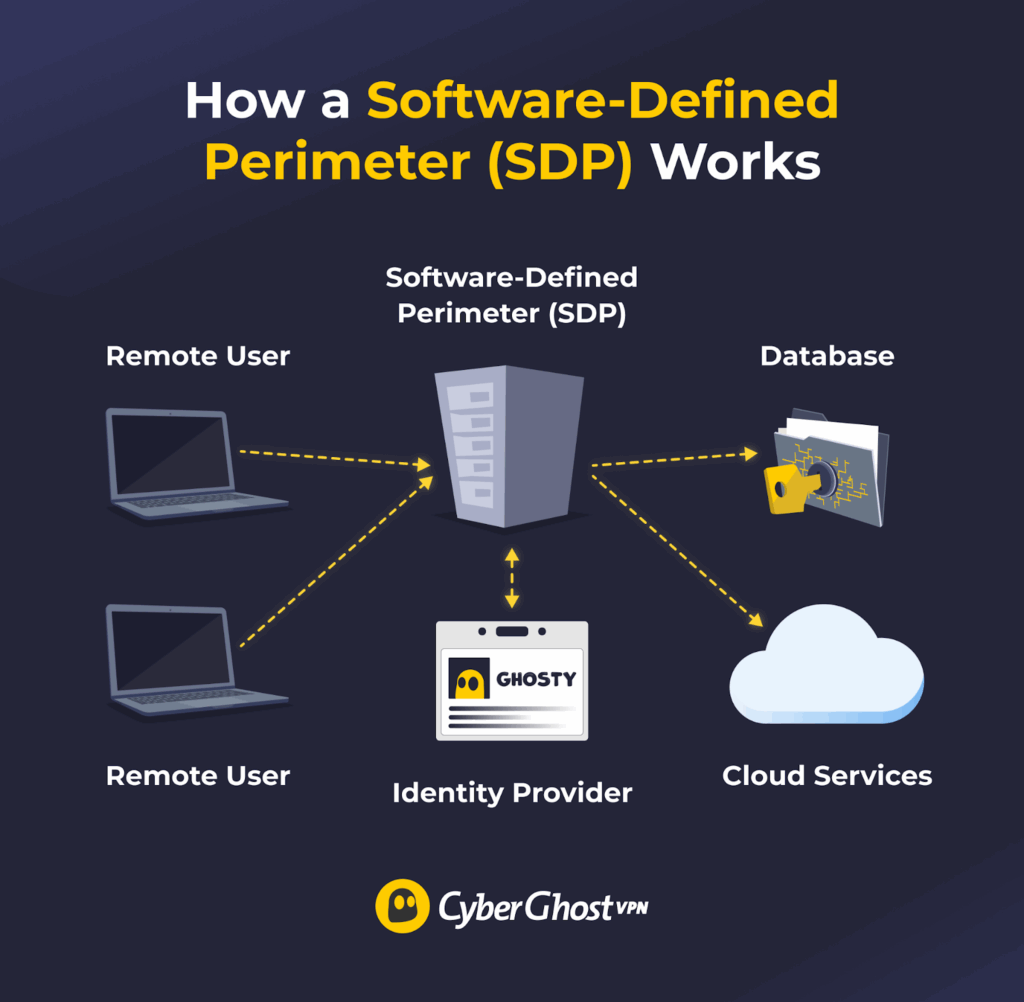
A Software-Defined Perimeter (SDP) is a security approach that attempts to make network resources invisible to unauthorized users. Internet-connected infrastructure, like servers and applications, only becomes available to a user after the SDP verifies their identity and device.
Real-world applications of SDPs generally include organizations securing large remote workforces, protecting cloud-based resources, and meeting strict security requirements.
Generally speaking, an SDP:
- Verifies user identity: Users have to log in to the system. This is typically done with a username and password, though multi-factor authentication can be added for extra security. SDPs may also integrate with third-party identity providers like Okta or Microsoft Entra ID to manage logins.
- Checks device integrity: Security inspections make sure the user’s device is running the latest operating system or that its antivirus is active. Devices that don’t meet the requirements aren’t allowed to access the network until they’re secured.
- Establishes secure connections: SDPs set up an encrypted, one-to-one connection between the user’s device and the network resource. This is usually done with the Transport Layer Security (TLS or mTLS) cryptographic protocol, though some SDPs may also integrate VPN functionality.
- Restricts access: Users can only connect to the server or application they’re authorized to use. The rest of the network should remain invisible to them, reducing the attack surface if the account or device is compromised.
How Do SDPs Relate to Zero Trust?
Zero Trust is a security model that assumes no user or device should be trusted by default, whether they’re outside or inside the network. It requires strict verification of identity and device health before granting access to internal resources. SDP is one cybersecurity framework that organizations can use to implement Zero Trust across their networks.
What Is a VPN and How Does It Work?
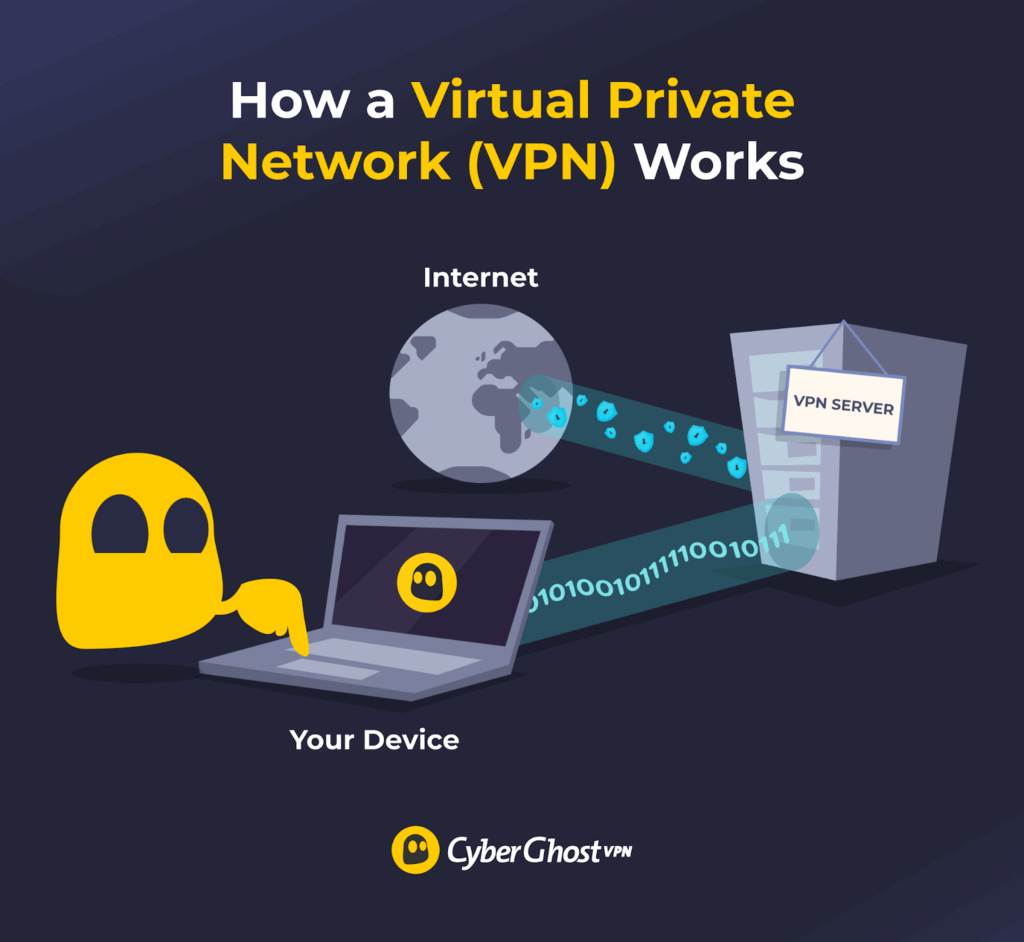
A virtual private network (VPN) is a networking technology that encrypts your internet traffic, making it more difficult to monitor. It also changes your IP address by assigning you one from a VPN server. To use a VPN, you download and install its app, launch it, connect to a server, and browse the web as usual.
Businesses typically use VPNs to secure remote access to internal company networks. Many consumers also use these services to protect their traffic and privacy when they surf websites, watch videos, play online games, or download files.
SDP vs VPN: What Are the Key Differences?
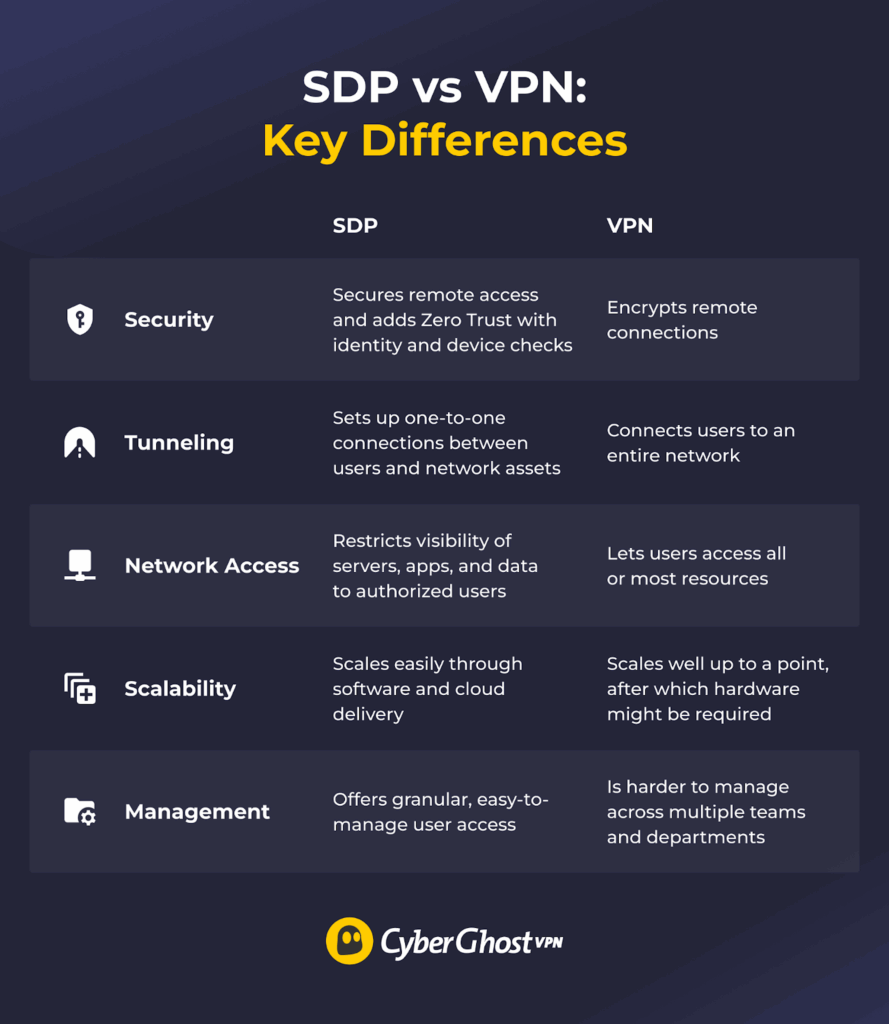
SDPs and VPNs provide secure remote access, but they do it differently. Here’s an overview of the main differences:
- Security: While traditional VPNs focus on encrypted network access, SDPs are built around identity-based access and typically enforce Zero Trust principles by default.
- Connections: Each service handles tunneling differently when it comes to connections. Traditional VPNs often grant network-level access, though access can be restricted through additional configuration.
- Network access: Depending on the configuration, VPN users may gain broader network access unless additional segmentation controls are in place. On the other hand, SDP solutions strictly control network access, ensuring that specific services, apps, and assets are only visible to authorized users.
- Scalability: SDPs scale relatively easily because they’re software-based and often delivered through cloud services. Enterprise VPNs can also scale, but businesses with rapidly growing remote workforces may need dedicated hardware (like VPN concentrators) to handle the increased load reliably.
- Management: Organizations may find it difficult to manage VPN access across different departments, and placing all teams under one VPN increases security risks. SDPs provide more granular control because they verify each user and assign them an individual secured connection.
Should You Use an SDP or a VPN?
SDPs are usually a good fit for enterprises or medium-to-large businesses with a large or fast-growing remote workforce. Organizations that need to implement Zero Trust policies to protect sensitive resources or comply with security regulations also tend to favor SDPs over VPNs.
Business-grade VPNs are typically preferred by smaller businesses or teams when moving to an SDP might not be cost-effective or worth the time investment. These organizations generally pair VPNs with other security tools, like antivirus and firewalls, to protect data, servers, and applications.
SDP vs VPN: The Bottom Line
Both services can secure remote connections, but many organizations favor SDPs because they easily integrate with Zero Trust security strategies. VPNs often have to be used alongside other cybersecurity tools to reach similar levels of security.
However, VPNs may be perfect for small teams, freelancers, or regular internet users. If you’re among them, CyberGhost VPN is an excellent option with high-end security features, servers in 100 countries, and intuitive apps for most devices. You can also try it risk-free with its 45-day money-back guarantee.
FAQ
What is the difference between an SDP and a VPN?
The main difference is that a virtual private network (VPN) is an online service, whereas a software-defined perimeter (SDP) is a framework for enhancing network security. Both use encryption to protect remote connections, but an SDP also verifies user identities, checks if devices are safe, and ensures resources are only accessed by authorized users.
How does an SDP enhance security compared to a traditional VPN?
An SDP encrypts connections just like a VPN, but it enforces other network security measures as well. It often integrates with third-party identity providers (like Okta, for example) and performs device checks, like making sure the operating system is up to date and the antivirus is running. SDPs also establish one-to-one connections between users and network assets, minimizing the attack surface if an account or device is compromised.
Can SDP completely replace VPNs in corporate environments?
In many remote-access use cases, the answer is yes. However, some organizations still rely on VPNs for site-to-site connectivity or legacy system support. SDPs can integrate VPN functionality when they encrypt remote connections, offering the same level of security. In addition to encrypting connections, SDPs also verify user identity, run device security checks, and restrict network access.
Is an SDP solution harder to set up than a VPN?
Generally no. SDPs are designed to deploy and scale quickly. VPNs are usually simple to install on individual devices, but managing them across multiple teams and departments can become difficult. Organizations may also need hardware VPNs to handle a fast-growing remote workforce, which adds extra complexity to the setup process.
Why are organizations switching from VPNs to Zero Trust and SDP models?
Many businesses are moving to Zero Trust and SDP cybersecurity models because they provide stronger network protection than VPNs. In addition to securing remote connections, they check user identities and verify device health before granting access. SDPs also keep servers, apps, and other assets hidden from unauthorized users, reducing the attack surface.

Leave a comment