
Coming up with a strong password can be frustrating. You’re told to use symbols, numbers, and random letters, and then you are expected to remember them off by heart. Most people end up reusing passwords or choosing something simple just to get by, which puts their accounts at risk.
Passphrases solve this problem in a much easier way. They use full words that make sense to you but are still challenging enough for attackers to guess. In this article, you’ll see clear passphrase examples and learn how to create ones that are secure, memorable, and actually practical for everyday use.
What Is a Passphrase?
A passphrase is a long password made up of multiple words instead of random characters. It works like a regular password by granting access to an account or device, but it’s designed to be easier to remember and harder to crack. Most passphrases look like short sentences or simple word combinations that feel natural to say or picture.
Traditional passwords are usually short and rely on symbols, numbers, and capitalization for security. Because they can be difficult to remember, people often reuse them or store them unsafely. This behavior creates a serious risk. Between April 2024 and early 2025, over 19 billion compromised passwords from multiple breaches1 were circulating online. Over 90% of them were reused or duplicated.
Passphrases solve this problem by using real words and adding length. This means they’re much harder to guess, while the use of natural language makes them easier to manage without relying on confusing, complex tricks.
How Does a Passphrase Work?
When you create a passphrase, the website or app doesn’t save the actual words you typed. Instead, it runs your passphrase through a hashing algorithm. A hashing algorithm turns your passphrase into a long string of characters that can’t be reversed back into the original phrase. This hashed version is what gets stored on the system.
Each time you try to log in, the same process happens again. The system hashes the passphrase you enter and compares it to the stored hash. If the two hashes match, access is granted. If they don’t match, access is denied. Because only the hashed version is stored, even a data breach doesn’t directly expose your real passphrase.
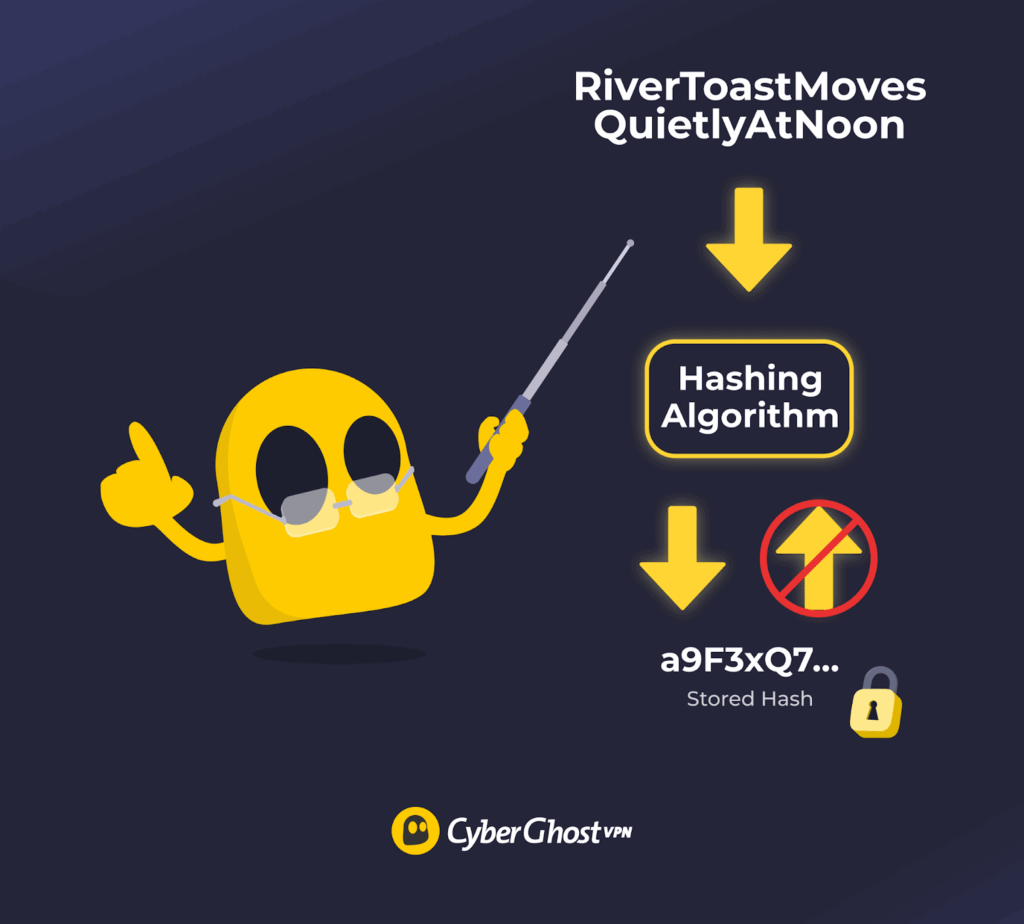
The strength of a passphrase depends on its length. Every extra word drastically increases the number of possible combinations an attacker would need to guess. During brute-force attacks, automated tools try thousands or millions of guesses in a short time. A long passphrase creates so many combinations that guessing it becomes unrealistic, even without using symbols or complex formatting.
Strong Passphrase Examples
A strong passphrase or security phrase is long, memorable, and made of words that are hard to predict together. Weak ones are usually short, common, or easy to guess. Below are examples of strong passphrases and what makes them effective.
| Weak Passphrase | Strong Passphrase | Why It’s Stronger |
| password123 | RiverToastMovesQuietlyAtNoon | Much longer and not based on a common word or pattern |
| Iloveyou | LemonBatteryCloudWindow7 | Uses unrelated words plus extra length |
| qwerty2024 | BooksFloatAboveBlueOceans3 | No keyboard pattern and far more combinations |
| letmein | PurpleBicycleDriftsThroughFog | Multiple words make guessing impractical |
| admin@123 | SunnyRoomsForgetOldMapsQuickly | Avoids obvious terms tied to accounts or roles |
Important: Passwords and passphrases here are provided for illustration purposes only and are publicly visible. Always create your own unique passphrases using a trusted password manager or a secure random method.
How to Create a Strong Passphrase
If you focus on length, randomness, and clarity, you’ll end up with a passphrase that’s easy for you to remember and hard for anyone else to guess.
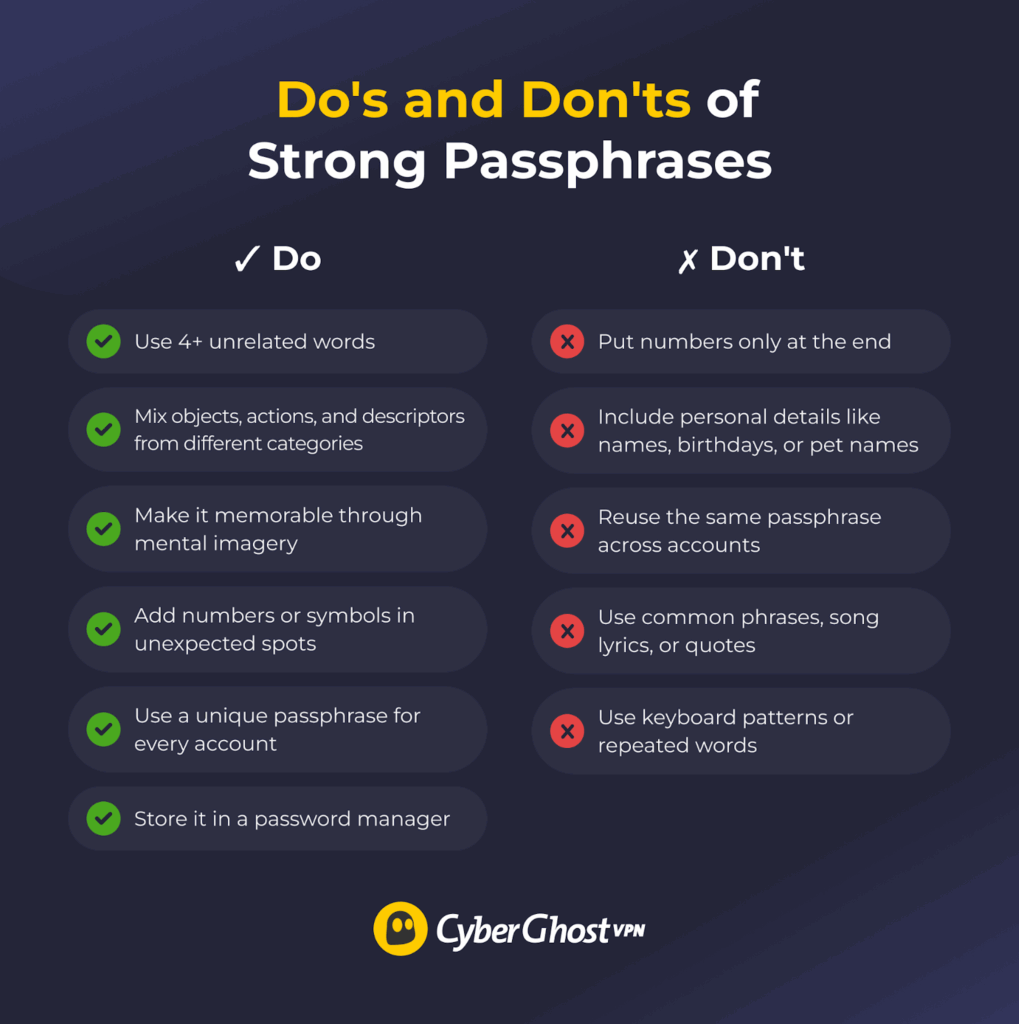
Aim for 4+ Words
Use at least four words when creating a passphrase. Each added word increases the total number of possible combinations, which makes guessing far more difficult. Four words is the minimum for a passphrase to offer meaningful protection.
Adding more words strengthens it further and usually doesn’t affect how easy it is to remember. Prioritize length over tricks or symbols, since longer passphrases made of simple words provide stronger security than short, complex passwords.
Combine Multiple Unrelated Words
Predictable word patterns are easy for attackers to guess. An analysis of 6 billion leaked passwords in 20252 showed that simple numeric sequences and common words still dominate, even when people try to make their passwords longer. This is why familiar combinations remain risky, even when turned into phrases.
To avoid this, use words that come from completely different ideas or categories. When each word comes from a different context, the passphrase no longer follows natural language patterns, which makes it much harder to anticipate or reconstruct. Focus on contrast, not familiarity. Mixing objects, actions, and descriptors that don’t belong together adds randomness without relying on symbols or complexity tricks.
Make It Memorable to You
Your passphrase should be easy for you to remember but difficult for anyone else to anticipate. Memorability should come from meaning or mental imagery, not familiarity. Common phrases, smooth sentences, and well-known expressions are easier to recall, but they’re also easier to guess.
Instead, use combinations that feel slightly unusual but still make sense in your head. Personal meaning can help as long as it isn’t public or easy to infer. A strong passphrase is one you can recall confidently while giving nothing away to outsiders.
Avoid Personal Information
Many people use personal details in their passphrases without realizing how predictable they are. Attackers know this and often try to guess information like names or birthdays first. In one survey, 36% of people said they include personal information in their passwords3. Details such as your name, your pet’s name, your favorite team, your birthday, or your city are often easy to find or guess. Using them makes your passphrase easier to crack.
Stick to words and ideas that have no direct connection to your real life. A strong passphrase shouldn’t reflect who you are, where you live, or what you like. The less personal it is, the harder it becomes for anyone else to make an educated guess.
Avoid Common Phrases and Patterns
Avoid typical phrases and predictable patterns when creating a passphrase. Attackers often use lists of popular sayings, song lyrics, quotes, and familiar word combinations because many people choose them for convenience. Even long phrases are weak if they are widely used or easy to recognize.
Patterns also make passphrases easier to guess. Repeated words, obvious sequences, keyboard patterns, or predictable capitalization reduce security. These patterns are built into guessing tools, even when a passphrase looks complex. Choose combinations that don’t sound familiar or follow a clear structure. A passphrase that feels unusual or awkward is much harder for attackers to predict.
Add Numbers or Symbols Strategically
On their own, extra characters don’t always make a passphrase stronger. Numbers and symbols help only when they add real variety. Putting a number at the end or swapping letters with common symbols like “@” for “a” is easy to predict and already built into guessing tools.
If you use numbers or symbols, place them in unexpected spots. One well-chosen character can add strength without making the passphrase hard to read or remember. The goal is to introduce variation where attackers don’t expect it.
If extra characters make your passphrase harder to recall, skip them. A long, word-based passphrase is already strong. Numbers and symbols should support that strength, not work against it.
Never Reuse Passphrases Across Accounts
Reusing passphrases across multiple accounts is one of the most common and risky security mistakes — around 78% to 84% of people admit to doing it4. When the same passphrase is used in more than one place, a single breach can quickly turn into many. Attackers often test the same credentials on other websites after compromising a service. The result allows them to switch accounts, even if the original passphrase was strong.
Because of this, a strong passphrase alone isn’t enough if it is reused. Data breaches, phishing, or leaks can expose credentials, and reusing them multiplies the damage. A large password leak study from 2025 found that 94% of compromised passwords were reused5 or duplicated. Only 6% were unique. Make sure to protect each important account with its own unique passphrase.
Store Passphrases in a Password Manager
A password manager helps you use a different passphrase for every account. It stores them securely, so you don’t have to remember dozens of logins or write them down. Everything is protected with strong encryption and unlocked with one master password or passphrase. Many password managers also lock automatically and require re-authentication after inactivity, which limits access if your device is lost or stolen.
Password managers can generate long, random passphrases that are hard to guess. They also reduce phishing risk by entering passwords only on the correct websites. People who use password managers are about 50% less likely to reuse passwords6. They make strong password habits easier to follow without adding friction.
A 2024 report also found that users who used password managers7 were less likely to experience identity theft or credential theft than those who didn’t. Only 17% of password manager users reported these incidents, compared to 32% of people who managed passwords on their own. That gap shows how much proper storage and unique passphrases can reduce risk.
Types of Passphrases
The goal of passphrases is to be hard to guess while staying easy to manage. Below are the most common and reliable types used in security guidance today.
-
- Diceware passphrases: Implement true randomness, with each word selected from a large list using dice or a trusted random generator. Because the words aren’t chosen by habit or meaning, they avoid predictable patterns and offer strong security. The tradeoff is memorability, since the phrases can feel awkward at first.
Example: orbit lantern cactus ripple velvet; grain tunnel maple horizon drift
-
- Mnemonic passphrases: Use memory techniques to make long passphrases easier to recall. A common approach is turning a sentence into a shorter string, such as using the first letter of each word. These work well when the original sentence is unique and private, not common or easy to guess.
Example: Every Sunday I run 5 miles before sunrise; passphrase: ESIr5mb4sunrise
-
- Hybrid or modified passphrases: Combine words with small, intentional changes like numbers or symbols. When used carefully, this adds variation without hurting readability or usability.
Example: BlueCoffeeRiver!92; Winter-train-sky_47
Passphrases vs Passwords: Key Differences
Passwords rely on complexity packed into a short string, while passphrases rely on length and readability. Understanding how they compare makes it easier to see why passphrases are now widely recommended for better security.
| Passphrases | Passwords |
| Usually long, often 15 characters or more | Typically short, often 8 to 12 characters |
| Multiple words combined into a phrase | Random mix of letters, numbers, and symbols |
| Easier to remember because they read like words | Harder to remember due to randomness |
| Very strong due to length and number of combinations | Weaker when short, even with symbols |
| Less likely to be reused or written down | Often reused or simplified |
How Long Should a Passphrase Be?
Security experts at NIST recommend using passwords and passphrases that are at least 15 characters long8. That usually means using four or more words. This length creates so many possible combinations that guessing attacks become unrealistic. If you can easily remember more words, five or six is even better. Adding length improves security much more than adding symbols or strange spelling.
For important accounts like email, banking, or password managers, longer is always safer. As long as the passphrase is easy for you to remember, using more words gives you better security with very little downside.
Pros and Cons of Using Passphrases
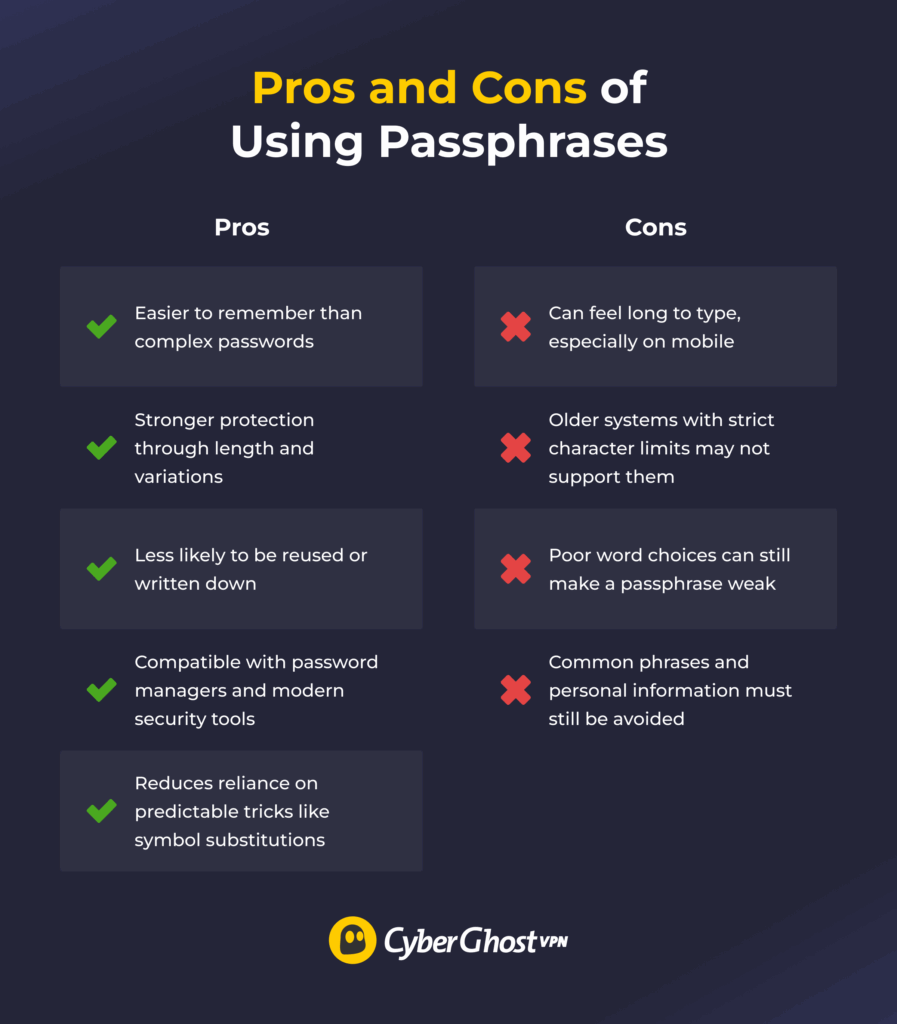
Passphrases have real advantages over traditional passwords, but they come with a few limitations. On the plus side, they’re less difficult to memorize because they use actual words. Also, they can be safer because of length and combination choice, and they work well with modern security tools and password managers. They’re also less likely to be written down or reused.
On the other side, passphrases can be tedious to type on mobile, and some older systems still impose character limits that make them challenging to use. Plus, using predictable words, like common phrases or personal details, can weaken their strength. The infographic below summarizes the key points.
Use Passphrases for Stronger Account Security
Using passphrases is one of the easiest ways to improve your account security without making life harder. They are easier to remember, harder to crack, and far more practical than short, complex passwords. Once you start using them, you spend less time resetting passwords and more time feeling confident about your online safety.
For even stronger protection, combining passphrases with a VPN adds another layer of security. When you log into accounts over public or shared Wi-Fi, your credentials can be exposed to anyone monitoring that network. CyberGhost VPN encrypts your internet connection, so even if someone is intercepting traffic, it’s near impossible to read what you’re sending.
That means your passphrase stays protected in transit, not just at the point of storage. If you’re not sure, CyberGhost VPN also offers a 45-day money-back guarantee, so you can try it without risk and decide if it fits your security needs.
FAQ
What makes a passphrase strong?
A passphrase is strong when it’s long, unpredictable, and easy for you to remember. Using four or more unrelated words creates many possible combinations, which makes guessing much harder. Avoid common phrases, quotes, or personal details, and focus on length instead of complexity. If a passphrase feels simple to recall but hard for anyone else to guess, it’s doing its job.
Are passphrases safer than passwords?
Yes, passphrases are generally safer than passwords for most people. They’re longer, which makes them much harder to guess or crack, and they’re easier to remember because they’re made of real words. That combination reduces common mistakes like reuse or writing credentials down. A well-made passphrase offers stronger, more practical security than a short, complex password.
How long should a passphrase be?
A passphrase should be at least four words long, which usually means 15 characters or more. That length makes guessing attacks impractical. If you can remember five or six words comfortably, that’s even better. The key is to prioritize length over complexity, since longer passphrases offer stronger protection without being harder to use.
Can I reuse the same passphrase across accounts?
No, you shouldn’t reuse the same passphrase across accounts. Once an attacker compromises one account, they often attempt to use the same credentials elsewhere. Reuse turns a single breach into a much bigger risk. Using a unique passphrase for each account limits the damage and keeps the rest of your accounts secure.
Should passphrases include symbols and numbers?
They can, but they don’t have to. A long passphrase made of words is already strong on its own. Adding a number or symbol can help in some cases, especially if a site requires it, but it should be done carefully. Avoid obvious patterns or predictable substitutions, and only add extra characters if they don’t make the passphrase harder to remember.
Can passphrases be guessed using personal information?
Yes, they can if you include personal information. Names, birthdays, pets, places, or anything someone could find online make a passphrase easier to guess. A strong passphrase avoids personal details and uses words that have no clear connection to your life. The less someone can learn about it from you, the safer it is.
Do passphrases work on all websites?
Not always. Most modern websites support passphrases, but some older systems still enforce limits on length or restrict spaces and certain characters. If a site caps passwords at a short length, a full passphrase may not fit. Use the longest option available and concentrate on unpredictability when that occurs. Whenever a site supports long passwords, a passphrase is usually the better choice.
How often should you change a passphrase?
You don’t need to change a passphrase regularly if it’s strong and hasn’t been exposed. Security experts now recommend keeping a good passphrase as long as it stays private and uncompromised. You should change it right away if there’s a data breach, phishing attempt, or any sign that someone else may have access. Otherwise, frequent changes can do more harm than good by pushing people toward weaker choices.
References
- 19 billion passwords compromised — here’s how to protect yourself right now — www.tomsguide.com
- Analysis of 6 Billion Passwords Shows Stagnant User Behavior— securityweek.com
- World Password Day Survey 2024 — bitwarden.com
- Password Manager Statistics 2026: How Passwords Are Changing Security — sqmagazine.co.uk
- Password Leak Study Unveils Alarming 2025 Trends: 94% of Passwords Reused — cinchops.com
- World Password Day 2025 Survey: 72% of Gen Z reuse passwords — bitwarden.com
- 2024 Password Manager Industry Report and Statistics — security.org
- How Do I Create a Good Password? — NIST

Leave a comment