
Using Instagram abroad can sometimes make your feed feel completely different. You might suddenly see unfamiliar recommendations, local ads, trending reels you don’t recognize, or content in another language. That’s because Instagram adapts to signals like your internet connection, device settings, and activity while you travel.
The good news is you can still use Instagram comfortably and securely while you’re away from home. In this guide, we’ll explain why Instagram changes during travel, how location signals work, and simple ways to protect your privacy and stay connected safely on public Wi-Fi.
Why Instagram Shows Different Content in Different Countries
Instagram wants to keep people scrolling, so it personalizes content based on location. The app uses regional signals to decide which reels, posts, ads, creators, music, and trends are most relevant to each user. That’s why someone opening Instagram in Tokyo may see very different content from someone using the app in Toronto or London.
Location also helps Instagram recommend nearby businesses, local creators, regional hashtags, and country-specific trends. Some songs, challenges, memes, and shopping features may even become popular in one country before spreading globally. To figure out where users are, Instagram looks at several signals, including:
- IP address: Instagram can estimate your location based on the internet connection you’re using.
- Device location settings: Your phone’s GPS and location permissions can help Instagram detect where you are.
- SIM card region: Your mobile carrier and SIM card country code may signal your current region.
- Language preferences: Instagram may recommend local content based on your app and device language settings.
- Activity patterns: The accounts you follow, reels you watch, and posts you engage with can influence regional recommendations.
How Long Does Instagram Take to Update Your Location?
Instagram can react to travel-related changes fairly quickly, but your feed and recommendations usually take a little time to adjust. You may notice different reels, ads, hashtags, or Explore page suggestions within a few hours of arriving in a new country, while other changes may continue evolving over several days.
That’s because Instagram uses multiple signals at once, including your internet connection, device settings, language preferences, and activity patterns while you travel. If you continue using Instagram while traveling, your feed may gradually start feeling more familiar over time.
Reasons Your Instagram Feed May Feel Different While Traveling
Traveling abroad can confuse your Instagram feed. Without warning, your Explore page is full of unfamiliar creators, local memes you don’t understand yet, and ads for places you’ll probably never visit again after your trip. If Instagram starts feeling less like your app and more like a tourist brochure, you’re definitely not the only one who experiences this while traveling.
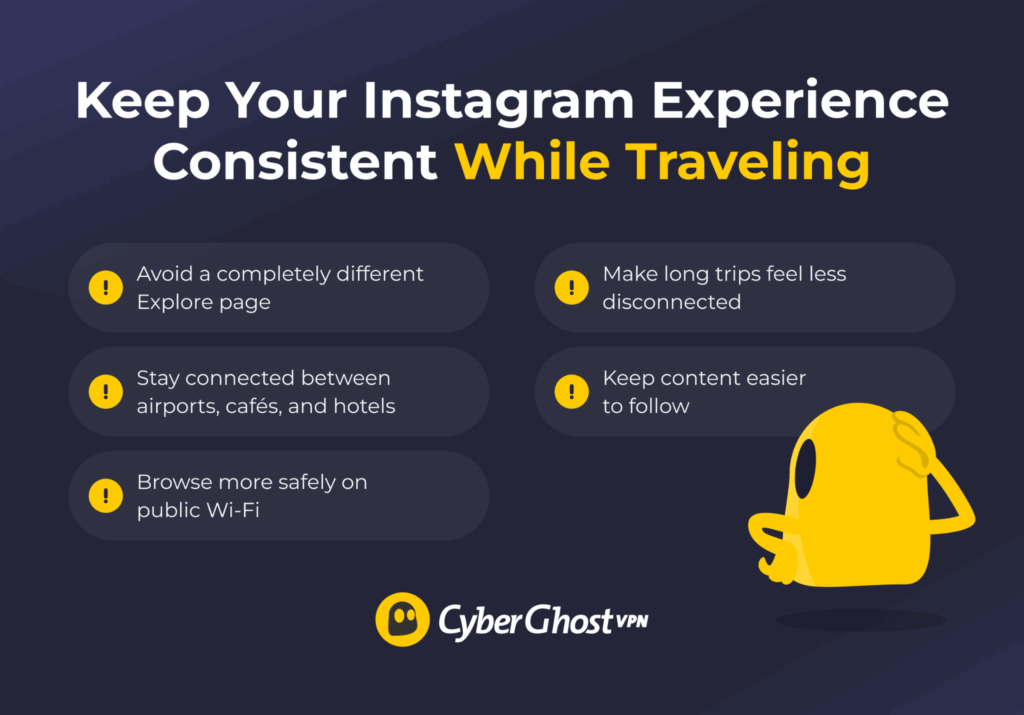
You may want to change your Instagram location to:
- Avoid a completely different Explore page: Instagram’s recommendations can shift when you connect from another country. Keeping your experience more consistent can make the app feel less random while traveling.
- Stay connected while moving between countries: If you’re constantly moving between airports, cafés, hotels, and countries, your recommendations can shift nonstop too. A steadier online experience helps Instagram feel more familiar wherever your trip takes you.
- Add a layer of security on public Wi-Fi: Free Wi-Fi at airports and cafés is convenient, but it’s not always private. Adding extra security while traveling can help protect your connection while you check messages, upload Stories, or doomscroll reels at the gate.
- Keep content easier to understand: Traveling abroad can fill your feed with more local content and unfamiliar trends. Seeing more content in your preferred language can make Instagram feel way less overwhelming while traveling.
- Make long trips more comfortable: If you’re abroad for weeks or months, Instagram may slowly adapt to your temporary location. A few simple adjustments can help your feed still feel familiar instead of completely rebooting your online life.
Ways to Keep Your Instagram Experience Consistent While Traveling
Instagram doesn’t have a simple country switch button, which can make the process feel confusing at first. The good news is there are simple ways to make Instagram feel more comfortable and easier to use while traveling.
Change Your Phone Language Settings
Your phone’s language settings can influence the type of content Instagram recommends while you travel. If you’re spending time in another country but still prefer seeing content in your usual language, updating your device language preferences may help keep your feed easier to follow and more familiar.
This can be especially useful during longer trips when Instagram starts showing more local language reels, captions, hashtags, and recommendations based on your location and activity abroad.
On Android
- Open your Android phone’s Settings.
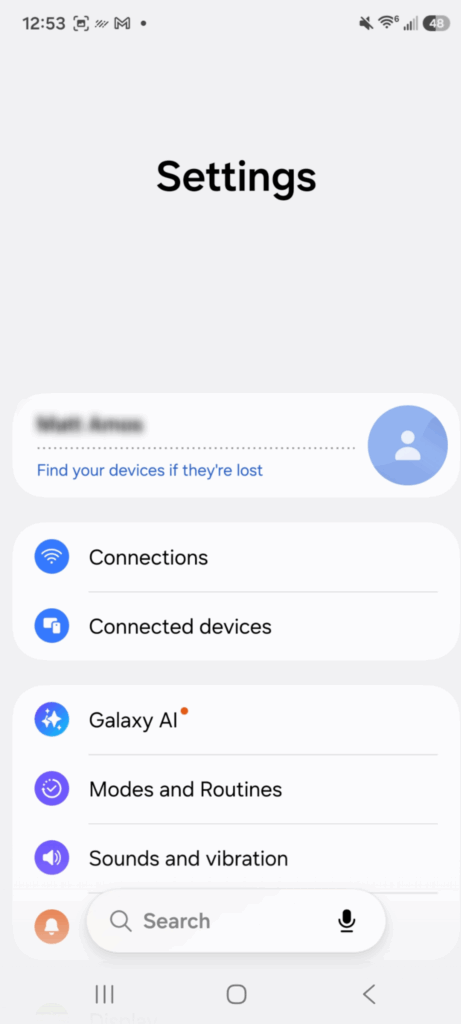
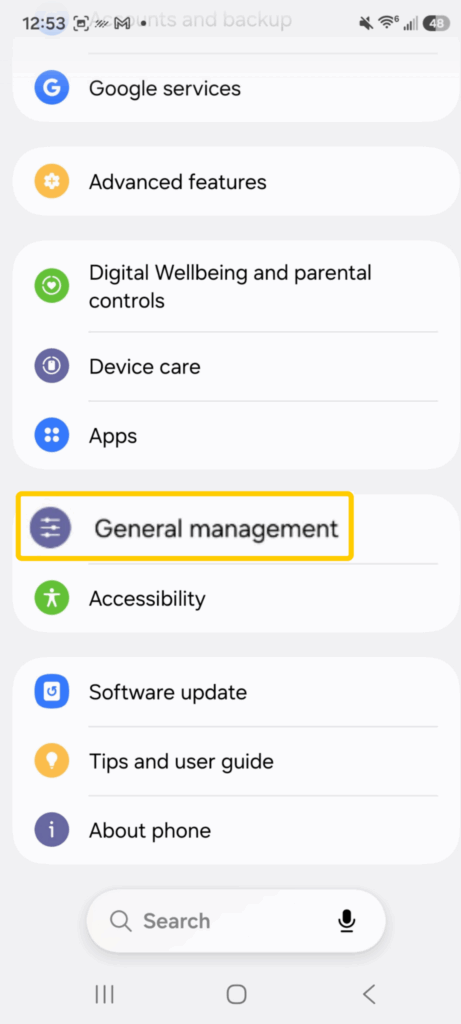
- Scroll down and tap General management (this might be System or Additional settings depending on your device).
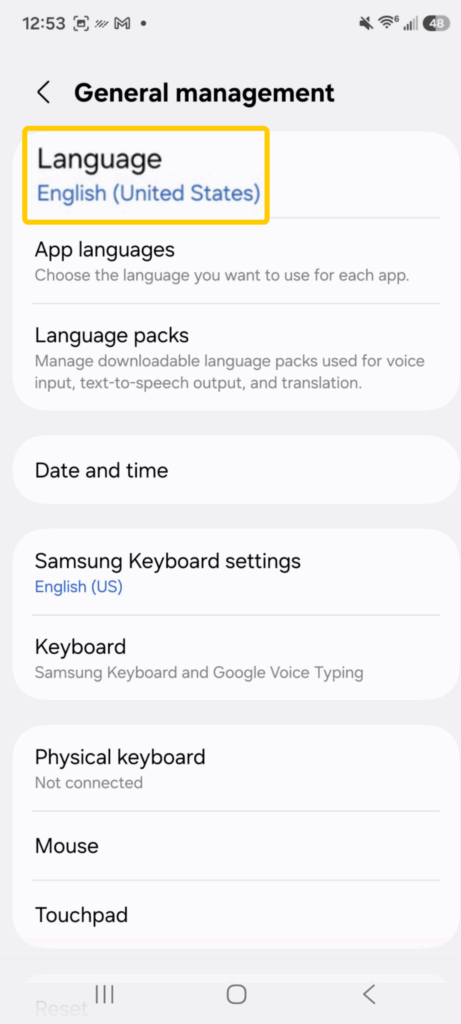
- Select Language and choose the language you use on Instagram and across your device.
- Save the changes and restart your phone if prompted. Then, reopen Instagram and continue using the app as usual.
On iOS
- Go to your Settings on iPhone and tap General.
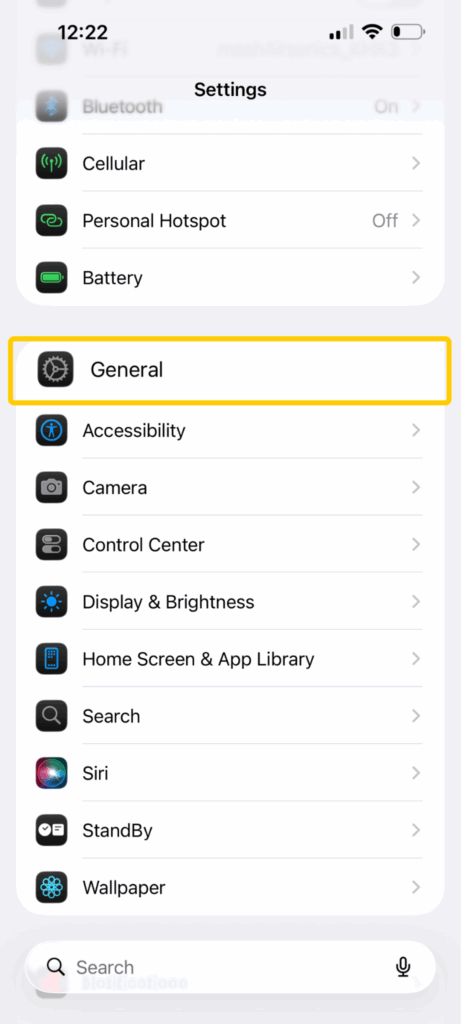
- Select Language & Region.
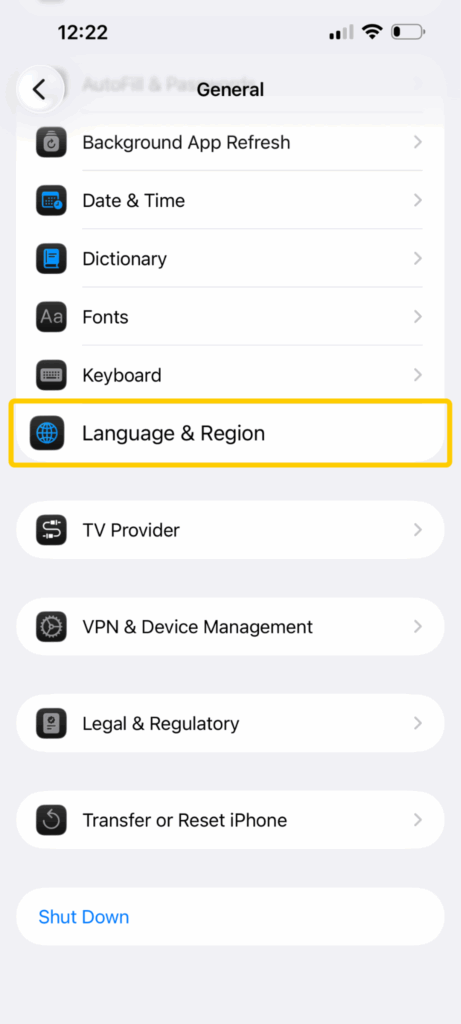
- Under Preferred Languages, choose Add Language…
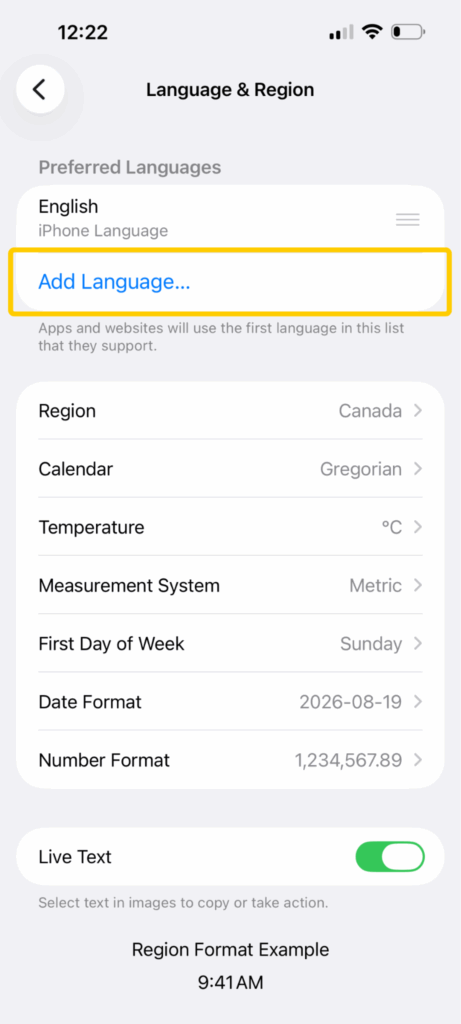
- Find your preferred language and confirm the update by tapping Use [Language].
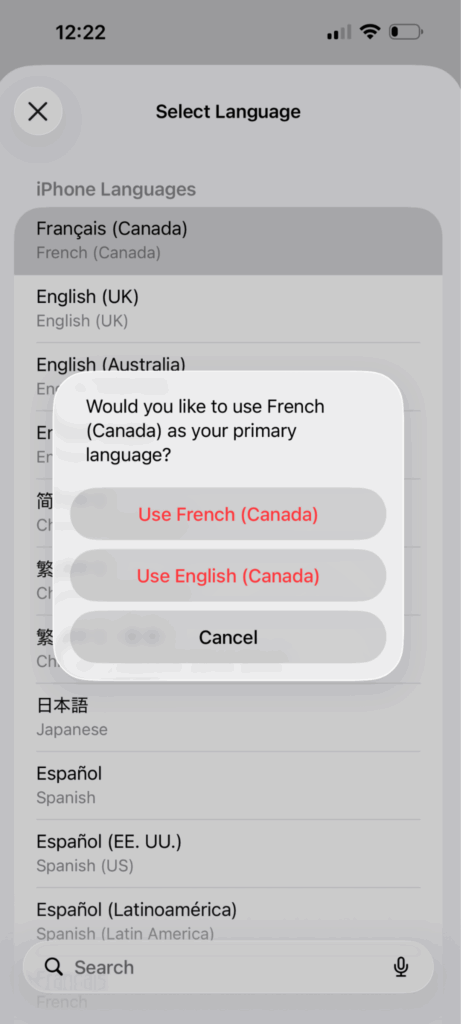
- Open Instagram again and continue using the app as usual.
Update Your Instagram Profile Information
Keeping your Instagram profile information up to date can help your experience feel more familiar while you’re traveling abroad. This is especially useful if you’re traveling for work, studying abroad, or spending a long time away from home. A few small updates can help your feed feel less random and more like your usual Instagram experience.
- Open Instagram and tap your profile picture in the bottom right corner, and then tap Edit Profile below your bio and profile photo.
- Review details like your bio language, external website, and contact information.
- If you use a professional account, make sure your business details and contact options are up to date.
- Save your changes and reopen Instagram if needed.
Follow Creators and Engage With Region-Specific Content
Instagram personalizes your feed based on the reels you watch, the accounts you follow, and the posts you interact with most often. If your recommendations start feeling disconnected while abroad, spending more time engaging with your usual interests can help make your feed feel more relevant again. Follow your favorite creators, like posts, save reels, and interact with familiar content to help Instagram continue showing content related to what you already enjoy.
This can also help keep your feed feeling more familiar while using hotel, airport, or café networks abroad. Over time, your Explore page and suggested content may start feeling more aligned with your regular interests again.
Use Local Hashtags and Audio Trends
Instagram can be useful for discovering what’s happening around you while traveling. Local hashtags, trending reels, and popular audio can help you find restaurants, events, attractions, cafés, and creators in the area you’re visiting.
Searching hashtags related to your destination or browsing local reels can make recommendations feel more relevant during your trip. Instead of seeing random tourist ads or generic suggestions, you may discover real-time travel tips, hidden spots, and local experiences shared by people nearby. This works especially well for travelers looking for current recommendations and authentic local content instead of relying only on traditional travel guides.
How to View and Turn off Instagram Location Services
Instagram can use location permissions to support features like nearby recommendations, location tags, local ads, and region-based content suggestions. Turning it off can help limit how much location information your device shares with the app, especially when using public Wi-Fi networks in airports, hotels, cafés, or other shared spaces.
On Android
- Open your Android phone’s Settings.
- Tap Location or Security & Location, depending on your phone.
- Select App Permissions.
- Select Instagram from the app list.
- Choose Don’t Allow to block location access completely, or select a limited option if available.
On iPhone
- Open your iPhone’s Settings.
- Tap Privacy & Security.
- Select Location Services.
- Scroll through the app list and select Instagram.
- Choose Never to completely block location access, or select While Using the App if you only want limited access.
- Turn off Precise Location for less accurate location tracking if you want extra privacy.
How to Edit Instagram Location in Posts and Stories
Instagram lets you add or update location tags on posts and Stories while traveling. This can be useful for sharing destinations, tagging restaurants or attractions, and helping friends or followers see where you took your travel photos and videos.
Location tags are public details attached to specific posts or Stories, so they’re different from your device’s location settings or the personalized recommendations Instagram shows in your feed.
Instagram Post
- Open Instagram and go to your profile page.
- Choose the post you want to edit.
- Tap the three-dot menu in the top right corner of the post.
- Select Edit from the menu.
- Open the current location tag or choose Add Location if there isn’t one already.
- Search for the city, business, or location you want to use.
- Select the new location and tap Done to save your changes.
Instagram Story
- Create or upload a Story as usual.
- Tap the Sticker icon at the top of the screen.
- Select the Location sticker.
- Search for the location you want to use and add it to your Story.
- Resize or move the sticker anywhere on the screen before posting.
Why Use a VPN for Instagram While Traveling?
Using Instagram abroad often means connecting to public Wi-Fi in airports, hotels, cafés, and other shared spaces. A VPN encrypts your internet traffic to help protect your data and browsing activity on these networks. It also adds an extra layer of privacy while you scroll reels, send messages, upload Stories, or manage your account while traveling.
CyberGhost VPN helps secure your connection with industry-standard encryption and privacy-focused VPN protocols while you use Instagram abroad. This can help reduce risks on unsecured public Wi-Fi and make browsing feel more private when moving between different networks during your trip.
CyberGhost VPN also includes helpful travel-friendly features like automatic Wi-Fi protection, which can secure your connection as soon as you join an unsecured network. Smart Rules lets you choose when to connect the VPN automatically, so boosting your security feels effortless.
Make Your Feed Feel More Relevant Again
Traveling abroad can change the kind of content Instagram shows you. Your feed, Explore page, ads, and recommendations may shift as the app adapts to new networks, locations, and activity during your trip. Small changes to your settings and activity can help make Instagram feel more familiar when you’re away from home.
It’s also important to think about privacy and security when using Instagram on the go. CyberGhost VPN improves your online security with strong encryption, secure VPN protocols, and privacy-focused features so you can browse Instagram more safely while traveling. You can try it risk free with CyberGhost VPN’s 45-day money-back guarantee (14 days for monthly users).
FAQ
How can I keep my Instagram experience more consistent while traveling?
Traveling abroad can change the reels, ads, hashtags, and recommendations Instagram shows you. Keeping your usual language settings, following familiar creators, and continuing to engage with the content you enjoy can help your feed feel more consistent while you’re away from home.
Can Instagram ban me for changing countries?
No, Instagram won’t ban you for using the app while traveling abroad. People access Instagram from different countries, Wi-Fi networks, and mobile networks all the time. However, if your account shows unusual login activity or rapid location changes, Instagram may trigger temporary security checks to confirm it’s you behind the screen and not someone else trying to access your account. You also should abide by local laws in any country you’re in — if Instagram is unavailable there, you shouldn’t try to access it.
Does Instagram track your location automatically?
No. Instagram may use signals like your IP address, device location settings, SIM card region, language preferences, and activity patterns to personalize content and recommendations. This may affect the Reels, ads, and Explore page suggestions you see while traveling abroad.
Will using a VPN affect Instagram while traveling?
Using a VPN while traveling can help protect your connection on public Wi-Fi networks in places like airports, hotels, and cafés. While a VPN can add a layer of privacy and security on unfamiliar networks abroad, it doesn’t prevent Instagram from using several signals, including device settings and account activity, to personalize content.
Can I still see content from other countries on Instagram while traveling?
Yes, traveling often exposes you to local creators, regional trends, and location-based recommendations on Instagram. You can also explore international content through Reels, hashtags, and location tags.
Why does Instagram still show content from home while I’m abroad?
Instagram looks at more than your current location when personalizing your feed. The app also considers factors like your long-term activity, followed accounts, language preferences, and viewing habits, so some recommendations from home may continue appearing while you travel.

Leave a comment