
You can get scammed on PayPal, even when the message or payment request looks convincing. Scammers often impersonate PayPal, buyers, sellers, or customer support to trick you into sending money, sharing login details, or giving them access to your device.
Not every PayPal scam starts with an obviously fake email, either. A scammer can send you a legitimate PayPal invoice or money request, then add a fake phone number or urgent instructions to it, hoping you’ll call them or send money before confirming the request is genuine.
Knowing how the scams work makes them much easier to spot. Though we can’t cover every eventuality, this guide explores the most common PayPal scams, the warning signs to look for, what to do if you’ve already interacted with one, and how to protect yourself in the future.
Can You Get Scammed on PayPal?
Yes. PayPal has security controls to help protect accounts and eligible transactions, but scammers can still trick people into sending money or giving away sensitive information.
Most PayPal scams rely on social engineering. Instead of breaking into your account, scammers try to convince you to take an action that benefits them. This could come in the form of sending a payment to them or refunding money that never arrived. They could also try to access your account by asking you to reveal your password or one-time security code or getting you to install remote-access software.
It’s also helpful to understand the difference between a scam and fraud:
- A scam generally involves you authorizing a payment or sharing information after a scammer deceived you.
- Fraud usually involves someone accessing your account or making a transaction without your permission.
The difference matters because PayPal may handle unauthorized transactions differently from payments you approved yourself. Regardless of the situation, always verify who you’re dealing with before sending money or sharing account information.
How Do PayPal Scams Work?
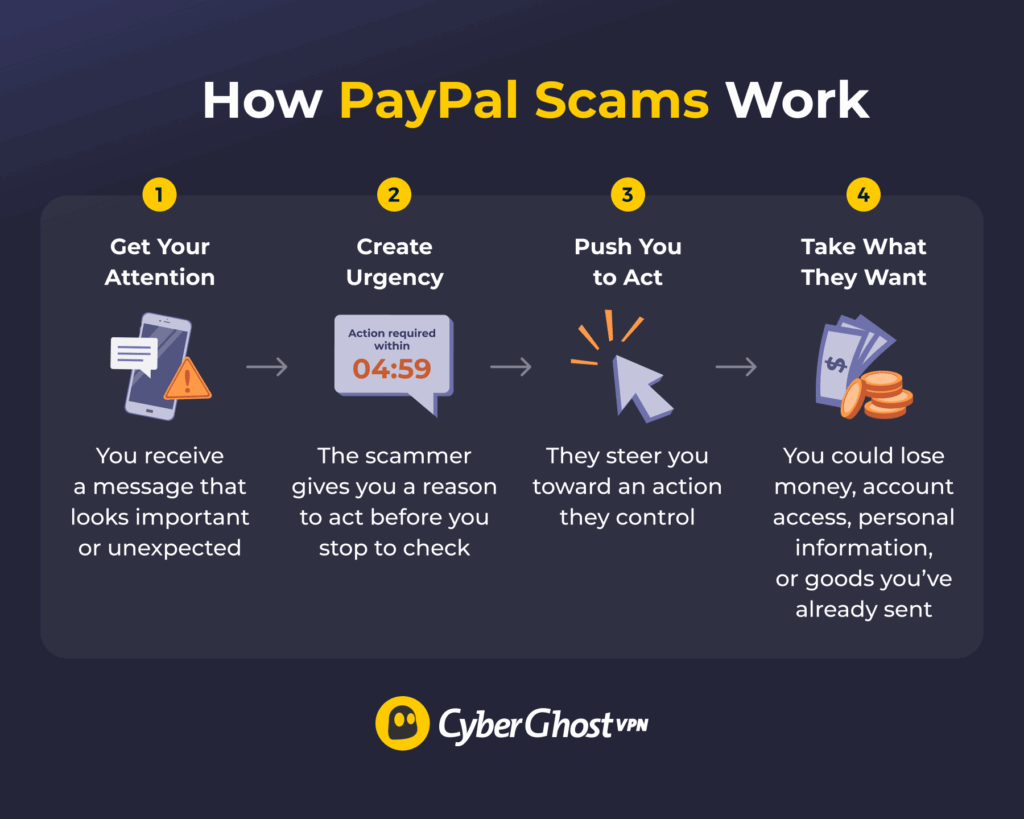
Most PayPal scams follow the same basic pattern. The details change, but the goal is always to pressure you into acting before you have time to think things through.
Here’s how many PayPal scams unfold:
- The scammer gets your attention: You receive an unexpected payment request, invoice, account warning, purchase confirmation, or message from a buyer or seller.
- They create a sense of urgency: The message claims PayPal locked your account, a large payment is about to go through, or you need to act quickly to avoid losing money.
- They direct you toward an action they control: That might mean clicking a link, calling a phone number, sending money, sharing a verification code, or installing remote-access software.
- They achieve their goal: Depending on the scam, they may steal your money, login details, or banking information, access your device, or persuade you to ship an item before receiving a genuine payment.
Urgency is one of the most reliable warning signs. If someone wants you to act before you’ve had a chance to check your PayPal account, slow down and verify the situation first.
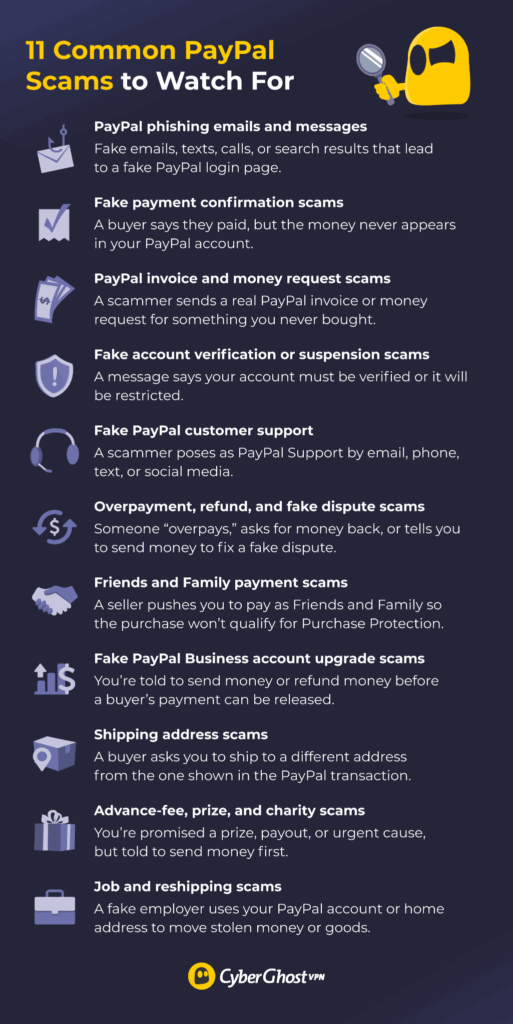
11 Common PayPal Scams to Watch For
PayPal scams can target buyers, sellers, personal accounts, and businesses. The names may vary, but these are some of the patterns you’re most likely to encounter.
1. PayPal Phishing Emails and Messages
A phishing message pretends to come from PayPal and to trick you into visiting a fake website or revealing sensitive information.
You might receive an email saying PayPal’s restricted your account, someone logged in from a new device, or you need to confirm your identity. The link leads to a fake PayPal login page designed to collect your email address and password. The same tactic appears in text messages, social media messages, and even sponsored search results that imitate PayPal’s login page.
Don’t use a link in an unexpected message to check your account. Open the PayPal app or type PayPal’s address into your browser and check for genuine alerts there.
2. Fake Payment Confirmation Scams
This scam often targets sellers. A buyer claims they’ve paid through PayPal, and a convincing payment confirmation arrives by email, prompting you to ship the item. The problem is that the payment never reaches your PayPal account. An email or screenshot isn’t proof that someone paid you. Sign in to PayPal and check the transaction before shipping anything.
3. PayPal Invoice and Money Request Scams
A PayPal invoice in your inbox can feel more convincing than a phishing email because it genuinely comes through PayPal. Scammers can still abuse this feature by sending invoices or money requests for purchases you never made.
Some add alarming notes telling you to call a phone number immediately to cancel a charge or fix a problem. The phone number belongs to the scammer, not PayPal. Once you call, they may ask for payment, financial information, security codes, or remote access to your device. Treat unexpected invoices as a signal to check your PayPal account, not a reason to call the number provided.
4. Fake Account Verification or Suspension Scams
A message or call tells you PayPal needs to verify your identity or it will suspend or restrict your account. The scammer may send you to a fake login page or ask for your password, payment card details, or one-time security code.
The pressure is the point. If you’re worried about losing access to your account, you’re more likely to follow instructions without checking first. Instead of responding to the message, open PayPal and look for account notifications. PayPal won’t ask for your password, full card number, or one-time verification code by phone, email, or text.
5. Fake PayPal Customer Support
The scammer pretends to work for PayPal and offers to help fix a problem with your account or a recent payment. They might contact you through email, phone, text, or social media using a profile that appears legitimate.
They’ll often ask you to do one of these things: share a verification code, send a “test” payment, install remote-access software, or provide banking information. On social media, they may reply to a post where you’re asking PayPal for help, then move the conversation somewhere private and try to get you to send money or hand over account details.
Recent scams have even abused genuine PayPal-generated emails by adding fake support numbers into legitimate-looking notifications.1 In another variant, scammers send tiny payments like a single cent to random accounts, triggering a real PayPal notification email. The alarming message and fake support number sit inside the payment note.
Don’t rely on a phone number or email because it looks official. Contact PayPal through its website or app instead.
6. Overpayment, Refund, and Fake Dispute Scams
You sell an item for $200, but the buyer appears to send $500. They tell you it was an accident and ask you to return the extra $300. PayPal may later reverse the apparent payment or it may never have been genuine in the first place. If you send the “refund” separately, you could lose your own money.
A related trick skips the overpayment: someone contacts you claiming PayPal reversed, disputed, or refunded their payment and tells you to send money somewhere else to fix the problem. The message may look official, but never settle a PayPal dispute through instructions from a stranger.
Use PayPal’s refund process when you need to return a genuine payment and never send a separate transfer because someone asks.
7. Friends and Family Payment Scams
A seller asks you to pay using PayPal’s Friends and Family option, often claiming it’ll avoid fees delays. But PayPal designed Friends and Family for personal transfers, not purchases, and PayPal Purchase Protection doesn’t cover those payments. If the seller disappears, never sends the item, or sends something different, you may have no way to recover the money through PayPal. When buying from someone you don’t know, always pay through Goods and Services.
8. Fake PayPal Business Account Upgrade Scams
This scam often targets marketplace sellers. A buyer claims they paid, but you receive an email saying the money can’t reach you until you upgrade to a PayPal Business account. The message then says you need to send money back to the buyer or pay a fee before PayPal can release the payment.
That isn’t how a genuine account upgrade works. PayPal lets you upgrade through your account settings. Never send money to receive money or unlock an incoming payment.
9. Shipping Address Scams
A buyer pays for an item, then asks you to ship it to a different address from the one shown in the PayPal transaction. If you agree, the buyer may later dispute the payment or claim they never received the item. If your tracking information shows delivery to a different address, you may not qualify for PayPal’s Seller Protection.
Always check the shipping address in the transaction before sending an item and understand how changing it may affect your protection.
10. Advance-Fee, Prize, and Charity Scams
A message says you’ve won a prize, qualify for a grant, or someone owes you a payout. The catch is that you need to pay a small fee or tax to claim it. Legitimate prizes don’t require you to send money, and PayPal warns against these offers.3 Scammers also pose as charities, especially after major disasters, and pressure you to donate through PayPal right away.
Never pay money to receive money, and always verify charities before donating.
11. Job and Reshipping Scams
An “employer” offers to pay you to process payments through your personal PayPal account or to receive and reship packages, keeping a cut for yourself. The money usually comes from compromised accounts and the goods from stolen cards, which makes you an unwitting money mule. When PayPal reverses the transactions, you could lose your own money and potentially face legal consequences.
A legitimate employer won’t ask you to process company payments through your personal PayPal account or reship goods bought with someone else’s money.
What Should You Do If You Got Scammed on PayPal?
What you do next depends on what happened. Clicking a suspicious link isn’t the same as sharing your password, sending money, or giving someone remote access to your device. The table below shows the most important first steps for each situation.
| What Happened | What to Do Next |
| You received a suspicious email or text but didn’t interact. | Don’t click or download anything linked in the email or call any numbers listed. Forward it to PayPal support and delete it.2 |
| You clicked a link but entered no information. | Close the page immediately. If you downloaded or installed something, remove it and run a trusted security scan. |
| You entered your PayPal password. | Change your PayPal password and update any other account using the same password. Then enable two-factor authentication if you haven’t already. |
| You shared a security code or account information. | Secure your account and contact PayPal through its official website or app. |
| You sent money to a scammer. | Check the transaction in PayPal and use the Resolution Center or PayPal support to see what dispute options apply. |
| You see a transaction you didn’t authorize. | Report the unauthorized transaction to PayPal as soon as possible. |
| You gave someone remote access to your device. | Disconnect the remote access session, remove the software, change compromised account passwords from a safe device, and contact your bank if you shared financial details. |
| You shipped an item after a suspicious payment. | Verify the payment in your PayPal account, keep all shipping records, and contact PayPal to find out whether Seller Protection may apply. |
If you lost money, don’t assume it’s gone or that you’ll receive a refund by default. Your options depend on how you made the payment, whether PayPal authorized it, and which PayPal protection program applies.
Does PayPal Refund Money Lost to Scammers?
Sometimes, but it depends. PayPal doesn’t automatically refund every scam and different rules apply depending on whether you authorized the payment yourself or someone accessed your account without permission.
In general:
- Eligible Goods and Services purchases may qualify for PayPal Purchase Protection if you don’t receive the item or it’s significantly different from the seller’s description. You’ll need to meet PayPal’s eligibility requirements and open a dispute within the required timeframe.
- Unauthorized transactions follow a separate reporting process. If someone accessed your account and made payments without your permission, report the activity to PayPal as soon as possible.
- According to PayPal Purchase Protection, it doesn’t cover Friends and Family payments, so recovering money can be much more difficult. Under PayPal’s US User Agreement, unauthorized activity protection applies when you follow the required reporting process. In the US, that means reporting the transaction within 60 days of the charge appearing in your account statement.
If you paid through a credit or debit card, your card issuer may let you dispute the transaction separately. Chargeback rights can sometimes cover situations that PayPal Purchase Protection doesn’t. Because PayPal disputes and card chargebacks have different rules and deadlines, check both options before deciding which process to use.
Sellers have a separate Seller Protection program for eligible transactions, but coverage depends on the transaction and whether you meet the program requirements. If you’ve lost money, look at how the payment went through, what went wrong, and which dispute or protection process fits your situation.
How Do You Report a PayPal Scam?
Report the scam through PayPal’s official channels rather than replying to the suspicious message.
Forward suspicious emails to phishing@paypal.com and then delete them. Use your official PayPal account to report strange invoices or money requests.
If someone accessed your account or made a transaction you didn’t authorize, report the activity through PayPal’s Resolution Center or fraud-reporting process. In the US, it’s also worth filing a report with the Federal Trade Commission (FTC) or the FBI’s Internet Crime Complaint Center (IC3). These reports help investigators track campaigns and can support a later card dispute.
How to Protect Yourself from PayPal Scammers
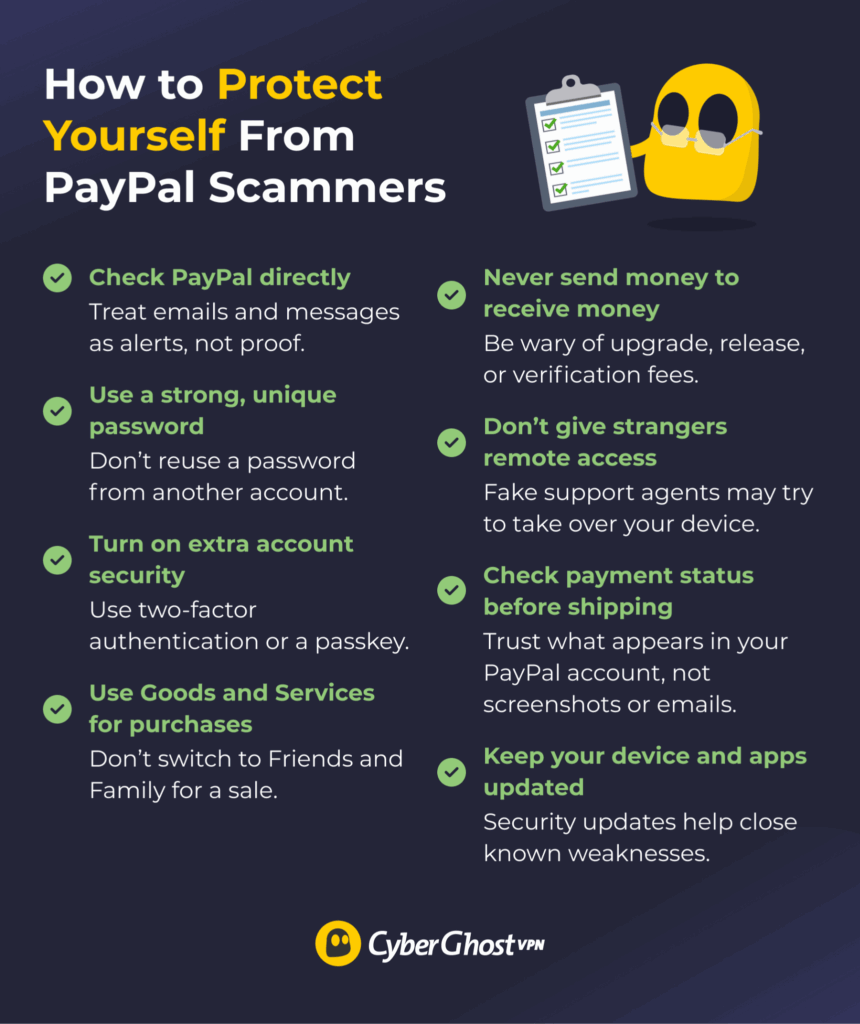
You don’t need to become an expert at spotting every new scam. A few good habits can block most common tricks.
- Always check your PayPal account and treat emails and messages as alerts, not proof.
- Use a strong and unique password for PayPal. A stolen password from another service shouldn’t open your payment account, too.
- Turn on two-factor authentication (2FA) or set up a passkey. An extra sign-in step makes a stolen password far less useful to an attacker.
- Pay through Goods and Services when buying from people you don’t know.
- Never send money to receive money. Be suspicious of “upgrade,” “release,” or “verification” fees tied to an incoming payment.
- Don’t let strangers control your device. Fake support agents often use remote access tools to take over accounts or banking sessions.
- Check payment status before shipping goods. What appears in your PayPal account matters more than a screenshot or email from the buyer.
- Keep your device and apps updated. Security updates close known weaknesses that attackers can exploit.
Can a VPN Help?
A VPN can’t tell you if an invoice is genuine, stop you from sending money to a scammer, or recover a payment, but it can help secure your internet connection. If you use PayPal at an airport, hotel, café, or other public Wi-Fi networks, CyberGhost VPN encrypts the connection between your device and the VPN server. That helps protect your traffic from people snooping on the local network.
Stay Alert When It Comes to PayPal Scams
PayPal scams come in many forms, but they all try to achieve the same thing: getting you to act before you’ve had time to verify what’s really happening. Whether it’s a fake payment confirmation, an unexpected invoice, or someone claiming to be PayPal support, treat the message with caution. Instead of clicking links, calling phone numbers, or trusting screenshots, open the PayPal app or website yourself and check your account.
If you’ve already interacted with a scam, take precautions like securing your account. Report the incident through PayPal’s official channels and check which protection or dispute options apply. Strong passwords or passkeys, multi-factor authentication, and careful verification all help reduce your risk, while CyberGhost VPN can add another layer of privacy by encrypting the traffic routed through the VPN tunnel when you access PayPal on public or shared Wi-Fi.
FAQ
What are the most common PayPal scams?
The most common PayPal scams involve impersonation, fake payments, and social engineering. Scammers may send convincing invoices or payment confirmations, pressure you into refunding money, or trick you into sharing your login details or security codes. Although the tactics vary, most scams create a false sense of urgency to get you to act. Going straight to your PayPal account and checking your account is one of the best ways to spot these scams.
How can I tell if a PayPal email is fake?
Don’t rely on the email alone. Open PayPal and check your account activity, invoices, and notifications. Be cautious of unexpected links, attachments, phone numbers, requests for passwords or security codes, and messages pressuring you to act immediately.
What should I do if I was scammed on PayPal?
Secure your account if you shared login details. Then check the transaction in your PayPal account, report suspicious or unauthorized activity, and use the Resolution Center or official PayPal support to see which dispute or protection options apply.
Does PayPal refund money lost to scammers?
It depends on the transaction. Eligible Goods and Services purchases may qualify for Purchase Protection, and unauthorized transactions have a separate reporting process. PayPal Purchase Protection doesn’t cover Friends and Family payments.
How do I report a PayPal scam?
Forward suspicious emails to phishing@paypal.com and delete them. Report unwanted invoices, money requests, and unauthorized transactions through your PayPal account using the Resolution Center or other official support channels. In the US, you can also report scams to the FTC or the FBI’s Internet Crime Complaint Center (IC3).
References:

Leave a comment