
A company with several offices has divergent networking needs from a business where employees work remotely. Both may need a VPN to protect traffic and provide workers with access to internal systems, but the way they set up those connections will likely look different.
That’s where a site-to-site or remote access VPN can come in. A site-to-site VPN links separate private networks so employees can access shared resources without setting up individual VPN connections. On the other hand, a remote access VPN lets people connect to the company network from home, while traveling, or wherever they’re working.
Neither one is necessarily better. The right choice depends on who or what needs to connect, how access should be managed, and whether the business needs both.
At a Glance: Site-to-Site VPN vs Remote Access VPN
| Feature | Site-to-Site VPN | Remote Access VPN |
| Network | Two or more private networks | Individual user/device to a private network |
| Connection type | Gateway-to-gateway | Device-to-gateway |
| Authentication | Typically handled between gateways | Typically verifies individual users or devices |
| Setup | Usually no individual VPN client needed | Often requires a VPN client or other sign-in method |
| Scalability | New locations and network links | More users, devices, and simultaneous connections |
| Best use case | Branch offices and fixed locations | Remote employees, traveling staff, and contractors |
How Does a Site-to-Site VPN Work?
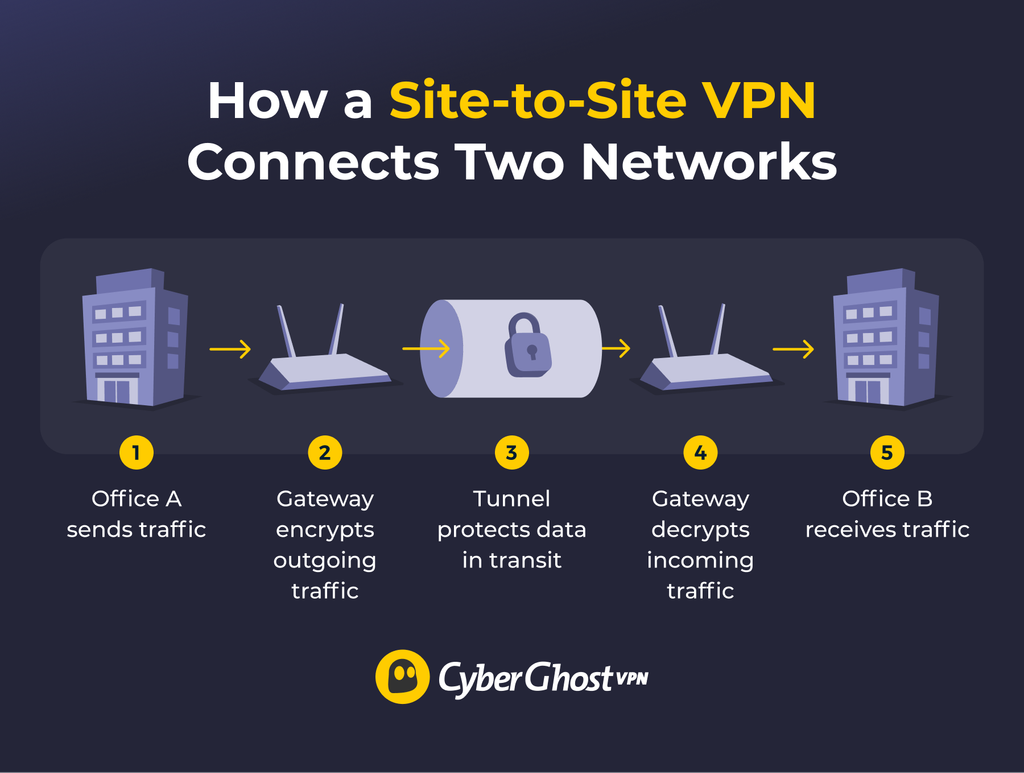
A site-to-site VPN creates an encrypted connection between two or more private networks like branch offices or private data centers so they can exchange data securely over the internet.
When you request a resource on another connected network at Office A, the local VPN gateway checks the destination against its routing rules. If the traffic is for the remote network, the gateway sends it through the VPN tunnel rather than treating it as ordinary internet traffic.
At the other end, at Office B, the receiving gateway decrypts the traffic and forwards it to the intended device or server. Replies follow the return route, allowing the two networks between offices to exchange data without employees having to do anything different.
Site-to-site VPN connections commonly use IPsec, a set of protocols that can authenticate the gateways and protect data as it travels between them. IT administrators configure which networks can communicate, how to route traffic, and what resources the network can access.
Advantages of a Site-to-Site VPN
Site-to-site VPNs make it easier for businesses to operate across multiple locations. Offices can maintain an ongoing connection, keeping shared files, applications, and internal systems accessible throughout the workday.
They can also reduce the workload for IT teams. Rather than installing and troubleshooting VPN configurations on every employee’s device, administrators manage connections between office networks. This is especially useful for businesses with several branches that rely on the same internal resources.
Limitations of a Site-to-Site VPN
Site-to-site VPNs can become more complicated as a business adds new locations. Each office may often require changes to gateways, routing, and firewall rules, which need careful planning and ongoing maintenance.
They’re also less suited to employees who work from home or travel. That’s because a site-to-site VPN connects networks, not individual workers. Those employees need a separate way to access company resources. Businesses may also need additional security measures to manage which users and devices can access specific systems.
How Does a Remote Access VPN Work?
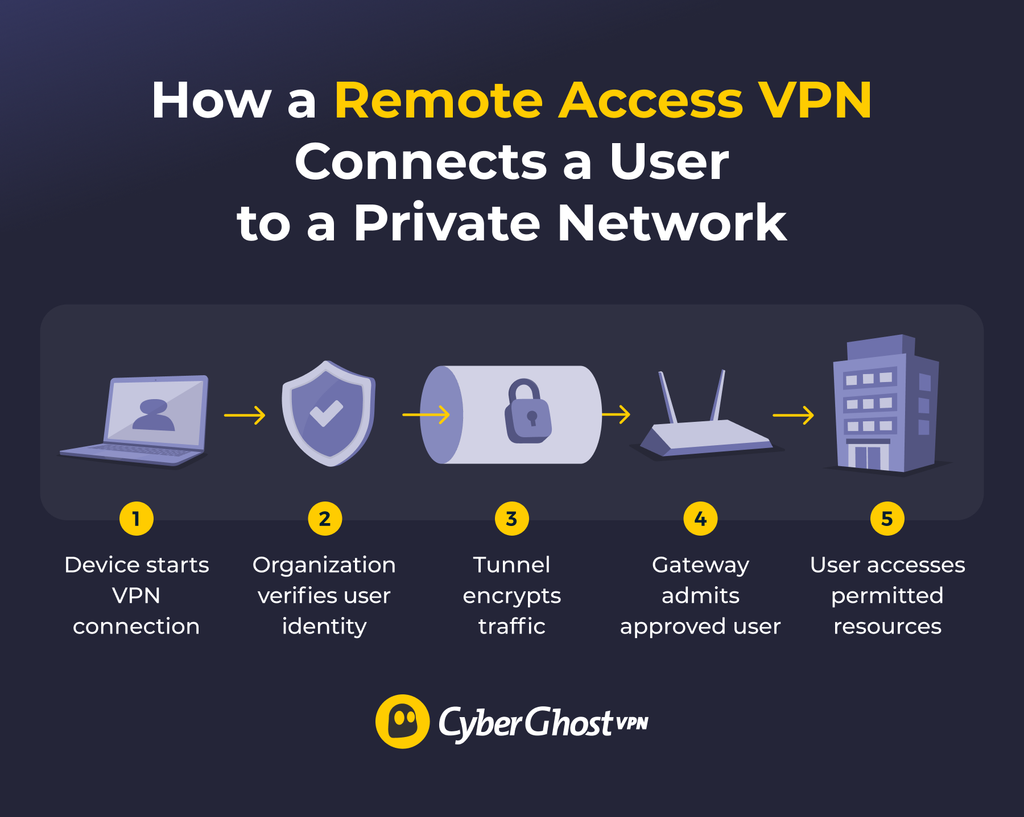
A remote access VPN creates an encrypted connection between an individual user or device and a private network when employees need access to internal files, applications, or servers while working from home, traveling, or outside the company network.
Before you can connect to a company network remotely, the VPN needs to verify you’re authorized. This involves signing in through a VPN client using a password, multi-factor authentication (MFA), a digital certificate, or a combination of methods.
Once approved, your device establishes an encrypted tunnel to the company’s VPN gateway. Traffic destined for internal resources travels through the tunnel, giving the employee access to the files, applications, and systems their permissions allow.
Unlike a site-to-site connection between fixed networks, a remote access tunnel applies to one user or device and may exist only for that session.
Pro tip: A business remote access VPN isn’t the same as a consumer VPN. A remote access VPN gives authorized users access to a specific private network. Consumer VPNs such as CyberGhost VPN encrypt your internet connection and route it through a VPN server rather than connect you to an employer’s network.
Advantages of a Remote Access VPN
A remote access VPN lets employees work from almost anywhere without losing access to the tools and files they need. They also give IT teams more control over individual access. Admins can assign permissions based on someone’s role, grant temporary access to contractors, or revoke a former employee’s VPN access without disrupting anyone else’s connection. This makes these VPNs useful for businesses with flexible working arrangements.
Limitations of a Remote Access VPN
Remote access VPNs create more user- and device-level administration as the number of people connecting grows. Organizations may need to manage VPN clients, user accounts, authentication, permissions, endpoint security, and connection capacity. Businesses also need enough VPN capacity to handle everyone connecting at once, particularly during busy periods.
Employees can also have varying connection quality depending on their device, internet service, and location. Someone working over unreliable hotel Wi-Fi may experience slow speeds or dropped connections, even if the company’s VPN infrastructure is running smoothly. Unlike office networks, home and public internet connections are outside IT’s control.
Site-to-Site vs Remote Access VPN: Key Differences
The two VPN types solve distinct connectivity problems, and that affects how organizations set them up and manage them.
Setup
Setting up a site-to-site VPN is a network configuration task. IT teams need to configure the gateways at each location, define which network ranges can communicate, and establish routing and firewall rules. Getting those settings right is important, especially when connecting networks with various configurations.
Remote access VPNs require another approach. Alongside the VPN gateway, administrators need to set up user authentication, permissions, and, where required, VPN software on employees’ devices.
Neither is simpler. Connecting two small offices may be straightforward, while linking dozens of branches can become a major project. The same goes for remote access: supporting ten employees is not the same as rolling out a VPN to thousands.
Scalability
Adding offices to a site-to-site setup can mean more gateways, routes, policies, and new tunnel relationships. Scaling a remote access VPN instead means having enough capacity for simultaneous connections, plus managing additional accounts, clients, licenses, authentication, and support as headcount grows.
A remote access VPN scales with users and devices. Organizations need enough capacity for concurrent connections and may also need to manage extra accounts, clients, licenses, authentication, and support.
Security
Neither type of VPN is more secure. Site-to-site VPNs authenticate the gateways connecting each network, while remote access VPNs verify individual users or devices before granting access. This makes remote access VPNs better suited to applying controls such as multi-factor authentication (MFA) at the point of connection.
Both approaches still depend on careful configuration. Strong encryption won’t compensate for broad access permissions, outdated software, or compromised devices. Firewall rules, network segmentation, and regular security updates remain important regardless of which VPN a business uses.
Management
Site-to-site VPN management centers on network infrastructure, while remote access VPN management centers more on identities and endpoints.
With a site-to-site VPN, IT teams look after the network infrastructure, monitoring tunnel availability, maintaining gateways, and updating routing or firewall rules as needed. Remote access VPNs involve more day-to-day user administration, from onboarding employees and managing devices to changing permissions and revoking access when someone leaves.
Modern remote access platforms can centralize much of this work, so having many users doesn’t always mean managing every connection separately.
User Experience
Employees working through a site-to-site VPN don’t usually notice the connection. They can open shared files and use internal applications like they would on their own local network. Remote access VPNs may require a little more involvement. For example, they’d have to launch a VPN client or sign in before starting work.
Some businesses use always-on connections to make this process automatic, so the experience depends on how they configure the VPN.
Performance
Performance depends more on the network and VPN infrastructure than on the VPN type. Gateway performance, bandwidth, latency, protocol choice, and overall network design all affect the result.
Site-to-site VPNs generally offer more predictable performance because they connect fixed locations with known internet connections and network equipment. IT teams can monitor traffic and plan bandwidth around those conditions. Remote access VPN performance is harder to standardize, since employees connect from remote locations using various devices, ISPs, and Wi-Fi networks.
When Should You Use a Site-to-Site or Remote Access VPN?
The main question is whether you need to connect fixed networks, individual users, or both:
| Your Business Needs | Consider |
| To connect branch offices to headquarters | Site-to-site VPN |
| To share internal systems between fixed locations | Site-to-site VPN |
| To give employees secure access while working from home | Remote access VPN |
| To let traveling staff or contractors access company resources | Remote access VPN |
| To manage access for individual users and devices | Remote access VPN |
| To connect multiple offices while supporting remote workers | Both |
You don’t have to choose one over the other. A company might use a site-to-site VPN to link its regional offices while providing remote access VPN connections to employees working from home. That way, the offices can share resources through their network connections, and employees outside those locations can still reach the systems they’re authorized to use.
Site-to-Site VPN or Remote Access VPN: Choose the Best Setup for Your Needs
There’s no universal winner between site-to-site and remote access VPNs. The right setup depends on how your business operates, where employees work, and which systems they need to reach.
For some businesses, one VPN type will cover everything they need. Others will benefit from combining both. What’s important is choosing a setup that gives people reliable access to the resources they need without creating unnecessary complexity or compromising security.
FAQ
What’s the main difference between site-to-site and remote access VPNs?
The main difference between site-to-site and remote access VPNs is what they connect. A site-to-site VPN links two or more private networks, allowing offices or other business locations to exchange data securely over the internet. A remote access VPN connects an individual user or device to a private network, so employees can access company resources while working elsewhere.
How does a site-to-site VPN connect separate networks?
A site-to-site VPN establishes an encrypted tunnel between VPN gateways. When someone accesses a resource on another connected network, the local gateway identifies the destination and sends the traffic through the tunnel. The receiving gateway decrypts the traffic and forwards it to the intended device or server. Responses travel back through the tunnel, allowing the networks to communicate without employees having to establish their own VPN sessions.
How does a remote access VPN connect users
A remote access VPN connects a user’s device to an organization’s private network through a VPN gateway. The user starts a VPN client and authenticates using a password, digital certificate, MFA, or a combination of methods. Once the VPN approves the connection, an encrypted tunnel carries traffic destined for the organization’s internal resources. Employees can then access the files, applications, and systems their permissions allow.
Is a site-to-site VPN more secure than a remote access VPN?
Neither a site-to-site or remote access VPN is more secure. Both can protect data traveling over the internet, but their security models differ. Site-to-site VPNs authenticate the gateways connecting separate networks, while remote access VPNs authenticate individual users or devices. This makes remote access VPNs particularly suited to enforcing controls such as MFA when employees connect from outside the office.
When is it best to use a site-to-site VPN?
A site-to-site VPN is best suited to businesses with two or more fixed locations that need access to the same internal resources. Because the connection operates between networks, employees at those locations can access permitted resources without starting individual VPN sessions. However, businesses with employees working from home or traveling may also need a remote access solution.
Can a business use both a site-to-site and a remote access VPN?
Yes, many organizations use both site-to-site and remote access VPN because they solve different connectivity problems. A company might use site-to-site VPNs to connect its headquarters or regional offices and also allow employees to use a remote access VPN while working from home or traveling. Combining the two allows businesses to maintain connections between fixed locations while providing secure access for employees outside those networks.

Leave a comment