
Cash App makes sending money quick and easy, which is exactly why scammers target it. A fake payment alert or message about a problem with your account can look convincing, especially when it creates a sense of urgency. Many scams don’t start with obvious warning signs. They start with a story that sounds believable enough to make you act before you verify it.
Cash App has security features that can help protect your account, but they can’t prevent every scam. Fraudsters may impersonate customer support, send fake payment requests, or promise free money in exchange for a small upfront payment. Knowing how to recognize these tricks and checking requests before acting can help you avoid losing money or exposing your personal information.
Is Cash App Safe?
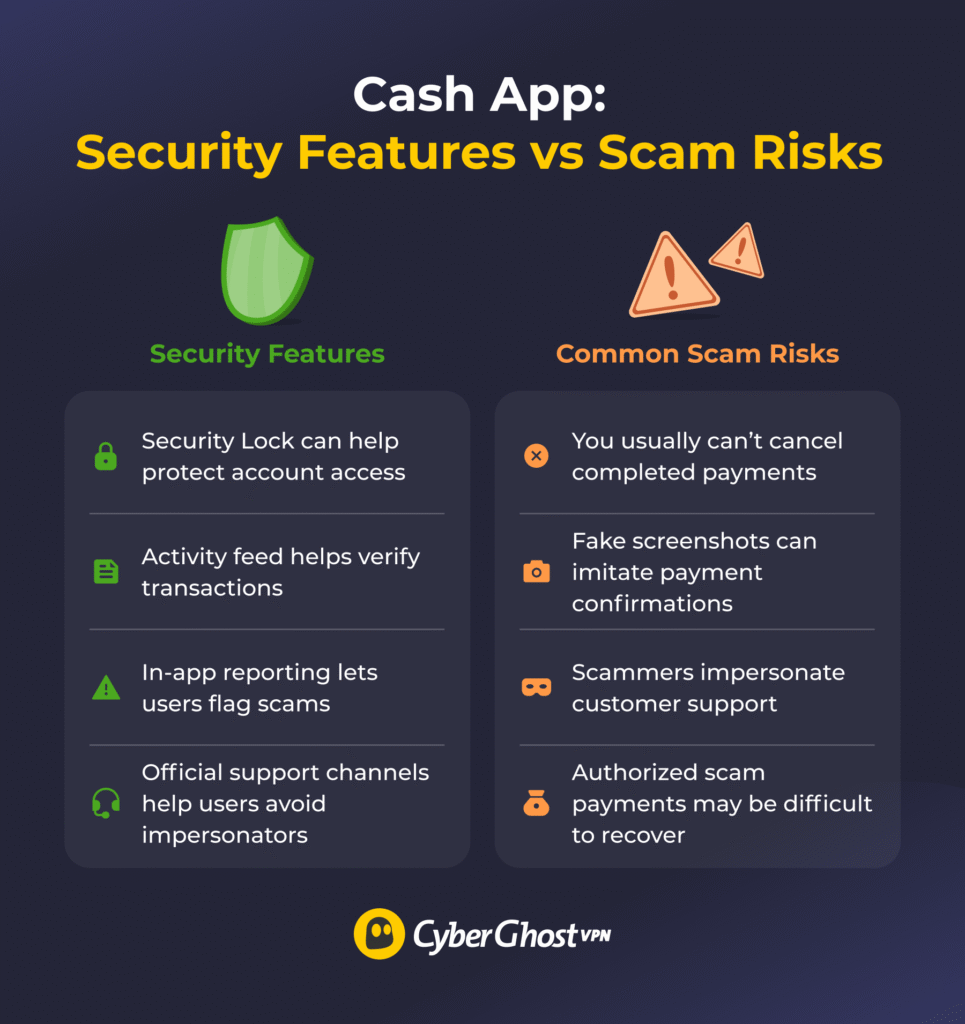
Cash App is generally safe to use, but you can still lose money to scams. It has security features designed to protect your account and payments, but they can’t stop someone from tricking you into sending money or sharing sensitive information.
Cash App is a mobile payment service that lets you send and receive money from your phone.
Like other peer-to-peer payment apps, it’s built for quick transfers. Completed payments are usually final, although you can sometimes cancel a transaction that’s still pending. This makes it especially important to check who you’re paying before sending money.
Cash App offers several built-in security and reporting features that can help protect your account and spot suspicious activity:
- Security Lock: Lets you require a PIN, fingerprint, or face scan before making payments.
- Activity feed: Helps you verify whether a payment actually appears in your Cash App account.
- Reporting tools: Allow you to report scam payments and suspicious accounts in the app.
- Official support channels: Give you a way to contact Cash App without relying on potentially fraudulent support messages or websites.
These protections are useful, but scammers often target the person using the app rather than the app itself. Fake support messages, phishing links, and fraudulent payment requests can still convince people to hand over information or send money voluntarily.
Cash App has also faced regulatory scrutiny over how it handles fraud. In January 2025, the Consumer Financial Protection Bureau (CFPB) ordered Block, Cash App’s operator, to pay up to $120 million in consumer redress and a $55 million civil money penalty. The agency cited failures involving fraud prevention, customer service, and investigations of unauthorized transactions.1
How Cash App Scams Work
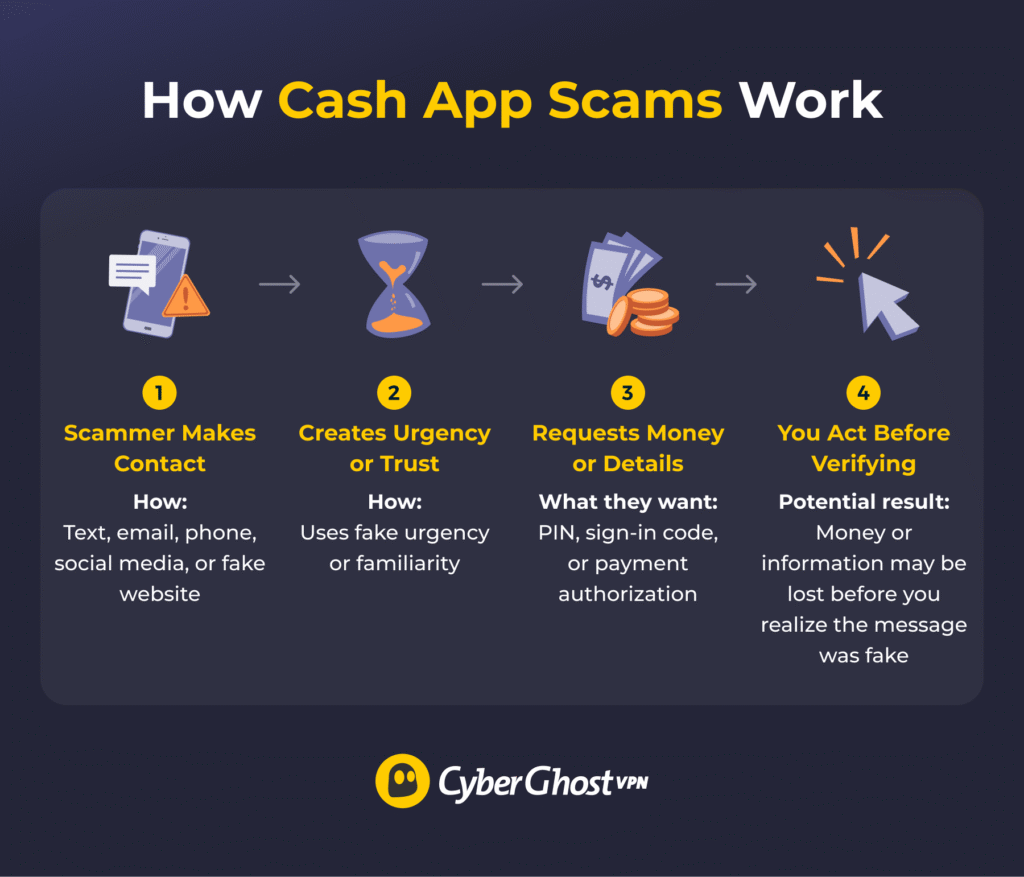
Most Cash App scams rely on social engineering, which involves tricking people into sending money or revealing personal information.2 Scammers might contact you through text messages, emails, social media, phone calls, or fake websites, often pretending to be someone you can trust.
They use one or more tactics to get you to act without checking whether the request is legitimate:
- False urgency: Claiming your account will be locked unless you act immediately.
- Pretending to be an authority: Posing as Cash App support and asking you to verify your account details.
- Building false trust: Using fake testimonials or claims about other winners to make a giveaway seem legitimate.
- Playing on your goodwill: Claiming they’ve sent you money by mistake and pressuring you to return it.
These scams can look different, but they share the same goal: getting you to trust the message instead of verifying it. A genuine-looking notification or convincing story isn’t proof that a payment request is legitimate.
Common Cash App Scams to Watch Out For
Scammers use different stories to exploit the same basic vulnerabilities. The examples below show the most common ways they try to obtain money or sensitive information.
| Red Flag | What to Do |
| “Cash App support” contacts you unexpectedly | Open Cash App yourself and use official support |
| Someone sends a payment and asks you to send it back | Check the original transaction and don’t send a new payment |
| You’re asked to pay a fee to receive money | Don’t pay and verify the offer |
| A message tells you to click a login link urgently | Open the app or go to the site yourself |
| Someone promises guaranteed investment returns | Don’t send money until you’ve verified the opportunity |
Fake Customer Support Scams
A scammer may pose as Cash App support and contact you by text, email, phone, or social media. They might say there’s suspicious activity on your account, a payment is stuck, or your profile needs to be verified. The goal is often to get your PIN, one-time sign-in code, debit card details, or access to your device.
Red flags:
- Unsolicited messages asking for personal or financial information.
- Links to support pages you didn’t search for.
- Requests to “verify” your account urgently.
- Offers to “fix” your problem if you call a number they provide.
If you need help, open Cash App and contact support through the app rather than trusting a message or number someone sends you.
Fake Payment and Payment Reversal Scams
A Cash App fake payment scam makes you believe money is in your account when it either isn’t there or shouldn’t be trusted. A scammer may send a fake screenshot showing a completed payment. In other cases, they say they sent money by mistake and ask you to return it. You might also receive a suspicious payment funded by stolen card details, followed by an urgent request to “refund” the sender with a separate payment.
A user may want to do the right thing and send money back before confirming what actually happened. If you need to return an unexpected payment, Cash App recommends using the refund option on the original transaction rather than sending a separate payment from your balance. If someone pressures you to send a separate payment back, verify the transaction under your account’s Activity first.
Giveaway Scams
Giveaway scams promise free money, but the real goal is to get you to pay first or hand over sensitive information. A scammer may pretend you won a prize, a social media giveaway, or a limited-time Cash App promotion. To make it feel legitimate, they may use copied branding, fake winner comments, or screenshots that appear to show successful payouts. Then they ask for a verification fee, a processing payment, or your account details.
Be skeptical of any supposed prize that requires you to send money or provide sensitive information before you can claim it. If a stranger promises fast cash but asks for a fee first, treat it as a major red flag and verify the offer before doing anything.
Phishing Links and Fake Cash App Emails
Phishing scams try to steal your account details by sending you to a fake page that looks official. You might get a text or email saying there’s a problem with your account, a suspicious login, or a payment that needs review. The message usually includes a link and a warning that you need to act right away. Once you click, you may land on a fake login page or a bogus support site built to capture your sign-in code, debit card information, or other sensitive details.
These scams create panic before you have time to think. If something seems wrong with your account, it’s much safer to check the app than to trust the link in the email or message.
Investment Fraud and Money-Flipping Scams
Investment fraud and money-flipping scams promise easy profits that don’t exist. A scammer might claim they can turn a small payment into a much larger one, or they may pitch a “guaranteed” investment in crypto, stocks, or some secret strategy. These scams often spread through social media, where fake screenshots and fake testimonials make the offer seem successful and low risk.
In some cases, scammers even send a small amount to build trust before pushing for a much larger payment. Once you send that bigger amount, they disappear. Claims of guaranteed fast returns with little or no risk are a major red flag. Don’t send money until you’ve verified the investment and the person or company offering it.
How to Tell if a Cash App Payment Is Fake
The safest way to check whether a Cash App payment is fake is to verify it inside the app, not through a screenshot, text, or email. Scammers often create fake receipts, edited payment confirmations, or messages that make it seem as if money is already on the way.
A fake payment may also come with requests to “upgrade” your account, pay a fee to unlock funds, or return money because the sender supposedly made a mistake. Treat those requests as red flags.
If you think a payment might be fake, open your Activity tab in Cash App and check whether the transaction actually appears there. Evaluate the sender’s details and be careful if the other person is pressuring you to act fast, send money back, or pay a fee to release the funds.
What to Do if You Get Scammed on Cash App
If you suspect someone may have scammed you on Cash App, stop talking to the scammer and report the issue through official channels. Fast action may not guarantee that you’ll recover your money, but it can help reduce further damage and improve the chances of catching unauthorized activity early.
- Stop engaging: Don’t send more money, try to negotiate, or click any new links the scammer sends. End all contact immediately.
- Report the transaction in Cash App: Open your Activity feed, select the payment in question, and use the reporting option provided in the app.
- Contact your bank or card issuer: Reach out to your bank or card issuer as soon as possible to ask about additional protection or dispute options. Your bank may have fraud protection that Cash App doesn’t provide.
- Secure your account: Review your recent activity, watch for unfamiliar payments or logins, and change passwords if you entered your credentials on a phishing site. Cash App provides guidance for accounts that may have been compromised, including steps to review activity and contact support for suspicious transactions.
- Document everything: Save evidence such as screenshots, usernames, email addresses, payment details, and timestamps. This can be useful if you need to dispute the charge with your bank or report to authorities.
- Report to authorities: Remember you can report the scam to the FTC or the FBI’s Internet Crime Complaint Center.
Will Cash App Refund Money for a Scam?
According to its Terms of Service, Cash App may refund money lost to a scam, but there’s no guarantee. Even if someone tricked you into authorizing the payment, recovering the money can be difficult.
That’s different from an unauthorized transaction, such as a payment made after someone gains access to your account without your permission. If you see a transaction you didn’t authorize, report it to Cash App as soon as possible and ask your bank or card issuer about any applicable protections.
You can report scam payments and suspicious accounts through the app. If it involves a linked debit or credit card, your bank or card issuer may also have dispute procedures that apply to your situation. The sooner you report suspicious activity, the better.
How to Reduce Your Risk of Cash App Fraud
Following some basic rules can help reduce your risk of Cash App fraud:
- Send money only to people you trust: Be careful with any payment request that comes from a stranger, even if the story sounds believable.
- Keep your sign-in details private: Never share your PIN or one-time sign-in code. Cash App won’t ask you to provide these credentials to support staff.
- Verify payments in the app: Don’t trust screenshots, emails, or text messages as proof that someone has paid you. Check your Activity tab instead.
- Be careful with unexpected payments: If someone claims they sent you money by mistake, check the transaction and use the original payment’s refund option rather than sending a separate payment.
- Contact Cash App through official channels: Open the app to get support instead of following links or calling numbers from unverified messages.
- Enable Security Lock: Require a PIN or biometric verification before making payments to add another layer of account protection.
Protecting Your Financial Data on Public Networks
When you’re on the go, you may use public Wi-Fi to check your Cash App balance or manage payments from a café, airport, or hotel. Public networks can expose your connection to other devices on the same network, so it’s worth taking extra precautions when handling financial information.
A VPN can add another layer of protection by encrypting your internet traffic between your device and the VPN server before it reaches the destination server. It can also mask your device’s IP address from the websites and services you access. However, a VPN doesn’t protect you from scams, phishing, compromised accounts, or payments you authorize yourself.
That’s why a VPN should complement (and not replace) your basic payment-app security habits. If you receive a message about your Cash App account out of the blue, open the app and verify the situation rather than clicking on an unfamiliar link or sending money. When you’re using financial services on public networks, combining a VPN with strong account security and careful payment verification can help reduce your overall exposure.
If you use Cash App on multiple devices, a VPN can help protect the connections. CyberGhost VPN supports up to 7 simultaneous device connections with one subscription, so you can connect your phone, tablet, laptop, or other supported devices at the same time.
Cash App Can Be Convenient, but Scams Move Fast
Cash App makes sending money easy, but that convenience can work in a scammer’s favor. Fake payment alerts, urgent account warnings, and promises of easy money are all designed to get you to act before you’ve checked the details.
The key to avoiding Cash App scams is to pause before sending money or sharing sensitive information. Don’t trust screenshots as proof of payment, and don’t pay fees to receive supposed prizes or transfers. Always use Cash App’s official support channels when something seems wrong.
You can’t eliminate every risk from peer-to-peer payments, but you can reduce your exposure by staying skeptical, verifying payment requests, and using the security controls available to you. When you’re handling financial information on public networks, CyberGhost VPN can add another layer of protection to your connection.
FAQs
What are the most common Cash App scams?
Common Cash App scams include fake customer support, fake payment confirmations, giveaway scams, phishing links, and investment fraud. Warning signs often include promises of easy money or pressure to act right away. To protect yourself, learn how to spot phishing attempts and always verify payments in your Cash App Activity tab rather than screenshots or messages.
Can someone scam me through Cash App?
Yes, many Cash App scams rely on tricking you into sending money, sharing sensitive information, or approving an action. Scammers can also target accounts through phishing, stolen credentials, or unauthorized access. Be cautious with unsolicited messages claiming to be from Cash App and verify account issues through the app or official support channels.
How can I tell if a Cash App payment is fake?
To tell if a Cash App payment is fake, check your Cash App Activity feed rather than relying on a screenshot, email, or text message as proof someone paid you. Be especially cautious if someone asks you to send a separate “refund” or pay a fee before you can receive the money.
What should I do if I get scammed on Cash App?
Stop communicating with the scammer, report the transaction to Cash App, and contact your bank or card issuer if it involved a linked account or card. Save evidence such as screenshots and timestamps. If you shared login credentials, change any affected passwords. Acting quickly can help limit further damage and gives you more time to report the incident and secure affected accounts.
Does Cash App refund money lost to scammers?
Cash App doesn’t guarantee refunds for authorized payments you send to scammers. However, if there’s an unauthorized transaction, report it right away to Cash App and your financial institution since different protections may apply.
How do I report a Cash App scam?
To report a Cash App scam, go to Cash App’s official in-app support options. Use the reporting option provided in the app to block the scammer’s account. Call your linked bank or card issuer to dispute the transaction or report any unauthorized charges. File a fraud report with the Federal Trade Commission (FTC) and report online cybercrimes to the FBI’s Internet Crime Complaint Center (IC3).

Leave a comment