
If you’re traveling abroad or have relocated permanently, you may see your TikTok feed isn’t what you expected it to be. If the platform keeps showing videos from your old region, your recommendations can start feeling out of touch, especially if you want to explore local creators, trends, and nearby events.
Thankfully, refreshing your TikTok location isn’t hard. You can make a few updates to your settings and activity to help TikTok better understand where you are now. In this guide, we’ll explain how TikTok determines your location and what you can do to get more locally relevant content in your feed.
Using TikTok on public or shared Wi-Fi can increase exposure to privacy and security risks. CyberGhost VPN encrypts your internet traffic to help add an extra layer of privacy while you scroll, post, livestream, or message on TikTok. It also helps reduce exposure on unsecured networks when you’re traveling, working remotely, or using TikTok on the go.
Reasons You Might Want to Change Your TikTok Location
TikTok uses different indicators to determine what to put on your feed, including your location, language preferences, and viewing habits. It doesn’t always get it right, though. While your For You Page (FYP) is often accurate, you might want to influence them for various reasons, like:
- Moving to a new country: Your real life may have changed overnight, but your TikTok feed can take a little longer to catch up. Updating your location can help swap old local trends for creators, videos, and recommendations that match your new day-to-day life.
- Traveling abroad: Half the fun of traveling is discovering what locals are watching, talking about, and laughing at online. Changing your TikTok location can help you find nearby food spots, travel tips, events, creators, and trends.
- Repetitive content: If your FYP feels like it’s running on autopilot, refreshing your location settings can help. A new region can introduce fresh creators, different humor, trending sounds, and content.
- Searching for local content: Updating your TikTok location can help you discover local hashtags, regional trends, neighborhood recommendations, and creators from your current area.
- New recommendations: If your feed still focuses on your previous country, changing your location settings can help point recommendations in the right direction again.
- Learning a new language or culture: Watching local TikTok content can be a fun way to pick up slang, jokes, trends, and everyday phrases naturally.
How to Change Your Location on TikTok
Changing your TikTok location usually takes more than adjusting one setting. TikTok looks at things like your language preferences, SIM card region, device settings, and activity to help estimate where you’re located. The methods below can help you improve the accuracy of your recommendations.
Switch Your SIM Card
TikTok can use your mobile carrier and SIM card region as one of its location signals. If your SIM card is linked to your old country, your FYP might keep serving content from the wrong region. Switching to a local SIM card can help TikTok recognize your new location and refresh the content, trends, and recommendations you see.
This can be useful for both viewers and creators. Viewers may start discovering more local creators, viral trends, events, and region-specific content. It’s handy if you’ve moved, you’re traveling, studying abroad, or building a TikTok audience in another region.
You may still need to update other settings like your device region, TikTok language preferences, or location permissions for better results. TikTok combines several location signals together, so changing your SIM card works best when paired with a few other location updates.
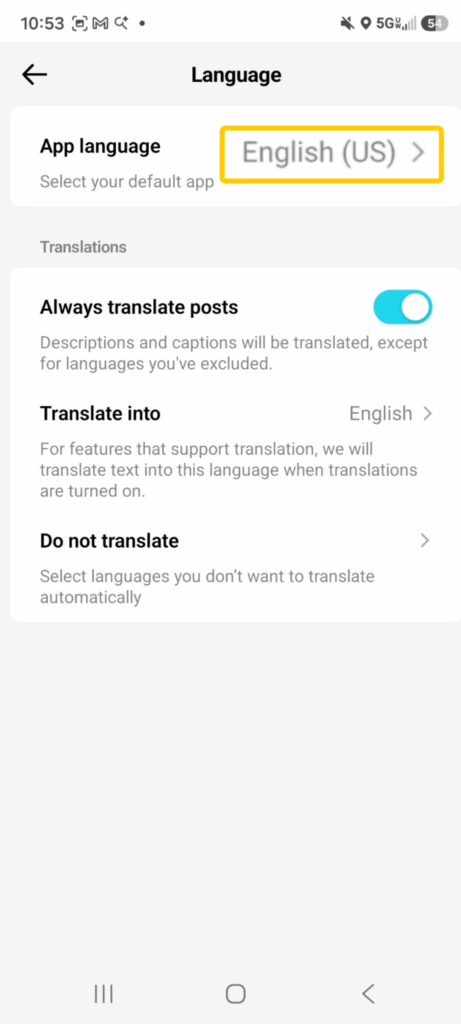
Update Your Language Preferences
TikTok pays close attention to the languages you use inside the app. Your preferred language helps shape the videos, captions, hashtags, creators, and trends that appear on your feed. If you want to explore content from another country, updating your language settings can help point TikTok in the right direction.
- Open TikTok, tap your profile icon, then open the menu in the top-right corner.
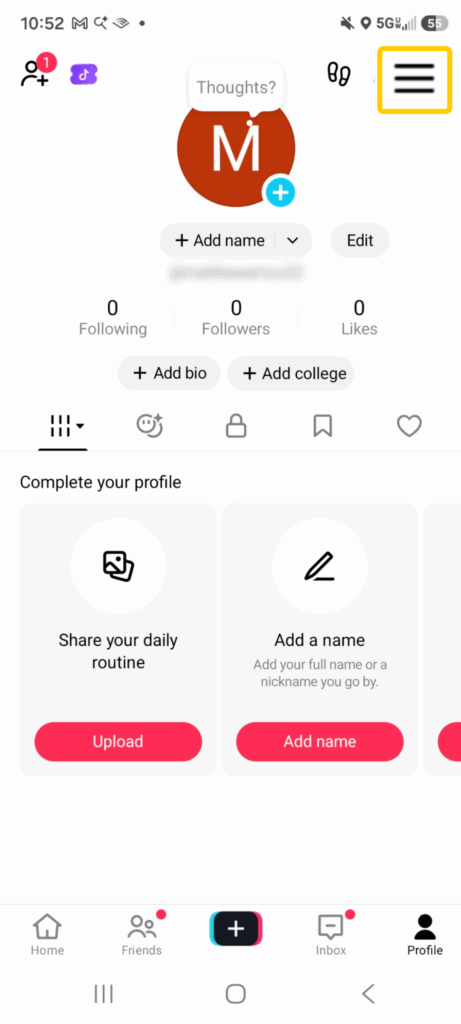
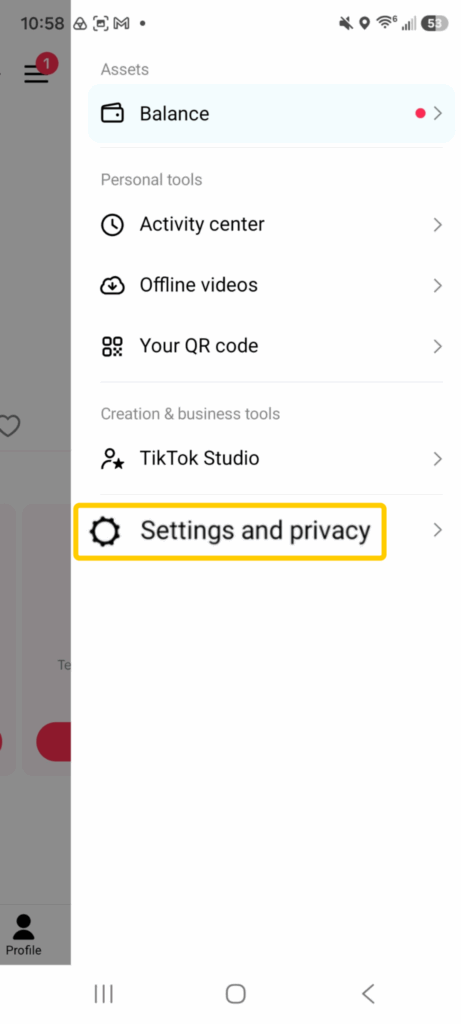
- Go to Settings and privacy.
- Tap Language.
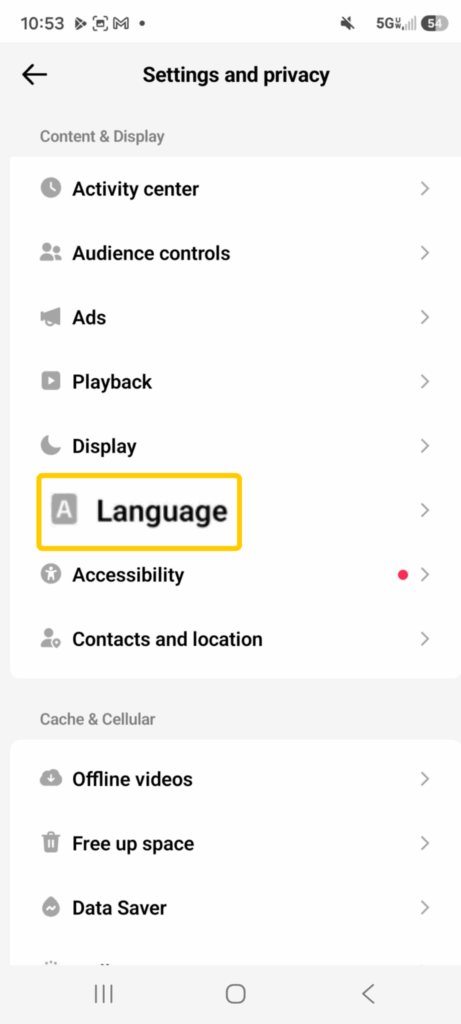
- Add or prioritize the language you want TikTok to recommend more content from.
Use TikTok’s Algorithm to Refresh Your Regional Feed
TikTok’s algorithm pays attention to almost everything you do in the app. The creators you follow, the hashtags you search for, the videos you watch all the way through, and even the comments you leave help TikTok figure out what kind of content belongs on your For You Page. If you want to shift your feed toward another country or city, you need to start giving the algorithm new location clues.
A good place to start is by following creators from your target region. If you recently moved to Canada, for example, following Canadian creators, local businesses, sports pages, travel accounts, and lifestyle influencers can help TikTok understand that your interests have changed. Creators can also use this trick to study regional trends, discover popular sounds, and learn what type of content audiences in that market actually engage with.
Clear Your TikTok Cache
TikTok stores temporary files called cache data to help the app load faster and remember parts of your activity. Over time, this cached data can include old recommendation signals tied to your previous location, viewing habits, searches, and interactions. Clearing your TikTok cache can help refresh the app and reduce the influence of outdated content patterns.
This can be useful for both viewers and creators trying to shift their TikTok experience toward another region. If your feed keeps showing trends, creators, or recommendations from the wrong country, clearing the cache may help TikTok process your newer location signals more effectively. It’s not a magic reset button, but it can give your algorithm a little nudge in the right direction. You find the Clear Cache action under Settings and privacy > Free Up Space.
Update Your Device Location Settings
Your phone’s region, timezone, and location settings can influence the type of content TikTok recommends. If your device still shows your old country or timezone, TikTok may continue pushing trends, creators, and videos from that region even after you move or travel. Updating these settings helps reinforce the other location signals TikTok uses to understand where you’re based.
Changing your device settings can also affect more than just your FYP. TikTok may start surfacing different trending sounds, local hashtags, regional ads, nearby LIVE content, and country-specific recommendations. For creators, this can make it easier to explore local trends and understand what audiences in a specific region are engaging with.
- Open your phone’s settings.
- Update your device’s region, timezone, and language settings to match your current location.
- Make sure TikTok has permission to access your location if you want the app to use local recommendations more accurately.
Signals TikTok Uses to Determine Your Location
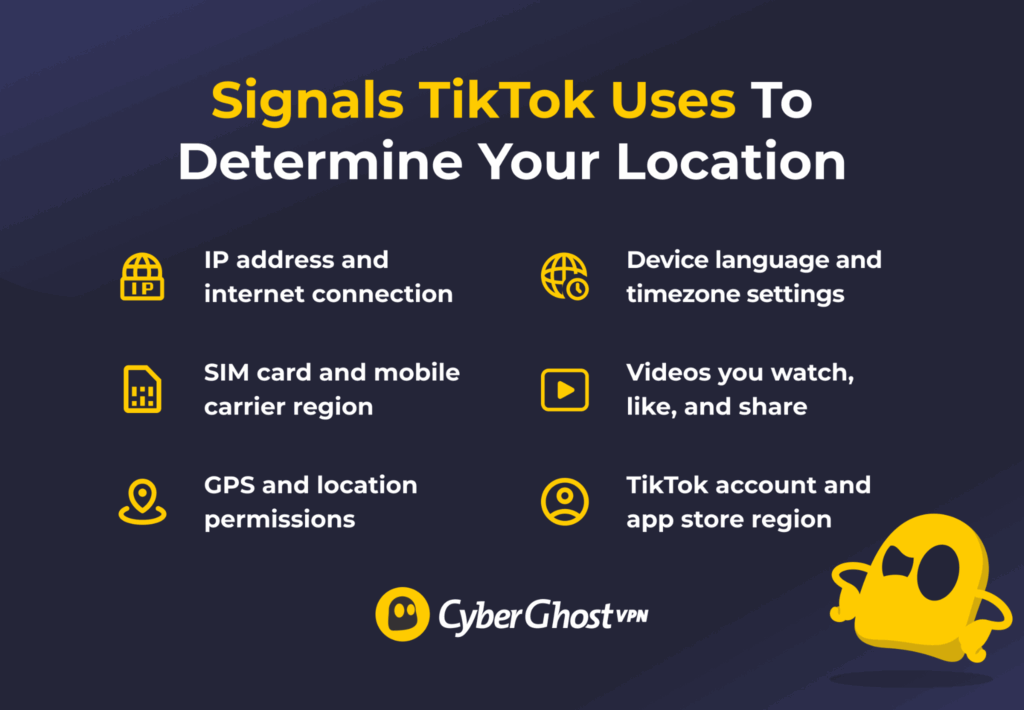
TikTok uses several data points to figure out where you’re located and what kind of content to recommend. The app combines different signals to personalize your For You Page, local trends, ads, hashtags, and creator suggestions. If one signal changes but the others stay the same, TikTok may still keep showing content from your original region.
- Your IP address: It tells TikTok the general location of your internet connection. This is one of the strongest signals TikTok uses to estimate your country and sometimes your general region.
- Your SIM card region: TikTok can detect the country linked to your mobile carrier or SIM card. If your SIM card is registered in Canada, the app may continue recommending Canadian content even while you travel.
- Your device’s GPS location: TikTok can use GPS data to detect your precise location. This helps the app recommend nearby content, local businesses, and regional trends.
- Your phone’s language and region settings: TikTok may look at your device language, timezone, and regional settings to understand where you’re based. A phone set to Spanish and the Mexico City timezone sends a strong regional signal.
- The content you interact with: TikTok tracks the videos you watch, like, comment on, search for, and share. If you regularly engage with creators from a specific country, your feed may slowly shift toward that region’s content.
- Your account and app store region: TikTok may also use the country linked to your App Store or Google Play account, along with the region selected when you created your TikTok account.
Keep Your TikTok Feed Relevant Wherever You Go
Getting TikTok to show more local content doesn’t have to be complicated. Once your settings, activity, and recommendations start matching your current location, your feed can feel much more relevant, fun, and useful for discovering nearby creators and trends.
If you regularly scroll TikTok on shared or public networks, CyberGhost VPN can help add an extra layer of privacy to your connection. It encrypts your internet traffic and adds extra privacy on unsecured Wi-Fi, whether you’re traveling, working remotely, or scrolling TikTok on the go. Better yet, CyberGhost VPN includes a 45-day money-back guarantee (14 days for monthly users), so you can give it a try risk free.
FAQ
How can I change my region on TikTok?
TikTok doesn’t offer a simple region switch in its settings. Instead, it uses signals like your device language, SIM card, IP address, and the content you interact with to determine what to recommend. If you want to change your FYP, try updating your language and region settings, following local creators, and engaging with videos, hashtags, and trends from that location. Over time, TikTok will usually adjust your recommendations based on those signals.
Does using a VPN change your TikTok location?
Not on its own. TikTok uses a combination of signals, including your device settings, SIM card information, app activity, and IP address, to personalize your feed. While a VPN can change the IP address associated with your connection, it’s only one of many factors TikTok considers. Using a VPN alone is unlikely to fully change the region of the content you see. A VPN is better suited to improving your privacy and security online, particularly when using public Wi-Fi.
Why is my TikTok content limited to one region?
TikTok personalizes recommendations using signals such as your location, language settings, and viewing activity. As a result, your feed may feature more creators, trends, sounds, and topics from a particular region. This helps surface content that is likely to be more relevant to local interests and events. Some videos, music, and features may also vary between countries due to licensing agreements, local regulations, or content distribution policies.
Can I switch TikTok regions without creating a new account?
Yes. Updating your device settings, following local creators, and interacting with regional content can gradually help refresh your recommendations without opening a new account. Try updating your device language and region settings, following local creators, and interacting with videos from your current area. Your feed may take some time to fully adjust because TikTok also uses your activity and other location signals to personalize recommendations.
How long does it take TikTok to refresh my feed?
There’s no set timeframe, but you may start noticing changes to your recommendations within hours or days. How quickly your feed adjusts depends on the signals TikTok receives, including your location, language settings, and the content you watch and engage with. The more you interact with local creators, trends, hashtags, and videos from your current area, the faster TikTok learns what content to recommend.
Why is TikTok still showing videos from my old country?
TikTok doesn’t rely on location alone when recommending content. It also considers factors like your viewing history, liked videos, followed accounts, and overall engagement patterns. If you’ve recently moved or started traveling, those older signals can continue influencing your feed until TikTok gathers enough new information to adjust its recommendations. Engaging with local creators, trends, and content can help speed up the process.

Leave a comment