
Facebook Marketplace is great for finding a bargain or selling things you no longer need, but that convenience also creates opportunities for scammers. FTC data for 2025 shows that shopping fraud was the most reported type of social media scam. Scams that started on Facebook accounted for more reported losses than those beginning on any other social platform.1
Scammers often rely on urgency or convincing stories to make an unusual request seem reasonable. Knowing how these tricks work can help you spot warning signs, protect your money and personal information, and walk away before a deal goes wrong.
How Facebook Marketplace Scams Work
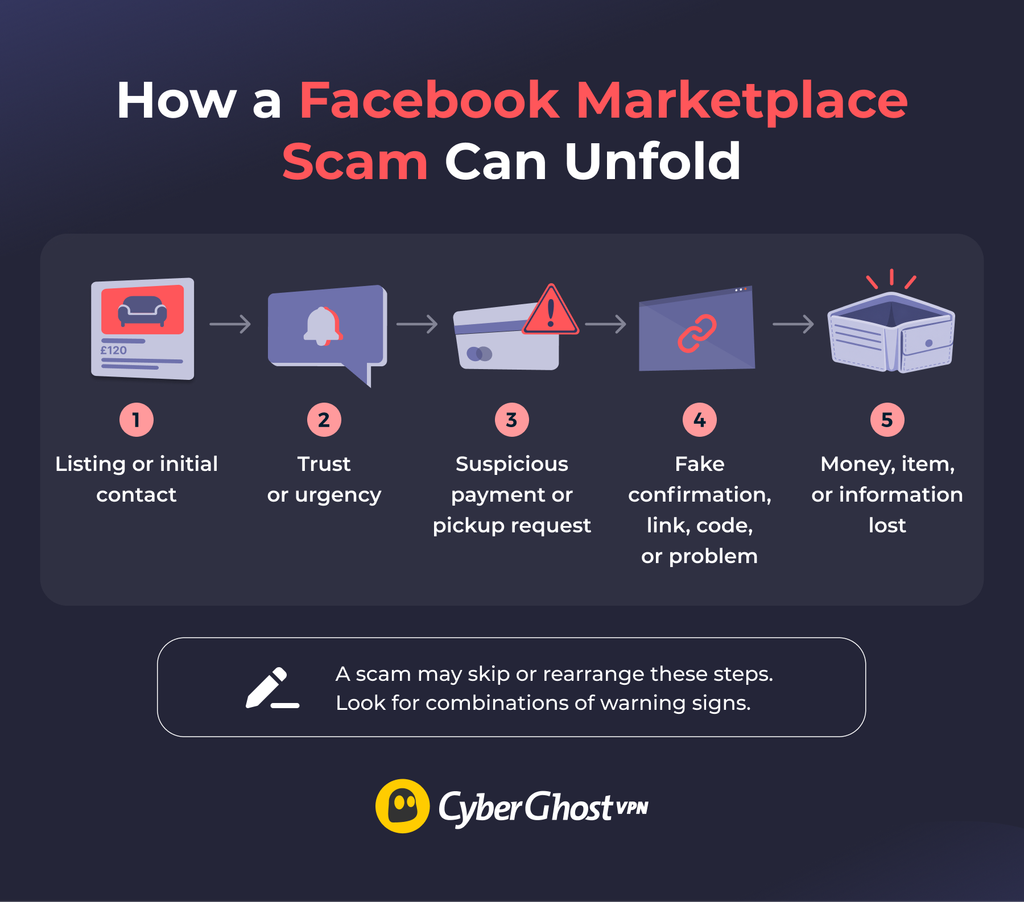
Most Facebook Marketplace scams start with what looks like a normal transaction. You agree on a price, arrange pickup or delivery, and exchange messages with someone you’ve never met. Somewhere along the way, the other person introduces a request that puts your money, personal information, or account at risk.
Scammers might pressure you to make a quick decision, move the conversation away from Messenger, send fake payment confirmations, or suddenly change the arrangements. These tactics can target buyers and sellers.
Unlike a traditional online store, you and the other individual set up the transaction on Marketplace. That means you often have to verify the listing, the payment, and the person you’re dealing with yourself. The warning sign isn’t always a suspicious message. Sometimes it’s a small change to an agreement that seemed reasonable at first.
10 Common Facebook Marketplace Scams
1. Fake Listings and Non-Existent Items
A fake listing advertises an item the seller doesn’t actually have or intend to sell. Scammers may steal photos from genuine listings, copy product descriptions, or advertise desirable items at unusually low prices to attract buyers.
When you ask questions, the seller may avoid giving specific answers and refuse to provide extra photos. Some might claim the item is no longer available or steer you towards a different product, turning the original listing into a bait-and-switch.
2. Fake Payment Confirmation Scams
This scam usually targets sellers. A buyer claims they’ve paid when they haven’t actually made a legitimate payment. They may send a screenshot, email, or message as proof, but the money never reaches your account. The scammer is hoping you’ll hand over or ship the item before you notice.
Some versions use fake emails that appear to come from Zelle, Venmo, or another payment service and claim you need to upgrade your account or pay a fee before receiving the money. A buyer may also show you a convincing payment screen in person and insist the transfer is still processing.
3. Overpayment and Refund Scams
An overpayment scam happens when a buyer appears to send more money than the agreed price and then asks you to return the difference. They may claim the overpayment was a mistake and pressure you to refund the extra money, sometimes through a different payment method.
The catch is that the original payment may be fake, fraudulent, or later reversed. For example, a fake check can appear in your account before the bank discovers it’s worthless. By then, the scammer has received your refund, and you’re left covering the loss.
4. Shipping, Courier, and Tracking Scams
Shipping scams can target either side of the transaction. A buyer may receive nothing or get tracking or delivery details that don’t match the order. Sellers may be told that a courier will collect the item, then receive a request to pay an unexpected insurance or “verification” fee first.
Someone saying their relative or courier will collect an item isn’t automatically suspicious. The suspicious part is when a straightforward arrangement suddenly involves extra payments, pressure to act quickly, or instructions that keep changing.
5. Deposit Scams for Cars, Rentals, and High-Value Items
Scammers advertise desirable cars, rental properties, electronics, or other expensive items and demand a deposit before you’ve had a chance to verify the listing. They may claim several people are interested or that the offer will disappear unless you send money immediately.
The listing may use stolen photos, and the person requesting payment may not own the item or have any authority to sell it. Once you’ve paid the deposit, they may disappear, leaving you without the item or money.
6. Phishing Links and QR Code Scams
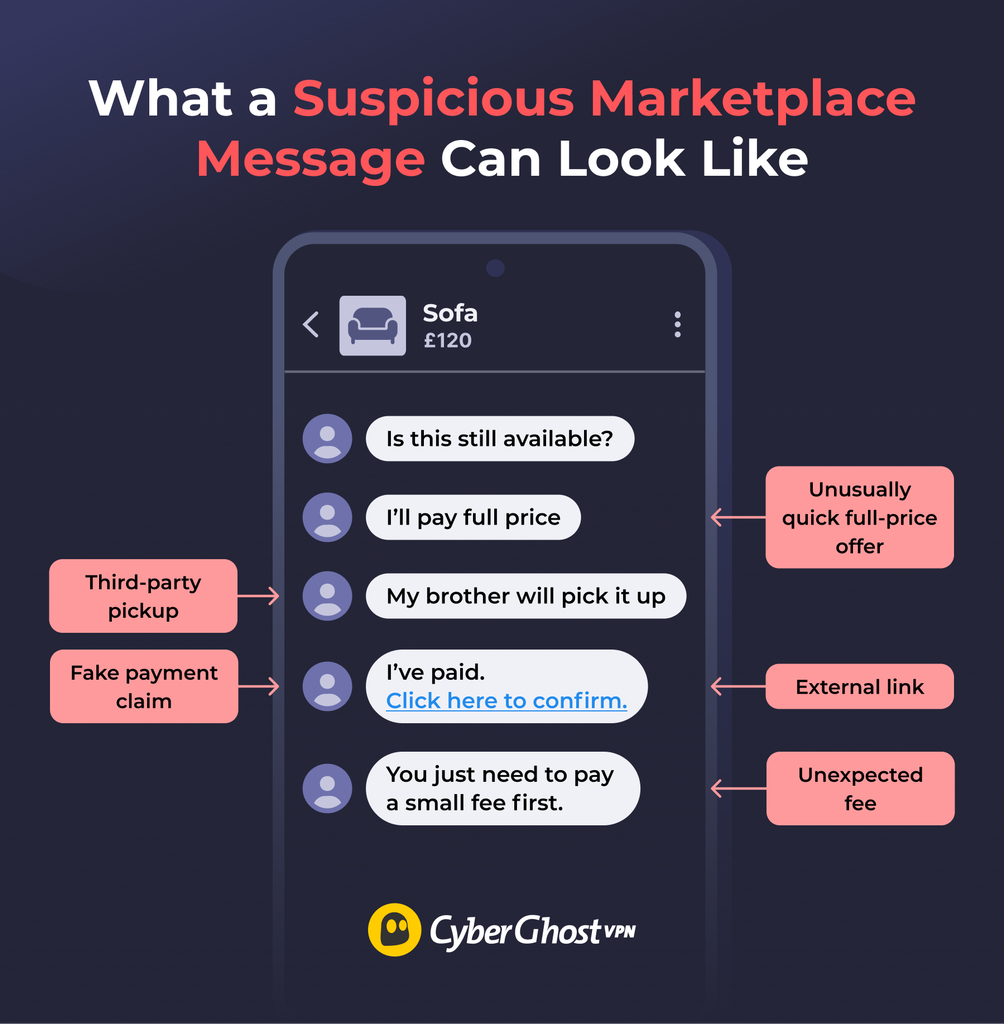
A Marketplace conversation may include a link asking you to “confirm your payment” or “verify your account.” The page can imitate Facebook, a payment service, or a courier and ask for login or payment details. The web address may also use a misspelling or extra characters that are easy to overlook at a glance.
Some scammers use QR codes instead of clickable links. Scanning the code can take you to the same kind of fraudulent website, but the destination may be less obvious before you open it.
7. Verification Code and Phone Number Scams
A buyer may ask for your phone number, claiming they need it to verify you’re a real person. Soon after, a verification code arrives, and they ask you to share it to complete the supposed identity check.
One common version involves Google Voice. The scammer enters your phone number while setting up a Google Voice number, then tries to trick you into sharing the code needed to complete the process. If successful, they may be able to link a Google Voice number to your phone number and use it for further scams.
Other versions target account security codes, potentially allowing scammers to access accounts protected by SMS verification. The key warning sign is someone asking you to share a code sent to your phone.
8. Counterfeit, Stolen, or Faulty Item Scams
In this type of scam, the seller sends an item — but it’s not what you expected. An item may look genuine in a listing and turn out to be counterfeit, stolen, damaged, or completely different from the description. Electronic devices may be advertised as working but could arrive damaged or faulty.
Scammers may use misleading photos, conceal defects, or make false claims about an item’s authenticity or ownership. Electronics, designer goods, and other expensive products can be particularly difficult to assess from listing photos alone.
9. Fake or Compromised Buyer and Seller Profiles
Scammers may create fake Facebook profiles or take over legitimate accounts to appear trustworthy. A fake profile might have generic photos, little Marketplace activity, or details that don’t match what the person tells you. However, a new account or limited profile information isn’t a sign of fraud.
Compromised accounts can be harder to spot because they may have years of activity, genuine photos, and established connections. A scammer using one of these accounts can appear more credible than someone contacting you from a new profile.
10. Fake Refund, Non-Delivery, or Chargeback Claims
Some scams happen after the seller hands over the item. A buyer may claim it never arrived or arrived damaged, then push for a refund before you’ve had time to check what happened. They may also open a dispute or chargeback after receiving the item and falsely claim it never arrived or wasn’t as described. This can be especially difficult when there’s little evidence of the delivery process.
How to Spot a Facebook Marketplace Scammer
You can often spot potential scams by looking at how several behaviors fit together. One unusual request can have an innocent explanation, so pay attention to the overall conversation. Several red flags appearing together are a much stronger reason to stop and reassess the deal.
| Suspicious Buyer Behavior | Suspicious Seller Behavior |
| Sends payment screenshots but pressures you to release the item before you can confirm payment | Advertises an item at an unusually low price and pushes for an immediate deposit |
| Asks you to share a verification code to prove your identity | Avoids straightforward questions about the item |
| Tries to move the conversation away from Messenger to an unfamiliar platform | Refuses reasonable requests for recent photos extra details |
| Introduces unexpected courier fees or changes collection arrangements | Claims several other buyers are interested to pressure you to reserve the item |
| Changes the agreed payment method or asks you to refund an apparent overpayment | Changes payment, collection, or delivery arrangements after you’ve agreed on the terms |
Pay particular attention to how the conversation changes. A genuine transaction usually becomes clearer as you agree on details such as payment and handover. A suspicious one often becomes difficult to explain and includes inconsistent instructions or requests for information that doesn’t seem necessary for the transaction. You may be pressured to complete the deal immediately.
How to Avoid Facebook Marketplace Scams
You don’t need to treat every buyer or seller as suspicious. A few consistent habits can make it much harder for a scammer to steer the transaction:
- Keep early conversations on Facebook or Messenger: Avoid moving to another platform unless there’s a good reason to do so.
- Check the person and listing before committing: Look over the profile, Marketplace activity, photos, description, and other listings. The goal is to see whether the overall story makes sense, rather than treat one detail as proof of a scam. A reverse image search can help you spot photos copied from other listings.
- Verify payments independently: Check your bank or payment app before releasing an item. Don’t rely on screenshots, emails, or a buyer’s payment confirmation screen. Be wary of messages claiming you must pay a fee or upgrade your account to receive money.
- Be careful with deposits and unexpected refunds: Avoid sending deposits for items, vehicles, or rentals you haven’t been able to verify. If a buyer appears to overpay, contact your bank or payment provider before returning any money. A payment showing in your account doesn’t always mean it’s final.
- Check shipping and collection arrangements: Agree on delivery or pickup details in advance. Be suspicious of unexpected courier fees, unfamiliar tracking links, or sudden changes to the agreed arrangements. Use legitimate shipping services and keep tracking information when sending items.
- Inspect expensive items before paying: Check the condition, model number, and authenticity of electronics, designer goods, and other high-value purchases where possible. Ask for proof of purchase or ownership when appropriate, and test electronics before completing an in-person sale.
- Protect your personal information: Only share the contact details needed for the transaction and avoid giving out your home address unnecessarily. Never share passwords or verification codes. If someone sends a link or QR code to verify your account, payment, or delivery, open the relevant service rather than using the link they provided.
- Choose a safe place to meet: Use a busy, well-lit public location where practical. Tell someone where you’re going and be wary of last-minute location changes.
- Keep a record of the transaction: Save all relevant messages and payment confirmations, receipts, photos, and shipping details. For expensive items, document their condition before handing them over. These records may help if someone later makes a false refund or non-delivery claim.
- Walk away if the details don’t add up: Reconsider the deal if the person makes repeated changes to payment or delivery, provides inconsistent explanations, or pressures you to act quickly.
What to Do After a Facebook Marketplace Scam
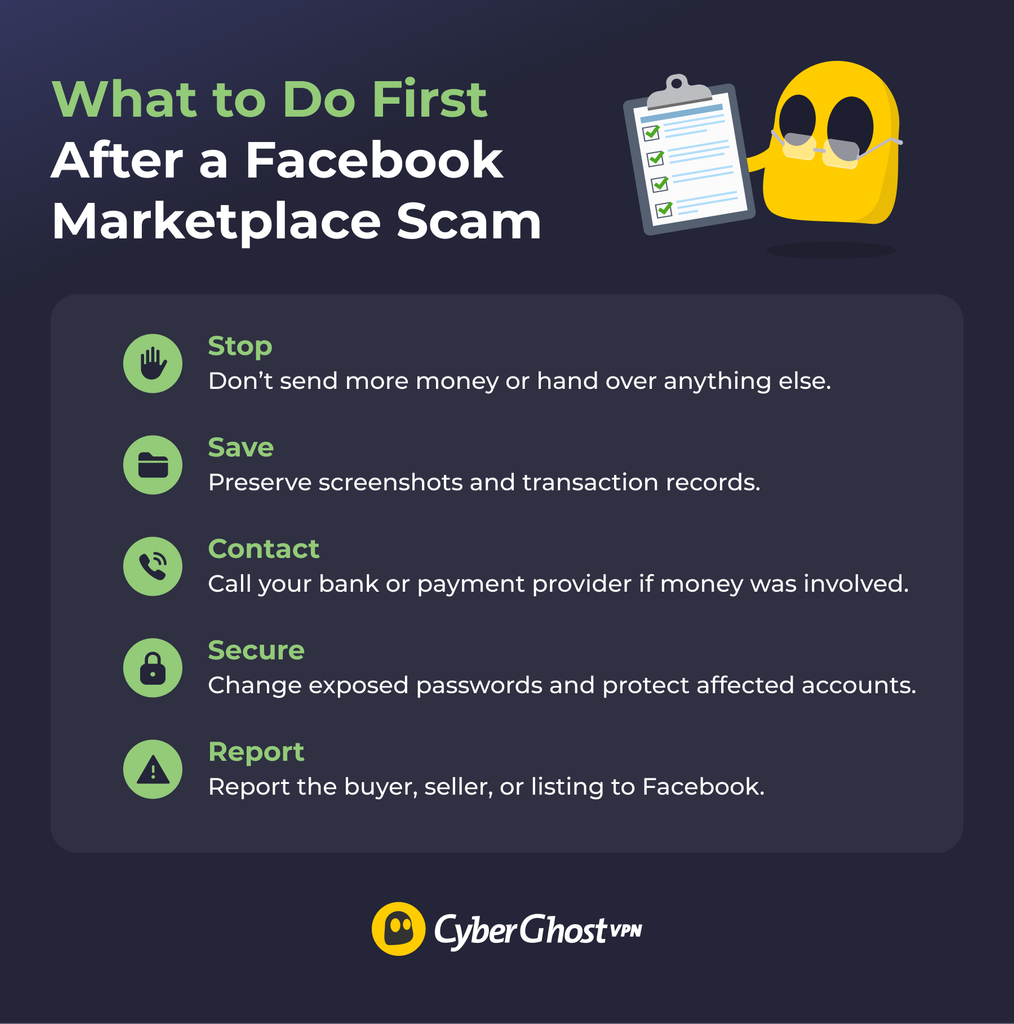
What you do next depends on whether you’ve lost money, shared sensitive information, or handed over an item:
- Stop the transaction: Don’t send more money, follow new payment instructions, or hand over anything else. Avoid further negotiations with the suspected scammer.
- Save the evidence: Keep screenshots of the listing, profile, messages, receipts, transaction IDs, emails, phone numbers, and tracking details. Do this before you block the account or delete anything.
- Contact your bank or payment provider: Explain the situation and ask whether the payment can be reversed or disputed. If you paid through Facebook checkout, check whether Purchase Protection applies to the transaction.
- Secure any affected accounts: Change compromised or reused passwords, review recent activity, and enable two-factor authentication where available. If you shared a verification code, secure the account connected to it as soon as possible.
- Report the buyer, seller, or listing to Facebook: Marketplace has different reporting options for buyers, sellers, listings, and conversations, so use the one that matches what happened.
- Block the account: Once you’ve preserved the evidence and submitted any necessary reports, blocking the person can stop further contact.
- Consider reporting serious incidents to local authorities: This may be appropriate if the scam involves theft, threats, a substantial financial loss, or concerns about your physical safety.
Stay Safer When Buying or Selling on Facebook Marketplace
Facebook Marketplace scams can take plenty of forms, from fake listings and payment messages to courier tricks and phishing links. A good habit is to stay in control of the transaction and question anything that suddenly makes a simple deal more complicated.
Good e-commerce practices are the first line of defense. CyberGhost VPN can add another layer of protection while you browse listings or communicate with buyers and sellers, especially on unfamiliar Wi-Fi. It encrypts your internet traffic, while Content Blocker helps prevent connections to known malicious domains.
Careful Marketplace habits and good online security can go a long way when you’re dealing with someone you’ve never met.
FAQs
What are the most common Facebook Marketplace scams?
Common Facebook Marketplace scams include fake listings, fake payment confirmations, overpayment tricks, shipping or courier scams, deposit requests, phishing links, verification-code scams, and counterfeit goods. Both buyers and sellers can be targeted, so it’s worth learning the warning signs before money or an item changes hands.
How can I tell if a Facebook Marketplace buyer is a scammer?
To tell if a Facebook Marketplace buyer is a scammer, watch for several suspicious behaviors appearing together. A buyer may show instant interest, ask a few useful questions, ask you to talk off Messenger, send payment screenshots, request a verification code, or introduce a relative or courier while the payment arrangements become complicated.
Is Facebook Marketplace safe to use?
Yes, Facebook Marketplace can be safe when you take sensible precautions. Check who you’re dealing with, verify payments yourself, inspect items where possible, and avoid rushing. Checkout, shipping, payments, and Purchase Protection aren’t available for every transaction or in every location.
Should I give a Facebook Marketplace buyer my phone number or address?
No, you don’t need to share your phone number or address on Facebook Marketplace because someone asks. Only share the contact and meetup details needed to complete the transaction. Never share passwords or verification codes.
What should I do if I get scammed on Facebook Marketplace?
If you were scammed on Facebook, stop sending money, save the listing and messages, and contact your bank or payment provider if the scam involved money. Secure any affected accounts, report the scam to Facebook, and contact local authorities if there’s theft, a serious financial loss, threats, or a safety concern.
How do I report a scam on Facebook Marketplace?
To report a scam on Facebook Marketplace, use Facebook’s reporting option. You can report a suspicious buyer, seller, or listing from Marketplace or the relevant conversation. Save screenshots and transaction details first, so you still have evidence if the account or listing disappears.
Can I get my money back after a Facebook Marketplace scam?
Recouping your money after a Facebook Marketplace scam depends on how you paid and other details of the interaction. Contact your bank, card issuer, or payment provider as soon as possible and ask about disputes or reversals.
Some eligible purchases made with Facebook checkout may have Purchase Protection. In-person transactions using cash or other person-to-person payment methods aren’t eligible for Facebook Purchase Protection, although your bank or payment provider may have separate recovery options.

Leave a comment