
SSTP VPNs were once a go-to option for Windows users who needed a secure and reliable way to protect their online activity. Because these VPNs rely on Microsoft’s built-in SSTP technology, they became popular for their strong encryption, smooth Windows integration, and ability to work more reliably on some networks.
The VPN world has changed a lot since then. Today, many VPNs use newer protocols like WireGuard® and OpenVPN because they offer faster speeds, better transparency, and wider device support. So where does that leave SSTP VPNs? Are they too old to rely on, or do they still have a purpose? In the next sections, we’ll break down how SSTP VPNs work, when they make sense to use, and how they compare to the VPN options most people rely on now.
What Is SSTP (Secure Socket Tunneling Protocol)?
SSTP is a VPN protocol, which means it’s one of the methods a VPN uses to create and manage a secure connection between a device and a VPN server. It defines how data is protected, transmitted, and authenticated during a VPN session.
Microsoft introduced SSTP in 2007 with Windows Vista to provide Windows users with a simple and secure way to connect to VPNs. It uses SSL/TLS encryption, the same type of protection that keeps your browser safe when visiting HTTPS websites. This encryption prevents third parties from reading your data while it travels across the internet.
Because SSTP is built directly into Windows, it works without additional software or complex setup. Some non-Windows systems, including Linux, macOS, and Android, can also use SSTP through third-party tools, but support on those platforms isn’t as complete or consistent.
How Does an SSTP VPN Work?
When you connect through an SSTP VPN, your traffic is sent through an encrypted SSL/TLS tunnel. This process conceals the contents of the transmitted data and can resemble HTTPS traffic on the network. Let’s look at what happens step-by-step:
- Connection request: When a VPN connection is initiated, your device sends a request to the VPN server to establish a secure SSTP tunnel. This goes through port 443, the same port used for HTTPS traffic.
- Secure handshake: The VPN client (the app on your device) and the VPN server perform what’s called a handshake. During the TLS handshake, the server presents a certificate, and the client and server agree on encryption settings and session keys. This helps verify the server and sets the encryption rules. From this point on, SSTP carries data inside an SSL/TLS-encrypted tunnel, which helps protect it from interception on the network.
- PPP encapsulation: SSTP wraps the traffic in PPP (Point-to-Point Protocol) frames and carries those frames through the TLS tunnel. PPP is also where user authentication is handled (for example, via EAP).
- Data tunneling: Every piece of information you send (like loading a website or sending a message) now travels through this encrypted tunnel to the VPN server. The server decrypts it (makes it readable again) and forwards it to its destination. The same happens with the data sent by websites back to your device.
Your data is protected inside an encrypted tunnel, which makes it difficult for anyone on the network to see what you’re doing online or intercept your information. At the same time, SSTP traffic can look similar to HTTPS traffic, so it can often work on networks where some VPN protocols struggle. That can make SSTP a practical option on some managed or filtered connections, including workplaces, schools, or hotels.
How Secure Is SSTP?
SSTP is considered a very secure VPN protocol because it uses SSL/TLS encryption. This is the same technology that protects HTTPS websites. When you visit a site with a padlock icon in your browser, it means HTTPS is using SSL/TLS in the background to keep your connection private. It prevents others from reading your messages or stealing sensitive data like passwords or payment details. SSTP applies that same kind of protection to all internet traffic on your device, not just websites.
The biggest issue with SSTP is that it’s closed-source and owned by Microsoft. Although the protocol is maintained and updated within Windows, independent researchers can’t audit the code or verify how quickly vulnerabilities are addressed. This makes SSTP less transparent than open-source protocols like WireGuard® and OpenVPN, which can be openly inspected and tested by the security community.
SSTP Pros and Cons
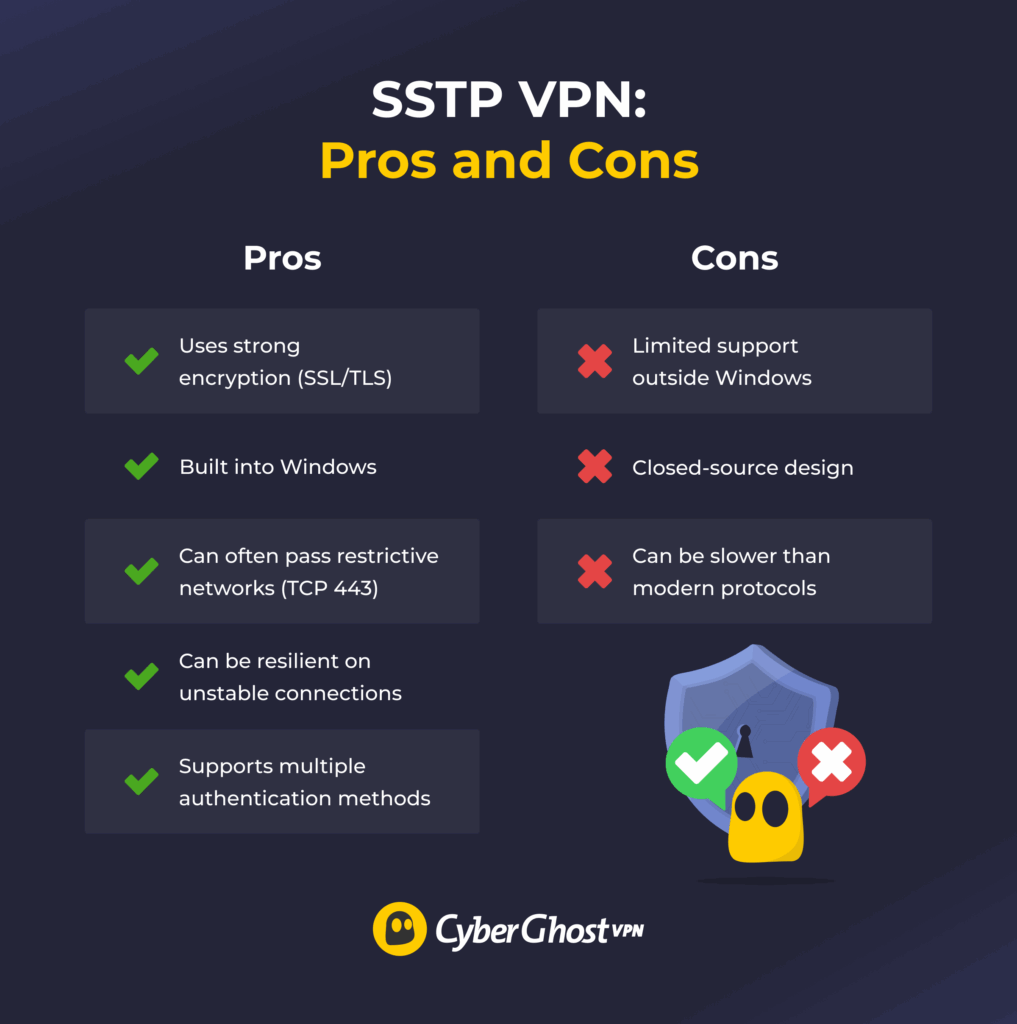
Advantages of SSTP
- Uses strong encryption: Relies on SSL/TLS encryption to keep data private on untrusted networks and hidden away from prying eyes.
- Integrates with Windows: Works out of the box on Windows. You don’t need any extra drivers or apps to set up an SSTP VPN connection.
- Passes through firewalls: Rides over HTTPS, so some networks are less likely to interfere with the connection.
- Handles unstable networks well: SSTP can keep the connection going even when the network is shaky. Because it runs over TCP, it can be more tolerant of packet loss, which may help reduce disconnects, but it can be slower.
- Supports flexible sign-in methods: Works with username-password logins, as well as certificates, which makes it suitable for personal and enterprise setups.
Downsides of SSTP
- Limited OS support: Offers excellent support on Windows but comes with limited, manual, third-party options on Android, Linux, iOS, and macOS.
- Remains closed-source: Prevents independent audits, which raises transparency concerns compared to newer and more modern VPN protocols.
- Runs slower than newer protocols: Uses older, heavier encryption and relies on TCP, which adds extra overhead. Newer protocols like WireGuard® are designed to be lighter and faster.
SSTP vs Other VPN Protocols
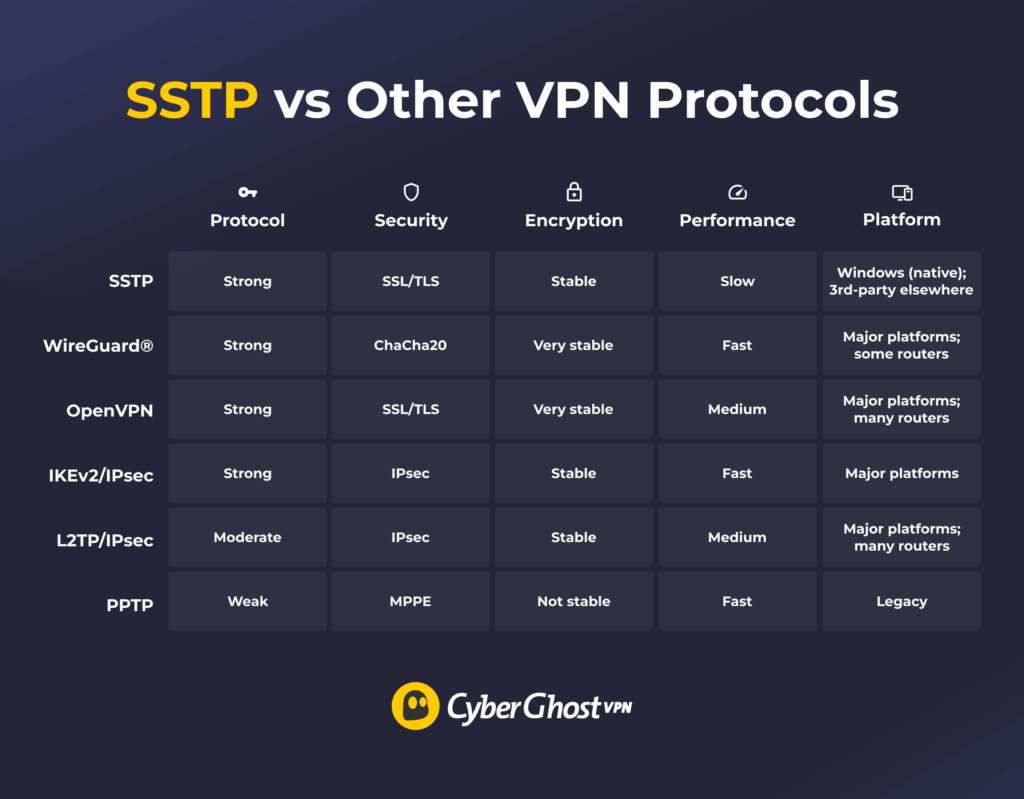
SSTP vs WireGuard®
WireGuard® is a newer VPN protocol that has quickly become an industry favorite. It uses modern cryptography, has a lightweight design, and provides fast speeds. SSTP, while still secure, is older and typically runs slower than modern protocols. Another benefit of WireGuard® is that it’s available on all major operating systems, and it’s supported by most of today’s VPN providers.
Unlike SSTP’s closed-source code, WireGuard® is open-source and easy to audit. Its inner workings can be checked by cybersecurity professionals, which means it’s highly transparent and more suitable for privacy-sensitive tasks. However, because it’s so new, it may not yet be supported on all legacy (older) systems.
SSTP vs OpenVPN
SSTP and OpenVPN are both secure, stable, and built around SSL/TLS encryption. However, OpenVPN is open-source, meaning its code is public and constantly reviewed by security experts. SSTP is owned by Microsoft, so only Microsoft controls its updates and internal workings.
SSTP can offer stable performance, but it’s generally slower than modern VPN protocols due to its older, more resource-heavy design. OpenVPN can be fast, but speeds vary by configuration and server distance, and it’s often slower than WireGuard®. Overall, OpenVPN offers better transparency, broader device support, and more consistent optimization thanks to its open-source development.
SSTP vs IKEv2/IPsec
IKEv2/IPsec and SSTP both offer strong encryption and stable connections, but they excel in different areas. IKEv2/IPsec is built for speed and mobility, and it quickly reconnects when you switch between networks.
SSTP doesn’t handle these switches as well because it runs over TCP and needs to re-establish the tunnel when the connection changes. It’s secure, but it usually performs slower than IKEv2/IPsec. Another drawback is that SSTP works best on Windows, while IKEv2/IPsec is supported across all major platforms.
SSTP vs L2TP/IPsec
L2TP/IPsec is an older protocol that uses double encapsulation, so it tunnels and encrypts your traffic in separate steps. That extra overhead can make it slower than SSTP and less efficient on some networks. SSTP is typically faster and can work more consistently across a range of connections.
Another benefit is L2TP/IPsec’s broad compatibility. It can be easily set up on a wide range of devices running across all of today’s mainstream operating systems. However, due to its age and its downsides compared to modern VPN protocols, it’s gradually being phased out.
SSTP vs PPTP
PPTP (Point-to-Point Tunneling Protocol) was one of the earlier VPN protocols. Today, it’s considered insecure and outdated. Its encryption can be cracked with modern tools, making it unsuitable for privacy protection. That’s why today’s VPN providers rarely still support this protocol.
Microsoft introduced SSTP as a more secure successor to PPTP. Although it’s not the most versatile protocol available, it offers significantly stronger protection. PPTP may still offer faster speeds due to its simplicity, but that speed comes at the cost of almost no security.
Bottom Line: SSTP Still Works, But It’s Showing Its Age
SSTP is still a dependable VPN option for Windows users, and its ability to work on restrictive networks remains a clear advantage. But its older design, slower performance, limited transparency, and weaker support outside Windows make it less appealing than modern alternatives.
Newer VPN protocols like OpenVPN, WireGuard®, and IKEv2/IPsec offer faster speeds, broader compatibility, and more visibility into how they handle security. CyberGhost VPN supports these advanced protocols across all major platforms, giving users faster speeds, stronger encryption, and more reliable privacy protection. With a 45-day money-back guarantee, you’ll have plenty of time to try them out to see if they work for you.
FAQ
What is SSTP, and how does it work in VPNs?
SSTP (Secure Socket Tunneling Protocol) is a VPN protocol developed by Microsoft. It creates a secure, encrypted tunnel between a device and a VPN server using SSL/TLS encryption. That same technology protects HTTPS websites inside web browsers. It can often work through firewalls that allow HTTPS traffic.
Is SSTP more secure than PPTP or L2TP/IPsec?
Yes, SSTP is more secure than PPTP and L2TP/IPsec. PPTP uses heavily outdated and vulnerable encryption, while L2TP/IPsec offers reliable security but can struggle with firewalls. That said, newer protocols like OpenVPN and WireGuard® are now preferred for modern VPNs.
Can SSTP VPNs work through firewalls?
SSTP is designed to work through firewalls. Because it runs on port 443 (the same port used for HTTPS traffic), most firewalls treat SSTP connections as regular secure web traffic. This can help SSTP work more reliably on some managed networks.
Is SSTP supported on non-Windows operating systems?
Limited support for SSTP exists for non-Windows operating systems, including Linux, macOS, and Android. However, it often requires manual setup or third-party tools. SSTP was built primarily for Windows and is fully integrated into that system.
What are the pros and cons of using an SSTP VPN?
The main advantages of SSTP include strong encryption, reliable performance on Windows, and high firewall resistance. Its drawbacks include limited support on non-Windows devices, slower speeds compared to modern VPN protocols (OpenVPN and WireGuard®), and its closed-source design.
How to connect to an SSTP VPN?
On Windows, SSTP is built into the operating system’s native VPN client (Settings > Network & Internet > VPN). You can set up an SSTP VPN by entering the VPN server’s address, selecting SSTP as the protocol, and authenticating with login credentials. Other operating systems require third-party software to establish an SSTP connection.
Is SSL the same as SSTP?
No, SSL isn’t the same as SSTP. SSL (Secure Sockets Layer) is a security protocol for encrypting data transmitted over the web. SSTP (Secure Socket Tunneling Protocol) uses SSL/TLS to create an encrypted VPN tunnel. In other words, SSL/TLS is part of the technology that SSTP relies on, not the same thing.
Which port does SSTP use?
SSTP uses TCP port 443, which is the same port used for communication with HTTPS sites in your web browser. This can help it work on some networks that allow standard HTTPS traffic, such as workplaces and public Wi-Fi.
Does SSTP provide encryption by default?
Yes, SSTP automatically encrypts all data transmitted between the device and VPN server using SSL/TLS encryption. This ensures that data remains private and secure, even when transmitted across public or unsecured networks

Leave a comment