
Email-based impersonation scams, commonly called phishing, have been a documented threat since the early days of the internet. As people become more tech-literate, they might get better at noticing phishing emails — but they might begin to overlook other potential points of attack. That’s why scammers can expand their repertoire to include phone calls and text messages.
This leads to the rise of vishing (voice phishing) and smishing (SMS phishing). Though the words may sound silly, these scamming methods can be very serious. These channels can feel more personal. Additionally, security software is less likely to block them and people may be less cautious on them than when checking email.
Here we lay out the differences between vishing, smishing, and traditional email-based phishing, as well as a new method called quishing involving QR codes. Then, we go over ways to protect yourself from phishing attacks in general and specific subtypes individually.
Differences Between Phishing, Vishing, Smishing, and Quishing
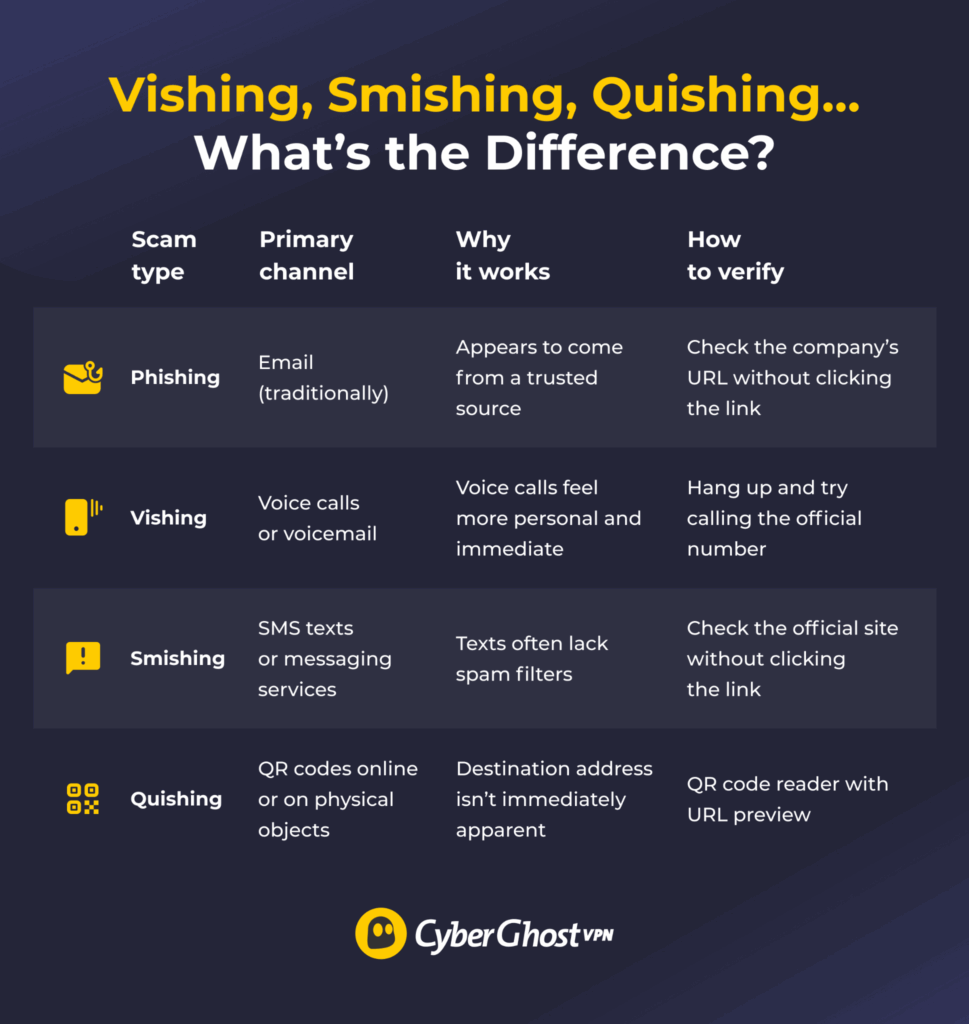
At their core, these fraud methods work by believably impersonating a trustworthy source, often trying to create a false sense of urgency. They mainly differ by the primary channel of attack, which leads to other recognizable differences.
Phishing
Phishing is the original form of this kind of impersonation fraud, and it usually happens through email. A scammer pretends to represent a legitimate organization, such as a bank or government body, to trick you into revealing sensitive information or performing a harmful action. The goal is to get your personal details, such as ID or account information, or to install harmful software on your device.
How to Recognize Phishing
- Impersonal and generic: Addressing you with a neutral term such as “Customer” or “Client” when you expect the service to know your name.
- Sense of urgency: Claiming that you need to act immediately or else something bad will happen.
- Low-quality text: Showing a lot of grammatical or syntax errors, odd character replacements, typos, or nonsensical text.
Vishing
Vishing (“voice phishing”) is a phishing method carried out through the telephone, using either live calls or recorded voicemail messages. The caller will pretend to be a trusted authority, such as a bank employee, tax agency representative, or tech support agent. Then, they try to convince you to give over personal information, install a malicious app, or visit a malicious website.
Vishing scammers use a variety of techniques to sound more convincing. For example, they could follow known call scripts and use background noise that sounds like a real call center. They might also use AI technology to impersonate someone’s voice, like your boss or a family member. Some vishing attackers even relegate the speaking to an AI bot trained to sound believable.
How to Recognize Vishing
- Invasive questions: Asking for identification, like an ID number or Social Security number, or personal details like your full name or your family members’ names.
- Authoritative voice: Speaking in a stern voice, insisting that you act immediately, or threatening legal action.
- Fake call transfers: Trying to keep you on the line so you don’t go and call the company the scammer is pretending to represent.
Smishing
Smishing (“SMS phishing”) occurs over text messages or a messaging app. These messages use similar tactics as phishing emails. For example, they might contain package delivery alerts, warnings threatening account suspension, and similar requests to confirm personal details. They also usually contain a link to a webpage that leads to a malicious website.
How to Recognize Smishing
- Mismatched numbers: Claiming to be from a company or service whose number you already have saved.
- Unusual sender number: Using a foreign telephone country code or an unfamiliar number format.
- Unrecognizable link URLs: Hiding where the link exactly leads with a link shortening or redirecting service.
Quishing
Quishing (“QR code phishing”) is a more recently developed phishing method. It uses QR codes to direct people to malicious websites. Scammers share these fake QR codes through emails, ads, social media, or physical objects like printed flyers, posters, and stickers.
How to Recognize Quishing
- Physical tampering: Looks like a QR code sticker pasted over another legitimate code on a poster, flyer, or billboard.
- Mistakes in URL: Leads to a site with a nonsensical URL or a misspelling of a known site (like “cybergh0stvpn.com.xyz”).
- Redirect chain: Goes to a site that redirects multiple times before landing on the malicious destination site.
What to Do If You’re Targeted by a Vishing or Smishing Attack
If you clicked through a phishing email, followed a smishing link, scanned a quishing code, or followed a vishing scammer’s instructions, don’t panic. Here’s what you should do:
- Stop all communication: Responding to one of these phishing methods confirms that your number or email address is active, which can lead to more phishing attempts.
- Verify through official channels: Check the alleged source’s official website or phone number. Don’t use the links provided in the phishing email or text.
- Report the incident: Contact the appropriate authority for reporting fraud incidents, if your jurisdiction has one.
- Contact your bank: Inform your bank or credit card provider if you shared any details about your account. They can keep a closer look on your account and prevent unauthorized money transfers.
- Monitor your account: Pay attention to any suspicious charges to your account, no matter how small. Some phishing scammers might wait until you forget they targeted you before trying to take advantage.
- Run a security scan: Check your device for malware. Phishing links or quishing URLs can download malicious software to your device.
We also have a more detailed guide on what to do if you’re targeted by a phishing attack, so you can inform yourself preemptively.
How to Protect Yourself from Vishing, Smishing, Phishing & Quishing
You can reduce the likelihood of a phishing attack by adopting more privacy- and security-conscious habits:
- For phishing emails: Use your email service provider’s spam filter. Double-check the exact spelling of company names in emails and links. Don’t download any attachments you didn’t ask for.
- For vishing phone calls: Let unknown callers go to voicemail. Don’t share personal information until you can verify that the caller is legitimate. If your country has a do-not-call registry, registering filters out telemarketing calls so suspicious calls are easier to spot. Enable your phone’s spam filtering if it has such a feature.
- For smishing texts: Treat any link received by text as suspicious. Instead of clicking the link, open your browser and check the company’s real site. Some smartphones have features that move messages from unknown numbers into a separate folder, which makes it harder for smishing to reach you.
- For quishing codes: Inspect the code before scanning. Look for stickers placed over legitimate codes, crooked placement, or other signs of physical tampering. Type the URL manually instead of scanning when possible. If you use a QR code reader, enable the option to show the destination address before following the link.
General Tips
- Turn on multi-factor authentication (MFA): Use an authenticator app instead of SMS where available, as SMS codes are more vulnerable to interception. Deny any unexpected authentication requests.
- Use a password manager: Pick a password manager that can also generate strong, unique passwords. If you follow a phishing link to a fake site, the password manager won’t auto-fill the login credentials, so you can tell the site isn’t legitimate.
- Pay attention to visited sites: Check any site you reach through an unexpected link for any common signs of a malicious site.
- Don’t share sensitive information: Be wary of requests for information that the alleged sender should already have — for example, someone pretending to be from your bank asking for your card or account number.
Phishing, Vishing, Smishing, Quishing: How Worried Should You Be?
Despite the different delivery methods, these scams share the same underlying structure and purpose. Scammers usually aim to create a false sense of urgency to bypass your better judgment. That’s why it’s important to learn the telltale signs of a phishing (or vishing, or smishing) attack, so you can ignore the pressure and stay levelheaded.
The most important step in defending yourself against all types of phishing is to stop and think. Take a moment and look at the information provided. Verify any claims and use the tools you have at your disposal to protect your data. This helps you stay safe against current phishing attacks and will help you as new “-ishing” threats arise.
FAQ
What is the difference between vishing and smishing?
The main difference is the attack vector. Vishing happens over voice calls and voicemail, while smishing happens through SMS texts or other messaging services. Their function is similar, but they have different “advantages” for the scammers. Vishing uses the pressure of real-time communication, while smishing happens over plaintext, which has fewer features that may look suspicious.
What is a vishing attack?
A vishing attack (or voice phishing attack) is a type of impersonation scam where a scammer calls their target, pretending to be a trustworthy authority. They try to coax the target into handing over sensitive information or installing malicious software on their device.
What is a smishing attack?
A smishing attack (or SMS phishing attack) is a type of impersonation scam that’s similar to email-based phishing, except the attack vector is a text message. Much like a phishing email, a smishing message often contains a link to a malicious website.
How can I protect myself from vishing and smishing?
What’s important is that you don’t act rashly. Try to verify the claims the call or message is making. Considering they’re pretending to be a trusted service, find the actual service’s site and contact information. You can also rely on your phone’s built-in security features, specifically spam filters. Many smartphones block calls from known scam numbers or isolate messages from unknown senders by default.
What should I do if I respond to a phishing call or text?
Cease all communication. Ideally, you shouldn’t respond at all. Even if you didn’t give any information away, now the scammers know the number is active. If you shared financial information with the scammer, you should contact your bank and the local anti-fraud authority. This can help prevent the scammer from abusing the information they obtained.
Are vishing and smishing forms of phishing?
In a broader sense, yes. While some sources insist that phishing means email based scams, the term can also refer to these kinds of impersonation fraud. Vishing, smishing, and the newer quishing tend to have common features like pretending to be a trusted service, fostering a sense of urgency, and trying to get you to a malicious website.

Leave a comment