
Most websites today use HTTPS, and for a good reason. It helps keep logins, payments, and messages private and protected from interception when you’re connected to a specific site. Still, HTTPS doesn’t secure your entire connection or hide your activity from the network you’re on.
A VPN fills in those gaps by encrypting everything your device sends and receives. Let’s break down how HTTPS and VPNs work, what each one protects, and when it makes sense to use either one or both together.
How Does HTTPS Work?
HTTPS (Hypertext Transfer Protocol Secure) is the secure version of HTTP, the protocol used to load websites. It uses TLS (Transport Layer Security) encryption to protect the connection between your browser and a website. Any data you send or receive, including logins, messages, and payment details, is scrambled into unreadable code while it’s in transit. That makes it much harder for attackers or network snoopers to intercept or steal your information.
HTTPS also uses digital certificates to verify a website’s identity. These certificates are issued by trusted organizations called Certificate Authorities (CAs). A valid certificate confirms that your browser is communicating with the real website and not an impostor. This verification is what allows the padlock icon to appear in the URL bar.
Key Benefits of HTTPS
- Encrypts site traffic: Protects sensitive data, including logins, messages, passwords, and payment details, from interception.
- Authenticates websites: Confirms you’re connecting to a legitimate platform.
- Prevents tampering: Stops attackers from altering data while it’s in transit.
- Boosts trust: Displays the padlock icon that signals a secure connection.
How Does a VPN Work?
A VPN (virtual private network) is an app you install on your devices. When it’s active, it encrypts all internet traffic leaving your gadgets and sends it through a secure VPN server. This hides your activity from internet service providers, network owners, and others on the same Wi-Fi network.
The VPN server also replaces your IP address with its own. An IP address identifies your device online and reveals your approximate geographical location. By replacing it, the VPN makes it harder for others to track you online. It also makes it appear as if you’re connecting from the server’s location.
Many VPNs include extra security tools, such as data leak protection, ad and tracker blocking, and an automatic kill switch. These features help prevent accidental data exposure, strengthen your privacy, and keep your browsing safer.
Key Benefits of Using a VPN
- Encrypts all your traffic: Protects all data leaving your device, not just current browser session.
- Masks your IP address: Makes it harder to track your location and identity.
- Secures public Wi-Fi: Blocks local attackers on unsecured hotspots.
- Enhances privacy: Prevents ISPs and others from tracking online activity.
HTTPS vs VPN: What Are the Key Differences?
HTTPS and VPNs both use encryption, but they protect data in very different ways. Here’s how they differ when it comes to security, speed, and device coverage.
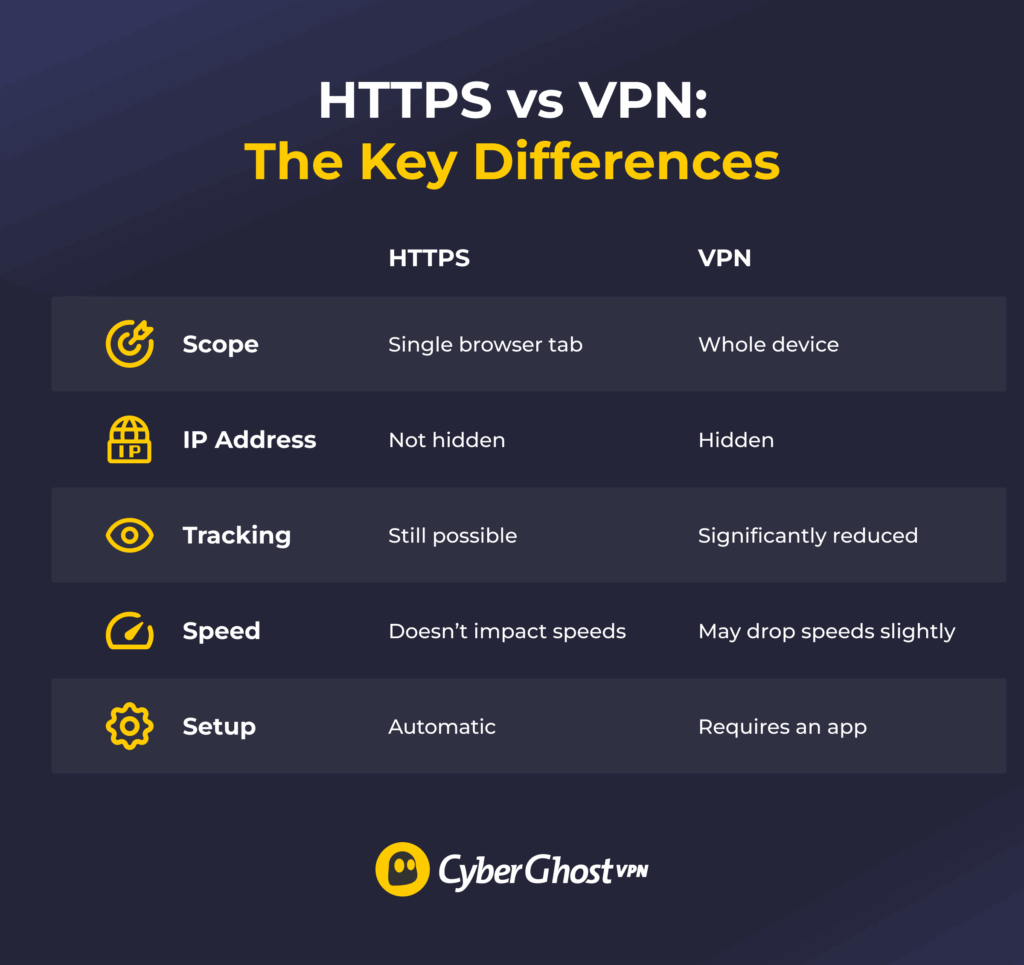
Security Measures
HTTPS encrypts the connection between a browser and a website, protecting data like logins and payment information in transit. However, it doesn’t secure anything outside of this singular communication channel.
A VPN closes these gaps. It encrypts all traffic from a device, not just the browser. Many VPNs also add protections like malicious-site filtering, ad and tracker blocking, and kill switches that stop traffic if the VPN disconnects.
Speed and Performance
HTTPS adds virtually no slowdown because it’s built into modern browsers and websites. A VPN, on the other hand, encrypts and reroutes all internet traffic through an external server. That extra step can slightly reduce speed, though the effect is minimal with newer protocols like WireGuard®. Choosing a nearby server can also help keep connections fast while maintaining privacy.
Compatibility with Devices
HTTPS works automatically inside web browsers, but only secures what happens there. A VPN extends encryption across your entire device, from browsers to email clients, games, and background services. Once the VPN is on, all outgoing data is secured, even over public Wi-Fi or shared networks.
When to Use HTTPS vs When to Use a VPN
HTTPS and VPN often overlap, but each shines in different situations. Knowing when to rely on one or both helps you stay safer and more private online.
Public Wi-Fi
Public hotspots are risky because attackers can monitor traffic on the same network. HTTPS protects what happens between your browser and individual sites, but it doesn’t stop others from seeing the sites you visit. A VPN is the stronger choice here because it encrypts all traffic and replaces your IP. That makes it much harder for anyone nearby to spy on your activity.
Geo-Restrictions
HTTPS can’t help when websites or digital services are blocked in your region. It only secures the connection once access is granted. A VPN routes your traffic through servers in different regions, making it appear as if you’re browsing from elsewhere. This can help you retain access to your usual sites on more restrictive networks in places like offices, libraries, and schools.
A VPN doesn’t change the laws regarding accessing blocked/inaccessible content. Use it to strengthen your privacy, not to bypass legal restrictions on licensed content.
Everyday Web Browsing
For casual browsing, HTTPS is already built into most sites. It works in the background, so you don’t have to worry about the privacy of your payment information or credentials (logins, usernames, and passwords). If you want to reduce tracking or keep your browsing history hidden from your internet provider, a VPN adds stronger privacy protection.
Everyday Computer Use (Non-Browser Apps)
HTTPS offers no protection outside the browser. Apps like email clients, cloud storage tools, or messaging platforms may use their own security, but not always. A VPN covers them by ensuring that no information sent from your device is visible to others. That makes VPNs the safer option whenever apps, not just browsers, are in play.
When to Use HTTPS and a VPN Together?
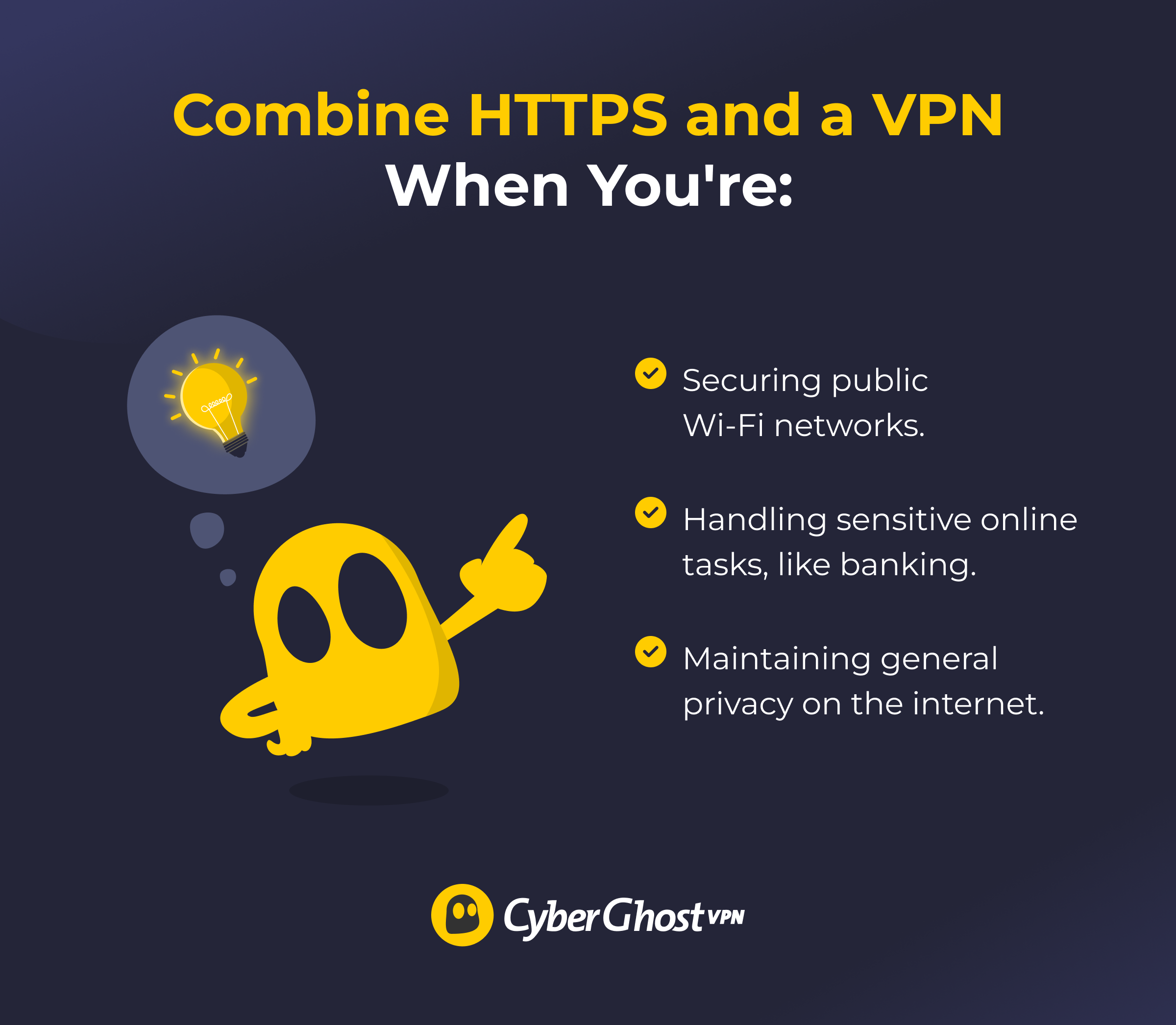
In practice, most people already use HTTPS by default. Adding a VPN doesn’t replace it but builds another protective layer. Combining them makes sense in the following scenarios and situations:
- Securing public Wi-Fi: Combine HTTPS and a VPN whenever you’re using public Wi-Fi hotspots to ensure outsiders can’t intercept or see your traffic.
- Handling sensitive tasks: Pair them for banking, shopping, or work portals. HTTPS protects each site session, while the VPN reduces digital tracking.
- Maintaining general privacy: Use both to limit what different parties can learn. Sites will see secure sessions, while others will see scrambled VPN traffic.
HTTPS + VPN = A Winning Combination
Online security isn’t just about one tool; it’s about building layers of defense. HTTPS has become the web’s default standard, but it only goes so far. A VPN adds privacy and flexibility on top of that standard, making your online activity much harder to trace. Together, they create a safer, more private baseline for everything you do online, whether that’s streaming, shopping, or staying connected while traveling.
CyberGhost VPN builds on HTTPS by covering all traffic on your device, not just your web browser. It offers high-end privacy for your sensitive data, ad and tracker blocking, as well as automatic Wi-Fi protection. You can use it on your computer, phone, tablet, and other devices. And thanks to its 45-day money-back guarantee, you’ve got plenty of time to test and see it in action.
FAQ
What is the difference between HTTPS and a VPN?
HTTPS protects data between your browser and a single website. That way, it makes sure that your logins, payments, and messages are not visible to others. A VPN protects all traffic from your device and replaces your IP address with the VPN server’s. HTTPS secures site sessions; a VPN secures your entire connection.
Is HTTPS enough to stay safe online without a VPN?
No, HTTPS isn’t enough to stay safe online. It protects data between you and a website, but it doesn’t hide browsing activity from internet providers, advertisers, or trackers. It also doesn’t protect applications outside your browser. A VPN delivers a much higher level of privacy and safety as it protects all your incoming and outgoing traffic.
Can HTTPS hide your IP address like a VPN?
HTTPS protects site sessions, but it doesn’t hide your IP address or cover non-browser apps. That means your IP remains visible to the site, your internet provider, and anyone else monitoring your network. A VPN replaces your IP as soon as you connect, pointing to the physical location of the chosen VPN server.
Does a VPN offer better protection than DNS over HTTPS?
DNS over HTTPS (DoH) makes sure others can’t see which websites you request. But it only protects that single step. A VPN offers better protection overall, as it secures your entire connection, including DNS, your traffic, and your IP address. While DoH improves privacy, a VPN provides broader protection against tracking and interception.
When should you use a VPN instead of relying on HTTPS?
A VPN is more useful on public Wi-Fi, when bypassing geo-restrictions, or when you need more privacy online. Remember that a VPN can make sure that your online activity remains private from your internet providers and digital trackers. It covers all apps and services, while HTTPS works in your browser only.
Do HTTPS and VPNs work together or separately?
They work together. Most websites already use HTTPS by default, and a VPN doesn’t interfere with it. Instead, the VPN adds an extra layer, secures traffic from your browser and other apps, and replaces your IP address, which minimizes tracking. HTTPS ensures safe site connections, while the VPN strengthens overall privacy.

Leave a comment