
When your device can’t connect to the network or a website you’re trying to access won’t load properly, the issue doesn’t always lie with the router or a device itself. It’s typically linked to a failure in how IP addresses are assigned or how domain names are resolved. This is where DHCP and DNS often come in, as they’re the two core systems that allow devices to connect to the internet and find websites.
They work together every time you go online, keeping your connection quick and organized. But because these systems exchange data with your network and ISP, some of your personal information can be exposed. Let’s go through what DHCP and DNS do, how they differ, and how they work together to help your network run efficiently.
Quick Comparison Table: DHCP vs DNS
| Aspect | DHCP | DNS |
| Purpose | Gives IP addresses automatically | Converts domain names to IPs |
| Function | Connects devices to a network | Finds websites by name |
| System type | Centralized, managed by a server | Distributed, global network |
| Ports | UDP 67 (server), 68 (client) | TCP/UDP 53 |
| Server role | Leases and renews IP addresses | Resolves names to IPs |
| Security | Uses authentication and logging | Uses DNSSEC for data integrity |
| Dependence | Needed for automatic setup | Needed for web access |
What Is DHCP and How Does It Work?
Dynamic Host Configuration Protocol (DHCP) is a network service that lets devices join a network without manual setup. Each time your device connects to Wi-Fi, DHCP automatically assigns it an IP address and basic network settings so it can communicate with other devices and access the internet.
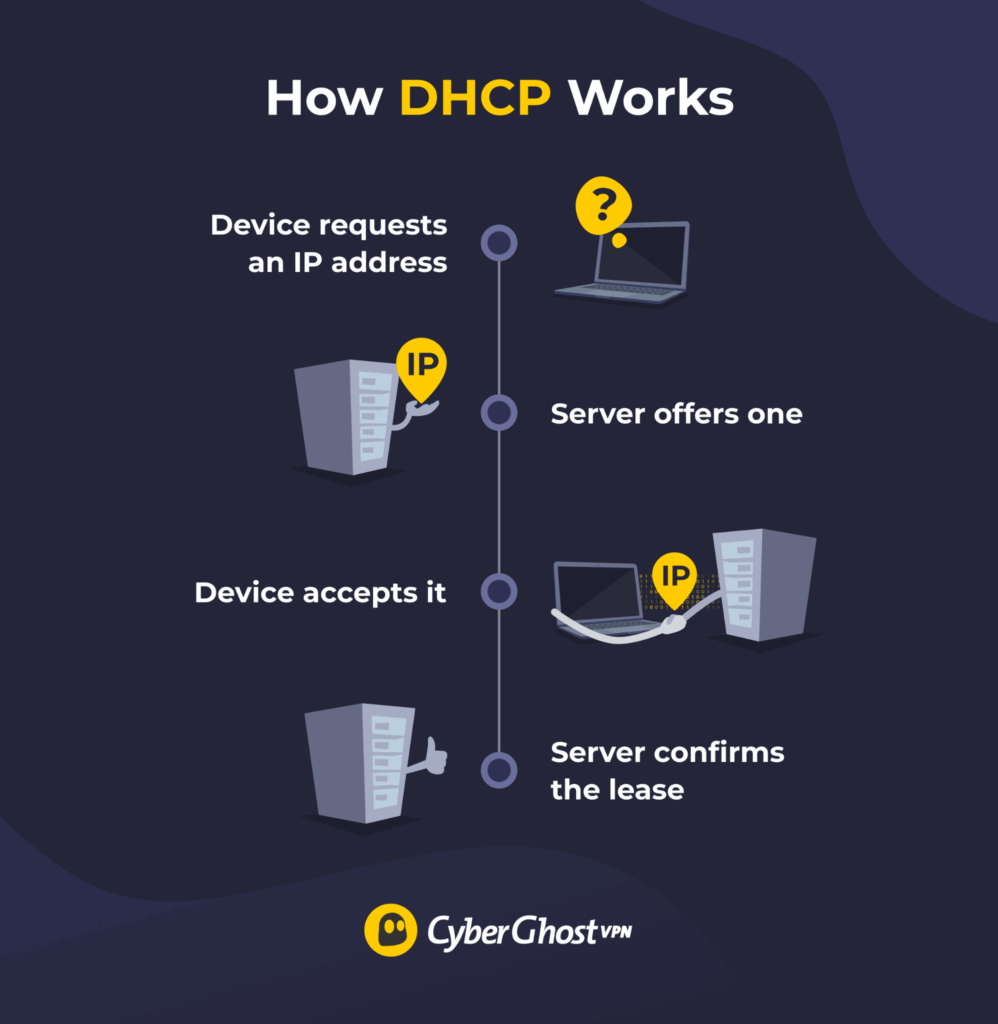
Behind the scenes, the process is simple. The device asks for an address, the DHCP server offers one, the device accepts it, and the server confirms the lease. This all happens in seconds, usually without you noticing. When the lease expires, the device either renews the same address or gets a new one.
In addition to an IP address, DHCP also provides details like the subnet mask, default gateway, and DNS server. Without DHCP, you would need to manually configure every device, which quickly becomes unmanageable on larger or frequently changing networks.
Benefits of DHCP
- Saves time: Hands out IP addresses automatically so devices can connect right away.
- Reduces mistakes: Lowers the chance of configuration errors caused by manual setup.
- Prevents conflicts: Makes sure each device gets a unique address on the network.
- Simplifies management: Lets admins control all network settings from one place.
- Adapts easily: Handles new devices or network growth without extra setup.
Drawbacks of DHCP
- Creates dependency: Devices rely on the DHCP server to connect.
- Limits control: Administrators may have issues or challenges with assigning fixed IPs without manual setup.
- Introduces risk: Attackers can exploit unsecured servers to issue fake IPs.
- Causes downtime: Network access stops if the server fails.
- Leads to shortages: Poor lease management depletes available IP addresses.
What Is DNS and How Does It Work?
Domain Name System (DNS) functions like the internet’s directory. It matches website names you type, such as google.com, with the IP addresses that computers use to locate them. Without DNS, you’d need to remember long strings of numbers to visit any site.
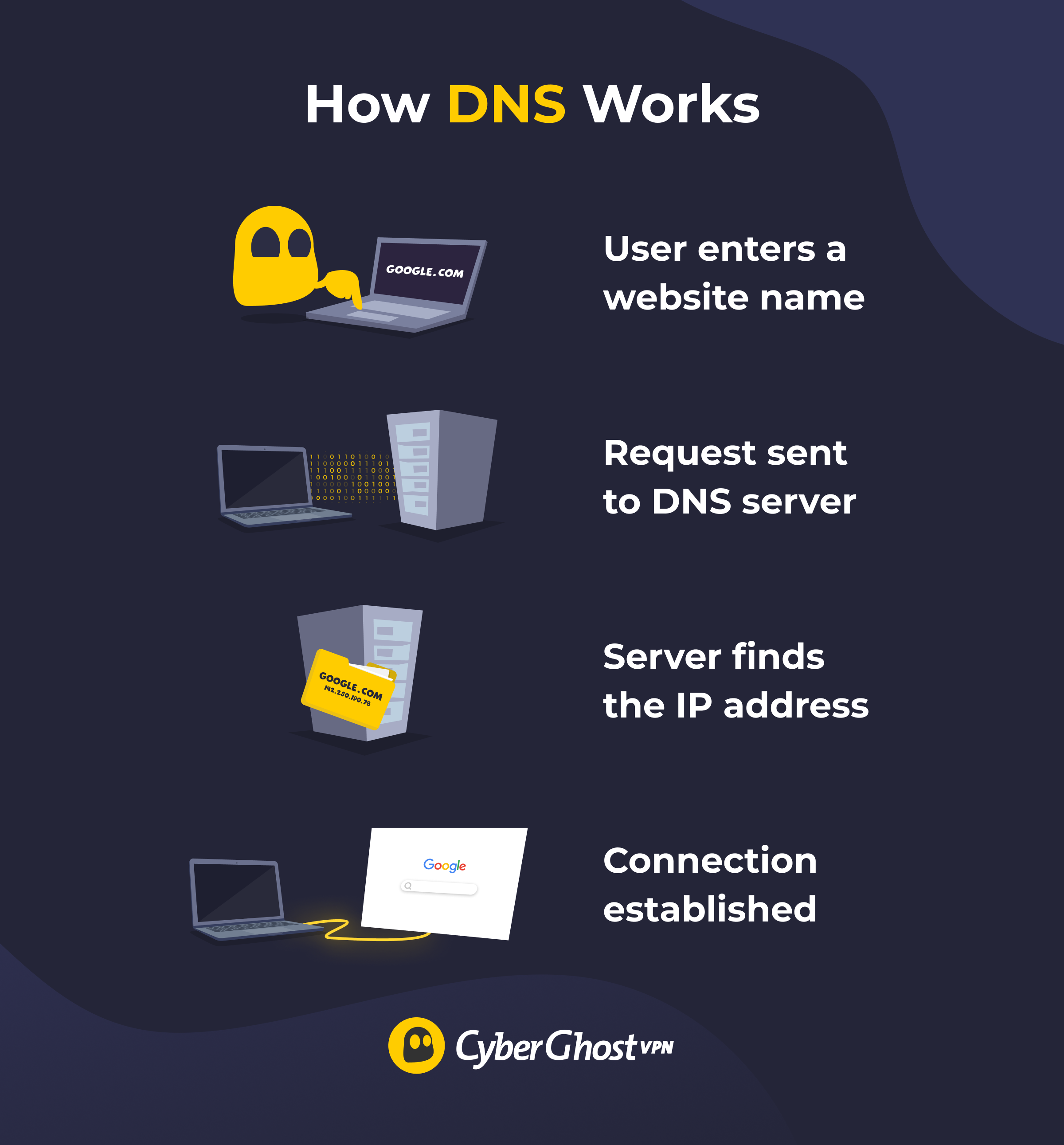
When you enter a website address, your device sends a request to a DNS server. The server finds the matching IP address and sends it back, allowing your browser to connect to the right destination. This process happens almost instantly in the background and repeats constantly as you browse.
DNS doesn’t host websites or move data itself — it just points traffic in the right direction. Because of that, it plays a crucial role in determining speed, reliability, and accessibility across the internet.
Benefits of DNS
- Simplifies access: Lets you visit websites by name instead of typing long IP addresses.
- Improves speed: Stores recent website data so pages load faster next time.
- Supports scalability: Handles heavy traffic by spreading requests across many servers.
- Boosts reliability: Keeps websites available even if one server goes offline.
- Eases updates: Makes it simple to change domain settings without interrupting access.
Drawbacks of DNS
- Depends on servers: Fails to work if the DNS server is down or misconfigured.
- Vulnerable to attacks: Can be targeted by spoofing or cache poisoning.
- Exposes data: Reveals browsing activity to ISPs or third parties without encryption.
- Causes delays: Slows browsing when servers are overloaded or far away.
- Needs regular maintenance: Requires updates to keep records accurate and secure.
What Is the Difference Between DHCP and DNS?
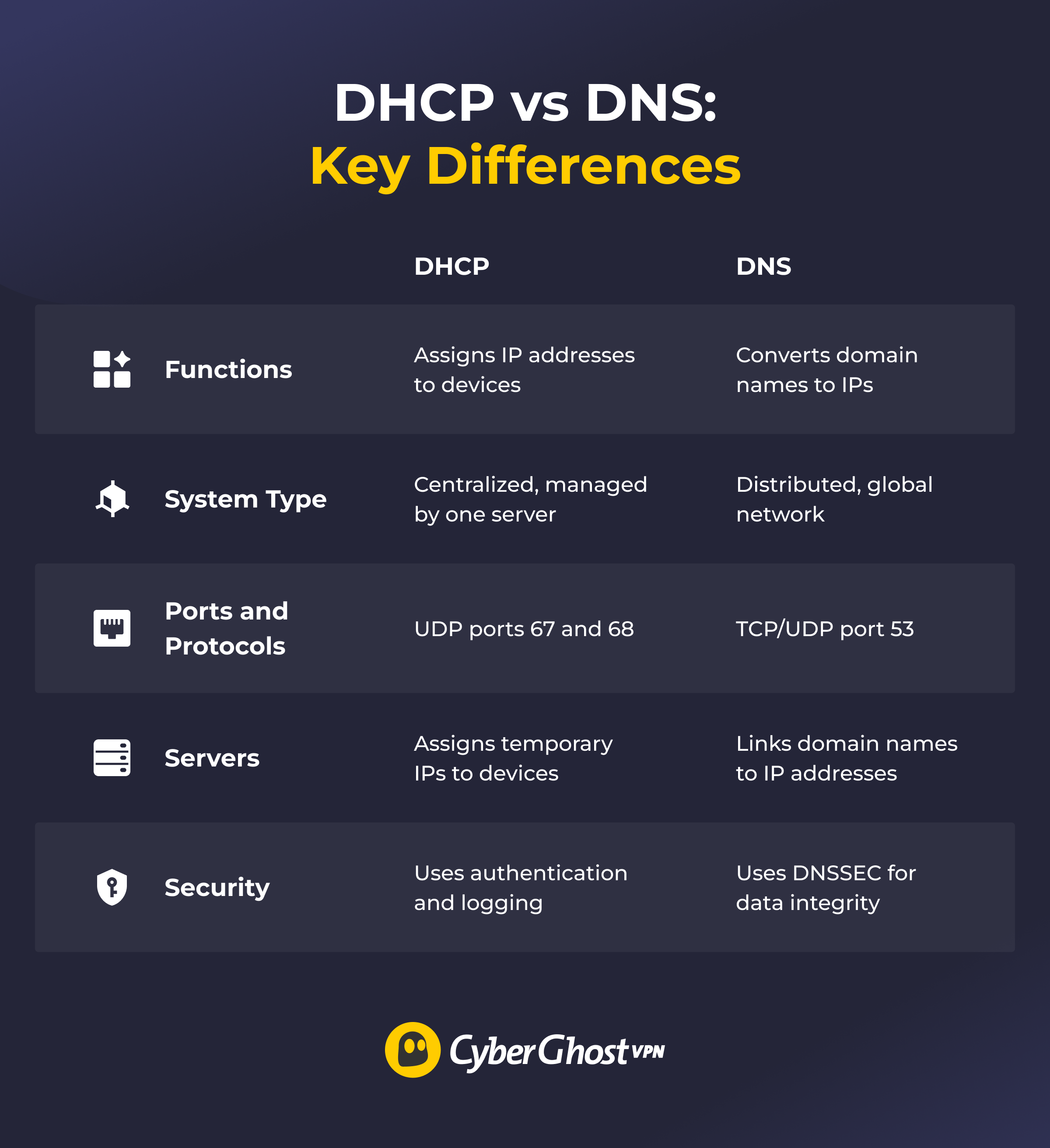
Functions
DHCP handles network setup behind the scenes, giving each device the configuration it needs to operate. DNS focuses on navigation, matching names to addresses so requests get to the right server.
System Type
DHCP operates a centralized system within a local network. There’s typically one server (or a small cluster) responsible for assigning and managing IP addresses. DNS works through a distributed system spread across servers worldwide, which makes it resilient and fast even under heavy load.
Ports and Protocols
DHCP runs on UDP ports 67 and 68 to quickly share information between the server and devices. DNS works mainly on port 53 and uses both UDP and TCP. UDP handles most everyday address requests, while TCP is responsible for transferring larger responses or zone transfers.
Servers
DHCP servers maintain a list of available IP addresses and temporarily lease them to devices that join the network. Those addresses can change over time. DNS servers store records that link domain names to their IP addresses. These records are more stable and allow devices to locate websites and services across the internet.
Security
DHCP and DNS are both important for network security, but they protect data in different ways. DHCP servers implement authentication and logging processes to monitor which devices receive IP addresses. This helps identify unauthorized access or unusual activity. DNS servers use DNSSEC (Domain Name System Security Extensions) which verifies that responses haven’t been altered in transit. This helps prevent users from being redirected to malicious or fake websites.
How Do DHCP and DNS Work Together?
DHCP and DNS work together every time a device connects and starts browsing. First, DHCP gives each device an IP address and tells it which DNS server to use. DNS then uses that configuration to map domain names to the right destinations.
In managed networks, DHCP and DNS are often linked so records update automatically. When a device gets a new IP address, DNS records adjust to match. This coordination helps keep communication fast and consistent without manual setup.
Why DHCP and DNS Matter for Network Security
DHCP and DNS are both essential for connectivity, but they don’t protect your privacy on their own. Since they share information about your device and activity with your network and internet provider, that data can sometimes be seen or tracked.
CyberGhost VPN adds a stronger layer of protection by encrypting your internet traffic. It uses powerful AES 256-bit encryption to scramble your data and make it unreadable to prying eyes. This means your online actions, such as the websites you visit or the apps you use, can’t be read or monitored, even on public Wi-Fi.
CyberGhost VPN also prevents DNS leaks by routing your requests through its private DNS server to safeguard your browsing information and help avoid malicious redirections. Its strict no-logs policy ensures that your online activity, connection details, or browsing history aren’t recorded or stored. As a result, CyberGhost VPN can’t disclose your data to anyone.
DHCP vs DNS: Keeping Your Network Safe and Reliable
DHCP and DNS are the backbone of how networks connect and communicate. DHCP gives every device an address so it can join a network without setup hassles, while DNS translates website names into the IP addresses that make browsing possible. Together, they keep your connection efficient and reliable.
Even though these systems manage data securely, they don’t protect your personal information. CyberGhost VPN changes your IP address and shields your data from interception. Its automatic kill switch blocks traffic if the VPN connection drops, preventing any unprotected data from leaking. Combined with DHCP and DNS, it helps you stay connected safely, whether you’re at home, at work, or on public Wi-Fi. Try it risk-free with our 45-day money-back guarantee and enjoy safe, seamless browsing anywhere.
FAQ
What is the main difference between DHCP and DNS?
The main difference between DHCP and DNS is their role in how networks operate. DHCP automatically gives each device an IP address so it can connect to a network. DNS translates website names into IP addresses so browsers can find the right location online. That said, DHCP manages local connections, and DNS helps direct internet traffic.
How does DNS work in a computer network?
DNS helps your device find websites by matching names to IP addresses. When you type a web address, your device asks a DNS server for the correct IP, so it can connect. This happens quickly and automatically in the background. CyberGhost VPN keeps these lookups private by routing them through its own secure DNS servers instead of your ISP’s.
What role does DHCP play in assigning IP addresses?
DHCP automatically assigns an available IP address to each device that connects to a network. It also provides other settings, like the gateway and DNS server, so the device can communicate properly. This removes the need for manual configuration and prevents address conflicts.
Can DHCP and DNS work together on the same network?
Yes, DHCP and DNS often work together on the same network. DHCP assigns each device an IP address, and DNS uses those addresses to link names to the right devices or websites. This collaboration helps maintain network organization and enhances connection speed and simplicity.
Which is more important for internet connectivity, DHCP or DNS?
Neither is more important — they serve different purposes. Without DHCP, devices would need manual setup to connect. Without DNS, users would have to remember IP addresses instead of website names. Both are essential for a usable internet connection.

Leave a comment