
You’ve likely come across the terms “DNS,” “VPN,” and “Smart DNS” while looking for security options online. The problem is that they’re often discussed as if they do the same thing, even though they solve very different problems.
Part of the confusion comes from how the privacy tools evolved over time. Years ago, simply switching to a different DNS server was sometimes enough to improve how connections were routed online1. As networks and filtering systems became more advanced, tools like VPNs and encrypted DNS technologies started playing a bigger role2. So, the “DNS vs VPN” conversation has stuck around, even though they aren’t direct replacements for each other.
While DNS, VPNs, and Smart DNS can all affect how you connect to websites and online services, they work in very different ways behind the scenes. Some focus on privacy and encryption, others on routing or access. Choosing the right one depends on what you actually need, whether that’s better security, fewer restrictions, or a smoother streaming and gaming experience. We’ll break down the differences between a VPN, DNS, and Smart DNS, and we’ll let you know what situations each is best suited for.
What Is DNS and How Does It Work?
DNS (Domain Name System) is often described as the internet’s address book because it translates website names into the IP addresses computers use to connect to the right server. It’s not a tool you have to manually “turn on.” It’s a core part of how the internet works. When you type a website name like “example.com” into your browser, DNS helps your device locate the correct server behind that address.
Here’s what happens in the background. Your browser first checks its cache to see if it has the right IP address stored from a previous visit. If it doesn’t find it, it sends a request to a DNS resolver, which is usually operated by your internet provider or a third-party service. The resolver then contacts other DNS servers step by step, starting with a root server, until it finds the correct IP address for the website and returns it to your browser. The process usually takes milliseconds.
DNS also relies heavily on caching. Once your device learns a website’s IP address, it temporarily stores it so future visits load faster without repeating the full lookup process every time.
By default, most people use the DNS servers provided by their ISP, but you can switch to a third-party provider by changing your device or router settings. Popular public DNS options include Google Public DNS (8.8.8.8 and 8.8.4.4) and Cloudflare DNS (1.1.1.1 and 1.0.0.1).
If you’re thinking about changing your DNS provider, pay attention to a few key factors:
- Reliability: Look for consistent uptime and fast response times.
- Privacy practices: Check what data the provider collects and stores.
- Security features: Find out if the provider blocks malicious or unwanted domains.
- Server network: Choose a provider with a wider network as it can improve performance based on your location.
What Is Smart DNS and How Is It Different?
Smart DNS is a service that changes how certain DNS requests are handled. Unlike a VPN, it doesn’t encrypt your traffic or route all your activity through another server. Instead, it only affects specific DNS requests while the rest of your connection continues normally.
When you try to access an online service, Smart DNS responds to the DNS request and routes it through a proxy server in another location. This can make the service think you’re in a different region, even though most of your internet traffic still travels directly between your device and the website or app.
That’s the main difference between regular DNS and Smart DNS. Standard DNS simply translates website names into IP addresses so your device knows where to connect. Smart DNS goes a step further by selectively redirecting some of those requests through different servers, usually to change how certain services respond to your location.
What Is a VPN and How Does It Work?
A VPN, or virtual private network, encrypts your internet traffic and routes it through a remote server. Instead of connecting directly to a website, your device connects to the VPN server first. The website then sees the VPN server’s IP address instead of your real one, which helps make your activity more private.
When you turn on a VPN, it creates an encrypted tunnel between your device and the VPN server. This helps protect it from people or networks trying to monitor your connection, such as public Wi-Fi operators, internet providers, or attackers on unsecured networks. The VPN server then sends your request to the website and returns the response to you.
Unlike DNS or Smart DNS, a VPN protects your full connection rather than just handling website lookups or specific requests. That’s why VPNs are commonly used for privacy, security on public Wi-Fi, remote work, and reducing how much browsing data can be tracked.
If you decide to use a VPN, it helps to choose one with strong encryption, transparent privacy practices, and a reliable server network. CyberGhost VPN uses AES-256 encryption to add a strong layer of protection to your data, follows a strict no-logs policy, and runs a large global network of servers. You also get features like an automatic kill switch and DNS leak protection, which can help reduce accidental exposure of your browsing data.
DNS vs Smart DNS vs VPN: Key Differences That Matter
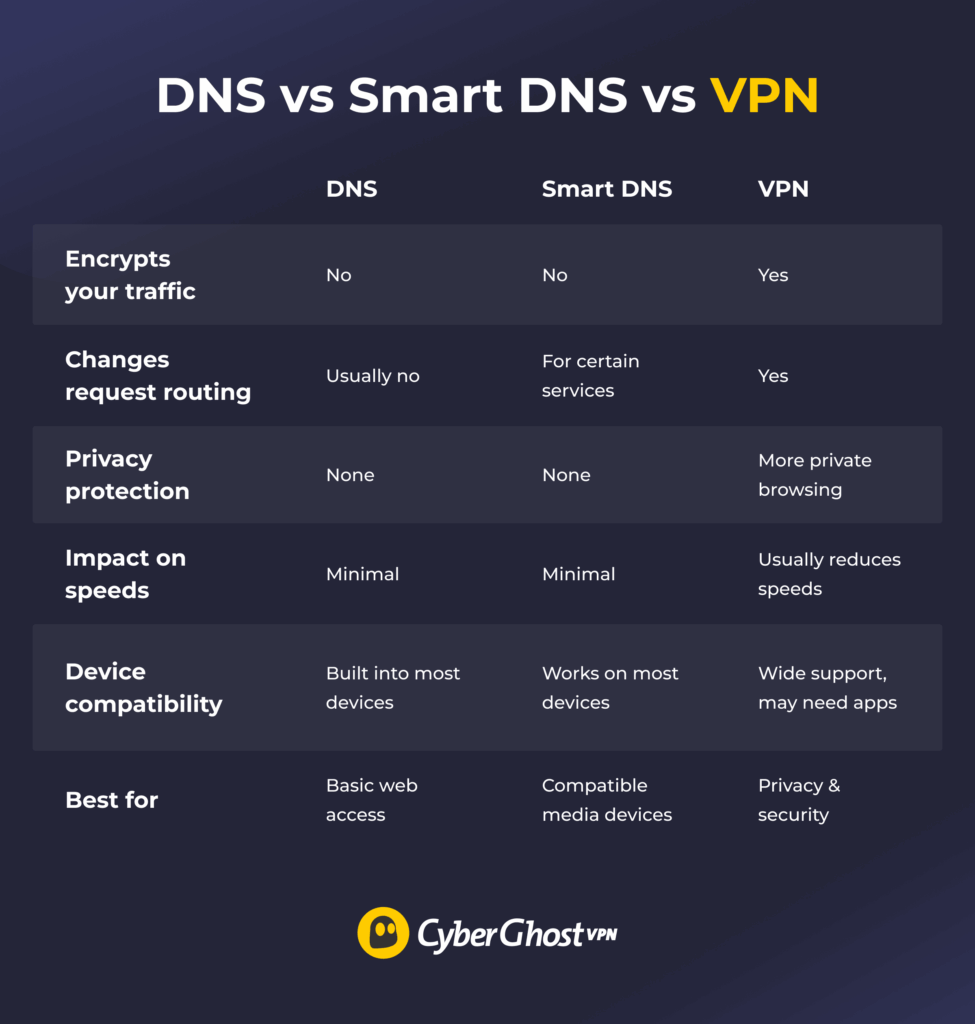
Security
A standard DNS service doesn’t secure your connection. In many cases, DNS requests are still visible to your ISP or network provider unless encrypted DNS features like DoH or DoT are being used. Smart DNS also doesn’t encrypt your traffic. It simply reroutes specific requests, so your activity can still be monitored while data travels across the internet.
A VPN adds a stronger layer of protection by encrypting your entire connection and routing traffic through a secure server. If you want to keep your connection more private, this is the option that does the heavy lifting.
Privacy
DNS and Smart DNS offer very limited privacy benefits. While Smart DNS can change how some services respond to your location, neither option hides your IP address or encrypts your internet traffic. Your ISP, websites, and other third parties can still see much of your activity.
A VPN is designed specifically for privacy. It encrypts your traffic and masks your IP address, making it harder for websites, advertisers, networks, or internet providers to track what you do online. Unlike Smart DNS, this protection applies across your entire connection.
CyberGhost VPN also includes features designed to minimize data exposure. It follows a strict no-logs policy, so it doesn’t store records of your browsing data. It uses RAM-only servers, which wipe data with every reboot instead of storing it long-term. It’s also based in Romania, where there are no mandatory data retention laws.
Speeds
DNS and Smart DNS usually have little impact on connection speed because they don’t encrypt your traffic or reroute your full connection. Smart DNS, in particular, is often used when people want location-based access with minimal speed loss.
A VPN typically adds more overhead due to encryption and rerouting, which can increase latency and reduce speed. The impact depends on factors like server distance, server load, and protocol choice. However, premium VPNs like CyberGhost VPN are designed to reduce speed loss with optimized routing, high-capacity servers, and modern protocols that handle data more efficiently.
Reliability and Stability
DNS and Smart DNS are generally very stable because they handle lightweight network tasks with minimal processing involved. Since they don’t reroute or encrypt your entire connection, fewer variables can affect performance.
A VPN adds more moving parts, so stability can vary. Your connection depends on factors like server distance, server load, and your chosen protocol. A nearby, well-optimized VPN server will usually provide a more stable experience than an overloaded or distant one.
Device Compatibility
DNS and Smart DNS work on almost any internet-connected device because they can be configured directly through standard network settings. That includes computers, smartphones, Smart TVs, game consoles, and even routers.
VPN compatibility depends more on the provider and device support. Most major VPNs offer apps for Windows, macOS, Linux, Android, iOS, and other common platforms, but support can vary on devices like Smart TVs or game consoles. CyberGhost VPN supports a wide range of popular devices. If a device doesn’t support VPN apps, you can set it up on a VPN-compatible router and cover your whole network in one go.
Pricing
Standard DNS is usually free whether you use your ISP’s default service or switch to a public DNS provider like Google or Cloudflare. Smart DNS services are typically inexpensive and charge a small subscription fee for added functionality.
A VPN costs more because it includes extra features like encryption, remote servers, privacy features, and dedicated apps across multiple devices. Long-term plans often reduce the monthly cost significantly.
Common Myths About DNS, Smart DNS, and VPNs
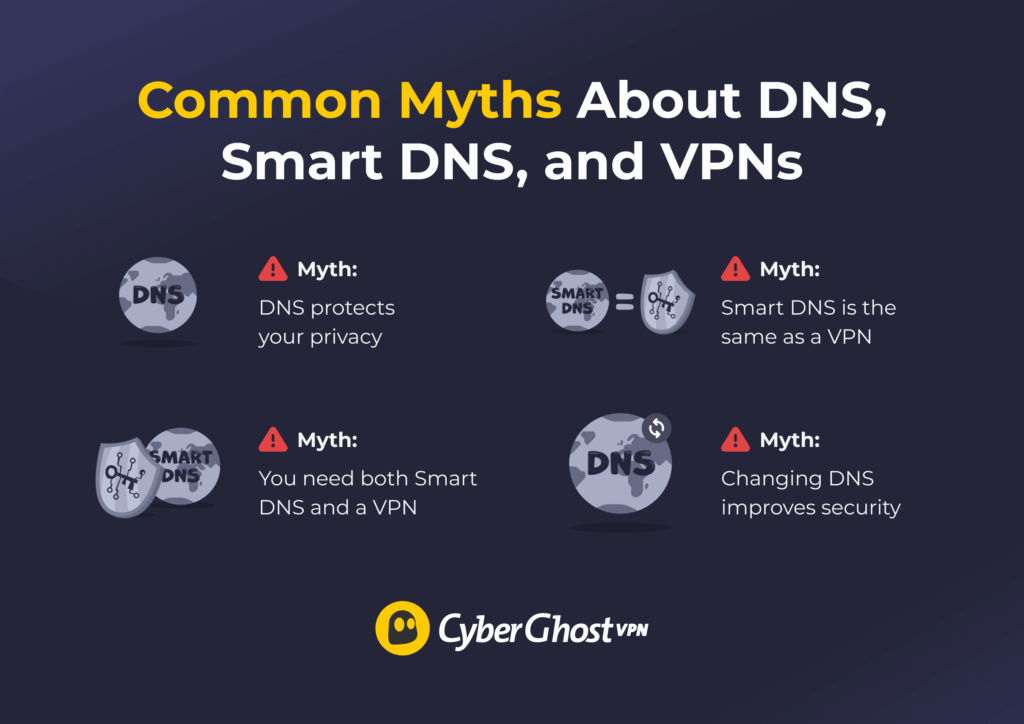
DNS, Smart DNS, and VPNs often get mentioned together, which is part of why people mix them up. While they can all affect how you connect to websites and online services, they solve very different problems. Here are some of the most common misconceptions.
- Myth 1: DNS protects your privacy.
DNS mainly handles website lookups. Switching to a different DNS provider may improve speed, reliability, or filtering features, but it doesn’t automatically make your browsing private. Your IP address and internet traffic can still be visible to websites, networks, and other third parties. - Myth 2: Smart DNS is the same as a VPN.
Smart DNS and VPNs work very differently. Smart DNS reroutes specific requests to help certain services respond differently to your location, but it doesn’t encrypt your traffic or protect your connection. A VPN encrypts your internet traffic and masks your IP address, which adds both privacy and security benefits. - Myth 3: You need both Smart DNS and a VPN at the same time.
In most cases, you don’t need both. Smart DNS is often chosen for speed and compatibility, while a VPN focuses more on privacy and security. Since a VPN already handles DNS requests internally, most users don’t need a separate Smart DNS service running alongside it. - Myth 4: Changing DNS improves security.
Changing your DNS can improve reliability or speed, but it doesn’t secure your connection on its own. Without encryption, your data can still be intercepted or monitored. For real security, you need a reliable VPN like CyberGhost VPN.
- Myth 1: DNS protects your privacy.
DNS vs VPN: Which One Should You Choose?
DNS, Smart DNS, and VPNs all change part of how your internet connection works, but they’re built for different goals. Standard DNS focuses on translating website names into IP addresses. Smart DNS prioritizes speed and compatibility by rerouting certain requests. A VPN goes further by encrypting your traffic and masking your IP address to add privacy and security across your connection.
If your priority is simple browsing performance or lightweight location-based routing, DNS or Smart DNS may be enough. But if you regularly use public Wi-Fi, want more privacy online, or prefer to keep your browsing activity more protected from networks, advertisers, or other third parties, a VPN is a more complete option.
CyberGhost VPN combines encrypted connections, IP masking, DNS leak protection, and a large global server network in one app, making it an easy way to add more privacy and security to your everyday browsing. You can try it risk-free with a 45-day money-back guarantee (14 days for monthly users).
FAQ
What’s the main difference between DNS and VPN?
The main difference is that DNS translates website names into IP addresses so your device can find and load websites. It doesn’t encrypt or hide your activity. A VPN encrypts your internet traffic and routes it through a remote server. This protects your data, replaces your IP address, and improves your privacy online.
Does changing my DNS server protect my privacy?
Changing your DNS server offers only limited privacy benefits. Some DNS services support encrypted DNS requests, which can limit how much your ISP can see, but it doesn’t encrypt all your internet traffic or mask your IP address. Your activity can still be tracked by websites, network operators, or other intermediaries, so it isn’t a more comprehensive privacy solution like a VPN.
Can a DNS service hide my IP address like a VPN?
No, a DNS service can’t hide your IP address. It only translates website names into IP addresses so your device can connect to them. Your real IP address is still visible to websites and other parties. A VPN routes your traffic through a remote server, which replaces your visible IP address with the server’s IP.
Which is better for streaming, DNS or a VPN?
For streaming specifically, Smart DNS is usually the better choice if your priority is speed and compatibility, because it changes how certain location-based requests are handled without encrypting your traffic. Standard DNS generally won’t make a major difference for streaming on its own. A VPN is the better option if you also want added privacy and security while streaming, since it encrypts your connection and masks your IP address. However, it can sometimes have a bigger impact on speeds depending on the server and network conditions.
Do I need both a DNS service and a VPN together?
No, you don’t usually need both. A VPN already handles DNS requests and encrypts your traffic, so it provides both extra privacy and basic DNS functionality. A separate DNS service can improve speed or give you more control over how requests are resolved, but it doesn’t add meaningful privacy when you’re already using a VPN.
References:

Leave a comment