
You spot a familiar Wi-Fi network at a café, hotel, or airport and connect without giving it much thought. But because a network has the right name doesn’t mean it’s legitimate. Someone nearby could have set up a fake hotspot designed to look like the one you trust.
An evil twin attack uses a fraudulent Wi-Fi network to trick you into connecting through an attacker-controlled hotspot. Once you’re connected, the attacker may try to redirect you to fake websites, steal login credentials, or even monitor unencrypted information. Secure connections still offer protection, but they don’t eliminate every risk, especially if you’re tricked into entering sensitive details on a phishing page.
What Is an Evil Twin Attack?
An evil twin attack happens when someone sets up a fake Wi-Fi access point that impersonates a legitimate network. The attacker might copy the name of a café, co-working, or transit network, making the fake hotspot difficult to distinguish from the real one.
Once you connect, the attacker controls the network path between your device and the internet. That puts them in an adversary-in-the-middle position, where they can view network activity, interfere with traffic, or direct you to a fake login page.
You may also hear the term “rogue access point.” This refers to an unauthorized Wi-Fi access point, while an evil twin imitates a legitimate network to deceive users.
These attacks aren’t theoretical. In 2024, Australian investigators linked fake Wi-Fi networks at airports and on domestic flights to fraudulent login pages that asked users for email or social media credentials.1 In November 2025, the courts sentenced the man behind the scheme to more than seven years in prison as part of a wider cybercrime case.2
How Does an Evil Twin Attack Work?
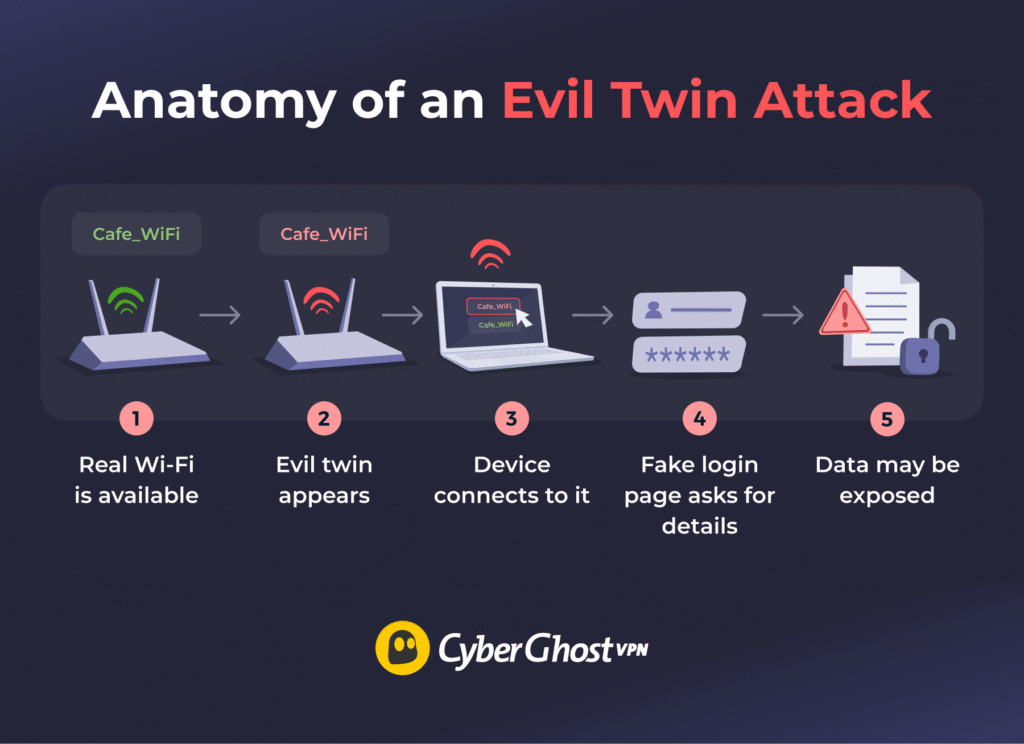
An evil twin attack works by making a fake Wi-Fi network look like one you already trust. You might be at a hotel, for example, and see a network called “Hotel_Guest_WiFi.” There’s nothing immediately suspicious about the name, but it could belong to someone impersonating the hotel’s real network.
The danger starts when your device connects to the fake hotspot. You might select it yourself, or your device could connect automatically depending on the settings. A stronger signal or a temporary disruption to the legitimate network can also make the impostor more likely to attract connections.
Once connected, you might see what looks like a normal Wi-Fi sign-in page, also known as a captive portal. Hotels, airports, and cafés commonly use these pages, so a request to sign in might not seem unusual. However, a fraudulent version could ask for your email password, social media credentials, or other sensitive information.
The attacker may also see some of your network activity, read unencrypted traffic, or interfere with connections, although that doesn’t mean they have access to all your online activity. HTTPS and other forms of encryption still protect much of your traffic, even when you’re connected to an untrusted network.
What Can an Evil Twin Actually See or Steal?
Controlling the Wi-Fi network puts an attacker in a useful position between your device and the internet. That still doesn’t give them an unrestricted view of everything on your device or everything you do online. What they can access depends on how you protect your traffic and what you choose to share while connected.
What the Attacker May See
Someone controlling the network may observe connection details and traffic that travels without encryption. Plain HTTP traffic, for example, can expose information sent across the connection and may also be easier to manipulate. Even when there’s encryption, some network-level details about the connection can remain visible.
This is where older warnings about public Wi-Fi can get a little misleading. Simply joining an evil twin doesn’t suddenly expose your photos, saved passwords, messages, or every page you open.
What Encryption Still Protects
HTTPS encrypts the connection between your browser and a legitimate website, while many apps use their own encrypted connections, too. That helps stop someone sitting on the local Wi-Fi network from reading the contents of your traffic as it passes by. Widespread website encryption has made basic Wi-Fi snooping far less revealing than it once was.3
A VPN adds another layer. CyberGhost VPN encrypts traffic between your device and the VPN server, making the contents of your traffic much harder for someone controlling the local Wi-Fi to decipher.
What a Fake Page Can Collect
Encryption can’t help if you willingly hand information to the attacker. An evil twin may redirect you to a fake captive portal or phishing page that asks for an email address, password, payment details, or other sensitive information.
If you enter those details, the attacker doesn’t need to break HTTPS or crack a VPN tunnel. The information goes straight to a page they control. That encrypted VPN tunnel still can’t verify whether the hotspot or website you’re using is genuine, so suspicious login prompts deserve a second look.
How to Detect an Evil Twin Wi-Fi Network
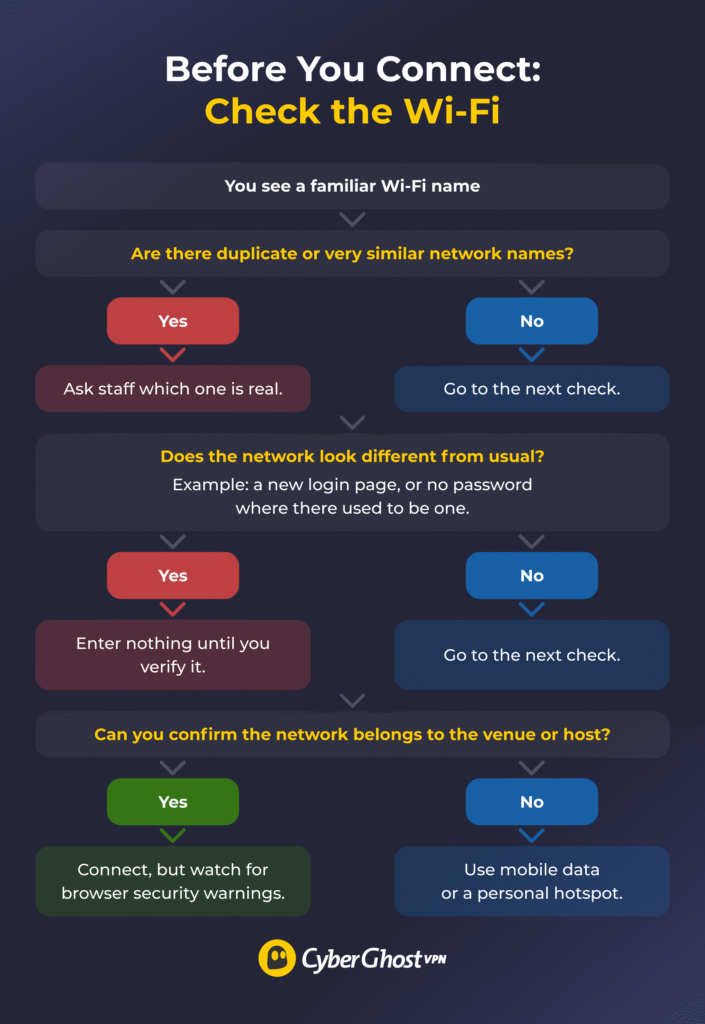
Spotting an evil twin can be tricky for one simple reason: the attacker wants the network to look ordinary. They can copy the same Wi-Fi name you expect to see, so scanning your network list usually won’t give you a definitive answer.
Here’s what warning signs can look like in practice:
- Two networks have the same or similar names: One could be another legitimate access point, but it’s worth checking before you connect.
- A network you normally use appears open: If the usual hotspot requires a password and an identical one doesn’t, treat that as suspicious.
- One duplicate has an unusually strong signal: Evil twins may be positioned closer to you or configured to appear more attractive to nearby devices. Signal strength alone doesn’t prove anything, though.
- Your device keeps disconnecting and reconnecting: More sophisticated attacks may interfere with the real access point to encourage devices onto the fake one.
- The captive portal looks different: Watch for unfamiliar branding, odd URLs, spelling mistakes, or a login process you haven’t seen there before.
- You’re asked for information that doesn’t make sense: A café Wi-Fi portal requesting your email password or social media login deserves a hard stop.
- Your browser shows a certificate or security warning: Don’t click through it to get online. Unexpected certificate errors can be a sign that something is interfering with the connection.
None of these signs alone proves you’ve found an evil twin. Duplicate SSIDs, signal strength changes, and captive portals can all have legitimate explanations. If you’re at a hotel, café, office, or event and something feels off, ask staff or the host for the exact network name and connection process before joining.
How to Prevent an Evil Twin Attack
You can’t control whether someone sets up a fake hotspot nearby, but you can make it much harder for that network to fool you. The strongest approach combines network verification, a healthy suspicion of unexpected login prompts, and encryption for the traffic you send over shared Wi-Fi.
Turn Off Automatic Wi-Fi Connections
Your device can reconnect to saved networks on its own. Check your Wi-Fi settings and disable automatic connections where it makes sense, especially for public networks you rarely use. Forgetting old hotspots can also reduce the chances of your device reconnecting to a lookalike network later.
Use Mobile Data or Personal Hotspot
If something about the available network feels wrong, skip it. Switching to cellular data or your own hotspot keeps your connection off the suspicious Wi-Fi. Remember that your mobile carrier still handles that connection.
Pay Attention to Captive Portals
A polished login page isn’t proof that it belongs to the venue. The padlock icon deserves the same caution. HTTPS tells you the browser encrypts the connection to that website. A phishing site can use HTTPS, so encryption alone doesn’t tell you whether the site itself is trustworthy.
Use Secure Login Methods
If a fake portal does capture one of your passwords, reusing it across several accounts makes the damage easier to spread. Give important accounts unique passwords and enable multi-factor authentication (MFA) or passkeys wherever they’re available. These add another hurdle if someone manages to steal your login credentials.
Use a VPN on Shared or Untrusted Wi-Fi
When you’re using public Wi-Fi, a VPN helps protect your connection even if the network isn’t trustworthy. CyberGhost VPN encrypts your internet traffic between your device and the VPN server, making it harder for someone controlling the hotspot to track your activity.
CyberGhost’s Wi-Fi protection can automatically connect your VPN or prompt you to connect when you join a Wi-Fi network. Our Kill Switch also blocks internet traffic if the VPN connection drops, helping prevent your traffic from leaking outside the encrypted tunnel.
However, a VPN won’t tell you whether a Wi-Fi network is genuine or protect you from entering details on a phishing page. It’s still important to verify unfamiliar networks and login requests.
What to Do If You Connected to an Evil Twin
Realizing you may have joined a fake Wi-Fi network can be unsettling, but the response depends on what actually happened while you were connected. If you only joined the network and didn’t enter credentials, download anything, or ignore security warnings, you likely don’t need to take the same steps as someone who handed information to a phishing page.
- Disconnect and forget the network: This stops your device from reconnecting to the same access point.
- Switch to mobile data or a Wi-Fi network you’ve verified: Use that connection for any cleanup steps that follow.
- Change credentials you may have exposed: Focus on accounts you logged into through a suspicious portal or page, starting with email, work, financial, and other high-value accounts. There’s no reason to reset every password you own because you connected.
- Sign out of other sessions where appropriate: Review active sessions and remove devices or logins you don’t recognize.
- Keep an eye on affected accounts: Watch for unexpected login alerts, password reset emails, transactions, or changes you didn’t make.
- Contact your bank or payment provider if payment details may have been exposed: Reach out as they can advise you on next steps for your account.
- Check your device if you downloaded anything suspicious: Install pending updates and run a malware scan if the fake network prompted you to download software, an attachment, or an unfamiliar app.
Treat Familiar Wi-Fi Names With Caution
A familiar Wi-Fi name can make a connection feel trustworthy before you’ve had a chance to check it. That’s exactly what an evil twin relies on. Verifying the network, treating unexpected connection prompts with caution, and using strong account protection can all reduce the chances that a convincing fake fools you.
Good judgment before you connect or enter information matters as much as the encryption protecting your traffic. Pair that judgment with a VPN, careful network verification, and caution around unexpected login prompts, and you’ve covered most of what an evil twin relies on to work.
FAQ
What is an evil twin Wi-Fi attack?
An evil twin Wi-Fi attack happens when someone creates a fake wireless network that impersonates a legitimate one. Cybercriminals hope the familiar name earns your trust and gets you to connect. Once connected, you may be exposed to traffic inspection, redirects, or fraudulent login pages.
How does an evil twin attack work?
The evil twin attacker creates a Wi-Fi access point that resembles a legitimate network in the hopes you’ll join. Once connected, you may see a fake captive portal or phishing page, while the attacker may also attempt to surveil or interfere with traffic passing through the connection.
How can I tell if a Wi-Fi network is an evil twin?
There isn’t one singular warning sign that proves a network is an evil twin. Watch for duplicate Wi-Fi names, unexpected open networks, unusual captive portals, repeated disconnections, certificate warnings, or strange requests for credentials. If anything feels off, confirm the exact network name and login process with the venue or host.
Can a VPN protect against evil twin attacks?
A VPN encrypts your internet traffic after you connect, limiting what someone controlling the local Wi-Fi can read in transit. It can’t confirm that the Wi-Fi network itself is legitimate or stop you from entering credentials into a phishing page. That’s why it works best alongside careful network verification and strong account security.
Is it safe to use public Wi-Fi?
Whether it’s safe to use public Wi-Fi hinges on staying alert to cyber threats. Modern HTTPS encryption protects much more traffic than it once did. But you should still pay attention to the network you join, browser warnings, and unexpected login pages. Verify unfamiliar hotspots when you can, and avoid entering sensitive information when something about the connection doesn’t look right.
References:

Leave a comment