
Apple’s iCloud Private Relay hides your IP address, helps guard your Safari browsing, and reduces some forms of tracking. So… is it basically a VPN?
Not really. Private Relay focuses on protecting certain Safari browsing activity, while a VPN can secure traffic from other apps and give you more control over your connection. They overlap in some ways, but those differences matter when it comes down to what type of online security you need. Let’s look at how they work, compare the biggest differences, and help you decide which one you should use.
What Do iCloud Private Relay and VPNs Have in Common?
Many people often reference iCloud Private Relay and a VPN in the same breath. That comparison is fair up to a point — the tools solve a similar problem in a similar way:
- They both can hide your IP address from the websites you visit: Most sites you visit can see your IP address, which can reveal your rough location and allow sites to track you across sessions. Private Relay and VPNs both sit between your device and the internet, so sites see an intermediary’s IP address instead of yours.
- They both can limit what your network operator sees: A VPN encrypts traffic sent through its tunnel, while Private Relay encrypts Safari traffic and DNS requests before sending them through Apple’s relay system.
- Neither one makes you anonymous: This is the part worth mentioning, since it’s the most common misunderstanding. Masking your IP address doesn’t stop a website from identifying you through logins, cookies, or browser fingerprinting. Private Relay and VPNs reduce IP-based tracking, but they don’t erase your digital footprint.
How Does iCloud Private Relay Work?
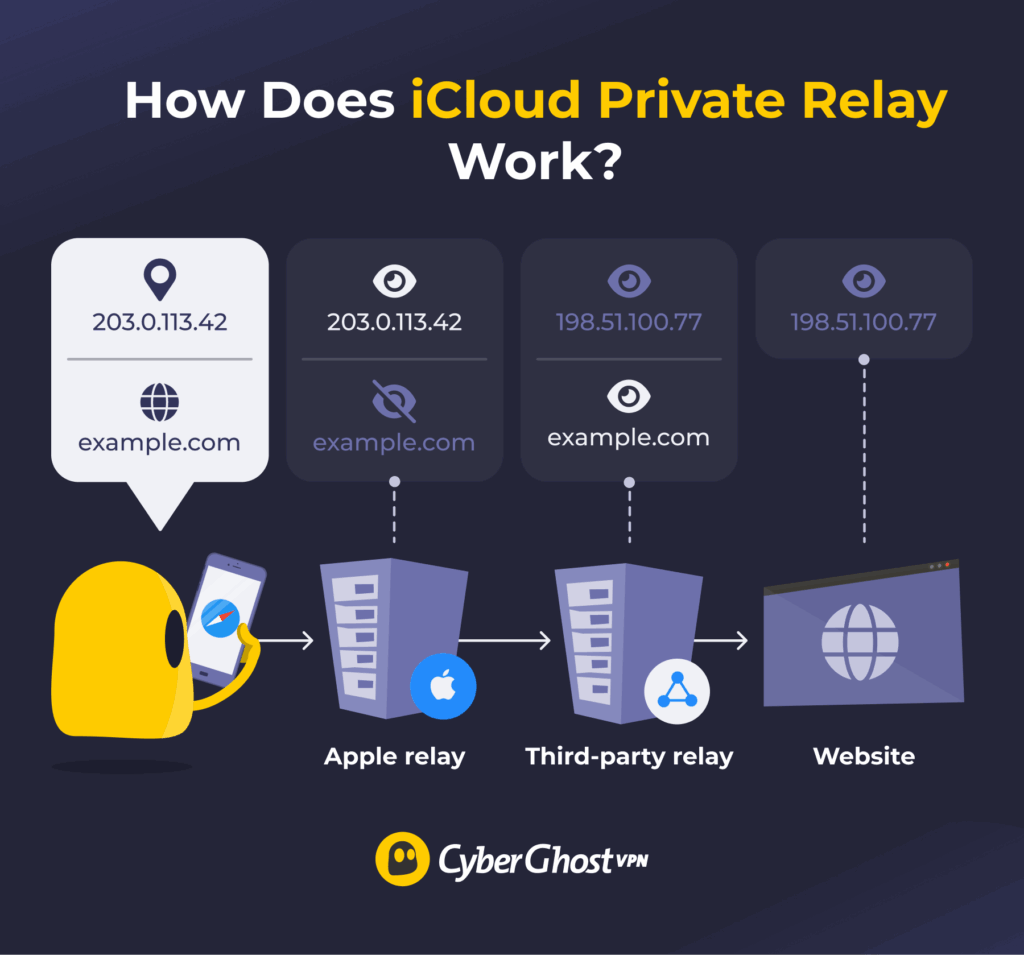
Private Relay comes bundled with iCloud+ (the paid iCloud tier that also gets you extra storage and Hide My Email). When it’s on, it encrypts your Safari traffic and DNS lookups and routes them through two separate relay stops before reaching the site you requested.
The first relay, run by Apple, can see your IP address but not which website you’re heading to, since the destination stays encrypted at that point. The second relay, operated by a third-party partner, can see the destination but only receives a temporary IP address instead of your real one. No single relay can associate your identity with both your IP address and the websites you visit.
Private Relay protects Safari browsing and DNS requests. It doesn’t provide the same device-wide traffic protection as a VPN.
iCloud Private Relay Pros
- Built into iCloud+
- Simple setup
- Keeps Safari browsing more private
iCloud Private Relay Cons
- Mainly protects Safari browsing
- Doesn’t provide the same app-wide protection as a VPN
- Only available on devices running iOS 15, iPadOS 15, macOS Monterey or later
- Requires active iCloud+ subscription
- Not available in some countries
- No server selection
How Does a VPN Work?
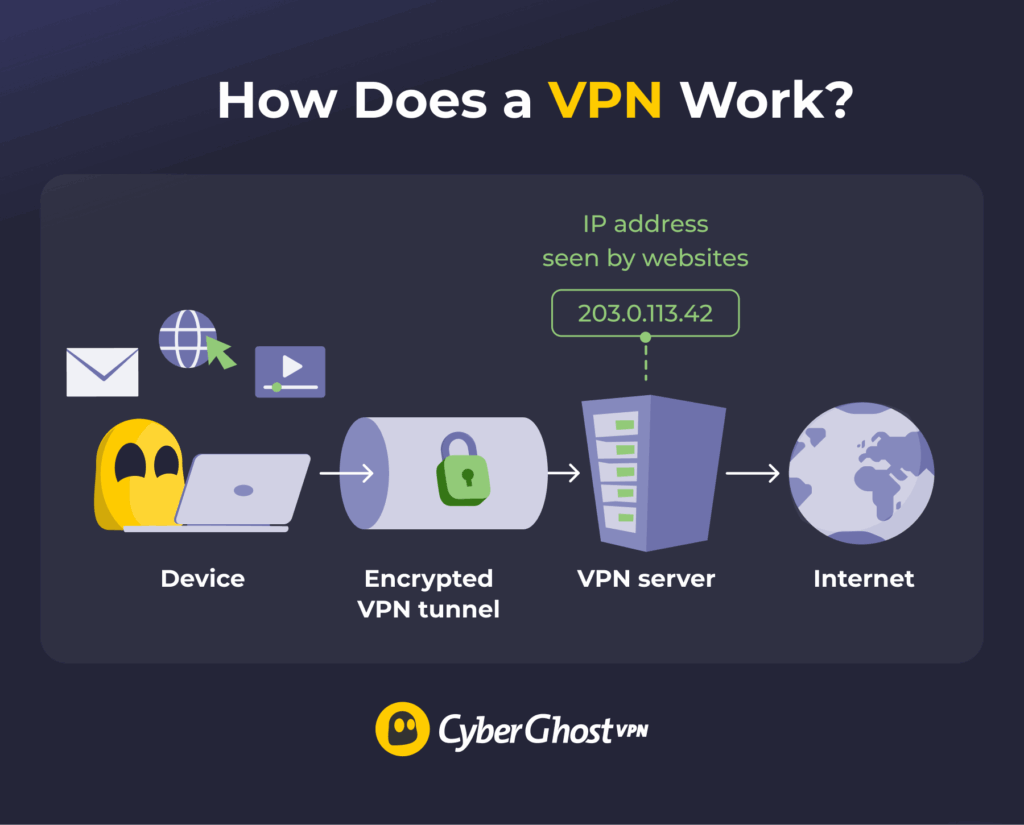
A VPN can route your device’s traffic through an encrypted tunnel to a server run by the VPN provider. By default, many VPNs route most or all supported traffic through the tunnel, although features such as split tunneling can let you exclude selected traffic.
Whatever you connect to sees the VPN server’s IP instead of your real one. At the same time, VPN protocols such as WireGuard® and OpenVPN establish and manage the encrypted connection. Depending on the protocol and configuration, the VPN may use encryption algorithms like AES 256-bit.
A VPN also gives you more control over how you connect. You can choose a server location, switch between protocols, and use additional features to manage your connection. For example, CyberGhost VPN includes a Kill Switch, which blocks your connection if the VPN drops unexpectedly, and Wi-Fi protection that automatically activates when you join new networks.
While your ISP and anyone else on that network only see encrypted traffic, the VPN provider can see certain connection information associated with traffic passing through its servers, so it’s important to choose a provider with a strong privacy policy and clear data-handling practices. CyberGhost VPN’s No-Logs policy has undergone multiple independent audits by Deloitte, and our RAM-only VPN servers erase all browsing data every time they reboot.
VPN Pros
- Works across multiple operating systems
- Secures traffic across the device
- Lets you choose from available server locations
- Includes advanced security features
VPN Cons
- Needs a separate app or a subscription
- Can slightly reduce speeds
Apple iCloud Private Relay vs VPN: Side-by-Side Comparison
| iCloud Private Relay | VPN | |
| What it encrypts | Safari browsing + DNS lookups | All traffic routed through the VPN tunnel |
| How it hides your IP | Splits knowledge across two separate relay operators | Routes supported traffic through a VPN server |
| Location control | General location or country and time zone | Choose a specific server location from a list |
| Device support | Apple devices that support Private Relay, including iPhone, iPad, and Mac | Supports major desktop and mobile platforms, with additional device support depending on the provider |
| Cost | Included with iCloud+ | Usually requires a separate subscription |
iCloud Private Relay vs VPN: Key Differences
Encryption: What Traffic Gets Protection?
The biggest practical difference is coverage. Private Relay secures Safari browsing and DNS requests, while a VPN can protect traffic from many apps and services. That matters if you often switch between browsers, apps, and devices.
IP Address and Location Control
Private Relay can either maintain a generalized location based on where you actually are or broaden it to your country and time zone. With a VPN, you can choose a server in another location and use an IP address associated with that location. This can be useful to see how websites appear in different regions or maintain access to services intended for your usual location while traveling.
Device Compatibility
iCloud Private Relay is only available on supported Apple devices, including iPhone, iPad, and Mac. It also requires an iCloud+ subscription and secures Safari browsing. VPNs support a broader range of devices and operating systems. Many VPNs support major desktop and mobile platforms. Some also offer apps or configurations for browsers, Smart TVs, routers, and game consoles.
Control and Customization
Once you turn Private Relay on, there isn’t much else to configure. This is great if you want a privacy feature without changing any settings.
VPNs give you far more control. While you can keep the default settings and connect in a few clicks, VPNs also give you more control over your connection. Depending on your provider, you may be able to choose a server location, switch VPN protocols, configure automatic connections, and use features like split tunneling, ad and tracker blocking, and a kill switch.
iCloud Private Relay vs VPN: Which One Should You Choose
The right choice depends on what you want to do online. If you browse the web on Apple devices, iCloud Private Relay may be enough. But if you want broader privacy, more flexibility, or access to features like location switching, a VPN may be the better option.
For Everyday Protection
If you use Safari on an iPhone or Mac, iCloud Private Relay can be a convenient way to add some privacy without installing anything. A VPN makes more sense if you browse across multiple apps or devices. It safeguards traffic beyond Safari, works across more platforms, and gives you more control over your virtual location.
For Public Wi-Fi and Sensitive Logins
If you often connect to public Wi-Fi, a VPN may be the better choice. It can provide an additional layer of security on unsecured networks by encrypting traffic between your device and the VPN server. This security can apply to traffic from apps beyond Safari, while iCloud Private Relay primarily safeguards Safari traffic.
For Travel
A VPN is often more useful because it secures traffic for more apps on your device. Most VPNs also let you choose a server location, which can be useful when you need to connect through a location associated with your usual services while traveling. VPN availability and regulations vary by country, so check local rules before using one while traveling.
Which Is Better Between iCloud Private Relay and a VPN?
iCloud Private Relay and a VPN both offer ways to improve your privacy online, but they differ in how they work and what types of traffic they secure. Apple designed Private Relay to protect Safari browsing and DNS requests through its relay system, while a VPN can route a broader range of traffic through an encrypted connection.
For simple browsing privacy on Apple devices, Private Relay may be all you need. If you want broader traffic coverage, more control over your connection, or the ability to choose from different VPN server locations, a VPN may be a better fit. The right choice depends on which devices you use and how much control and coverage you want from your privacy tools.
If a VPN is the right choice for you, CyberGhost VPN offers servers around the world and support for Windows, Apple, and Linux devices. There’s a 45-day money-back guarantee (14 days on the monthly plan), so you can try it completely risk-free.
FAQ
Is iCloud Private Relay the same as a VPN?
No. While both encrypt some of your internet traffic and hide your IP address, they work differently. iCloud Private Relay only protects Safari browsing and DNS lookups on supported Apple devices, while a VPN can encrypt traffic from many apps and browsers across your device. VPNs also usually let you choose a server location, while Private Relay doesn’t.
Does iCloud Private Relay hide my IP address?
Yes. Private Relay replaces your real IP address with a temporary one before your Safari traffic reaches a website. This helps prevent websites from seeing your actual IP address and makes it harder to link your browsing activity to your specific network. However, this only applies to supported Safari traffic and DNS lookups.
Can iCloud Private Relay change my location?
Not in the same way as a VPN. Private Relay assigns a temporary IP address that keeps your approximate location while hiding your exact IP address. You can choose to use an IP address that maintains your general location or country and time zone, but you can’t manually select a specific country, region, or city.
Which one is more secure, iCloud Private Relay or a VPN?
Neither is more secure, but a VPN generally provides broader protection. A VPN can route traffic from many apps through an encrypted tunnel, while Private Relay safeguards Safari browsing and DNS requests.
Should I use iCloud Private Relay and a VPN together?
Not usually. A VPN and iCloud Private Relay can conflict because both affect the routing of your traffic, and a VPN may prevent Private Relay from working. Certain devices or configurations may require you to disable one to use the other. For most people, there’s little benefit to using both at the same time. If you want broader traffic coverage, a VPN can secure traffic from more apps and browsers. If you want privacy while using Safari, then Private Relay may be sufficient.

Leave a comment