
Split tunneling is a VPN feature that lets you decide which apps or websites use the encrypted VPN tunnel and which connect through your regular internet connection. It’s useful if you want to balance VPN privacy with direct access to certain apps or services. For example, you could route your banking app through the VPN while allowing streaming or gaming traffic to use your normal internet connection.
This gives you more flexibility than a full tunnel VPN configuration, with the trade-off that traffic outside of the VPN tunnel won’t have encryption or IP masking. This guide explains how split tunneling works, when it makes sense to use it, when to avoid it, and how to enable it with CyberGhost VPN.
Split Tunneling Explained
Split tunneling lets you choose which traffic goes through the encrypted VPN tunnel and which traffic uses your normal ISP connection. With split tunneling on, your device will send your internet traffic via two different routing paths at the same time:
- VPN-routed traffic: Passes through the VPN tunnel.
- Bypassed traffic: Connects through your standard ISP connection.
This provides you with more control over your connection and allows you to use local services and VPN‑protected apps at the same time. Bypassed traffic doesn’t receive the VPN’s encryption, although individual apps or websites may still use their own encryption.
VPN providers may implement split tunneling in different ways. One common approach is allowing selected apps to use the VPN while others bypass it. Another is to route everything through the VPN except for specified apps or websites.
Here are the main differences between these approaches:
| Selective Encryption (Include Mode) | Selective Bypass (Exclude Mode) | |
| Definition | Only selected apps or URLs use the VPN. Everything else uses your normal connection. | Everything uses the VPN except the apps or URLs you exclude. |
| Example | Keep YouTube and gaming traffic on your normal internet connection. Route work apps or other traffic you want to encrypt through the VPN. | Use the VPN for all traffic. Exclude Netflix or Wikipedia so their traffic bypasses it. |
When to Turn On Split Tunneling
Split tunneling can be useful when routing all your traffic through a VPN isn’t the best fit for what you’re doing. Here are some situations where it can help.
1. Avoiding Slow Speeds
If a VPN connection is adding latency or slowing down certain traffic, you can route that traffic through your normal connection instead. For example, excluding your gaming client from the VPN tunnel may reduce latency if the VPN route is adding delay.
Of course, excluding an app means it no longer has a boost of protection from your VPN. If you want to keep gaming or streaming traffic encrypted without the same hit to your performance, CyberGhost VPN offers gaming-optimized servers designed to limit VPN-induced latency.
2. Using Local and VPN-Based Services Simultaneously
Some websites and apps may work differently depending on the network connection or IP address they use. You might route your browser through the VPN while allowing a separate app to use your regular connection. The VPN-routed traffic appears to come from the VPN server’s location, while bypassed traffic continues to use your normal connection. Always make sure your use of a VPN complies with the app’s terms and any applicable laws.
3. Accessing Your Local Area Network (LAN)
Depending on your VPN configuration, connecting to a VPN can interfere with access to devices on your local network, such as printers. A LAN bypass or split-tunneling setting can allow local traffic to use your normal network while the VPN remains active.
4. Avoiding VPN Blocks
Some websites or services may restrict access when they detect traffic from a VPN IP address. With split tunneling, you can exclude these websites from the VPN tunnel to maintain access. Again, make sure your VPN usage complies with applicable laws and policies.
When Should You Avoid Split Tunneling?
Split tunneling isn’t a good fit for every situation, since traffic excluded from the VPN goes unprotected. Avoid it when you’re handling sensitive information, connecting over an untrusted network, or accessing systems that require all traffic to follow a specific VPN route.
There are also limitations to keep in mind:
- Support for split tunneling depends on your VPN app, operating system, and protocol. Switching protocols may change whether it’s available or how it behaves.
- Some apps or services may not behave normally if they use their own networking or routing mechanisms.
- Some VPN implementations may not let you apply split-tunneling rules to every type of traffic.
- Software updates can change how apps handle traffic, possibly breaking existing split-tunneling rules.
If split tunneling isn’t working as expected, check your VPN provider’s documentation for known constraints.
What’s the Difference Between Split Tunnels and Full Tunnels?
Here’s how the two approaches compare in practice:
| Key Differences | Split Tunnel | Full Tunnel |
| Data encryption | Only traffic routed through the VPN receives VPN encryption. Bypassed traffic may still use application-level encryption such as HTTPS. | All supported traffic routes through the VPN tunnel. |
| Internet access | Allows selected traffic to use the VPN while other traffic connects to the internet. | Everything you do on the internet (including general browsing) travels through the VPN’s secure tunnel. |
| Security | It might be less secure, because some traffic doesn’t go through the VPN tunnel. | Provides VPN protection to more traffic because fewer connections bypass the VPN. |
| Performance | Can reduce VPN overhead for traffic that bypasses the tunnel. | Can add some VPN overhead, which may affect connection speed or latency. |
How to Set Up Split Tunneling With CyberGhost VPN
To configure split tunneling, you need a VPN that offers the feature. CyberGhost VPN offers it on Android and Windows.
How to Activate VPN Split Tunneling on Android
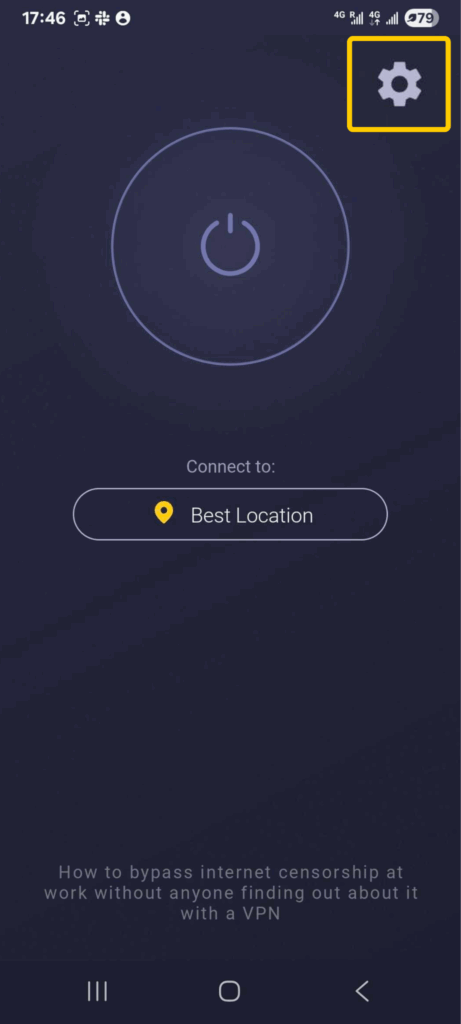
- Launch the VPN and tap the Settings icon. Make sure you disconnect from the VPN server before continuing.
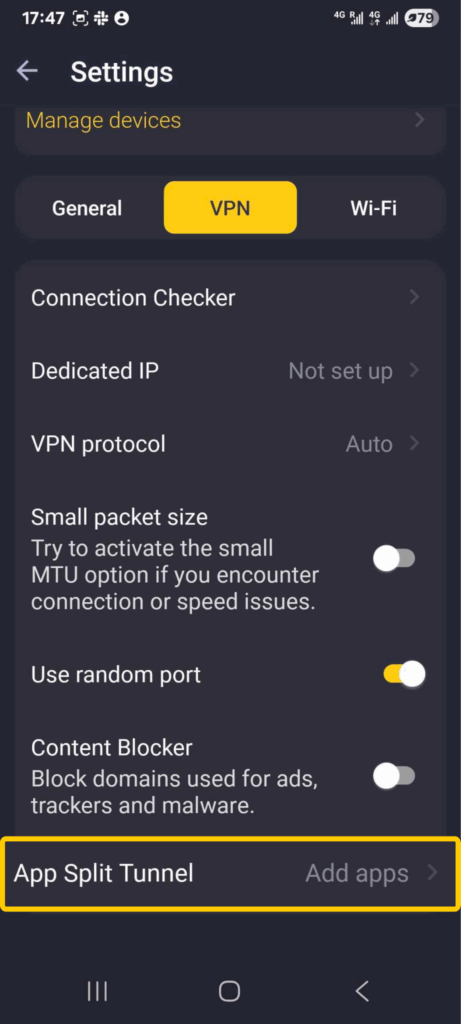
- Once you’re in Settings, navigate to the panel under Manage devices and tap on VPN. Select App Split Tunnel at the bottom of the screen.
- Choose which apps should bypass the VPN.
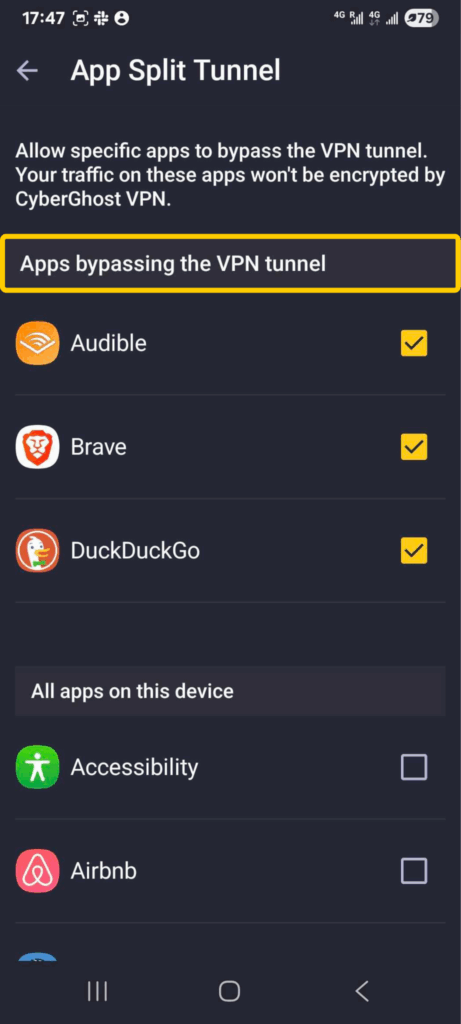
- To switch back to full tunneling, return to Add apps and turn off the toggle for all apps.
How to Configure Split Tunneling on Windows
The CyberGhost VPN app for Windows has an Exceptions feature that lets you exclude sites from the VPN tunnel.
- Launch the CyberGhost VPN app and log in.
- Click on Smart Rules in the bottom left-hand corner. Open Exceptions.
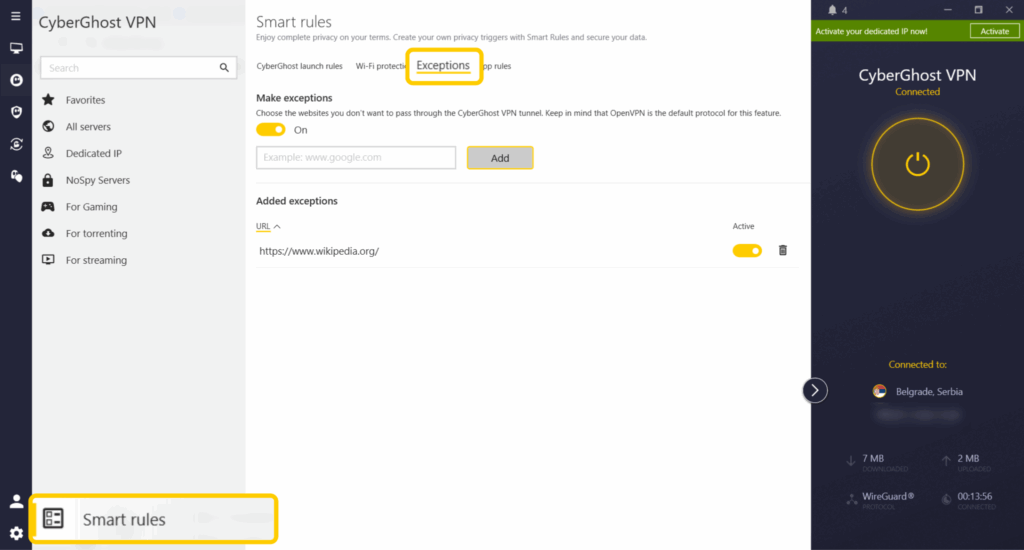
- Turn on the toggle switch under Make exceptions. Then type in the URL of any website you want to exclude from the VPN tunnel and confirm by selecting Add.
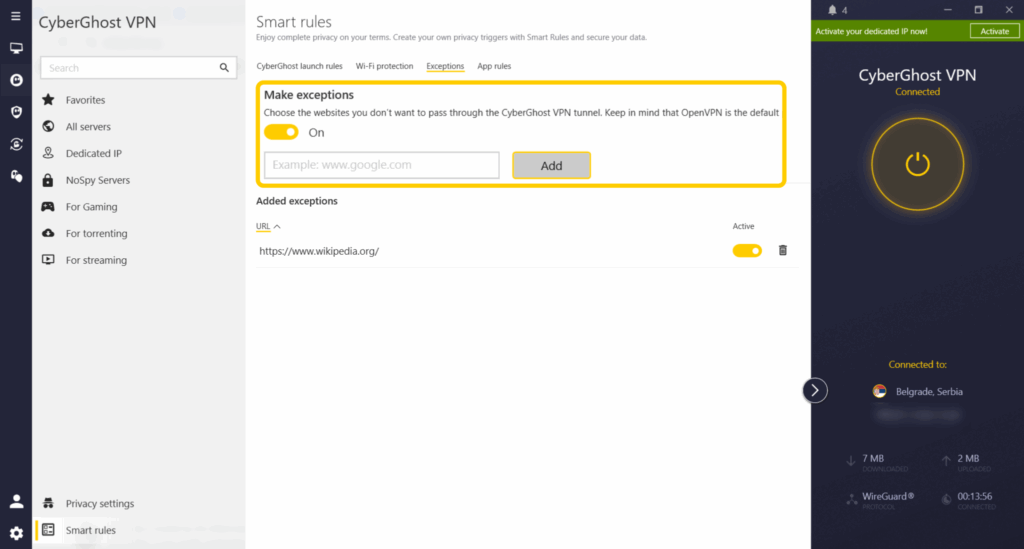
That’s it. The URL will now appear on the list of URLs that bypass the VPN tunnel. You can deactivate or delete this URL at any time.
How to Test If Your VPN Split Tunneling Is Working
Unsure if you’ve activated split tunneling? Here are some steps you can take to check:
- Connect to your VPN.
- Open an IP-checking site from an app or browser that should use the VPN.
- Confirm that your VPN connection uses the public IP address shown.
- Open an app or website you’ve configured to bypass the VPN.
- Check the public IP address again.
- Confirm that it matches your network’s public IP address rather than the VPN’s IP address.
- If you’ve configured LAN access, try connecting to a local device like a printer.
Is Split Tunneling Secure?
Yes, split tunneling can be secure, but only for the traffic you continue to route through the VPN. Any apps or websites you exclude use your normal internet connection, so any data sent won’t use the VPN’s encryption. Your ISP and anyone monitoring the local network can potentially see information about those connections that would otherwise go through the VPN tunnel. However, many websites still encrypt their own traffic using HTTPS.
If you’re using public Wi-Fi, handling sensitive information, or want all supported traffic to go through the VPN, a full tunnel is usually the safer option.
Is Split Tunneling Right for Me?
Split tunneling is a good choice when you want more control over how your VPN handles different apps and websites. It lets you keep VPN protection while allowing selected traffic to connect to your regular network, which can be useful for local devices, services that don’t work well with a VPN, or activities where you prefer a direct connection. A full tunnel allows you to protect every supported connection.
CyberGhost VPN gives you the flexibility to choose the setup that suits your needs. With split tunneling on Android and the Exceptions feature on Windows, you can decide which traffic bypasses the VPN while keeping the rest of your connection protected. Whether you prefer the simplicity of a full tunnel or the control of split tunneling, you can tailor your VPN connection to the way you use the internet.
FAQ
What does VPN split tunneling do?
Split tunneling lets you route some apps or websites through a VPN while allowing other traffic to use your normal internet connection. This can help you balance VPN protection with direct access to local services or better performance for selected traffic.
Should I enable split tunneling?
Enable split tunneling when you need speed or access to local services. Disable it if you want all supported traffic to receive VPN protection. For example, you can set up split tunneling to access the internet through the VPN while still connecting to devices on your local network, such as a printer.
Does split tunneling slow down the internet?
Not necessarily. Split tunneling can improve performance for traffic that bypasses the VPN because that traffic doesn’t travel through the VPN server. However, it doesn’t guarantee faster speeds. You can help mitigate this by getting a fast VPN. CyberGhost VPN offers 10-Gbps servers and unlimited bandwidth.
How do I know if my VPN is on full tunnel or split tunnel?
Many VPN apps use full tunneling by default, routing all supported traffic through the VPN unless you configure exceptions. If you want to set up split tunneling, you’ll need to configure your VPN. To check that you set up split tunneling correctly, you can visit one of the apps or URLs you selected and confirm that its public IP address matches your normal connection rather than the VPN connection.
Does split tunneling work with all VPN protocols?
No. Split tunneling support depends on the VPN app, operating system, and protocol. Some combinations may limit or change how split tunneling works, so check your VPN provider’s documentation if the feature isn’t available or behaves unexpectedly.
Is split tunneling good for gaming?
It can be. If routing your game through the VPN is adding noticeable latency, excluding the game from the VPN may improve responsiveness while the rest of your apps continue using the VPN. If you want to keep your gaming traffic protected without sacrificing performance, try connecting to a nearby CyberGhost VPN gaming-optimized server first. Split tunneling is a good alternative when you need a direct connection for a particular game or service.

Leave a comment