
A message says your payment failed, Netflix will suspend your account, or someone signed in from a new device. There’s a button, QR code, or support number waiting for you, and the whole thing may look convincing. These are common Netflix scam tactics designed to trick you into sharing login credentials, payment details, or personal information. But Netflix sends legitimate account alerts too, so a convincing message isn’t automatically a scam.
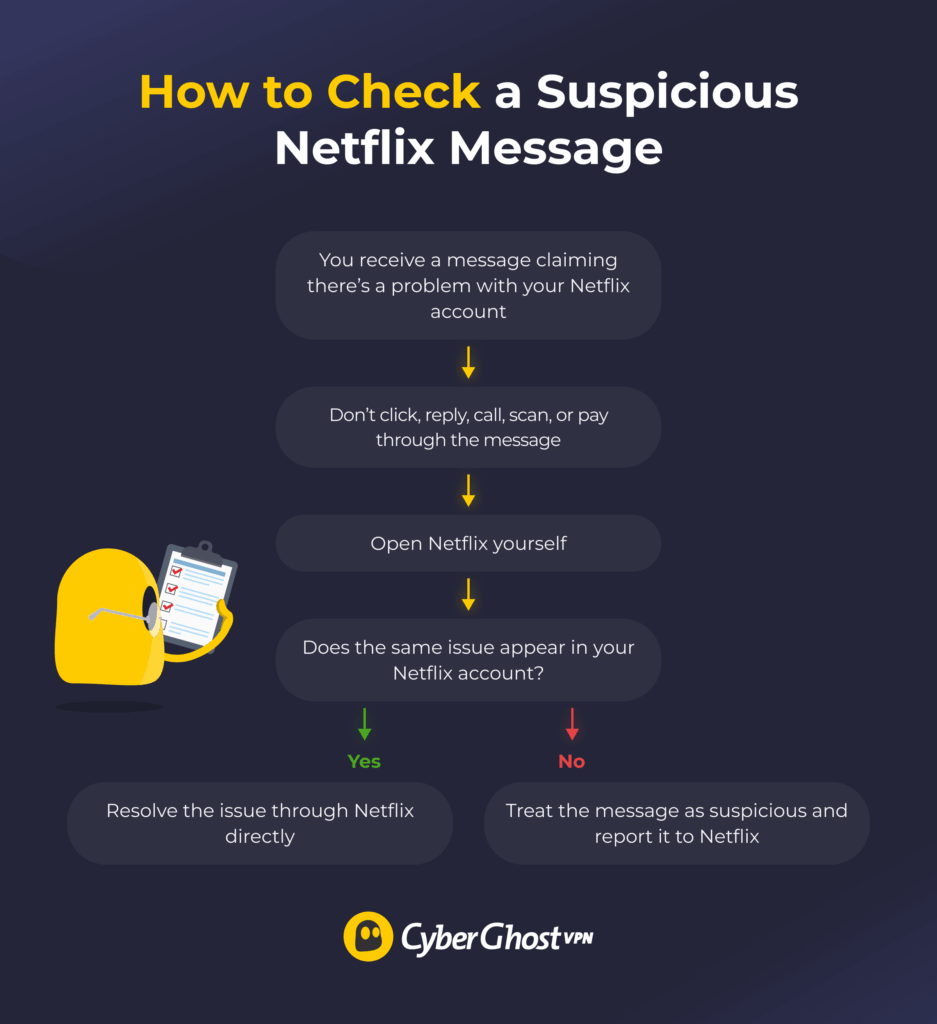
A Netflix scam email can copy genuine branding, billing language, and security warnings closely enough to make you hesitate. But don’t use any contact information or click on any links contained in the message. Instead, use the Netflix app or navigate to the Netflix website, then check whether the same alert appears in your account.
We’ll explain how to spot fake Netflix emails, texts, and alerts, how to check whether someone has accessed your account, and what to do if you’ve already clicked a scam link or shared information.
What Is a Netflix Scam and How Does It Work?
A Netflix scam impersonates the company to trick you into sharing login credentials, payment information, or personal data. Scammers copy familiar account messages because they already feel routine. The scam may reach you through email, text, a phone call, a QR code, a pop-up, or a social media post.
The pattern is usually the same. A believable message makes an urgent or tempting claim, then directs you to a fake login page, payment form, support conversation, attachment, or download. Netflix branding doesn’t mean someone breached Netflix itself. Scammers can copy the company’s name and appearance. If they steal your Netflix password and you’ve reused it elsewhere, they may also try the same credentials on your other accounts.
How to Tell If a Netflix Email, Text, or Call Is Fake
The best way to tell if a Netflix message is fake is to verify its claim through your Netflix account rather than relying on the message itself. Scammers can copy logos, polished wording, familiar billing language, and even convincing sender details.
Start by checking your account. Then look at what the message asks you to do and inspect details such as the sender address and destination of any links. The following checks can help you separate genuine Netflix alerts from impersonation scams.
Primary Test: Check Your Netflix Account
Open the Netflix app or navigate to the official website, then check whether the message matches what you see in your account. Don’t use the email, text, QR code, pop-up, search ad, or phone number that brought you there.
Check the relevant account details, including:
- Account status: Look for warnings about your membership or subscription.
- Payment details: Check whether a payment actually failed or your payment method needs updating.
- Recent sign-ins: Search for activity you don’t recognize.
- Devices: Review devices currently using your account.
- Account changes: Check for changes to your email, password, or plan.
If the message claims your payment failed or Netflix is about to suspend your account but there’s no corresponding issue in your account, don’t act on the message. If you find a change you didn’t make, open the Netflix Help Center and contact support from there.
Strong Warning Signs: Know What Netflix Won’t Request by Email or Text
Netflix sends genuine billing, account, and sign-in messages, but it will never ask you to share certain sensitive information by email or text, including:
- Your Netflix password
- A credit or debit card number
- Bank account details
- Payment through a third-party website or vendor1
A genuine billing notice may tell you there’s a problem, but you should make any changes from your Netflix account rather than through the message. The warning may sound perfectly normal. What the message asks you to do next is often the more useful clue.
Secondary Clues: Inspect the Message for Branding and Sender Details
Fraudulent Netflix messages can look remarkably clean. A familiar logo, polished design, or sender name that says “Netflix” doesn’t always prove the message is genuine. Look beyond the branding and check:
- Sender and reply-to addresses: Watch for details that don’t match Netflix.
- Link destinations: Check where a link actually leads before interacting with it. Most browsers will display the destination URL at the bottom of the screen if you hover over the link. A convincing button can still point to an unrelated or deceptive website.
- Language and formatting: Poor grammar can be a warning sign, but polished writing doesn’t make a message legitimate.
- Support details: A phone number can be copied into a fake message or website, so verify support information through Netflix.
Don’t rely on the padlock or HTTPS alone either. HTTPS encrypts the connection between your browser and the website, but it doesn’t necessarily mean the website itself is trustworthy.2
Common Netflix Scams
Netflix scams often use pressure or a promised reward to push you into acting before you’ve had time to check the claim. Knowing what the most common versions look like can make them easier to recognize.
Fake Payment and Account Suspension Messages
Fake billing warnings claim there’s a problem with your payment or membership and pressure you to fix it immediately. You may get an email or text claiming billing couldn’t process your card, your membership has expired, or Netflix will suspend your account unless you update your payment method.
The message may include a deadline and a button such as “Update Payment” or “Restart Membership.” Some versions use a QR code or place the link inside a PDF attachment. Following them can take you to a fake Netflix login page that asks for your email and password before requesting card details, billing information, or other personal data. That extra step helps the fake Netflix payment page feel more convincing because it copies the normal account flow.
Fake Sign-In and Security Alerts
Fake security alerts claim that someone signed in to your account from a new device or location or you need to confirm your identity. The message may ask you to “secure your account,” approve the login, or verify your account before the platform restricts access.
Netflix does send genuine new device and security emails, so the subject alone doesn’t tell you whether the message is real.3 Fake versions may copy password reset notices and account-verification emails. They often include a link to a fake sign-in page where you’re asked to enter your credentials. Once you do, attackers collect that information for their future use.
Fake Offers, Surveys, and Gift Cards
Some Netflix scams lead with a reward rather than threaten you with an account problem. You might see an offer for a free membership, a steep discount, a loyalty bonus, or a gift card for completing a short survey.
The catch usually appears when you try to claim the reward. You may be asked to pay a small fee, provide card details to “verify” eligibility, share personal information, or download something. Scammers can promote these offers through emails, text, social media posts, and ads, sometimes using countdowns or claims that only a few rewards remain.
Their goal may be to access your Netflix account or distribute malware. Be cautious with any unexpected offer that asks for payment, account credentials, or sensitive information.
Fake Customer-Support Calls and Pop-Ups
Fake Netflix support scams try to convince you that you need immediate help with an account, billing, or security problem. They may begin with a pop-up, search result, email, or text telling you to call a support number before Netflix locks your account or the problem gets worse.
Once you call, the scammer may ask for your login details, card information, payment by gift card, or permission to install remote-access software. Don’t assume a phone number is genuine because it appears in a polished message or website. If you need help with your account, open the Netflix Help Center yourself or use the contact options inside the Netflix app.
How to Tell if Someone Has Access to Your Netflix Account
A suspicious message may be an attempted scam, but changes inside your account can point to a real compromise. Checking for activity you don’t recognize, including:
- Password-reset or email-change messages you didn’t request
- Netflix signing you out without explanation
- Charges you don’t recognize
- A new profile appearing that nobody in your household created
- Account details changing without your approval
You can also review recently active devices through Manage Access and Devices. That gives you a clearer picture of account access and lets you sign out of individual devices or all devices. However, don’t treat the list as a complete real-time record. Netflix says devices can take up to 48 hours to appear, and some signed-in devices may not be shown.4
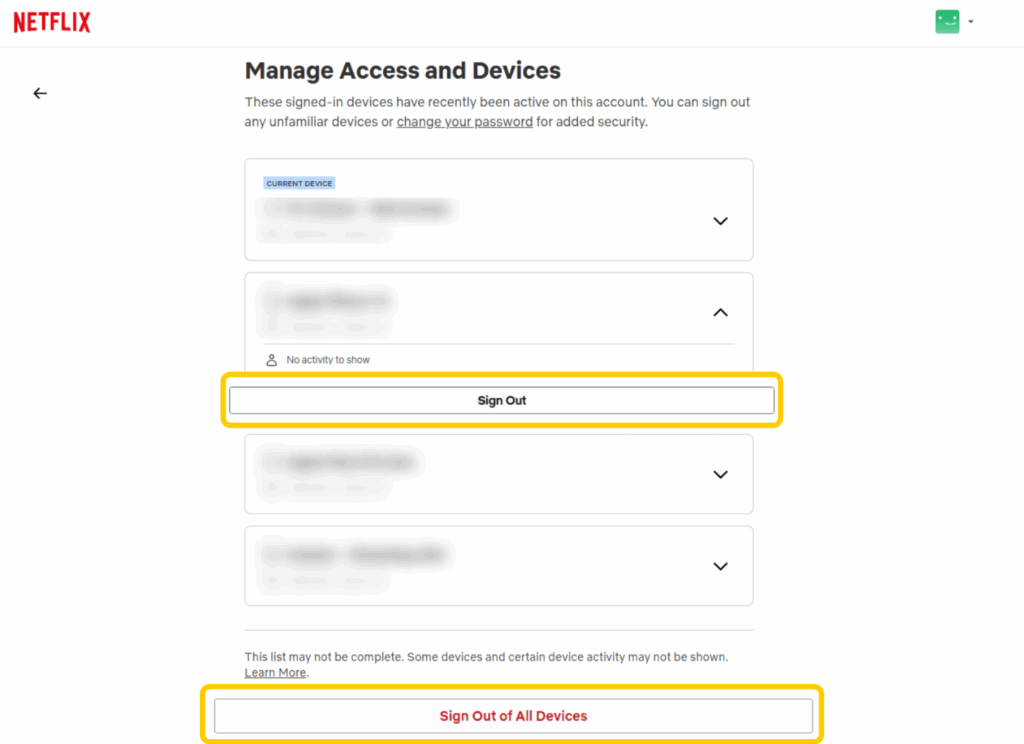
Location details can help, but they’re not definitive. A new sign-in may show a nearby city or a different area because Netflix bases the location on the device’s IP address. Look for a combination of unexplained devices, account changes, charges, or activity rather than relying on one unusual location.
Remember that a genuine Netflix email may still be evidence of unauthorized activity. If you receive a real new device, password reset, or account change notification that you didn’t trigger, open Netflix on your own and investigate. If someone changed the email address associated with your account or you can no longer sign in, contact Netflix support.
What to Do if You Clicked a Netflix Scam Link or Shared Information
What you should do next depends on how far the scam went. Receiving a message requires a different response from entering your password, sharing payment details, or installing software.
| What Happened | Immediate Action |
| You received the message but didn’t interact | Don’t reply, click links, scan QR codes, or call numbers in the message. Verify the claim through Netflix, report the message, and delete it. |
| You clicked but entered nothing | Close the page and don’t download, install, or approve anything. Check your account independently and report the suspicious link. |
| You entered your Netflix password | Change your Netflix password immediately and update it anywhere else you reused it. Secure the email account linked to Netflix and sign out of unfamiliar devices. |
| You entered payment or personal information | Contact your bank or payment provider promptly, monitor for unauthorized activity, change affected credentials, and report the scam. |
| You downloaded a file or installed an app | Disconnect from the service if necessary, remove any untrusted software, update the device, and run a reputable security scan. |
| You lost access or the account email changed | Navigate to the official Netflix Help Center and follow the account recovery steps. |
A stolen password can cause problems beyond Netflix if you’ve reused it elsewhere. Change the password on any other account that uses the same credentials. If you reused it for a work account, notify your IT or security team right away.
Pay close attention to the email account linked to Netflix, too. It receives password-reset links and account-change alerts, so securing it can help prevent someone who has your credentials from maintaining or regaining access to your Netflix account.
How to Report a Netflix Scam
Forward suspicious Netflix emails and texts to phishing@netflix.com. Don’t click links, open attachments, or interact with the message to investigate it first. You can also report fake Netflix websites, apps, QR codes, or support numbers by sending Netflix the relevant details.
If someone compromises your account, you’ve lost access, or you notice charges you don’t recognize, reporting the scam isn’t enough on its own. Go to the official Netflix Help Center and contact support for help securing your account or resolving billing issues.
How to Reduce the Risk of Netflix Account Scams
Good account security and careful verification can reduce both your chances of falling for a Netflix scam and the damage if one succeeds. Use a unique password for Netflix that you don’t use anywhere else. A password manager can help you create and store strong, unique passwords without having to remember each one.
Your email account deserves as much attention. It receives password-reset links and account-change alerts, so enable multi-factor authentication where available and review its recent activity if you notice anything suspicious. You can also:
- Review connected devices: Check Manage Access and Devices and sign out devices you don’t recognize.
- Update payment details through Netflix: Don’t use payment links in unexpected emails or texts.
- Keep your software current: Install updates for your browser, operating system, and security tools.
- Avoid unexpected downloads: Don’t install “support” software or unofficial apps sent through messages or pop-ups.
- Use a trusted route to Netflix: Open the app, use a saved bookmark, or let your password manager take you to the stored login page.
- Pay attention to account alerts: Investigate notifications about sign-ins or account changes you didn’t make.
CyberGhost VPN can add another layer of privacy and security when you’re using public or shared Wi-Fi by encrypting internet traffic routed through the VPN tunnel. It can’t tell whether a Netflix email, text, or website is genuine, so you should still verify unexpected alerts through Netflix and protect your accounts with unique credentials.
Verify Netflix Alerts Before You Act
Netflix scams can copy genuine billing notices, security alerts, and support messages closely enough to look convincing. The safest habit is to treat an unexpected message as an alert to investigate, not proof that something is wrong. Open your official Netflix app, check your account, and only take action once you’ve confirmed the issue there.
If you’ve already interacted with a scam, respond according to what you shared or installed: change exposed passwords, secure your email account, contact your payment provider if necessary, and report the scam.
For an extra layer of online privacy, CyberGhost VPN gives you access to security features such as DNS leak protection and automatic Kill Switch, alongside a global server network. You can try it risk-free with a 45-day money-back guarantee (14 days on the monthly plan).
FAQ
What is a Netflix scam?
A Netflix scam impersonates the company to trick you into sharing login credentials, payment details, or personal information. It may arrive through email, text, phone call, fake website, pop-up, QR code, or social media. Some scams also try to persuade you to download malicious software or contact fake customer support.
How can I tell if a Netflix email is fake?
The most reliable way is to open the official Netflix app and check whether the same warning appears in your account. Don’t rely on logos, sender names, grammar, or urgent wording alone, as these can all be convincing. Be especially cautious if the message asks for your password, payment details, bank information, or payment through a third party.
What should I do if I clicked a Netflix phishing link?
If you clicked the link but didn’t enter any information or download anything, close the page and check your Netflix account independently. If you entered your password, change it immediately and anywhere else you reused it. If you share payment details, contact your bank or payment provider. Remove and scan for any software you downloaded or installed.
Will Netflix ask for my password by email or text?
No. Netflix says it won’t ask you to share your Netflix password by email or text. It also says it won’t request your credit or debit card number, bank account details, or payment through a third-party website or vendor in these messages.
How do I report a Netflix scam?
Forward suspicious emails and texts to phishing@netflix.com, then delete the original message. You can also send Netflix the details of a fake website, app, QR code, or support number. Contact Netflix through its official Help Center if you’ve lost access or spotted unauthorized charges.
References:

Leave a comment