
Instagram doesn’t show you who viewed your profile, and third-party apps claiming to reveal the secret may put your account at risk. You can see who views your Stories and who likes or comments on your posts, but these interactions don’t prove someone is stalking you. If you’re worried, Instagram gives you ways to take control. From making your account private to restricting or blocking people, you can limit who sees your content and who can contact you.
What Does Instagram Tell You About Your Profile Viewers?
Instagram doesn’t tell you who viewed your profile, but it lets you check four types of activity that can flag unusual attention:
- Story viewers: Open your Story and swipe up to see who watched it. This shows viewers of that Story, not profile visitors.
- Likes and comments: Check who likes or comments on your posts. Repeated engagement may indicate interest, but it doesn’t prove stalking.
- Insights: Professional accounts can access aggregated audience and performance data, but Insights doesn’t identify individual profile visitors.
- Followers: Scan your follower list for unfamiliar accounts. Generic usernames, missing profile pictures, or few posts or followers may warrant a closer look. However, those traits don’t prove someone is monitoring you.
Why Profile-Viewer Apps Don’t Work
Instagram doesn’t provide third-party apps with a list of profile visitors, so apps claiming to reveal them can’t legitimately deliver that information. Their results may be fabricated, and some may use unauthorized data collection. The same caution applies to apps claiming to reveal deleted posts or private DMs.
Some third-party apps ask for your Instagram password, putting your account at risk. Anyone who obtains your credentials could access private content, send messages from your account, change settings, or lock you out. If you’ve shared your password with an unofficial app, change it and review your login activity.
What Counts as Instagram Stalking?
Instagram stalking generally means a pattern of unwanted attention or contact that causes fear or safety concerns. It can include sending repeated messages or using social media to track someone’s communication or location.
Stalking is a crime in all 50 US states, though definitions and penalties vary. Federal law also covers certain stalking involving interstate travel or electronic communications. Repeated unwanted online attention isn’t automatically a crime. Whether conduct qualifies as stalking depends on the circumstances and the applicable laws, including the nature and pattern of the behavior.1
The CDC’s 2023/2024 survey found that about 1 in 5 women and 1 in 10 men in the US have experienced stalking in their lifetimes.2 Among stalking victims, social media is one way perpetrators make unwanted contact or monitor others:
| Gender of stalking victim | Received unwanted social media messages | Perpetrator monitored or tracked them through social media |
| Women | 46.8% | 36.3% |
| Men | 53.9% | 43.8% |
Instagram Privacy Features to Control Unwanted Attention
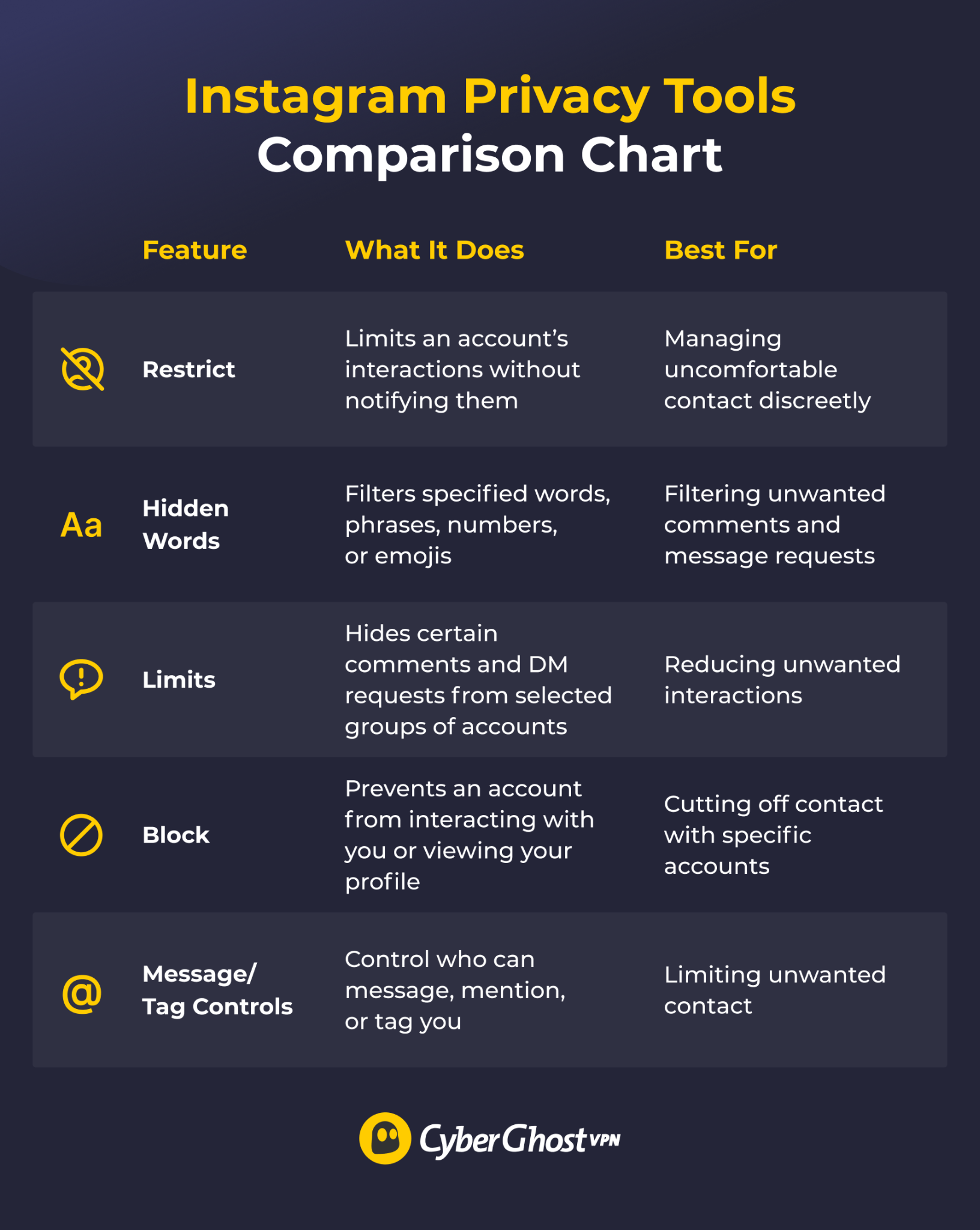
These features won’t show who views your profile, but they let you control who can contact or interact with you.
Restrict
When you restrict someone, they can’t see when you’re online or whether you’ve read their messages. Their new comments on your posts are visible only to them unless you choose to approve them, and you won’t receive notifications for future comments from that account. Instagram doesn’t notify them that you’ve restricted them.
Pro tip: To restrict someone, open their profile, tap the three-dot menu, and select “Restrict.” Use it to limit interactions without blocking the account.
Hidden Words
Hidden Words automatically hides comments and message requests containing words, phrases, numbers, or emojis you specify. It doesn’t alert the sender and is useful when you keep receiving the same unwanted phrases from multiple accounts.
Limits
Limits temporarily hides comments and DM requests from people who don’t follow you or who followed recently. Use it during a sudden increase in unwanted comments or message requests.
Block
Blocking an account limits its ability to find your profile, view your content, or interact with you. You can also choose to block other accounts that person may have or create.
Message, Comment, Tag, and Mention Controls
Instagram gives you several layers of control over how people interact with you:
- Messages: Open Instagram’s privacy settings and review who can message you. Messages from people you don’t follow may appear as requests, which you can manage separately.
- Comments: You can choose who’s allowed to comment on your posts. Restrict it to followers only, people you follow, or even approve comments manually before they appear.
- Tags: Control who can tag you in posts and captions. You can disable tagging completely, approve all tags before they show up, or only allow followers to tag you.
- Mentions: Decide who can mention you (use your @ handle). You can limit this to followers or turn it off entirely.
How to Deal With Unwanted Attention on Instagram
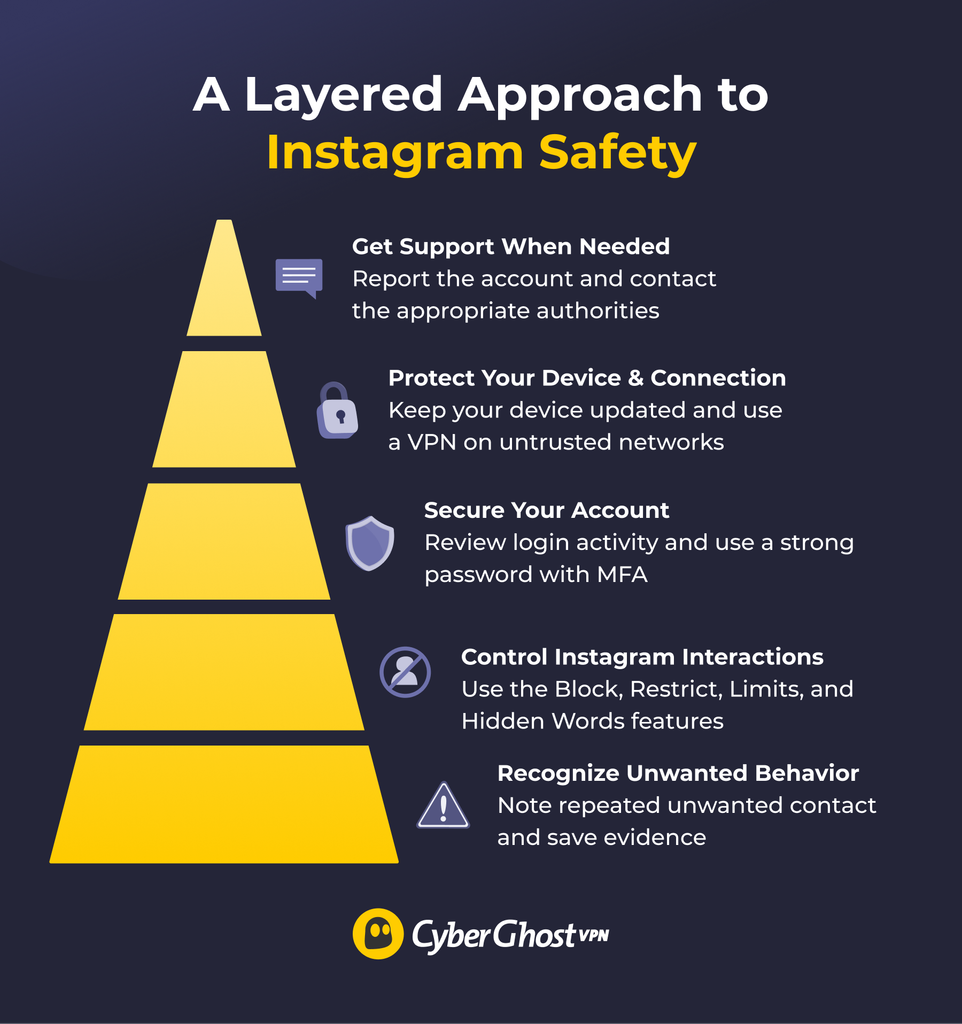
Think of Instagram safety in layers, from spotting unwanted behavior to getting outside support. Follow these steps to protect yourself and limit unwanted interactions or attention:
- Recognize unwanted behavior: Don’t feel obligated to engage with someone who makes you uncomfortable. As long as you feel safe doing so, send one brief message asking them to stop, but don’t reply if you feel threatened. Save screenshots and timestamps of messages, comments, and DMs as evidence.
- Control Instagram interactions: Block and report accounts that contact or harass you. Use Restrict, Limits, Hidden Words, and message controls to manage unwanted interactions. Set your account to private to approve follower requests.
- Secure your account: Use a strong, unique password with multi-factor authentication, and review your login activity for anything unfamiliar.
- Protect your device and connection: Keep your devices and software updated.
- Get support when needed: Tell someone you trust if someone’s behavior concerns you. Consider temporarily deactivating your account to have a break.
If someone contacts you outside Instagram, save all your messages and call records and consider changing your number. If the person shows up at your home or workplace, threatens you, or puts you in immediate danger, contact local emergency services or law enforcement as appropriate. Local domestic violence organizations can help you explore stalking support resources.
Share Less Identifying Information
Photos, Stories, locations, and tags can reveal more about your daily life than you may realize. Limit what you share to make it harder for others to infer your location or routine:
- Avoid posting your phone number, home address, ID numbers, or details that could identify your vehicle.
- Check photos for landmarks, street signs, and other recognizable locations before posting, and skip location tags.
- Keep your workplace and predictable routines private. Avoid sharing real-time location updates or announcing that you’re away from home until you return.
- Ask friends and family not to post identifying details about your location.
Secure Your Account and Connection
Instagram’s controls only cover Instagram. Take steps to secure your other accounts and devices, too:
- Install reputable antivirus software with real-time protection for your device and operating system.
- Review privacy settings on other social accounts, including Facebook and TikTok.
- Consider a personal safety app if you have a specific need for emergency alerts.
Where a VPN Can Add Protection
A VPN like CyberGhost VPN encrypts your internet connection and masks your device’s public IP address. This helps protect your traffic from people monitoring the network between your device and the VPN server, including on public Wi-Fi.
A VPN can’t hide your activity from Instagram, limit what you share publicly, or secure a compromised account. Use it alongside Instagram’s privacy controls, not as a replacement for them. CyberGhost VPN offers a 45-day money-back guarantee (14 days for monthly plans), so you can try it and see whether it fits your needs.
Take Control of Your Instagram Privacy
You might not be able to see who’s secretly checking your Instagram profile, but you can control how much access people have to you. Making your account private, reviewing your followers, and using Instagram’s Restrict and Block features can help you manage unwanted attention. It’s also worth checking what personal information you’re sharing in your posts, Stories, and bio.
If someone’s behavior goes beyond curiosity and starts making you uncomfortable, don’t feel pressured to ignore it. You can document unwanted interactions, report harassment to Instagram, and reach out to someone you trust for support. You don’t need to know exactly who’s viewing your profile to start protecting your privacy.
FAQs
What is a stalker on Instagram?
Instagram stalking is a pattern of unwanted attention or contact that causes fear or safety concerns, such as repeated messages or monitoring someone’s location. You don’t need to establish that someone’s behavior meets the legal definition of stalking to block them, save evidence, or seek support.
Can you see if someone is stalking your Instagram?
No, you can’t directly see if someone is stalking your Instagram profile or viewing it excessively. You can check who viewed your Stories and look for suspicious patterns, but Instagram doesn’t show you who looks at your profile. Use Instagram’s privacy controls to limit unwanted contact.
How do you protect yourself from Instagram stalkers?
To protect yourself from Instagram stalkers, block and report unwanted contact, adjust your message and comment settings, and consider making your account private. Limit location details in your posts and enable multi-factor authentication. Save evidence of harassment and seek support if you feel unsafe.
Why shouldn’t I use apps that claim to show Instagram stalkers?
Apps claiming to show who viewed your Instagram profile can’t legitimately provide it because Instagram doesn’t share profile-visitor data with third parties. Using these apps can also compromise your account security, as they may try to collect data or your login information.
Can a VPN protect me from Instagram stalkers?
A VPN can improve network privacy, but it can’t prevent stalking on Instagram. CyberGhost VPN encrypts your connection and masks your public IP address, which helps protect your traffic on untrusted networks like public Wi-Fi. It doesn’t hide your activity from Instagram or limit what you share publicly.

Leave a comment