
Deleting your cookies doesn’t mean you’ve stopped websites from tracking you. Your browser can still give away enough information to make you recognizable.
That’s because browser fingerprinting pieces together details like your operating system, installed fonts, and screen resolution to create a distinctive profile. Advertisers and other trackers can use that profile to recognize your browser across browsing sessions, often without you noticing.
What Is Browser Fingerprinting?
Browser fingerprinting is a tracking method used to gather information about your browser, device, and online activity. It relies on various techniques to collect different data points. When combined, they can create a unique identifier or profile used to track your activity across sessions.
Unlike traditional tracking methods such as cookies, fingerprinting doesn’t rely on storing an identifier on your device, which can make it more difficult to detect or avoid.
How Does Browser Fingerprinting Work?
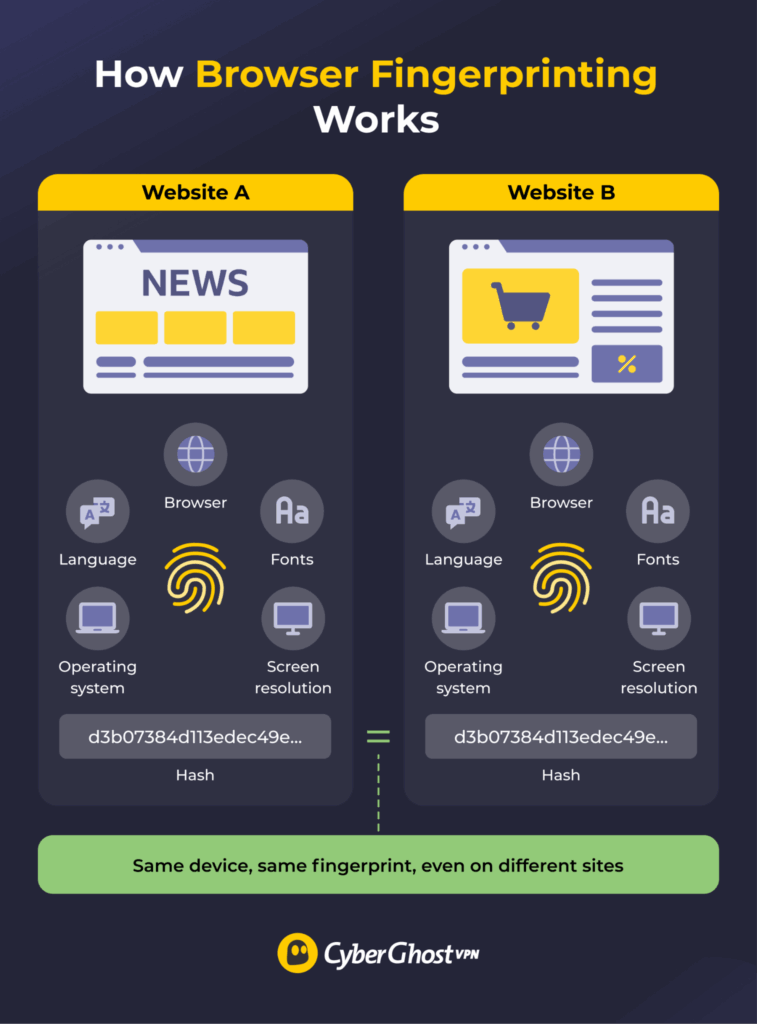
When you visit a website, your browser shares certain information to help the page load and work properly. This can include your operating system, screen resolution, language preferences, and other settings.
Websites can also use scripts, often written in JavaScript, to collect more details about your browser and device. Some of these scripts have legitimate purposes, such as making sure a website displays correctly across different browsers. Others can use the same information to help recognize you when you return.
Common information collected by browser fingerprinting includes:
- Browser type and version
- Operating system
- Screen resolution
- Browser extensions (if detectable)
- Time zone and preferred language
- Keyboard layout
- Installed fonts
- Touchscreen settings
- Cookie settings
- IP address
- Certain hardware or driver details
Fingerprinting systems can turn these details into an identifier, sometimes using a process called hashing. They can then compare that identifier, or the underlying characteristics, with information collected during future visits to estimate whether the same browser has returned.
How Unique Is Your Browser Fingerprint?
You can get an idea of how recognizable your browser is using tools such as the Electronic Frontier Foundation’s Cover Your Tracks or Am I Unique?. These tests examine your browser’s characteristics and compare them with other browsers in their datasets. The more unusual your combination of settings, the easier it may be to distinguish your browser from others.
For example, using Chrome on Windows isn’t particularly unusual. But add your screen resolution, time zone, installed fonts, and other settings, and the number of browsers with a similar fingerprint may shrink.
A fingerprint doesn’t always reveal your name, email address, or other personal details. But it can help websites recognize the same browser over time. If that fingerprint is later linked to an account or other identifying information, it may also become associated with a particular person.
What Is Browser Fingerprinting Used For?
Much of the discourse surrounding browser fingerprinting focuses on how it impacts individual online privacy. On the other hand, it also serves many other purposes essential to many websites, online services, and entire industries.
Fraud and Bot Detection
Websites often employ a form of fingerprinting to detect potential bot or fraudulent activity. They do so by focusing on the differences between how automated systems and humans behave when interacting with web pages.
For example, a website might notice hundreds of requests coming from browsers with nearly identical configurations. That could be a sign of automated activity, especially when combined with unusually fast clicks, repeated login attempts, or other suspicious behavior.
Fingerprinting can also help detect attempts to disguise a device or repeated new account creation after a block. It isn’t proof of wrongdoing on its own, but it gives security systems another clue when deciding whether to allow an action or investigate further.
Authentication and Account Security
Fingerprinting can provide an extra layer of authentication to help prove users are who they say they are. Fingerprint-based security systems create detailed user profiles and associate them with risk scores. They assess new sign-ins based on how closely they match the digital fingerprint and whether they fall within the risk tolerance the user profile allows.
A different fingerprint doesn’t mean someone has stolen your account. You might be using a new browser or have changed your settings. That’s why fingerprinting works best alongside passwords, multi-factor authentication (MFA), and other security measures, rather than replacing them.
Advertising and Online Tracking
Advertisers and tracking companies can use browser fingerprints to recognize visitors across websites and browsing sessions, even when you clear and block cookies. By connecting those visits, they can build a picture of your interests, browsing habits, and interactions with online ads.
These companies can use browser fingerprints to personalize advertising, measure campaign performance, or create more detailed marketing profiles. The advertiser doesn’t need to know your name. Being able to recognize the same browser repeatedly can be enough to track patterns in your online activity.
Personalization and Other Uses
Websites, online platforms, or web apps often use fingerprinting techniques to recognize user devices and optimize their experience. Apps may adapt their recommendations, content, language, and presentation based on your fingerprint. Marketplaces can even use it to segment customers or implement dynamic pricing.
Platforms may also use fingerprinting to police user behaviors or enforce their terms of service. For example, if someone accesses the same account from unusual devices or locations, that mismatch can trigger a security review or account suspension. Online games may use it to enforce player bans by preventing multi-accounting or other cheats.
For some sites, fingerprinting can also help analyze traffic and usage patterns for site optimization strategies.
Browser Fingerprinting Techniques
Like a real-life fingerprint made up of many lines, curves, and physical features, a digital fingerprint consists of many data points that become more identifiable when combined. Below are some of the most common methods used to construct your fingerprint:
- Canvas fingerprinting: A canvas is an HTML5 element used to render images and graphics in the browser window. By getting the browser to render an invisible canvas element, scripts may infer details about your browser, graphics card, and drivers.
- WebGL fingerprinting: WebGL (Web Graphics Library) is an API for rendering interactive 2D or 3D objects in the browser. Scripts can trigger it to reveal similar details about how the browser or device processes graphics.
- Audio fingerprinting: Fingerprinting scripts can generate an audio signal and analyze how your browser and device process it. Subtle differences may allow them to guess information about your device’s audio drivers, hardware, and software.
- TLS fingerprinting: TLS (Transport Layer Security) is a common protocol used to secure traffic between a device and web server. Analyzing the secure handshake process between the server and client browser can reveal information about the device.
- Media device fingerprinting: Modern websites may interact with many device components, such as headphones, video cards, audio cards, cameras, and external media players. Gathering information about them can help distinguish your fingerprint.
- Cross-browser fingerprinting: These fingerprinting details, such as your device’s hardware, screen resolution, and operating system, can identify you even across different browsers.
- Behavioral fingerprinting: This process focuses on analyzing your unique tendencies and habits when using the web. For example, this includes your cursor or scrolling movements, typing patterns, and the pages you visit.
Browser Fingerprinting vs Cookies
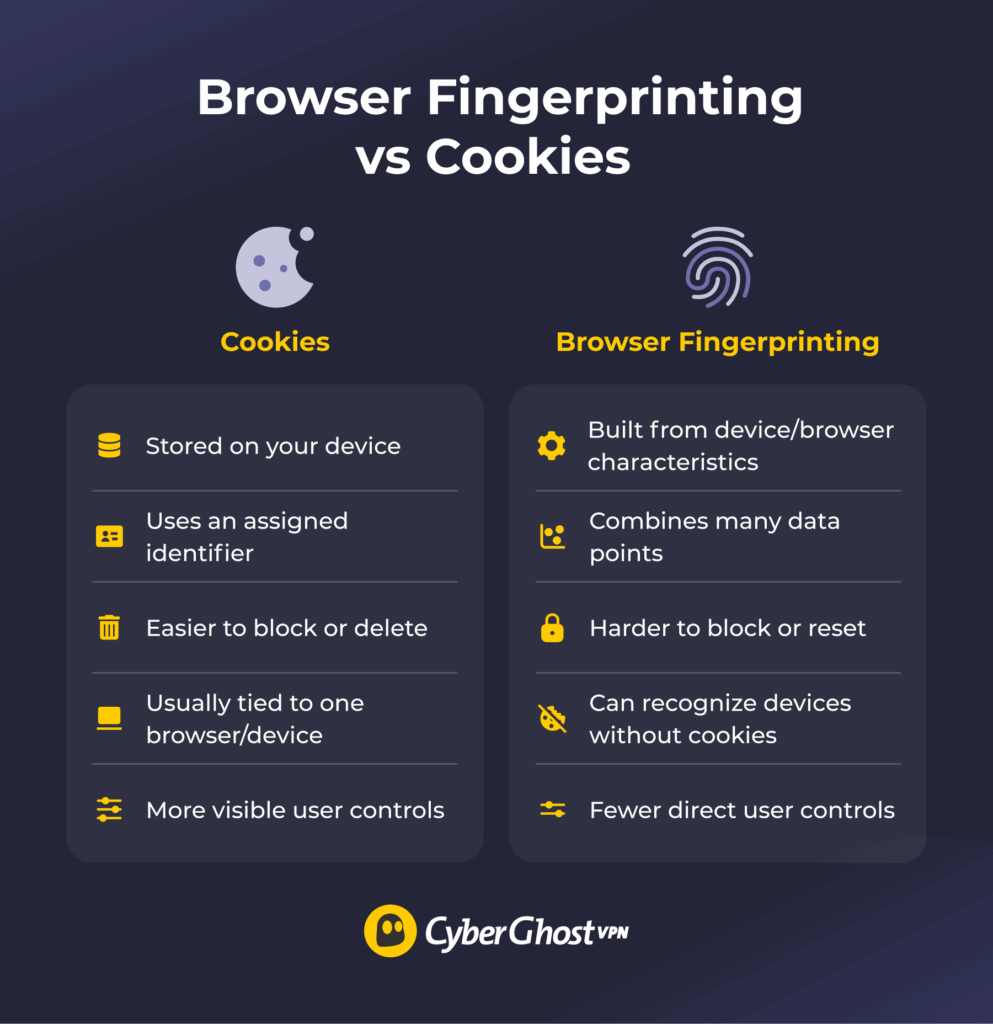
Cookies have a related but distinct role compared to browser fingerprinting. While they also help websites keep track of you across sessions and manage your identity, they work in a different way.
Cookies are small pieces of data websites store in your browser. They can remember things like your login status, shopping cart, or language preferences. Tracking cookies can also contain unique identifiers that allow websites and advertising services to recognize your browser across visits.
Browser fingerprinting doesn’t need to store an identifier on your device. Instead, it combines details about your browser and device, such as your operating system, screen resolution, and settings, to create a recognizable profile.
The biggest difference comes down to how much control you have. You can usually view, block, or delete cookies through your browser settings. Fingerprinting is harder to manage because there’s no single file or identifier you can erase. Even after clearing your cookies, websites may still recognize your browser.
That doesn’t mean cookies are harmless or that fingerprinting is always more invasive. Both can be used for legitimate purposes or to track your activity across websites. The privacy risk depends on what information websites collect, how it’s used, and whether it’s shared with other companies.
Privacy laws like the General Data Protection Regulation (GDPR), ePrivacy Directive, and California Consumer Privacy Act (CCPA) can apply to both techniques, although the specific requirements depend on how they’re used. Fingerprinting is particularly concerning when companies use it to get around cookie restrictions or continue tracking people who’ve tried to opt out.
Even so, many websites today use a combination of browser fingerprinting and cookies to track you and modify the content you see.
Is Browser Fingerprinting a Privacy Risk?
Browser fingerprinting can be a privacy risk, but it depends on how it’s used and what you consider a privacy violation. One of the key concerns is the lack of transparency regarding how websites use your digital fingerprint. Once it’s created, your fingerprint may be shared, sold, or used to track you in ways that you don’t realize or can’t realistically manage.
Researchers have found links between fingerprint-based profiles and the ads and content users see. In some studies, fingerprint-based tracking has persisted even after users opted out under certain privacy laws.1
The most obvious risk is that businesses or advertisers abuse knowledge of your fingerprint to target you with personalized ads or influence your behavior. You may get specific content, offers, or prices based on certain data points.
Fingerprinting becomes even more concerning when it’s combined with personal information, such as your name, email address, or account details. This can turn an otherwise anonymous browser profile into one linked to your identity. If a data breach exposes that information, it could also give scammers more details to use in targeted attacks.
How to Prevent Browser Fingerprinting
It’s unlikely that you can stop all forms of browser fingerprinting, and it may not always be desirable to do so. But you can minimize your digital footprint and reduce the accuracy of your fingerprint:
- Use a privacy-focused browser: Browsers like Brave and Firefox include protections designed to limit fingerprinting. Other options like LibreWolf offer stronger privacy defaults, while Tor Browser standardizes many characteristics so its users are harder to distinguish from one another.
- Get a VPN: A VPN is an online privacy tool that encrypts your traffic and hides your real IP. While it’s not effective against most fingerprinting techniques, it can help disguise your actual device IP and location, which makes it more difficult to track your activity. Some VPNs also have built-in filters that block traffic from known ad or tracking domains.
- Disable JavaScript: Many fingerprinting scripts run on JavaScript, so disabling it for your browser or specific sites can prevent some forms of data collection. However, this will also likely break a lot of modern sites that rely on JavaScript to function.
- Limit extensions and browser customization: Unusual extensions, fonts, settings, or other customizations can add distinctive characteristics to your fingerprint. Installing lots of privacy extensions can sometimes make your browser easier to distinguish from others.
Take Back Some Control Over Your Browser Privacy
You can’t control every detail your browser shares, but you can make it harder for websites to recognize you. The best defense is to understand what browser fingerprinting is and how it affects you so you can find the right balance. Using a privacy-focused browser, limiting unnecessary extensions, and blocking trackers can help make your browser harder to fingerprint.
Using a VPN like CyberGhost VPN adds another layer by hiding your real IP address and encrypting your internet traffic. It won’t erase your browser fingerprint, but it can help reduce how much information websites and other third parties can associate with your online activity. Combining these tools gives you more control over your online privacy without having to give up your everyday browsing experience.
FAQ
What is a browser fingerprint?
A browser fingerprint is a collection of information that can help identify your browser or device across sessions. Like pieces of a puzzle, it combines seemingly unrelated data points, such as your hardware, software, browser preferences, location, and more, to create a digital signature that websites can use to track you.
How does browser fingerprinting work?
Browser fingerprinting often relies on many different techniques to gather as many data points as possible. Some techniques focus on using scripts that support modern website features to reveal details about your browser preferences or how it processes media like graphics, audio, or interactive objects. Others analyze your online behavior. Websites then combine these data points and, sometimes, link them with other identifying information to create a distinctive profile.
Can websites identify me using my browser fingerprint?
Yes, websites can identify you with browser fingerprinting, but it depends on how unique your browser fingerprint is and whether they combine it with your personal information. In most cases, a browser fingerprint consists of information that may identify your browser or device, which may not be unique enough. Trackers or ad networks may combine fingerprinting with personal data, account activity, cookies, or other identifiers to link the device profile to you.
How can I prevent browser fingerprinting?
Some browsers provide settings or add-ons that can block certain fingerprinting techniques or standardize or randomize certain values, making your browser harder to distinguish from others. Disabling JavaScript or using ad/tracker blockers may also help, although they can sometimes break website functionality. A VPN can hide your IP address and approximate location.
Does a VPN hide my browser fingerprint?
No, a VPN is usually not enough to hide your browser fingerprint. A VPN changes your real IP address and approximate location, but most fingerprinting techniques collect information from your browser and device, which a VPN doesn’t change. Changing your IP address removes one useful tracking signal, though, and some VPNs can also block connections to known tracking domains.
Is browser fingerprinting legal?
Yes, browser fingerprinting is generally legal, but privacy laws may restrict its use. Regulations such as the GDPR and EU ePrivacy may require consent or another valid legal basis when using fingerprinting to identify or track users. Requirements vary by jurisdiction and technology use. Unlike cookies, the way fingerprinting works also makes it difficult to detect abuse and enforce compliance.

Leave a comment