
Choosing between UDP and TCP can noticeably affect how your VPN performs. UDP often delivers lower latency and feels more responsive, while TCP prioritizes reliable, ordered delivery and can perform better on unstable connections. Neither option is better because the right choice depends on your network and what you’re doing online.
This guide explains how UDP and TCP differ, how they affect VPN performance, and when it’s worth switching between them if your VPN lets you choose.
UDP vs TCP VPN: The Quick Answer
Keep automatic protocol selection enabled unless you’re troubleshooting a connection problem. For a manual OpenVPN setup, start with UDP and try TCP if UDP won’t connect or continually drops. UDP adds less transport overhead, while TCP can recover missing data. The best result still depends on your network, server distance, and activity.
TCP vs UDP at a Glance
TCP prioritizes reliable, ordered delivery, while UDP keeps the connection lighter and usually more responsive. That trade-off shapes how each one performs inside a VPN tunnel.
| Feature | TCP | UDP |
| Connection setup | Uses a three-way handshake | Skips a transport-layer handshake |
| Delivery | Uses acknowledgments and retransmissions | Offers no built-in delivery guarantee |
| Packet order | Restores the correct order | Packets may arrive out of order |
| Error detection | Uses a checksum and recovery mechanisms | Uses a checksum without built-in recovery |
| Flow and congestion control | Built in | Left to the application or higher-layer protocol |
| Overhead | Higher | Lower |
| Typical latency | Usually higher | Usually lower |
| Best VPN role | Reliability and fallback | Everyday first choice for OpenVPN |
How TCP and UDP Work
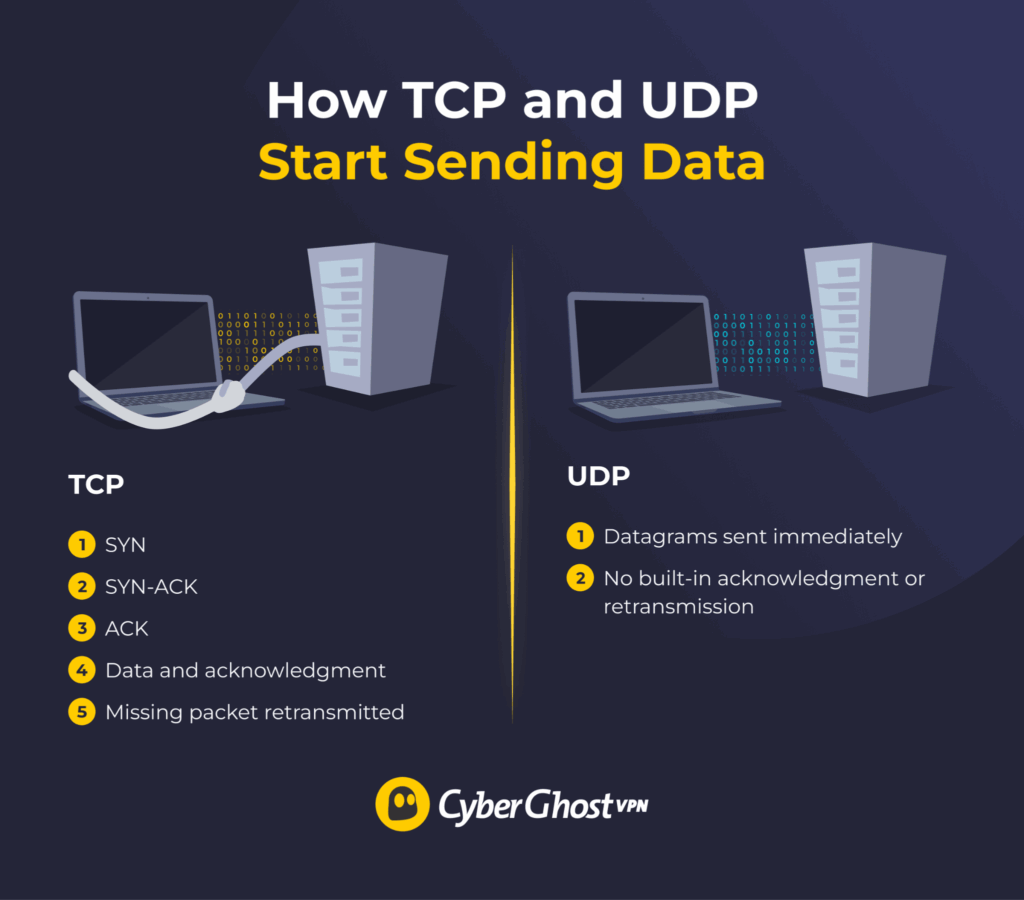
TCP and UDP are transport protocols. They don’t encrypt your traffic or create the VPN tunnel themselves. Instead, they determine how data moves between your device and the VPN server. That difference affects speed, reliability, and how the connection responds to packet loss.
How TCP Establishes and Maintains a Connection
TCP is connection-oriented, so it establishes a link between the sender and receiver before any data starts moving. That setup uses a three-way handshake, which follows a predetermined set of steps:
- Synchronize (SYN): Your device asks the server to open a connection.
- Synchronize-acknowledge (SYN-ACK): The server accepts the request and sends back its own synchronization details.
- Acknowledge (ACK): Your device confirms the response, and the connection is ready.
Once the session begins, TCP tracks every piece of data with sequence numbers. These numbers help the receiving device spot missing information and rebuild packets in the correct order. The receiver also sends acknowledgements to confirm what arrived. When an acknowledgment doesn’t appear in time, TCP treats the data as lost and retransmits it.
TCP also uses flow control to avoid overwhelming the receiving device. Congestion control serves a similar purpose across the wider network, reducing the sending rate when traffic becomes crowded. These safeguards make TCP dependable for tasks where complete, ordered delivery matters.
The extra coordination takes time, though. Every acknowledgment, retransmission, and rate adjustment adds overhead, especially when the server is far away or packet loss is high. TCP can recover from missing data, but it can’t prevent every packet from disappearing in transit. It also doesn’t encrypt traffic by itself.
How UDP Sends Data Without a Handshake
UDP is connectionless, so it can start sending data without first setting up a session between your device and the server. It packages information into datagrams and sends them as soon as they’re ready.
Each UDP header includes a source port, destination port, length, and checksum. That checksum helps detect corrupted data, but UDP doesn’t handle recovery on its own. It won’t resend a missing datagram, restore packets to the correct order, or confirm that the receiver got them.
That lighter approach reduces protocol overhead. There’s no three-way handshake, no acknowledgment cycle, and no built-in retransmission process slowing things down. Applications can still add their own buffering, recovery, pacing, or congestion controls when needed.
This makes UDP a strong fit for time-sensitive traffic, where newer data often matters more than recovering something that arrived too late. It isn’t inherently unsafe or inaccurate. It just leaves more responsibility to the application using it.1
How TCP and UDP Work Inside a VPN Tunnel
TCP and UDP sit beneath the VPN protocol and handle how encrypted packets move between your device and the VPN server. OpenVPN can use either transport.
A port identifies the destination application or service on a host, not a network endpoint on its own. The combination of IP address, transport protocol, and port number defines a full network endpoint.
The traffic inside the tunnel can follow its own rules. You might browse a website using TCP while the OpenVPN tunnel carrying that traffic runs over UDP. This setup lets the application handle acknowledgments and retransmissions without adding a second TCP recovery layer around it.
That distinction matters when OpenVPN runs over TCP. If a packet goes missing, the TCP connection inside the tunnel and the outer TCP tunnel may both detect the loss, request retransmission, and reduce their sending rates.
Often called TCP-over-TCP meltdown, those overlapping reactions can slow the connection and stall newer data behind the missing packet. A head-of-line blocking can make it worse.2
Running the tunnel over UDP avoids that duplicate recovery process. The inner TCP application still resends anything it needs, while the VPN tunnel keeps moving newer packets. That’s one reason OpenVPN generally recommends UDP for performance and keeps TCP available as a fallback.
How Packet Loss, Latency, and Jitter Affect TCP and UDP
A fast connection can still feel sluggish if packets go missing or arrive at uneven intervals. That’s why speed alone doesn’t tell the full story. Here are the other things that can have an impact:
- Packet loss: The failure of data to reach its destination.
- Latency: The time data takes to travel between two endpoints.
- Network jitter: The variation in that delay from one packet to the next.
These issues affect TCP and UDP because each transport handles missing and delayed data in its own way.
Packet Loss
TCP watches for missing data through sequence numbers and acknowledgments. When something doesn’t arrive, it retransmits the lost segment. That helps preserve complete, ordered delivery, though it can also hold up newer data while TCP waits for the missing piece.
UDP keeps moving. It doesn’t retransmit lost datagrams at the transport layer, so the application has to decide what happens next. A game might predict the next movement, a call app may smooth over a missing sound, and a video service might briefly lower quality.
That trade-off matters most in real time. Recovering an old packet can be less useful than delivering the newest one on time.
Latency and Jitter
TCP’s acknowledgments, retransmissions, and ordered delivery can add extra delay. The effect becomes more noticeable when the VPN server is far away, or the network already has high latency. One missing segment can also delay everything queued behind it.
UDP avoids that transport-layer wait, which often helps keep gaming, Voice over Internet Protocol (VoIP), and live streaming more responsive. It still feels the effects of jitter and packet loss, though. Uneven arrival times can cause stuttering, robotic audio, dropped words, or short visual glitches.3
Real-time apps usually use buffers or their own recovery tools to soften those problems. Their goal is to keep the experience moving, even when every packet doesn’t arrive perfectly.
When Should You Use TCP or UDP for a VPN?
The right choice depends less on benchmarks and more on what you’re doing online. Gaming, calls, and live streaming benefit from timely updates, while remote access and long-running tasks often value connection stability more.
UDP vs TCP VPN for Gaming, VoIP, and Live Streaming
In gaming, a delayed update can be worse than a missed one. Games often use prediction or interpolation to fill small gaps and keep movement smooth. TCP may stop to recover a missing packet, turning a brief network hiccup into a noticeable pause.
VoIP works in a similar way. A tiny gap in speech is usually less disruptive than freezing the whole conversation to resend an old packet. Live streaming also benefits from steady delivery, since buffering and quality adjustments can often handle small losses without stopping playback.
That doesn’t mean UDP will always feel faster or more stable. Heavy packet loss or unstable routing can still cause stutter, dropped words, or visual glitches. Still, for gaming, voice calls, and live video, UDP is usually the first option worth trying.
When TCP Is a Better Choice
TCP makes more sense when reliability outweighs minimum latency. Try it if UDP repeatedly disconnects, the VPN tunnel won’t establish, or long-running transfers keep failing.
It can also help with remote access and other tasks where a stable session matters. TCP tracks delivery, restores packet order, and resends missing data, so it’s better suited to situations where interruptions are costly.
Many file-transfer tools already use TCP inside the VPN tunnel, though. That means you don’t need a TCP-based VPN tunnel for every download.
Stable Network vs Unstable Network
A speed test may show UDP is faster, yet that result won’t mean much if the connection drops five minutes later. TCP can benchmark slower yet still deliver a better experience by keeping the tunnel active.
On a clean, stable network, the gap between the two may be small. On a noisy or inconsistent one, they can behave very differently.
Which TCP or UDP Options Does CyberGhost VPN Use?
CyberGhost VPN supports OpenVPN, WireGuard®, and Internet Key Exchange version 2 (IKEv2), though the available options vary by operating system. The app can choose a VPN protocol based on the connection, which is the easiest option for most people. OpenVPN is the only one of these that can run over either TCP or UDP.
WireGuard® works in another way. It sends its packets over UDP rather than offering a TCP transport mode. IKEv2 is another standalone VPN protocol rather than a transport option, so choosing it isn’t the same as switching OpenVPN from UDP to TCP.
Pick the VPN protocol first. TCP or UDP becomes a separate decision only when the chosen setup supports both transports.
How to Choose the Right Option
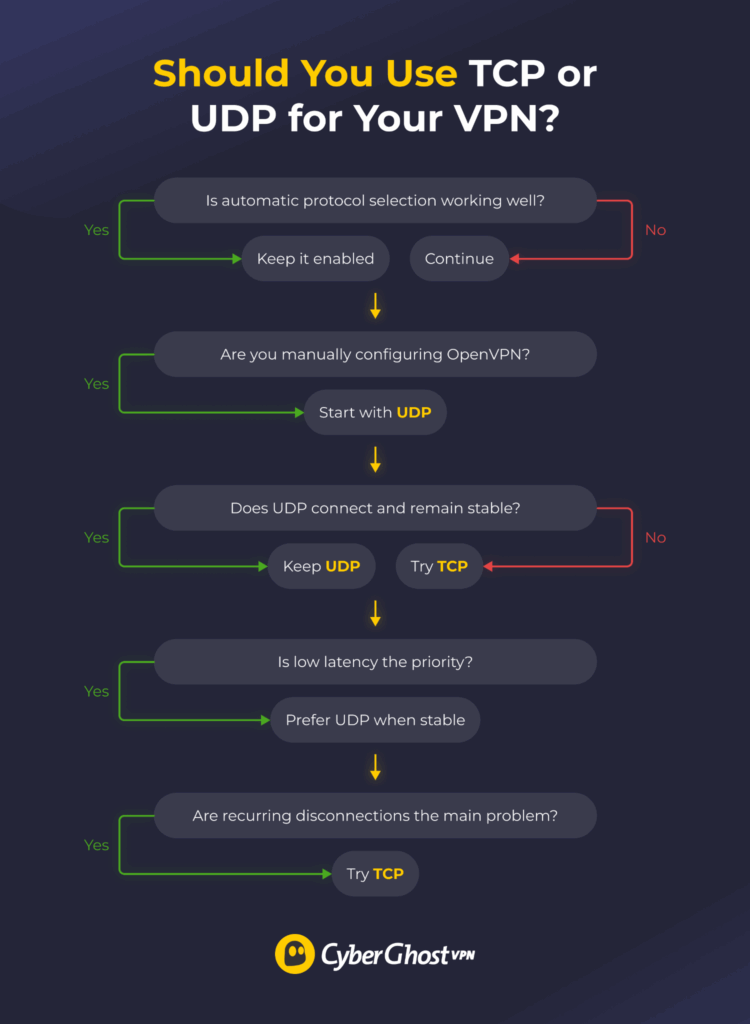
You usually won’t need to choose. We suggest leaving CyberGhost VPN’s automatic protocol selection enabled unless you’re troubleshooting a connection issue.
For a manual OpenVPN configuration, test UDP first. Keep the device, network, and server location unchanged while comparing the two. Try TCP if UDP fails to connect or drops over and over again. It’s the activity that matters rather than the speed test.
App controls vary by platform and version, so check the latest CyberGhost VPN support guidance before changing a setting.
Choose the Right VPN Transport for Your Connection
There’s no universally better option. UDP is usually the best place to start because it keeps overhead low and often delivers the most responsive experience. TCP becomes useful when your network is unstable or UDP can’t maintain a reliable connection.
If you’re using CyberGhost VPN, you usually won’t need to make that decision yourself. Automatic protocol selection chooses a suitable VPN protocol for most situations, while manual OpenVPN configurations let you switch between UDP and TCP when you’re troubleshooting a connection. Put it to the test yourself risk-free with a 45-day money-back guarantee (14 days on the monthly plan).
FAQ
What are the major differences between UDP and TCP protocols?
TCP establishes a connection before sending data, then uses acknowledgments, sequence numbers, and retransmissions to keep delivery complete and ordered. UDP skips that setup and sends datagrams immediately, which reduces overhead and often lowers latency. Both can detect corrupted data, though UDP doesn’t recover missing packets by itself. Neither transport encrypts VPN traffic on its own.
What are the advantages of UDP over TCP?
UDP has a smaller header, skips the three-way handshake, and doesn’t wait for delivery acknowledgments. That lighter process often keeps latency lower and helps time-sensitive traffic move without many hiccups. It’s useful for gaming, VoIP, and live streaming, where a late packet may be less valuable than the latest one. Performance still depends on the network and application.
Should I use TCP or UDP for a VPN?
Keep automatic protocol selection enabled unless you’re solving a specific connection problem. For a manual OpenVPN setup, UDP is usually the better place to start because it adds less overhead. Try TCP when UDP won’t connect, keeps disconnecting, or performs inconsistently. Test both options on the same device, network, and server location before deciding which one works better.
Do streaming services use TCP or UDP?
Streaming services can use TCP, UDP-based protocols such as QUIC, or a mix of both. The application may handle buffering, packet recovery, and quality changes itself, while the VPN tunnel uses a separate transport underneath. That means TCP-based streaming traffic can still travel through an OpenVPN tunnel running over UDP. A paid account or subscription may be required to use the service.
Does TCP make a VPN more secure than UDP?
No. TCP improves delivery reliability through acknowledgments, packet ordering, and retransmissions, but those features don’t encrypt the connection. VPN protection comes from the tunneling protocol, authentication, and encryption used by the VPN service. Choosing UDP doesn’t weaken the tunnel, and choosing TCP doesn’t automatically strengthen it.
Is UDP less secure than TCP?
No. UDP isn’t less secure than TCP. They’re transport protocols that determine how data travels rather than how it’s encrypted. When you use a VPN, encryption comes from the VPN protocol, such as OpenVPN, rather than TCP or UDP themselves.
References:

Leave a comment