
Identity theft can start with something as simple as a reused password, a convincing phishing message, an exposed database, or an improperly disposed document. Once someone has enough personal, financial, or login information, they may be able to impersonate you, access an existing account, or apply for services in your name.
You can’t completely eliminate the risk of identity theft, but you can make your information harder to steal, your accounts more difficult to access, and suspicious activity easier to spot. The best approach uses several layers of protection rather than relying on one app or security tool.
What Information Do Identity Thieves Target?
Identity thieves may target many types of information, including personal, financial, login, contact, and medical details. The table below shows common examples and how criminals may misuse them.
| Information Type | Examples | Risks |
| Personal | Full name, address, date of birth, government ID number | Impersonation, account applications, identity verification |
| Financial | Card numbers, bank details, tax information | Unauthorized transactions or financial fraud |
| Login | Passwords, recovery codes, security-question answers | Account takeover and access to stored information |
| Contact | Phone number, email address | Phishing, social engineering, account recovery attempts |
| Medical | Insurance details, member numbers | Medical identity misuse or fraudulent claims |
How Does Identity Theft Happen?
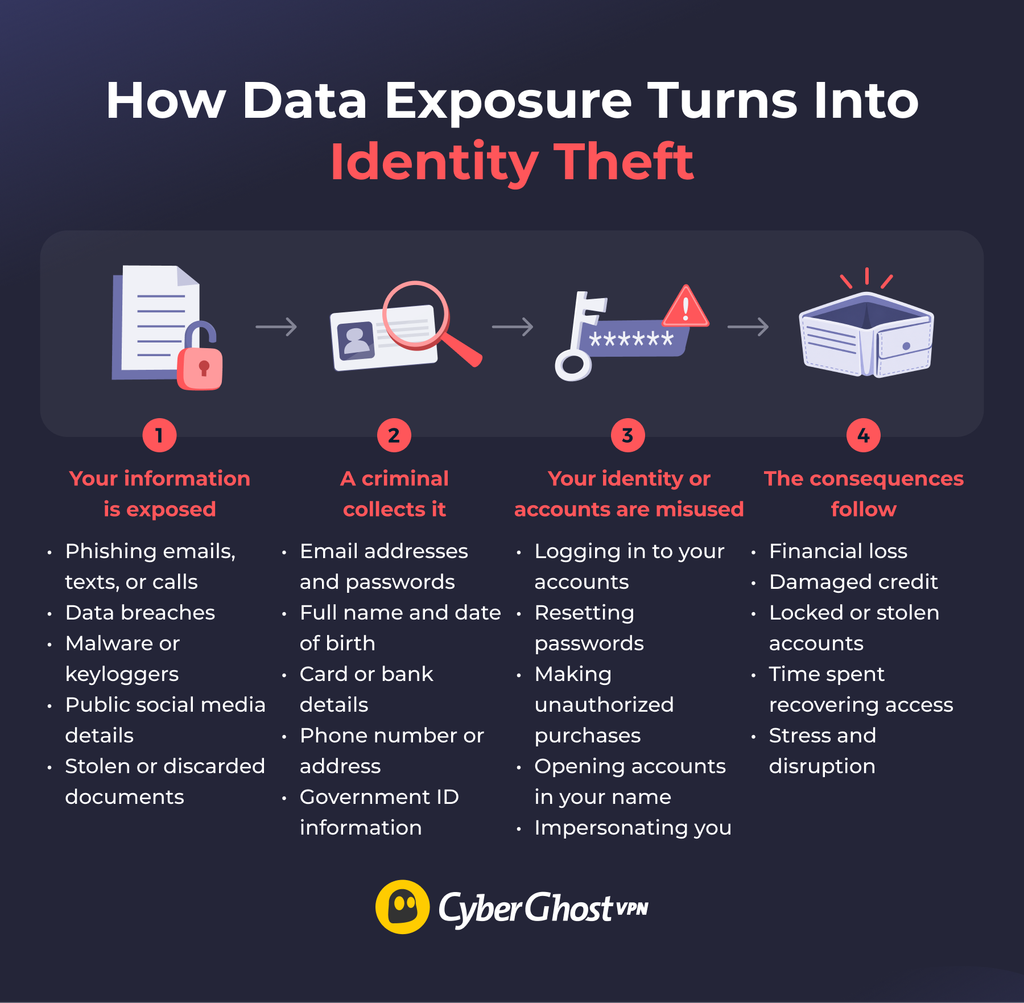
Identity theft happens when someone uses your personal or financial information without your permission. This information can include your name, address, bank or credit card account number, government identification number, medical insurance information, or online account credentials. Personal details can become more useful to identity thieves when they’re combined.
Identity theft doesn’t always involve a cyberattack. It can take other forms, including financial fraud (such as new credit cards or loans), account takeover, tax-related identity theft, and medical identity theft. In every form, the criminal only needs enough identifying information to misuse yours.
Identity thieves gather information from both online and offline sources, so preventing identity theft involves more than only protecting one account. Some attacks will attempt to trick you into giving up information, while others will exploit compromised systems, weak account security, malware, or data that was already publicly available.
Phishing and Social Engineering
Phishing attacks attempt to fool you into divulging information or performing an action that benefits the attacker. A scammer may impersonate your bank, an online store, a delivery company, your employer, or a government agency and request that you click a link, open a file, provide account information, or share an authentication code. They often contact you through text messages (smishing) and phone calls (vishing).
The message may attempt to convey a sense of urgency. Examples include account suspension, failed payment, or a suspicious activity alert that requires immediate attention. Modern phishing attempts can also be convincing, so spelling errors are not a reliable way to identify them.
Data Breaches and Leaked Credentials
A data breach can expose information you gave to an organization. Depending on the incident, exposed data could include email addresses, passwords, contact information, payment details, or other identifying records. Once exposed, criminals may use or combine that information with data obtained elsewhere.
Malware and Compromised Devices
Malware can steal information stored on your device or capture sensitive data while you use it. Depending on the type, it may access browser data, record keystrokes, monitor activity, or steal saved files and credentials. This can expose email accounts, payment information, login details, and documents stored on your phone or computer.
Weak or Reused Passwords
Password reuse can turn one compromised login into a problem across other accounts. If criminals obtain a username and password from one breach, they can try the same combination on email, social media, shopping sites, and financial services.
Your email account is particularly important because many services use email to reset forgotten passwords. Someone who gets control of your inbox may therefore gain access to accounts that initially had different passwords.
Oversharing Personal Information Online
Details that seem harmless on their own can help criminals build a more convincing picture of you. Public profiles may reveal your full name, birthday, workplace, relatives, phone number, location, interests, previous addresses, or travel plans.
This information can support social engineering. A scammer who knows where you work and which bank you use can create a much more believable phishing message than one sending generic emails at random. Personal details may also help someone answer account-recovery questions or impersonate you when contacting a service provider.
Stolen Mail and Discarded Documents
Identity theft isn’t exclusively digital — paper documents can also expose valuable information. Mail taken from an unlocked mailbox, a lost wallet, or documents thrown out intact can provide a criminal with a name, address, and account number.
Unsecured Networks
Public or shared Wi-Fi can expose your activity if the network has poor security or an attacker sets up a fake hotspot with a convincing name. This risk has diminished thanks to HTTPS, which encrypts the connection between your browser and the site. Still, a fake hotspot can still steer you toward look-alike login pages, and not every app or site protects all its traffic.
12 Ways to Prevent Identity Theft
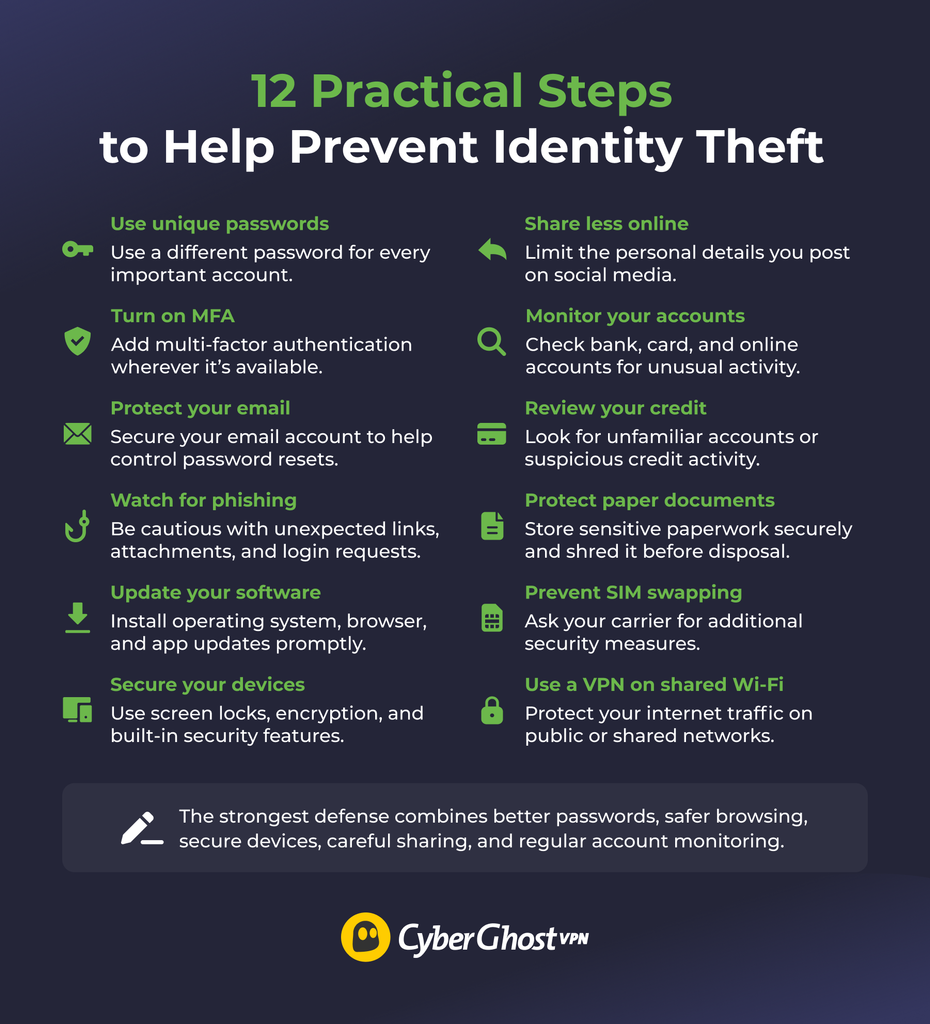
No single precaution covers every route an identity thief might use, so the steps work best together. Tips 1 to 3 protect your accounts, so start there.
1. Use a Unique Password for Every Account
Using a unique password for every account limits the damage if one password becomes compromised.
The National Institute of Standards and Technology (NIST) recommends using a password manager for accounts that still require passwords. A reputable password manager can generate and store unique credentials so you don’t have to memorize each one. NIST’s current consumer guidance also emphasizes length, recommending at least 15 characters when you need to create a password.1
Secure the password manager with a strong account password and multi-factor authentication when available. Never reuse its master password on another service.
2. Turn On Multi-Factor Authentication
Multi-factor authentication (MFA) adds another barrier if someone obtains your password. Instead of relying on one credential, an MFA-protected account requires additional proof, such as an authenticator app, security key, passkey, or verification code.
NIST notes that MFA can help protect an account even after an attacker compromises its password, although some methods are stronger than others. It identifies text-message codes as more vulnerable than some alternatives.1 When a service offers passkeys, hardware security keys, or authenticator-based verification, consider those options.
Where available, enable MFA on accounts that contain sensitive information or provide access to other services.
3. Secure Your Email Account
Your email account deserves extra protection because it often acts as the recovery route for your other online accounts. If someone gains access to your inbox, they may see private messages, intercept security notifications, request password resets, or learn which financial and shopping services you use.
Give your primary email account a unique password and enable MFA. Check that the recovery phone number and backup email address still belong to you, and review active sessions or connected devices if your provider offers that option.
It’s also worth reviewing mail-forwarding rules. An attacker who accesses an inbox may create a rule that copies selected messages elsewhere, allowing them to continue collecting information after you change the password.
4. Learn to Recognize Phishing Attempts
Beware of unexpected requests for passwords, personal information, payments, or authentication codes. Phishing messages often create urgency to pressure you into acting before you can verify the request yourself.
Review the sender carefully, but don’t rely on the displayed name alone. Instead of clicking a link in an unexpected banking, shopping, or account-security message, open the organization’s app or enter its known website address yourself. If you receive an unexpected phone call, end the call and contact the organization through a verified number.
Scammers also use text messages, QR codes that lead to fake login pages, and AI-generated voices that can make a call sound like a relative or colleague. If someone urgently asks for money or codes, hang up and call your relative on a number you normally use, and consider agreeing on a family code word.
Never share an MFA code with someone who contacts you. A code may be what an attacker needs after they’ve already obtained your password.
5. Keep Your Devices and Apps Updated
Software updates close known security vulnerabilities that attackers can exploit. This includes your operating system, browser, mobile apps, security software, and other programs that access sensitive information.
Enable automatic security updates where practical, especially on devices you use for email, banking, shopping, or work. Remove software you no longer use, since an abandoned or unsupported application can become another unnecessary point of exposure.
The same goes for hardware: if a phone, computer, or router no longer receives security updates from its manufacturer, consider replacing it. Some routers also need firmware updates installed manually, so check the manufacturer’s site or your router’s settings.
6. Lock and Encrypt Your Devices
A strong device lock helps protect the information on your phone or computer if it’s lost or stolen. Use a secure PIN, password, or supported biometric option and configure the screen to lock after a reasonable period of inactivity.
Modern phones and many computers support device encryption, which protects stored information from unauthorized access when you lock the device. Check your operating system’s security settings to make sure you enabled the appropriate encryption features.
You can also activate your platform’s device-finding and remote-erasure tools where available. These features don’t replace good account security, but they can give you more control if someone steals a device containing sensitive information.
7. Limit the Personal Information You Share Online
The less you post, the less a scammer has to work with. Review the information on your social profiles and posts to see if you’ve shared information like your birthday, phone number, hometown, workplace, relatives, current location, or travel plans.
Check the privacy settings for the platforms you use to limit what others can see on your profile, including your personal information, photos, and posts. You should also avoid sharing photos that display addresses, tickets, identification documents, financial information, or other sensitive details in the background.
8. Monitor Your Bank, Card, and Online Accounts
Frequently checking your accounts helps you spot unauthorized activity that might go undetected otherwise. Look for transactions you don’t recognize on your bank and credit card statements and watch for unexpected changes to your contact details, payment methods, or account settings.
Where available, turn on notifications for purchases, transfers, new logins, password changes, or other important events. Alerts reduce your reliance on remembering to inspect every account manually. While monitoring can’t absolutely stop someone from obtaining your information, it can help you detect misuse and secure an affected account sooner.
9. Check Your Credit Reports and Consider a Credit Freeze
Identity thieves often use stolen details to open new credit cards, loans, or phone contracts in someone else’s name. Because these accounts are often opened without your knowledge, checking your credit report regularly is one of the best ways to catch this kind of fraud early. Look for accounts or applications you don’t recognize and for personal details that are wrong, such as an address you’ve never lived at.
Some countries also let you limit who can see your file. In the US, a credit freeze can make it much harder for an identity thief to open new credit accounts in your name because lenders need access to your credit file before approving an account.
10. Protect Physical Documents and Mail
Store and dispose of documents containing identifying information carefully. Social Security cards or equivalent government identification, tax paperwork, medical records, bank statements, and other sensitive documents shouldn’t be left where visitors or strangers can access them.
Shred paperwork that contains information you no longer need rather than placing it intact in household trash or recycling. Collect sensitive mail promptly and consider switching to digital statements that can be stored securely.
You can also reduce what you carry. Storing important documents you don’t need at home limits what could be exposed if you lose your wallet or bag.
11. Protect Your Mobile Account from SIM Swapping
Your phone number links to many accounts through text-message codes and password resets. In a SIM swap, a criminal convinces your carrier to move your number to a SIM card they control, then receives your calls and texts.
Ask your carrier whether it offers extra protection, such as an account PIN or passcode, number-lock or port-out protection, and alerts for account changes. Where you can, use an authenticator app or security key instead of text-message codes, and never share a verification code with anyone who contacts you.
12. Use a VPN to Protect Your Internet Traffic on Shared Networks
A VPN can improve your online privacy and help protect your data. CyberGhost VPN encrypts the traffic traveling between your device and the VPN server and routes it through a remote server. This layer of protection can be useful on public or shared Wi-Fi, where you may not know who operates the network or how securely it’s set up.
CyberGhost VPN also replaces the IP address websites see with the VPN server’s IP address, which can reduce how much your real IP address reveals about your connection.
If you use public or shared networks, CyberGhost VPN can add this layer of privacy protection to your broader security setup. However, it won’t stop you from entering credentials on a phishing site, strengthen weak passwords, remove personal information you’ve shared online, or protect information already stored in a company’s database.
Signs Someone May Be Using Your Identity
Unexpected financial, account, or credit activity can be an early warning sign of identity theft. Common signs include:
- Bills, charges, or bank withdrawals you don’t recognize
- Regular bills or mail that stop arriving
- Accounts on your credit report that you didn’t open
- Denied credit or a loan you didn’t expect
- Calls from debt collectors about debts that aren’t yours
- Medical bills or insurance statements for care you didn’t receive
- A rejected tax return because one already exists under your name
- Password-reset messages or MFA prompts you didn’t request
- Notifications about new devices or changes to an account’s address or phone number
- Trouble signing in with credentials that previously worked
None of these signs proves identity theft — an unfamiliar transaction could be a merchant name you don’t recognize — but they’re worth investigating.
What to Do If You Think Your Identity Has Been Stolen
If you think your identity’s been stolen, act quickly to contain the problem, document what happened, and contact the companies involved. For example, if you notice unauthorized activity, contact the relevant bank, card issuer, service provider, or account platform and report the issue. Follow their instructions to secure the affected account and prevent further use.
Keep records of suspicious transactions, messages, login alerts, account changes, and conversations with companies or authorities. This can make it easier to explain what happened and support any fraud disputes or recovery steps that follow.
US victims can report identity theft through IdentityTheft.gov, which provides a personalized recovery plan based on the type of identity theft involved.
If your information appeared in a data breach but you haven’t seen signs of misuse, follow the breached organization’s instructions and respond according to the type of information exposed. A leaked password, credit card number, or government identifier may each require different next steps.
How Much Can You Really Reduce the Risk of Identity Theft?
You can’t remove every identity theft risk, especially when companies and organizations already store some of your information. But you can reduce the exposure of your information, make your accounts harder to access, and spot suspicious activity before it causes more damage.
That’s why identity theft prevention works best as an ongoing habit rather than a one-time setup. Review your account security from time to time, stay cautious about unexpected requests for personal information, and pay attention to changes in your financial or online accounts. If you use public or shared networks, a VPN such as CyberGhost VPN can also add privacy protection to your internet traffic.
FAQ
How can I prevent identity theft?
You can reduce the risk of identity theft with several layers of protection rather than relying on one tool. Use unique passwords, enable multi-factor authentication, secure your devices, limit the personal information you share, stay alert to phishing attempts, and monitor important financial and online accounts for unusual activity.
What are the best ways to protect my personal information?
The best way to protect your personal information is to share sensitive information only when it’s necessary and keep it securely stored. Review what you make public online, use device locks and encryption, and be cautious when a website, message, or caller asks for financial, login, or identifying information.
Can strong passwords prevent identity theft?
Yes, strong passwords can reduce account-takeover risk, but they can’t prevent every form of identity theft. Use a unique password for each account so one compromised login doesn’t expose other services. A password manager can also help you create and store unique credentials without having to remember them all.
Does MFA help prevent identity theft?
Yes, MFA can help prevent identity theft by making account access harder if someone obtains your password. It doesn’t prevent other risks such as phishing, data breaches, or stolen documents, but it can stop a compromised password from being enough to access an account.
How do I know if my identity has been stolen?
If someone stole your identity, you may notice activity you don’t recognize across your financial, credit, and online accounts. Warning signs can include unfamiliar charges, accounts you didn’t open, unexpected password reset messages, login alerts from unknown devices, changes to your account details, or problems accessing an account with credentials that previously worked.

Leave a comment