
Ransomware is a type of malware, but not all malware is ransomware. Ransomware is a specific subset designed to extort victims in exchange for restoring their data. They share a complex relationship as ransomware often works alongside other types of malware to carry out attacks.
Understanding the difference is critical because ransomware is one of the most dangerous types of malware threats. While we can’t cover every conceivable scenario, we’ll discuss the most common ways to take preventative measures to protect your most valuable files and help avoid threats from cybercriminals.
Key Differences Between Malware and Ransomware
In most cases, the processes of detection, remediation, and recovery are similar for all categories of malware, including ransomware. However, ransomware often features certain characteristics that generally distinguish it from other types of malware attacks.
| Malware | Ransomware | |
| Definition | Any type of malicious software developed to damage, destroy, infiltrate, compromise, or steal data from a system. | A specific type of malware designed to encrypt or steal a victim’s data and hold it hostage for a ransom. |
| Primary goal | Varies by type but can include data theft, spying, unauthorized access, disruption, or financial gain. | Extortion for financial gain. |
| Typical behavior | Infects or compromises a system and may remain hidden while carrying out its objective. | Remains hidden while encrypting or exfiltrating data, then reveals itself to make a ransom demand. |
| Potential impact | Data or credential theft, unauthorized access, system damage, disruption, financial loss, or privacy breaches. | Data loss or exposure, operational disruption, financial losses, and reputational or regulatory consequences. |
| Recovery | Identify, quarantine, and remove the malware. Systems may need to be restored to a clean state, and compromised credentials reset. | Isolate affected systems, remove the ransomware, and restore data from clean backups where possible. Paying the ransom doesn’t guarantee recovery. |
What Is Malware?
Short for “malicious software,” malware is an umbrella term that refers to any harmful software program. Malware can serve different purposes and exploit a target system in many ways, including gaining unauthorized access, stealing data, disrupting operations, achieving long-term persistence, or spreading throughout the network.
Many types of malware try to remain hidden for as long as possible to continue to operate, extract value, or cause maximum damage. While ransomware is one category of malware, other common types include:
- Viruses
- Worms
- Trojan horses
- Spyware
- Adware
- Rootkits
- Bots or botnets
For example, a virus is a type of malware that embeds itself in a host file and can infect other files or programs. A worm is a similar type of malware that replicates itself to spread to other devices across a network.
Attackers often combine different types of malware to achieve a specific objective, and individual malware strains blend capabilities from multiple categories.
What Is Ransomware?
Ransomware is the name for a specific subset of malware that locks or steals data to demand payment for its return. The word “ransomware” is a combination of the words “ransom” and “malware.”
Cybercriminals use various techniques to spread ransomware onto target devices and once ransomware has encrypted enough files, it announces itself and demands payment to unlock the files. It usually demands a hard-to-track form of payment, such as cryptocurrency. If the user fails to pay, the ransomware threatens to expose or permanently delete the files.
Ransomware can mean the component that carries out the encrypt-demand-decrypt attack chain. However, it often forms part of a more complex malware arrangement, with other components helping attackers gain access, move through a network, steal data, or evade detection.
These ruthless tactics make ransomware one of the greatest cybersecurity threats today. In fact, ransomware netted cybercriminals over $813 million in revenue in 2024 alone, according to Statista.1
While the attacker’s motivations are usually monetary, victims may also suffer collateral damage such as system disruption, regulatory scrutiny, reputational damage, and follow-on attacks.
How Malware and Ransomware Work
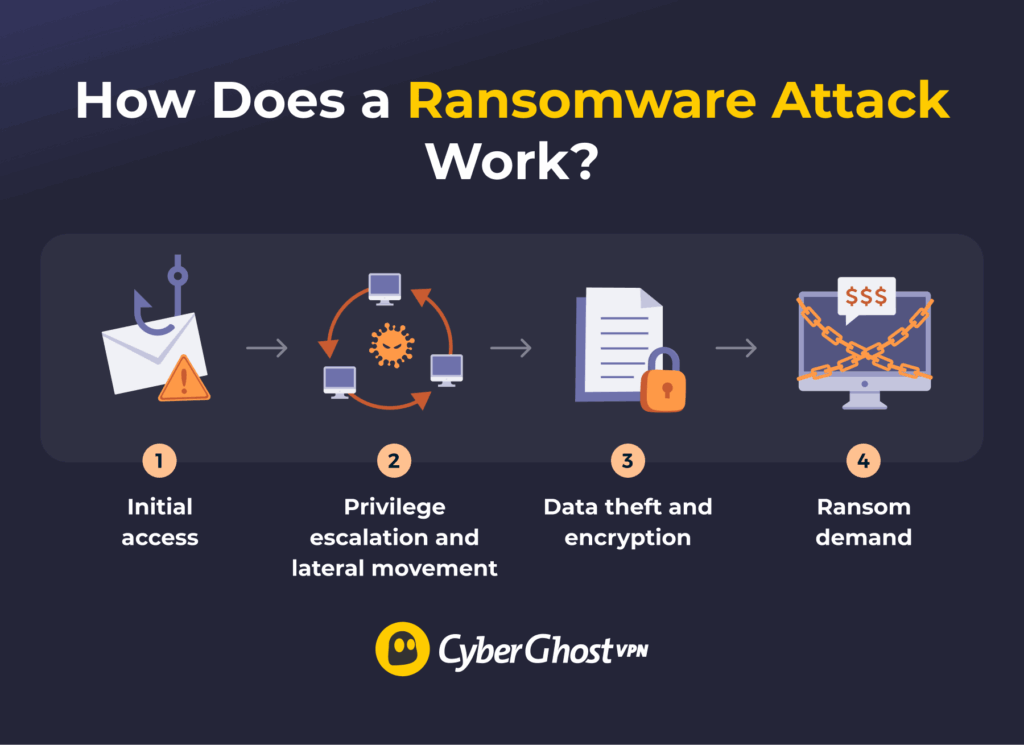
The biggest difference between ransomware and other types of malware is that ransomware announces itself to its victim. Most malware operates as discreetly as possible to avoid detection. However, as a form of malware, ransomware can share many of the same attack patterns as other types.
Ransomware campaigns often use other types of malware at different stages. Trojans and remote access Trojans (RATs) can help gain access to compromised devices, while credential stealers collect login information, and rootkits help conceal their activity. Attackers may also use malware to disable security software or steal sensitive files before encrypting them as part of double extortion attacks.
How Does Malware and Ransomware Spread?
Malware can spread by reaching machines in many different ways, often relying on the ability to self-replicate, like viruses or worms. Others may hide in specific file types or rely on specific transfer mediums, such as USB drives or network connections, spreading only when a person or system unknowingly carries them along.
Other attacks rely on social engineering techniques to trick victims into downloading malicious files that infect their devices. For example, they might pose as a customer support agent and send malicious download links or ask for remote access to your device.
One of the most common ways to spread malware is through phishing. This usually involves fake emails, texts, or websites that look legitimate but can steal your data or spread malware. This method is a favorite among ransomware gangs, especially when combined with a successful business email compromise (BEC) attack.
Among the many other ways malware can spread are fake software and updates, infected drives, supply chain attacks, or exploiting common vulnerabilities and exposures (CVEs). These vulnerabilities often arise from outdated or unpatched software programs. Attackers also abuse poor security habits, misconfigured security controls, or overly permissive access rules.
Once attackers gain a foothold by infecting a specific device, they can use many of the same techniques to expand their access within it or spread to new networks.
CryptoLocker is one example that used a combination of automated and social engineering tactics to spread. It relied on a botnet to automate blasting out phishing emails with fake shipping notices, often linking to fake sites or containing malicious attachments.5 WannaCry took a different approach, using worm-like capabilities to spread among Microsoft Windows PCs.3
How Have Malware and Ransomware Evolved?
Ransomware has evolved with its emergence as a service-based model. Ransomware-as-a-Service (RaaS) is a model where ransomware developers sell or lease access to their tools and infrastructure.4 This makes it possible for bad actors to buy ready-made ransomware or use the developer’s infrastructure to launch attacks.
These cybercriminals can focus on identifying targets, developing social engineering or phishing campaigns, or refining their extortion methods. This model has contributed to the shift from small-time, opportunistic ransomware attacks to more large-scale attacks.
Attacks can also involve multiple extortion attempts and more persistent access. This lets criminals collect more than one payout from a single attack. Alternatively, they may appear to honor the initial agreement, only for the same ransomware attack to resurface later.
Complex IT supply chains and the growing reliance on Internet of Things (IoT) devices also create more opportunities for malware attacks. AI can help attackers develop malware and convincing social engineering campaigns more efficiently, while techniques like polymorphism help malicious code evade detection.5
It’s no coincidence that IBM’s X-Force Threat Intelligence Index 2026 report revealed a 49% year-on-year increase in ransomware groups, accounting for 20% of all cybercrime.6 The report also highlighted the rise of RaaS as a key driver of ransomware’s popularity.
How to Prevent Malware and Ransomware Attacks
As with most cyberthreats, basic personal security principles are an important part to preventing ransomware attacks. However, the specific nature of ransomware means that there are some extra precautions you should take:
- Use security tools: Install reputable antivirus software on all your devices. Leave it on in the background and run full scans. Look for proven vendors that specialize in ransomware protection.
- Update your system: Keep your operating system, apps, browsers, and security software up to date. Enable automatic updates and check that you have the latest version installed.
- Avoid suspicious online content: Don’t click on suspicious downloads, links, or email attachments.
- Be alert for phishing: Be wary of suspicious messages, links, or requests, even if they appear to come from someone you know. Verify unusual requests through official or trusted channels.
- Keep your accounts secure: Use strong passwords, enable multi-factor authentication (MFA) or passkeys, and don’t reuse credentials.
- Back up important files: Keep multiple backups of your most valuable files across different platforms (cloud storage, external hard drives, etc.) as paying a ransom doesn’t guarantee you’ll get your files back.
- Use a VPN with added security features: VPNs encrypt your connection and mask your real IP address, making it harder for others on your network to intercept your data. CyberGhost VPN also offers a Security Suite to help protect against malware.
Malware vs Ransomware: Protect Yourself from Both
Both malware and ransomware remain serious threats to anyone who owns a digital device. While much of the same security advice applies to both, understanding the differences between ransomware and other kinds of malware can help you better protect your data.
What makes prevention so hard is that cybercriminals may combine ransomware with credential stealers, Trojans, and other malicious tools. You often need a combination of anti-malware tools, good cybersecurity hygiene, and secure data backups to protect your most important data.
When it comes to malware, keep your devices updated, watch for unexpected activity, and use trustworthy security tools to boost your online safety. CyberGhost VPN offers a full-fledged VPN service that encrypts your online traffic from your device to the VPN server. Try us risk-free for 45 days (14 days on the monthly plan). There’s also a comprehensive Windows Security Suite add-on to help protect your PC from a wide variety of threats.
FAQ
What is ransomware?
Ransomware is a specific form of malware. Cybercriminals use it to infect a target device, encrypt the files, and hold them hostage to extort a ransom. Often, perpetrators also copy the data to make additional demands under the threat of destroying, exposing, or selling it.
What is the difference between malware and ransomware?
The difference between malware and ransomware is that malware is a catch-all term that refers to all kinds of malicious software, while ransomware is a specific type of malware that locks your files and demands payment to reinstate them. Ransomware is one category of malware, but not all malware is ransomware.
Which is more dangerous, malware or ransomware?
Both malware and ransomware can be dangerous, depending on the sophistication, attacker motivation, and the target. Ransomware is popular among cybercriminals because it’s monetizable, making it one of the bigger malware threats today.
How does ransomware infect a device?
Ransomware spreads through phishing emails, fake downloads, and connections with infected devices. Some ransomware groups choose specific targets to maximize how much they can extort. In this case, they may use more sophisticated network infiltration methods or complex social engineering setups.
How can I protect against malware and ransomware?
The best protection against malware and ransomware is to have a robust antivirus program installed. You should also keep your systems updated, secure your account logins, and stay vigilant against potential phishing or social engineering attacks. Finally, keep secure backups of all your most important or valuable data.
Is it illegal to pay ransomware to decrypt files?
No, it’s not illegal to pay a ransom to recover your files. However, it’s not recommended by cybersecurity professionals or law enforcement. There’s no guarantee that criminals will honor their side of the bargain. Willingness to pay may even motivate them to use double-extortion tactics, future ransomware attacks, or other cybercrimes.
What is crypto malware vs ransomware?
“Crypto malware” can refer to various malicious programs designed to mine or steal cryptocurrency or conduct other crypto scams. The most common are cryptominers, which use the infected device’s processing power to mine for cryptocurrencies like bitcoin. Others may include wallet stealers that target private keys or credentials and clipboard hijackers that replace copied wallet addresses to redirect transactions.
References:
- Total annual amount of money received by ransomware actors worldwide from 2017 to 2024 (in million U.S. dollars) — Statista
- U.S. Leads Multi-National Action Against GameOver Zeus Botnet and Cryptolocker Ransomware, Charges Botnet Administrator – FBI
- WannaCrypt ransomware worm targets out-of-date systems – Microsoft
- Ransomware as a service: The new face of industrialized cybercrime – Microsoft
- Obfuscated Files or Information: Polymorphic Code – MITRE ATT&CK
- X-Force Threat Intelligence Index 2026 — IBM

Leave a comment