
Yes, you can be tracked with a VPN in some situations, though what another party can learn depends on the signals available to them. A VPN replaces the public IP address websites see with the VPN server’s IP and encrypts traffic between your device and that server. This limits what people watching the connection can learn.
The tricky part is that online tracking doesn’t rely on a single clue. Observers may sit at different points along the journey, each with access to their own slice of information. Some may only recognize that a VPN is running.
Others may identify you through signals unrelated to your public IP. More advanced techniques can draw conclusions from connection patterns alone. Let’s separate routine tracking from the edge cases and look at where a VPN helps.
What Does “Tracked With a VPN” Actually Mean?
Tracked with a VPN could mean someone notices the VPN connection, sees your online activity, recognizes you through another signal, or links two separate connections. Someone can know you’re using a VPN without knowing what you’re doing through it.
Observers may be able to do the following:
- Detect VPN use: Recognize a VPN server IP address or an encrypted traffic pattern.
- See online activity: Learn which websites, pages, or online services someone uses.
- Recognize a person or device: Connect activity through accounts, cookies, browser fingerprints, advertising IDs, or other identifiers.
- Expose the original connection: Reveal a public IP address or Domain Name System (DNS) request because of a leak, connection drop, or configuration problem.
- Correlate traffic: Compare visible details such as timing, direction, and data volume at different points in the connection.
There’s one more distinction related to tracking: an IP address isn’t a verified identity or a precise map pin. It can indicate a network and approximate area, but identifying the person behind it usually requires other evidence.
What Can Different Observers See When You Use a VPN?
When you connect to a VPN, the traffic from your device follows a new route: through the local network and your internet service provider (ISP) to the VPN server, which forwards it to the website or app. Each observer along that path sees something different, and seeing the VPN connection isn’t the same as reading what’s inside it.
| Observer | Detect VPN Use | What May Remain Visible |
| ISP or Wi-Fi operator | Usually | The VPN server’s IP address, connection times, duration, direction, and traffic volume, and DNS requests if they leak outside the tunnel |
| Website or app | Often | The VPN server’s IP address, account identity, cookies, browser or device identifiers, and location data you permit it to access |
| Employer or school | Usually, when you use its network | Connection metadata and more activity if it controls the device, account, browser, monitoring software, or company VPN |
| VPN provider | Yes | The connection to its infrastructure and data needed to route traffic, though what it retains is subject to its policy and implementation |
| Government or law enforcement | Depends on access and observation points | Records from services, account information, seized-device data, connection metadata, and potentially correlated traffic patterns |
How Can You Still Be Tracked While Using a VPN?
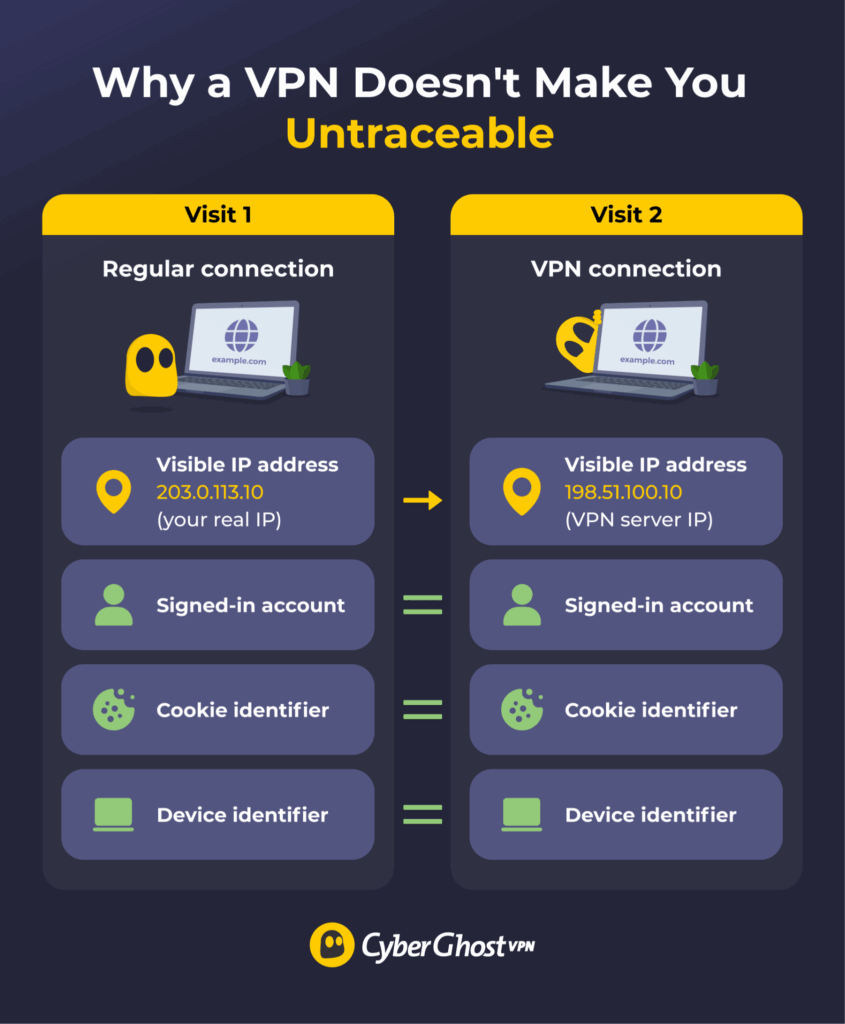
You can still be tracked while using a VPN because a VPN changes what an observer can see on the network, but your accounts, browser data, device settings, and local software carry on as before.
Seeing a familiar recommendation or location prompt after connecting doesn’t prove the VPN failed. In most cases, another signal allows the website, app, or device to recognize you. Here are the most common ways that happens.
Logged-In Accounts and Shared Information
The VPN server’s IP address won’t make an account forget who signed in. Email services, social networks, online stores, and workplace portals can associate activity with the profile you’re using. They already have a much clearer identifier than an IP address: the account itself.
Reusing the same account with and without a VPN also gives the service a straightforward way to connect those sessions. Details you enter, including an email address, phone number, or delivery location, create similar links. Private browsing won’t erase that relationship once you’ve signed in or shared the information.
Cookies, Fingerprints, and Device Identifiers
Browsers have a memory of their own. Websites can save identifiers and preferences in cookies or local storage, while tracking pixels can report that a page or message loaded. These signals may recognize a returning browser even after the public IP address visible to the website has changed. Clearing cookies won’t necessarily remove local storage or identifiers retained by the service itself.
Browser fingerprinting draws on a wider collection of characteristics, including the browser version, operating system, language, time zone, screen size, fonts, and supported features. Combined, these details can create a recognizable profile, although it won’t always be unique or permanently reliable.1 A digital fingerprint generally points to a browser or device rather than verifying the name of the person using it.
Apps may also use operating system identifiers, such as a resettable advertising ID, to associate activity with a device.2 Switching networks or VPN servers leaves most of these browser characteristics and device identifiers unchanged.
GPS and App Permissions
The VPN server’s location influences the IP-based estimate a website makes. Phones and apps have other ways to work it out, drawing on Global Positioning System (GPS), nearby Wi-Fi networks, cellular towers, and Bluetooth. An app with location permission may receive a much more precise result than the VPN server suggests.³
That can explain why a map or weather app still knows your area after the VPN connects. Camera, microphone, contact, and motion permissions may reveal other information, too. What an app learns depends on the access you’ve granted and the data it collects.
DNS, WebRTC, and Connection Leaks
A VPN carries traffic through an encrypted tunnel. A leak or connection problem may send some information along another route. A DNS leak can expose domain requests to an ISP or outside resolver, while a Web Real-Time Communication (WebRTC) leak may reveal additional IP information in certain browser and network configurations.
If the VPN disconnects and traffic returns to the regular connection, websites or network observers may briefly see the original public IP address and unprotected connection metadata.
Managed Devices and Monitoring Tools
A VPN can’t control software that records activity on the device. An employer’s monitoring tools may capture visited pages, app use, keystrokes, or screenshots on a managed computer. Spyware and other malicious software can collect similar information without permission.
In both cases, the observation happens before traffic enters the VPN tunnel or after it reaches the screen. That local access falls outside the connection protected by a VPN. It can work perfectly and still miss what local software records on the device itself.
How Can VPN Traffic Be Detected or Correlated?
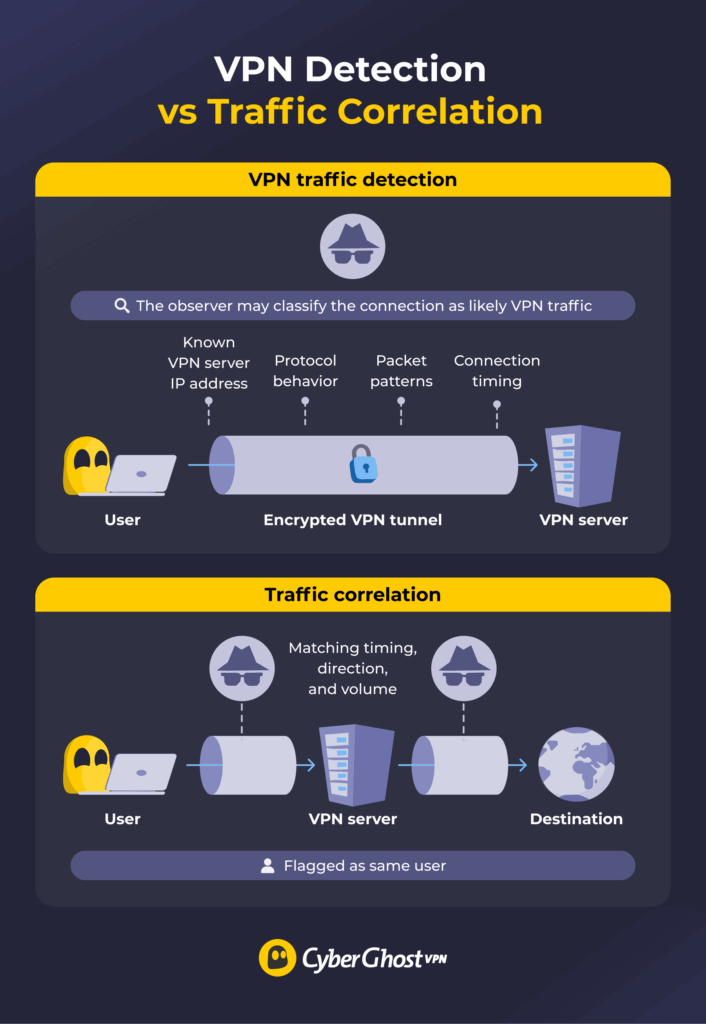
A network may detect a VPN connection without seeing what travels through the encrypted tunnel. Detection examines connection characteristics, while correlation compares traffic patterns observed at different points.
VPN Traffic Detection and DPI
The simplest clue is often the destination IP address. VPN services operate servers that handle connections for many users, and network operators or websites may compare an IP address with databases of known VPN infrastructure. Ports and protocol behavior can add context, although either clue may be unreliable on its own.
Traffic also develops patterns. Researchers have demonstrated that OpenVPN connections can be fingerprinted using byte patterns, packet sizes, and server responses.4 Connection timing, handshake behavior, and other characteristics can add more clues. Deep Packet Inspection (DPI) systems analyze these characteristics to classify network traffic.
Even when encryption protects the payload, classification doesn’t expose the underlying activity. It tells the observer what kind of connection it may be dealing with.
Obfuscation can disguise some recognizable features or make VPN traffic resemble ordinary encrypted web traffic. That may make classification harder, especially when an observer weighs several signals together. It can’t guarantee that every network, detection system, or active test will mistake the connection for something else.
Traffic Correlation Attacks
An adversary with visibility near both ends of a VPN connection may compare when data enters and leaves, which direction it moves, and how its volume changes over time.
Similar timing correlation is a documented limitation of low-latency privacy networks when an observer can monitor both sides of a connection.⁵ A close match can suggest that the flows belong to the same connection even though the contents remain encrypted.
This kind of analysis requires useful observation points, overlapping monitoring, and enough traffic to compare. A correlation offers an inference rather than proof of who visited a particular page or what they did there.
The distinction is worth keeping in mind. VPN detection indicates that someone may be using a VPN. Traffic correlation tries to connect activity observed at separate points. Neither result decrypts the VPN tunnel, and neither provides a complete identity by itself.
How to Reduce Tracking While Using a VPN
Online tracking draws on your network, browser, accounts, device, and permissions. A well-rounded privacy setup combines a reliable VPN connection with sensible controls across each of these areas . These five steps cover the signals that deserve the most attention:
- Choose a provider you can evaluate: Look for clear ownership, understandable privacy documentation, specific data-handling practices, and recent independent audits. Price alone tells you little. Read what the provider says it collects, what it retains, and how it backs up those claims before trusting it with your connection.
- Use leak safeguards: Enable the automatic kill switch and DNS leak protection where available. The kill switch stops traffic from falling back to the regular connection if the connection drops, while DNS leak protection keeps requests on the intended route. After connecting, check which public IP address and DNS resolver are visible. Repeat the test after changing servers or networks.
- Limit browser tracking: Review cookie permissions instead of accepting every prompt, and clear stored site data you no longer need. A privacy-focused browser can also reduce common tracking signals. Private or incognito mode mainly controls what remains on your device after the session, so it shouldn’t be treated as a universal tracking shield.
- Review account and device signals: Signing in connects activity to the account, so consider whether a login is necessary for what you’re doing. Check which apps can access your location and other sensitive permissions. You can also review or reset advertising identifiers, depending on the controls your device provides.
- Keep the device trustworthy: Install operating system, browser, and app updates. Remove extensions you no longer use, especially those with broad access to browsing data. Download software from sources you trust and investigate unfamiliar apps or processes rather than assuming the VPN can contain anything already running locally.
Pro tip: CyberGhost VPN replaces the public IP address websites see with the VPN server’s IP and encrypts traffic between your device and that server. Its automatic Kill Switch and DNS leak protection help prevent accidental exposure. CyberGhost VPN also has an independently audited no-logs policy and doesn’t track browsing activity.
The Bottom Line on VPN Tracking
Tracking via VPN isn’t a yes-or-no outcome. An ISP may recognize a VPN connection, a website may remember an account or browser, a phone may continue sharing its location, and a capable observer may compare traffic patterns. Each situation reveals its own clues and requires a different level of access. The useful answer is what an observer can learn and whether those clues can be connected to you.
This layered view is also the right way to use CyberGhost VPN. It handles the network side of the equation, while cookie controls, careful account use, app permissions, and a trustworthy device cover signals outside the tunnel. Used together, those controls reduce how many useful clues each observer can collect. Vanishing from the internet is not a realistic promise. The practical win is a smaller, less revealing trail and more control over what remains.
FAQ
Are VPNs untraceable?
No, a VPN reduces network-level visibility, but it doesn’t remove every identifying signal to make it untraceable. Services may still recognize you through an account, browser, app, or device. The observer involved and what signs are available to them determines what remains traceable.
Can websites tell you’re using a VPN?
Yes, a website may recognize an IP address associated with VPN infrastructure or notice other signs of VPN use. That detection identifies the likely connection type. It doesn’t unlock the encrypted tunnel or reveal what your ISP and local network couldn’t see inside it.
Can a Wi-Fi owner see your browsing history when you use a VPN?
No, the Wi-Fi owner can usually see that your device is exchanging encrypted traffic with a VPN server. They can’t see the individual websites and pages inside that connection, but connection times, traffic volume, and the server’s IP address stay visible.
Can an employer track you while you’re using a VPN?
Yes, especially if your employer controls the device, network, account, or monitoring software. A personal VPN encrypts traffic on its way to the VPN server. Monitoring tools installed on a managed computer can still record websites, app use, keystrokes, or screenshots on the device.
Can your phone’s location still be tracked with a VPN?
Yes, a VPN changes your IP-based location but your phone can still share its location through other systems. GPS, nearby Wi-Fi networks, cellular towers, Bluetooth, and granted app permissions may provide a more precise position. The exact visibility depends on your device settings and permissions.
Can law enforcement trace VPN activity?
Yes, law enforcement can potentially trace your VPN activity. Law enforcement visibility depends on the records, devices, accounts, metadata, and observation points available. However, detecting a VPN connection alone doesn’t establish someone’s browsing activity. In some cases, investigators may combine information from services, devices, or traffic analysis to build a broader picture.
References:

Leave a comment